The AI cost of JavaScript frameworks
One of my pet peeves with the web development community is that so many of the decisions we make are vibes-based. Frameworks are “blazing fast,” tools will “supercharge” your development, the right abstraction will benefit both you and your users (DX and UX all in one!). All of this breathless boasting is usually offered with zero evidence. Alex Russell has called this “frontend’s lost decade”, Baldur Bjarnason has called programming a pop culture, and I’ve tried to counter this trend in my blog with facts and benchmarks (at my best, anyway).
For a long time it seemed like our community’s allergy to evidence was driven by the desire for greater DX. In other words, devs just liked the way it felt to type JSX in React, and the arguments promoting React or related tools (“the virtual DOM is fast!”) were largely post-hoc rationalizations to justify those initial gut feelings. (Jonathan Haidt would likely agree with this assessment.)
But in the agentic era, when developers are no longer typing code by hand and are thus less constrained by DX, I still see vibes ruling the day (and not just in the sense of “vibe-coding”). Frontends are rewritten because some framework or another is “better for agents.” (Did anyone think to ask the agents?) The resulting code is “faster,” the agents make “fewer mistakes,” etc. Once again, these claims are often made without evidence. Whenever I read one of these accounts, I think to myself, “Where are the benchmarks?”
Well I got curious, so I wrote a benchmark. The structure of this benchmark is pretty straightforward:
- Design a small but non-trivial Pokémon app using the PokéAPI (those who have followed my work will be unsurprised)
- Instruct agents to build the app with a particular JavaScript framework/meta-framework (e.g. Next.js, Nuxt, SvelteKit, etc.)
- Test the output against a spec conformance suite (to avoid agent cheating)
- Evaluate the results in terms of development time, tokens spent, lines of code, and performance and accessibility scores in Lighthouse
The app is fairly simple: you’ve got a list of Pokémon with their types, moves, and data from various games. You can search, filter, etc.:
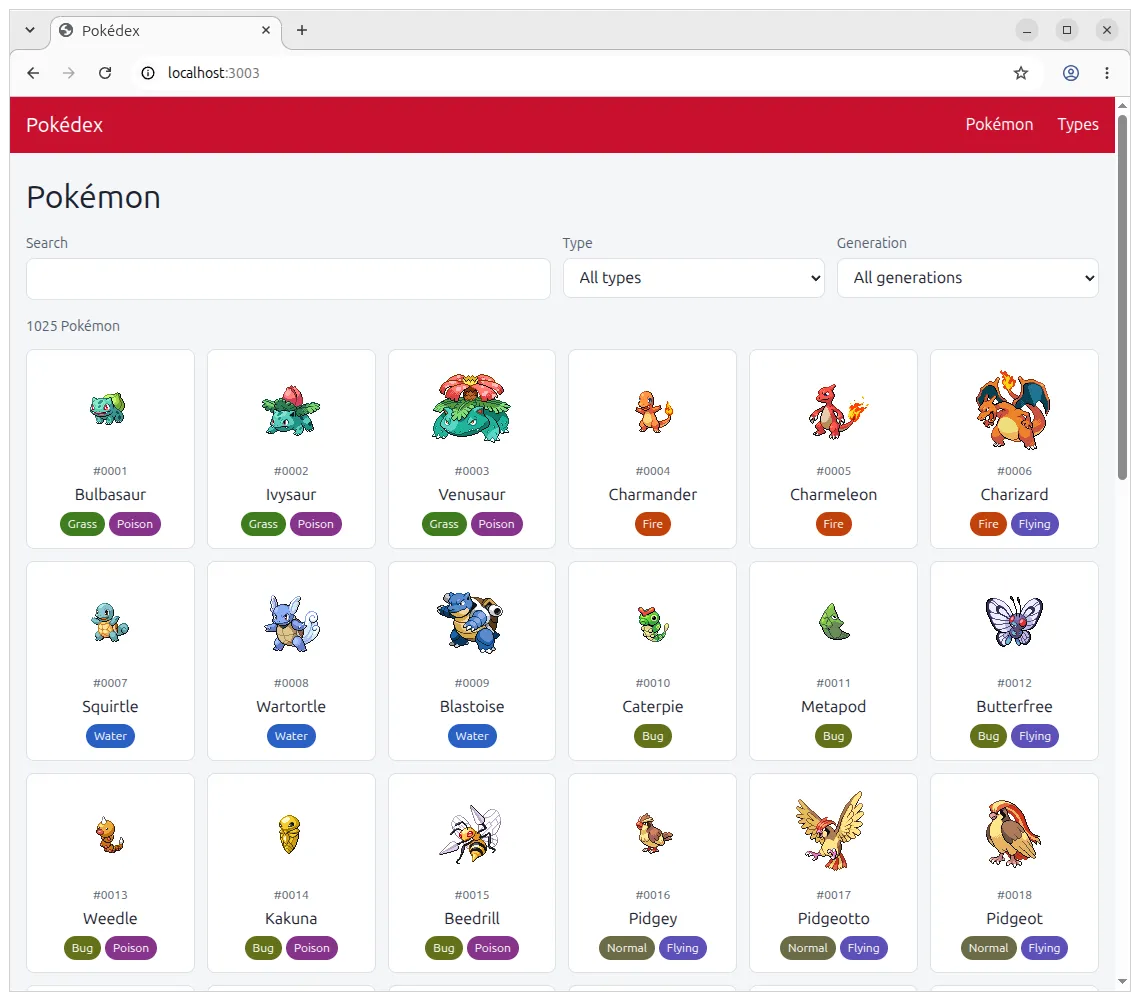
I should start off with some caveats: this is not a perfect experiment. This app represents only one holotype – it’s a relatively content-based site with little interactivity, closer to a Wikipedia than a Figma, GMail, etc. That said, I had to choose some app to build, and this one is at least easy to understand at a high level, and relatively straightforward to spec out and test.
To try to even the playing field, I had each framework/meta-framework use the official MCP or skills for that tool. I wanted to avoid accusations of “this framework is not well-represented in the training data, that’s why we built our MCP, we expect people to use it,” etc. I also didn’t over-specify the exact architecture to use (e.g. SSR vs CSR), nor did I specify that the app should be as performant as possible. I simply gave the spec to Opus 5.5 with high effort and told it to use the latest version of the given framework. Each agent ran in a sandbox and without any knowledge that it would be tested in Lighthouse on performance and accessibility, although it was given the conformance test suite.
Note I also didn’t mandate any CSS methodology, except to avoid using Tailwind, Bootstrap, or any other component framework, and to design based on a set of spec tokens to enforce some visual consistency. I didn’t want to make this test all about CSS, but instead about JS frameworks, CSR vs SSR, SPAs vs MPAs, etc. The resulting app is tested against a conformance suite based on the accessibility tree rather than the raw DOM to avoid mandating any particular HTML structure – one framework uses web components which rely on shadow DOM, so this was required.
One thing I learned from this experiment is that everything I’m measuring is very stochastic. LLMs are random-word generators, so sometimes you get a low dice-roll and an agent goes off on some weird tangent wasting a bunch of tokens, through no fault of the framework or its tools. Lighthouse itself can give inconsistent results as well: Largest Contentful Paint (LCP) may decide that one image is the “largest” element, then pick another one on the next run. It’s hard to have a perfectly fair experiment, but running multiple iterations did help, and I’ve tried to be honest about the variance.
With all that throat-clearing out of the way, let’s get to the results.
Results
I’m going to break this down by multiple dimensions: cost to build, quality, and maintainability. For each framework/meta-framework, I took the median of 5 runs: in other words, I built the same app 5 times in the same framework. (Yes, this is the kind of zany thing you can do with coding agents these days.)
The exception was Angular, which failed to create a measurable app twice, so I took 3 iterations instead for some metrics. (This is explained below.)
Cost
| Framework | |
|---|---|
| Hono+htmx | $2.67 |
| Astro | $2.76 |
| Nuxt | $2.82 |
| Vanilla | $2.98 |
| Next.js | $3.14 |
| Qwik | $3.27 |
| TanStack Start | $3.54 |
| SolidStart | $3.79 |
| React Router | $3.81 |
| SvelteKit | $4.28 |
| Gracile+Lit | $4.65 |
| Angular | $4.97 |
| 02468 |
Note that this quotes the API prices directly from Claude Code and doesn’t actually represent how much money I spent. I’m on a Max plan, so this was just part of my overall $100/month.
Note also the variance: React Router’s median is roughly $1 worse than that of Hono+htmx, but the cheapest version of React Router ($2.82) is still cheaper than the most expensive version of Hono+htmx ($3.19). However some reliable patterns do emerge.
Most clearly, SvelteKit, Gracile+Lit, and Angular are more expensive to build than the other frameworks. For SvelteKit, this may be due to the fact that the agents read the SvelteKit v3 migration guide in every run, likely because it’s too new to be in Opus 5.5’s training data. Similarly for Gracile, the agents didn’t know the framework very well and either cloned the Gracile repo or read its compiled source from node_modules. For Angular it seems to be a function of the total code size (see below).
I should also mention that not every agent made use of an MCP/skill/Claude Code plugin, nor did every framework have one:
Click to see AI tool usage
| Framework | Installed | Used by the agents? |
|---|---|---|
| Angular | Angular MCP and Angular agent skills | MCP in 3/5 runs, skill tool in 4/5 runs, skill files in 2/5 |
| Astro | Astro MCP server | MCP in 2/5 runs |
| Gracile+Lit | N/A | N/A |
| Hono+htmx | Hono skills | Skill tool in 5/5 runs |
| Next.js | next-devtools-mcp and next-dev-loop skill | Skill files in 1/5 runs, AGENTS.md in 2/5 runs |
| Nuxt | Nuxt MCP | N/A |
| Qwik | N/A | N/A |
| React Router | React Router skill | Skill tool in 5/5 runs, skill files in 5/5 runs |
| SolidStart | N/A | N/A |
| SvelteKit | Svelte Claude Code plugin | MCP in 5/5 runs |
| TanStack Start | N/A | Skill files in 2/5 runs |
| Vanilla | N/A | N/A |
For example, TanStack Start’s agent only discovered its skill files in 2/5 runs (they’re shipped in the node_modules of the project). For Nuxt, the MCP was never used by the agents. For Next.js, agents only read the skill file in 1/5 runs and the AGENTS.md in 2/5 runs. This is a wide range of results, which points back to the stochastic nature of LLMs. I still consider this a valid experiment, though, because I doubt many vibe-coders are shouting at their agents in all-caps to use the MCP (and plenty are probably skipping it entirely).
Also, if you’re wondering how I came up with Hono+htmx: essentially, I wanted htmx represented somehow, and Hono seemed like a fine pairing (i.e. as a JavaScript alternative to Rails/Django/etc.). As for Gracile+Lit, I wanted web components represented via their standard-bearer framework (Lit), and was only aware of Gracile as a meta-framework. If there are better candidates, then those would be great for a follow-up experiment.
For “Vanilla,” note that the agent was told to use “vanilla JavaScript or TypeScript with Vite, without a UI framework.” Surprisingly, this underperforms several frameworks, which seems to demonstrate that having some framework can be better than nothing (or better than raw Vite, anyway). Vite was chosen because it undergirds many frameworks and represents fairly standard and agnostic JavaScript infrastructure.
The total time and tokens track pretty closely with the cost:
| Framework | |
|---|---|
| Astro | 8.2 |
| Hono+htmx | 8.6 |
| Nuxt | 9.0 |
| Vanilla | 10.1 |
| TanStack Start | 10.3 |
| Qwik | 10.7 |
| SvelteKit | 10.8 |
| Next.js | 10.9 |
| SolidStart | 11.2 |
| Gracile+Lit | 12.1 |
| React Router | 12.5 |
| Angular | 17.2 |
| 0510152025 |
| Framework | |
|---|---|
| Nuxt | 3.85 |
| Astro | 4.13 |
| Hono+htmx | 4.26 |
| Next.js | 4.99 |
| Vanilla | 5.00 |
| Qwik | 5.64 |
| TanStack Start | 7.07 |
| SolidStart | 7.13 |
| React Router | 7.58 |
| SvelteKit | 8.53 |
| Gracile+Lit | 9.04 |
| Angular | 9.76 |
| 051015 |
The tokens, by the way, were reported by Claude Code. The duration is just the total wall-clock time.
Quality
Of course, because I think that outcomes matter, I also tested the agents with Lighthouse. As software developers, I think it’s important that we not only build things cheaply but also performantly and accessibly.
I should first note two caveats about my benchmark:
- The Pokémon app is small and doesn’t represent a large, complex real-world application.
- Lighthouse and the Core Web Vitals in general are biased against SPAs, so the MPA frameworks are almost guaranteed to win on metrics like Total Blocking Time (TBT), JavaScript bytes, etc. I considered adding some in-app performance metrics but backed off because it added complexity and variability to the benchmark, and these would be metrics I invented as opposed to industry standards.
For simplicity’s sake, I’m only reporting the scores for the home page. There are other pages, but they all score fairly similarly or they have wild swings in metrics like LCP, so it just complicates things to include them.
In short: the Lighthouse scores for Performance, Accessibility, and CLS (Cumulative Layout Shift) are nearly saturated and don’t vary much by framework:
| Framework | CLS | Performance | Accessibility |
|---|---|---|---|
| Angular | 0.000 | 98 | 100 |
| Astro | 0.000 | 100 | 100 |
| Gracile+Lit | 0.000 | 100 | 100 |
| Hono+htmx | 0.000 | 100 | 100 |
| Next.js | 0.000 | 99 | 100 |
| Nuxt | 0.000 | 100 | 100 |
| Qwik | 0.000 | 100 | 100 |
| React Router | 0.000 | 100 | 100 |
| SolidStart | 0.000 | 100 | 100 |
| SvelteKit | 0.000 | 100 | 100 |
| TanStack Start | 0.000 | 99 | 100 |
| Vanilla | 0.111 | 97 | 100 |
So to get some more interesting numbers, we need to look at other metrics. The most reliable one is the JavaScript bytes sent, which largely tracks the client-side framework size:
| Framework | |
|---|---|
| Astro | 0 |
| Vanilla | 7 |
| Gracile+Lit | 8 |
| Hono+htmx | 18 |
| SvelteKit | 36 |
| SolidStart | 40 |
| Qwik | 40 |
| Nuxt | 84 |
| Angular | 93 |
| React Router | 115 |
| TanStack Start | 118 |
| Next.js | 142 |
| 050100150 |
The Total Blocking Time (TBT) is interesting in that it’s not purely a function of the JavaScript bytes; some of the apps spend more time on the main thread than others. That said, the numbers are all quite small:
| Framework | |
|---|---|
| Astro | 0 |
| Gracile+Lit | 0 |
| Hono+htmx | 0 |
| SvelteKit | 0 |
| Vanilla | 0 |
| TanStack Start | 1 |
| Qwik | 3 |
| SolidStart | 11 |
| React Router | 17 |
| Nuxt | 40 |
| Next.js | 71 |
| Angular | 103 |
| 0255075100125 |
Largest Contentful Paint (LCP) is highly variable due to the aforementioned issues with the metric itself. As expected, though, it does broadly punish SPAs and reward MPAs:
| Framework | |
|---|---|
| Astro | 810 |
| Gracile+Lit | 956 |
| Hono+htmx | 978 |
| Qwik | 979 |
| SvelteKit | 1130 |
| SolidStart | 1204 |
| Vanilla | 1667 |
| Nuxt | 1727 |
| React Router | 1729 |
| Angular | 1954 |
| TanStack Start | 2028 |
| Next.js | 2090 |
| 05001000150020002500 |
Note that the wild variance in the Next.js numbers can be explained by the fact that one app avoided lazy-loading images and the other four didn’t. Astro and Vanilla have similar swings that appear to be caused by prioritization or LCP quirks.
In general though, it’s unsurprising that the metric tends to reward MPAs that paint quickly with HTML rather than SPAs that paint after client-side JavaScript runs (along with possibly multiple throttled round-trips to grab the Pokémon data). Ignoring variance, LCP here is mostly a function of JavaScript bundle size. (Qwik is a notable exception here: technically it’s an SPA that uses client-side routing, but it scores among the MPA frameworks.)
Note though that some of the frameworks varied in whether they focused more on the client or the server, or even whether they used a client-side framework. For example, the Gracile agent didn’t even use Lit in two runs. For “Vanilla,” the agent had full latitude (aside from being told to use Vite), but still chose to build an SPA all 5 times.
SSR vs CSR is also partly where the trouble with Angular came from: in 2 runs, the agent built an SSR app that rejected non-localhost (even though the instructions explicitly said that the app would be behind a reverse proxy). I considered this a valid failure to adhere to the spec and decided not to re-run the 2 failed iterations. (This only affects the code size and performance measurements; I have reported all 5 Angular iterations for the “cost” section.)
Maintainability
There are lots of ways to measure maintainability (including fancy things like cyclomatic complexity), but I decided to keep it simple and report something tried-and-true: total lines of code.
| Framework | |
|---|---|
| Hono+htmx | 1370 |
| Nuxt | 1415 |
| Astro | 1461 |
| Vanilla | 1492 |
| Next.js | 1539 |
| React Router | 1564 |
| SvelteKit | 1611 |
| SolidStart | 1630 |
| TanStack Start | 1697 |
| Gracile+Lit | 1717 |
| Qwik | 1744 |
| Angular | 2009 |
| 05001000150020002500 |
To me this is one of the more interesting charts. In a sense, the whole point of a framework is to reduce the amount of code you need to maintain. In Rich Harris’s memorable words:
“Frameworks are not tools for organizing your code; they are tools for organizing your mind.”
– Rich Harris, “Rethinking reactivity”
In the agentic era, this hits even harder because the code size ultimately impacts the number of tokens, including in future edits, meaning it affects the literal cost to maintain a codebase over time. This doesn’t mean that succinctness is the only value that matters, but it’s certainly interesting to see that Hono+htmx can do roughly the same thing as Angular with ~70% of the code (and faster, to boot).
Conclusion
There are many ways you could improve this benchmark. For example, you could mandate that the agent use Service Workers for offline caching, or optimize the Pokémon image files, or use lazy-loading, fetchpriority, the Speculation Rules API, etc. Even though I know a lot of these performance hacks, I deliberately didn’t steer the agents toward any of them, because it’s not what a typical vibe-coder would do.
On the other hand, this entire benchmark could be cheated by just pre-generating all the HTML files as static assets (there are only so many Pokémon). I specifically forebade that in the instructions and made it an explicit check in the test harness, because I felt that it wasn’t in the spirit of the benchmark. (My aim is to simulate a large volume of possibly-dynamic data, which is more challenging than a purely static site.)
You could also improve the way I ran the benchmark by running more iterations, using different coding agents, trying different effort levels, using different frameworks or different versions of the frameworks, trying with and without MCPs/skills, testing in more browsers than just Chromium, building different types of apps, etc. I didn’t do these things mostly in the interest of time. However, if anybody wants to run the benchmark themselves or fork it, it’s on GitHub, so I encourage you to go nuts. I’ll happily report your results here (along with any mistakes or flaws you may find).
My goal here is not to write the end-all-be-all benchmark for “I’m a vibe-coder, which framework should I choose?” The point of this post is to demonstrate that it’s possible in the era of AI coding to still make decisions based on evidence rather than vibes. The benchmark itself is largely vibe-coded, although I did review the code, so if there are mistakes then please consider them mine. I’d also be perfectly happy to see competitor frameworks try to improve on what I’ve done here.
I’m also not trying to vilify any particular framework. I didn’t know which one would “win” before running the benchmark, although I did suspect that MPAs would outperform SPAs (which I’ve cheerfully admitted throughout this post). You could certainly write a more SPA-favored benchmark by making the app a complex dashboard, a video game, a productivity app, etc. You could also pick different metrics: Lighthouse and the Core Web Vitals are pretty tough on SPAs, so you could measure in-app interactivity instead.
I’m also sure that the framework authors themselves could improve their frameworks or AI tools and do better on this benchmark. I have a strong suspicion, for example, that the current crop of MCPs and skills may be doing more harm than good. So if this post is the last word on these frameworks’ performance, I’ll be sorely disappointed. I’m sure there are also emerging frameworks that are champing at the bit to do well on benchmarks such as this one.
If nothing else, I hope this post inspires you to apply additional scrutiny to your choice of JavaScript framework in this weird new era of vibe coding. Are you really picking your tech stack based on evidence? Or are you just going with what you already know? That’s certainly understandable, especially if you’re still reading, reviewing, and debugging the code yourself. But if you’ve gone largely hands-free, then what attachment do you really have to the choices you made back when you were typing code line-by-line like an animal? If you’re re-evaluating the entire way you build software, maybe it’s worth re-evaluating what you type after npm install? Just saying.
Personally, I don’t have any attachment to the frameworks I’ve evaluated above, except that I believe we should strive to build the best possible experiences for our users. I know and respect many of the authors of the above frameworks, and I know that they are working tirelessly for the same values I champion. My hope is just to push the entire community in a better direction toward better, faster, and more accessible frameworks to power the next generation of web apps.
Addendum
Framework versions used in the test (note Qwik had a patch release partway through the test):
| Framework | Version |
|---|---|
| Angular | @angular/core 22.2.3 |
| Astro | astro 7.4.2 |
| Gracile+Lit | @gracile/gracile 0.11.0, lit 3.3.3 |
| Hono+htmx | hono 4.13.14, htmx.org 2.0.11 |
| Next.js | next 16.4.3, react 19.3.1 |
| Nuxt | nuxt 4.6.2, vue 3.5.44 |
| Qwik | @builder.io/qwik-city 1.20.2 (iteration 1), 1.20.3 (iterations 2, 3, 4, 5), @builder.io/qwik 1.20.2 (iteration 1), 1.20.3 (iterations 2, 3, 4, 5) |
| React Router | react-router 8.5.0, react 19.3.1 |
| SolidStart | @solidjs/start 2.1.0, solid-js 1.9.17 |
| SvelteKit | @sveltejs/kit 3.1.0, svelte 5.57.2 |
| TanStack Start | @tanstack/react-start 1.169.4, react 19.3.1 |
| Vanilla | vite 8.3.5 |
You can comment on the fediverse or Hacker News.