Do web components have a future if nobody is writing them?
With my previous post on “using the platform”, I was surprised that the comments on Hacker News and Lobsters tended to veer toward web components. This surprised me because I didn’t mention web components at all in the post.
I was less surprised when I did some research and found that the entire “use the platform” mantra was first popularized by Polymer, which was Google’s early attempt at a web-components-based JavaScript framework. In 2018 they even called it “our motto”! So this explains why a lot of people seem to have it burned into their brains that “use the platform” means “use web components.”
Now, one of the reasons I didn’t mention web components in the post is that, in my opinion, they’re actually not a great example of “use the platform” (regardless of the motto’s origins). I instead leaned on examples of HTML and CSS features that tend to be more performant, more accessible, and require far fewer lines of code than the equivalent in JavaScript. This is largely thanks to the advances that the browser vendors and standards bodies (e.g. the CSS Working Group and Open UI project) have made in the past few years.
Modern Web Guidance
Web components popped into my head again, though, after a comment on Mastodon pointed me to Google’s Modern Web Guidance. I wasn’t aware of this tool before writing the post, but essentially it’s a set of skills that you can give to an agent to nudge them in the direction of using more modern browser features. Essentially, it’s “use the platform” for agents (or at least the Chrome team’s vision of it).
As I was watching the demo, though, I was struck by how hard it is to see where web components fit into the picture. In the presentation, Phil Walton shows how you can use Modern Web Guidance to create a web app that feels more like a native app in terms of following your finger smoothly as you touch the screen, thanks to features like CSS scroll snap points and scroll-driven animations.
But nowhere in the demo are we really seeing the code – this is pure vibe-coding. And as I watched, I struggled to think of any place where, if I were building Modern Web Guidance myself, I would put instructions to tell the agent, “Hey, you should use custom elements, shadow DOM, or other web component primitives here because it’s going to make the end user experience better.” And that’s because there’s nothing that web components can really do to make the end user experience better. (Arguably you could say that shadow DOM improves CSS performance, but I’ve benchmarked this to death, and you can effectively get the same boost with compile-time CSS scoping, which many frameworks and tools like Svelte, Vue, and Tailwind are already doing.)
So I took a look at the actual code for Modern Web Guidance, and my hunch was confirmed: web components feel like an afterthought. For the first six months of the project’s lifetime, there was almost no mention of web components. This only changed 3 weeks ago when a single commit landed, which mostly provides guidelines for those already using web components, around the topics of accessibility, pre-rendering, styling, etc. But nowhere does the Modern Web Guidance strongly recommend the agent to use web components – in fact, there’s a whole section titled “Decide whether you even need a custom element” which sounds downright discouraging at times. As written, if you throw the Modern Web Guidance at an agent building a brand-new product, it seems unlikely to me that it would choose to use web components.
To be fair, there is one exception: a line for Chrome extension authors recommends using shadow DOM for complex UI injected into a page. This seems perfectly sensible to me, although it’s a fairly narrow use case. Another line suggests using web components for “design systems, embeddable widgets, and self-contained UI,” but this is also fairly narrow, and reads to me as a faint nod within the larger context of “decide whether you even need a custom element.”
Web components at a crossroads
So where do web components fit into this new AI coding world? I’m not going to rehash all my points about web components’ strengths and weaknesses; I’ve already done that at considerable length. Instead I want to talk about what’s new if people are no longer writing the code (or increasingly, even reading it).
This section was painful for me to write, because I spent years working on a web-components-based framework (LWC), participating in the Web Components Community Group and Accessibility Object Model group, and defending web components on my blog, in podcasts, etc. And yet I have to acknowledge that their core value proposition have been severely weakened by agentic coding.
In short, web components were designed for a world where people typed HTML by hand, code was scarce, and thus reuse was an economic necessity. None of those things are true anymore, or at least they’re much less true and becoming less so by the day. So the elevator pitch of “build for a common standard and your components will be easier to pick up and reuse” becomes less compelling as more and more people are vibing UIs from scratch on top of a largely invisible platform substrate.
This doesn’t just devastate the value proposition of web components: it also impacts the JavaScript frameworks that inspired them. Increasingly I read about teams rewriting their entire frontend from one framework to another, based largely on the vibes of “it’s probably better for agents.” Regardless of the merits of these rewrites (which I think ought to be more evidence-based along the lines of “it uses fewer tokens” or “it’s a faster end-user experience”), we’re likely to see more of them in the future. And if people start seeing the framework layer as disposable, it seems unlikely to me that they would assign much value to the layer one step below that.
As I argued in a 2023 post, component libraries were already moving from a “batteries-included” model to a more “DIY” mindset. The apotheosis of this is shadcdn, which might seem like a machine for spitting out reams of boilerplate, but in a sense, that’s the point. Rather than make your touchpoint with a component system an inflexible API that resists your attempts to style or tweak it, you import the individual bits and pieces and then rearrange them at your will. This shift was already underway before AI coding, and now with LLMs “reams of boilerplate” are an advantage rather than a detriment. And none of this plays to the strengths of shadow DOM, reflected attributes, or other web component mainstays.
Salvaging web components
There are two (slightly weak) cases I can try to make for web components in this new world of AI coding.
The first is so-called micro-frontends, or the idea of separating a large UI into multiple sections that can be built by different teams without clobbering each other. Web components were explicitly designed for this scenario: avoiding “friendly fire” (in Brian Kardell’s memorable phrasing). In a world of agents, this kind of sandboxing is actually a well-known technique, because typically you want to isolate agents into strict boundaries to avoid them rampaging on top of each other. In other words, web components could theoretically allow you to have multiple swarms of agents working on separate parts of the UI without their CSS, events, or globals clashing with one another.
The obvious counterpoint is that the web already has a great sandboxing primitive, which is iframes. Iframes offer even firmer boundaries than web components: not only are components isolated from each other, but they also live in separate JavaScript realms with postMessage as the only communication channel. There are several tradeoffs that I don’t want to get into here (synchronous vs asynchronous communication, memory usage, the porousness of closed vs open shadow DOM), but I do think web components have a chance in this fight. (Arguably, the Modern Web Guidance’s “design systems and self-contained UI” are also examples of micro-frontend-like scenarios where web components can shine.)
The second argument is that reuse still matters even when rewrites are just a prompt away. For example, I still believe that my <emoji-picker> element is a good poster child for an effective web component: there is no reason to rebuild this thing in React, Vue, Svelte, and a dozen other frameworks, even though you could trivially do so with an LLM these days. It’s a standalone, client-only component, and most of its complexity lives in managing the emoji data, IndexedDB, etc., with little need for touchpoints with a framework to manage its rendering or lifecycle. So packaging it as a web component and allowing folks to wrap it in their framework layer of choice (or none at all) is still a sensible distribution model.
Arguing against web components as a lingua franca for reuse sounds (to me) like an argument that all code sharing or even open source in general is a waste of time in the agentic era. My colleague André Staltz has shown that this is clearly false: if anything, AI coding is increasing the amount of shared code, not decreasing it. Even if you can rebuild something with agents, that doesn’t mean that it’s worth spending the tokens to do so. (Although I do still wonder about smaller projects.)
The stronger counterargument is that agents already have a perfectly good component reuse layer, which is React. I don’t believe this, though, because I don’t think that React is the last JavaScript framework the world will ever need. Performance benchmarks like the js-framework-benchmark and isomorphic SSR benchmark still stubbornly argue against React adoption: as it turns out, the virtual DOM is still pure overhead. React could certainly reinvent itself for the agentic era, but I imagine this could lead to compatibility problems that would argue more strongly for web component adoption, if for no other reason than to get off the update treadmill.
Still, I think the strongest argument of all is that neither web components nor React nor any other framework really matter, except maybe as a footnote in someone’s AGENTS.md or an aside in an agent’s thinking process. Recently I vibe-coded a small app for my wife, and the agent mentioned that it was wavering between Preact and Svelte before finally settling on Preact. To be honest, I didn’t care at all because the app worked and solved the problem at hand.
Conclusion
I still have a soft spot for web components, and when push comes to shove I’ll happily defend them against any detractors.
There’s even a web component on this very site! The theme picker above is an “HTML web component” (or “light DOM component”), which I find quite nice as an alternative to the old-school “HTML with jQuery sprinkles” approach. Defining setup logic in connectedCallback just feels cleaner to me than awkward querySelector acrobatics. That said, I’ll admit that I had to explicitly tell my agent to use a web component (otherwise I’m certain it would have just shrugged and reached for querySelector).
Despite my sentimentality for web components, though, I think that the web component advocates working on standards, frameworks, or browsers will have to work twice as hard to argue for their relevance in an AI coding future. I no longer have a dog in this fight, but I looked at the status of some longstanding problems with web components and was disappointed to see that server-side rendering, stylesheet sharing, and accessibility still appear to be unsolved. These kinds of flaws – which mind you, directly impact the end-user experience and are thus unchanged with AI coding – will have to be fixed if web components want to have a fighting chance.
If web components don’t survive, or they wither away to forgotten infrastructure on a minority of websites, then what will they have accomplished? Well, I do think that one unambiguous victory for web components has been in “explaining the platform.” This was one of the original goals of web components: taking a native HTML element like <video controls> or <details>/<summary> and explaining how web developers could build it themselves from platform primitives. And in fact if you look at the browser DevTools, you’ll even see “user-agent shadow DOM” hiding inside these elements.
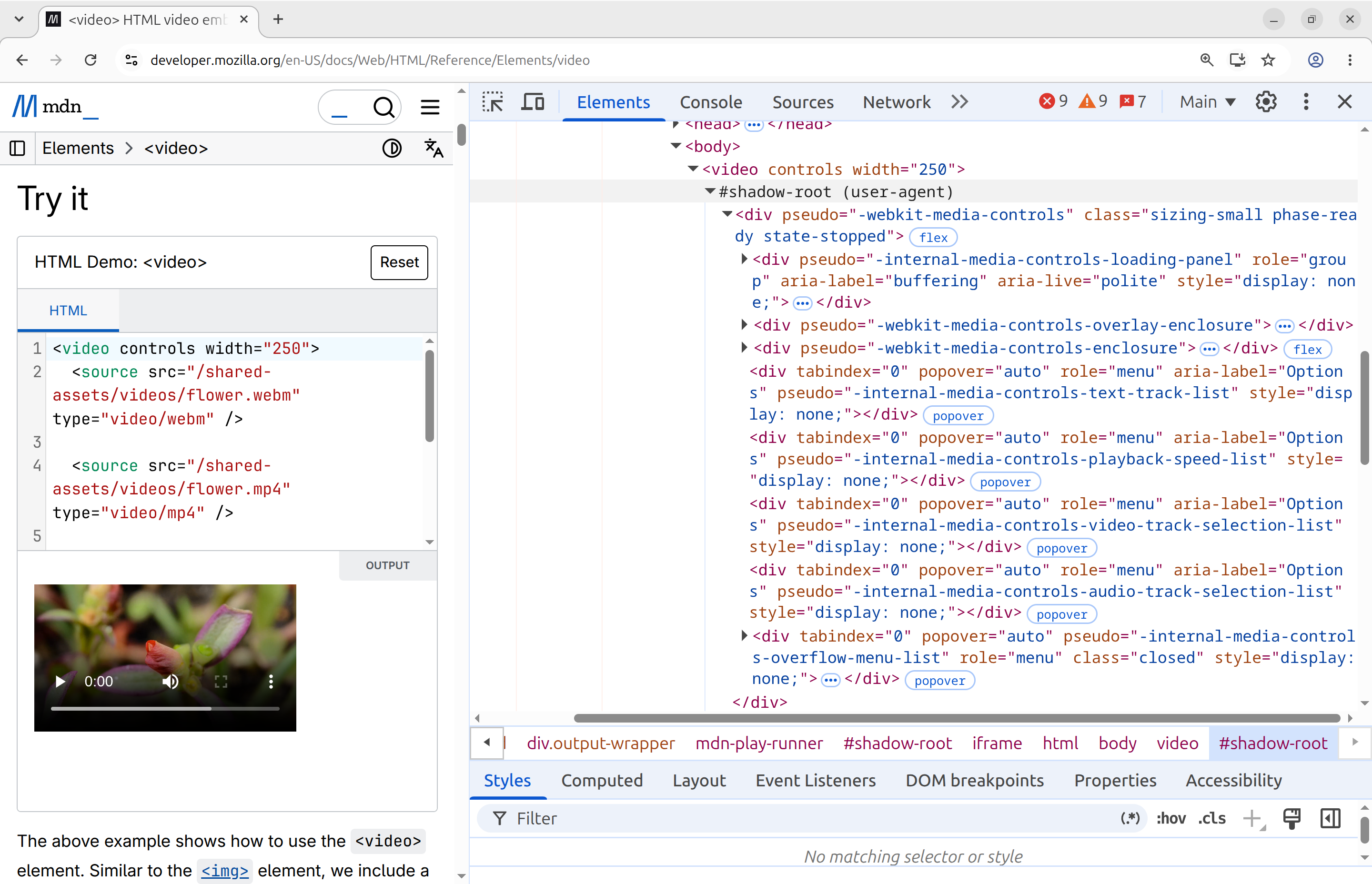
<video controls> in Chromium DevTools.So from a standards and internal-consistency perspective, web components have been a clear win. They provide a degree of coherence between userland and the platform that, without them, might have felt ad-hoc or inconsistent from browser to browser.
This has also created a symbiotic relationship between standards and userland, where web component concepts have flowed back into standards and influenced the design of new platform features. You can see this most clearly in the Open UI project, where terms like “parts” and “slots” are frequently invoked (both of which come from web components), and which has landed several new features in browsers such as customizable <select>, popovers, and invoker commands, with more likely on the way.
So whatever happens to web components in the future, and regardless of whether web developers ignore them, forget them, celebrate their demise, or write them off entirely, nothing can take this victory away from them. They are woven into the texture of the web platform in a way that can never be undone. For me, this makes me happy even if I never write another web component again.
You can comment on the fediverse.