Archive for 2012

App Tracker and Chord Reader go open-source

I recently open-sourced two of my Android apps – App Tracker and Chord Reader. You can find the code on GitHub.

I open-sourced them for very different reasons, although the catalyzing events were similar. In both cases, I had a request from a fellow dev for more information about the app, which made me question why I was keeping it closed-source in the first place. And in both cases, I couldn’t find a good reason to keep the code private.

App Tracker
But in a broader sense, the two apps mean very different things to me. App Tracker was a project that I poured a lot of effort into, but which turned into an unmitigated failure, with only 294 active users (and less than 4,000 downloads) after almost two years on the Android Market. It’s kind of embarrassing to admit now, but at the time I was writing it, I actually thought App Tracker would be my ticket into doing freelance app development as a full-time gig – hence the laughable premium version. Ultimately, though, the app suffered from bad design and bad marketing (can you guess what it does from the name and icon?), and it never really took off. So in this case, opening up the source means acknowledging my failure and cutting my losses. It’s a humbling moment.

Chord Reader
Chord Reader, on the other hand, was an app that I barely put any effort into, and against my expectations became pretty successful, with over 35,000 downloads (and 10,000 active users) after about a year. It’s even made me a modest amount of money from the AdMob campaign (about $100), although I put in the ads more out of curiosity than anything. I never really found the time or interest to keep maintaining this app, though, so it ended up becoming something of a neglected stepchild to me. There were lots of requests for new features (autoscroll, set lists, bluetooth integration), but for some reason I just couldn’t muster up the enthusiasm to implement them. So in this case, opening up the source means releasing my app to the community, where hopefully it will find more dedicated contributors. It also means getting rid of the ads (since there’s no point in having ads in an open-source app), which I’m actually relieved to do, because they weren’t making me enough money to justify uglifying up the UI.

Of course, a lot of code gets open-sourced, and a lot of it gets lost in the abyss of endless cyberspace. There’s no point in making a big show about releasing this code without explaining a bit about why anyone should bother looking at it. So here’s my brief run-down:

App Tracker reads the system logs (“logcat”) in a background Service and notes when other apps are being launched, which allows it to keep usage statistics. It should be interesting for anyone looking to write an app to detect when a third-party app has been started (which was the question from a fellow dev that prompted me to open-source it). For instance, all of the various “protect my apps with a password” security apps use this technique. Be forewarned, though: these methods are faulty, given that the Android OS treats with suspicion any Service that tries to run 24/7, and may kill your Service without warning.

Chord Reader reads chord charts downloaded from sites like AZChords.com and UltimateGuitar.com, parses the text, and displays information about the chords, including various guitar fingerings. The most interesting part is the system of regexes (really, a grammar) to parse the chords and determine, for instance, that “Abmaj7” and “G#M7” both mean the same thing: “A-flat, major quality, 7th added.” A good place to see this in action is the unit tests. Music geeks should get a kick out of it. And of course, anyone who just wants to contribute to the project (like the dev who first contacted me and suggested open-sourcing it) is welcome to create branches and pull requests on GitHub.

Oh, and in case I haven’t made it clear elsewhere, when I open-source something on GitHub, please assume that the license is the WTFPL license, or some other very permissive open-source license. I honestly don’t care what you do with the code, although hopefully you’ll be nice about it and give me credit. Happy coding!
One-star reviews are lousy bug reports

Puzzling over cryptic bug reports is a frustrating and unavoidable part of being a developer. When users want to complain to you about a bug, they just usually don’t think through all the pieces of data that might help solve the problem.

What OS are you using? What version of the software? What were you doing to cause the bug? When users are angry, they don’t want to deal with such tedious details. They just want to vent.

This happens with large software companies, small software companies, and indie developers alike. It’s such a common gripe among developers that it’s not even worth describing any further. Any seasoned dev knows what I’m talking about.

In the Android world, dealing with bug reports is even more frustrating, because they usually come in the form of 1-star reviews on the Android Market. 1-star reviews provide all the cathartic venting that users desire, without any of the useful information that could actually solve the problem.

Here are some actual 1- and 2-star reviews I’ve gotten on the Android Market:

  • didn’t open… gutted
  • There is no sound on moment would give higher rating when fixed
  • always forced close on samsung galaxy s. I have to uninstall it.

Yeah, not so helpful. Figuring out a bug from comments like these is like trying to solve a detective story with half the pages torn out.

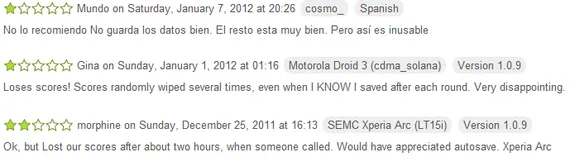
Worst of all, these kinds of comments are dispiriting for developers, because star ratings are so crucial to getting your application to be highly ranked in the Market. My own recent app KeepScore had only 4- and 5-star reviews, and was starting to get ranked pretty highly, before receiving an onslaught of these nasty little comments:

Angry? Yes. Helpful? No.

KeepScore is designed to save scores automatically. In particular, it’s supposed to automatically save your scores whenever the app leaves the foreground, as shown here in the source code.

I couldn’t reproduce the data loss described in these reviews. Even when an incoming call disrupts an ongoing game, KeepScore gracefully exits and displays a comforting message saying, “Game automatically saved.” I’ve never seen it lose data.

So what happened here? Did the Android system kill the app before it could call the onPause() method and save the data (which, according to the Android Activity Lifecycle, shouldn’t happen)? Did the users just accidentally create a new game, so that it replaced the old one in the “Resume Last Game” section, making them think that the data had been lost? Who knows. Without a proper bug report, I have no idea what to make of this.

Bad reviews make the author feel better, but they rarely lead to better applications. I’m going to try not to let these reviews sour my experience with KeepScore, though, or discourage me from putting more effort into it. I want to get to the root of this problem.

So, loyal KeepScore users, have any of you run into this particular issue? If so, please report it on the GitHub page, and let’s squash this bug! Oh, and if I do manage to fix it, please leave a nice little comment for my trouble, will ya? It’d be nice to have some good reviews to offset all these bug reports.

CatLog now supports external Intents

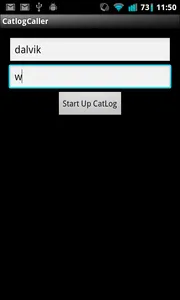
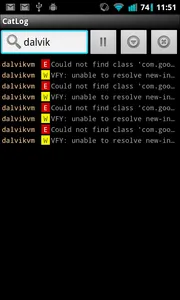
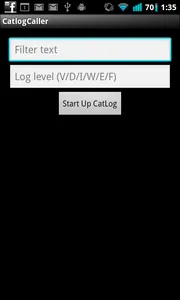
As of version 1.3.2, you can now start up the main CatLog activity using an external Intent, with parameters for filter text and log level.

For Android developers, the idea is that you can just put a switch in your app where, if some debug variable is enabled, you can press a button or access a menu item to start up CatLog and search for text related to your app. This should make it less painful to do debugging, in situations where you don’t have access to adb logcat.

I’ve written a simple demo app on GitHub to show how to use the new Intent.  But the basic gist is that you want to paste something like this into your code:

Intent intent = new Intent("com.nolanlawson.logcat.intents.LAUNCH");

intent.putExtra("filter", myFilterText);
intent.putExtra("level", myLevelText);

startActivity(intent);

That’s it! Full documentation is below.

Intent

com.nolanlawson.logcat.intents.LAUNCH

Parameters

filter

Text to filter by.  Case doesn’t matter, and you can search for either process ids, tags, or log text.

level

Log level to set CatLog to, case insensitive.  One of:

  • E (error)
  • W (warn)
  • I (info)
  • D (debug)
  • V (verbose)
  • F (what a terrible failure)