Archive for the ‘Web’ Category

Let’s learn how modern JavaScript frameworks work by building one

Hand-drawn looking JavaScript logo saying DIY JS

In my day job, I work on a JavaScript framework (LWC). And although I’ve been working on it for almost three years, I still feel like a dilettante. When I read about what’s going on in the larger framework world, I often feel overwhelmed by all the things I don’t know.

One of the best ways to learn how something works, though, is to build it yourself. And plus, we gotta keep those “days since last JavaScript framework” memes going. So let’s write our own modern JavaScript framework!

What is a “modern JavaScript framework”?

React is a great framework, and I’m not here to dunk on it. But for the purposes of this post, “modern JavaScript framework” means “a framework from the post-React era” – i.e. Lit, Solid, Svelte, Vue, etc.

React has dominated the frontend landscape for so long that every newer framework has grown up in its shadow. These frameworks were all heavily inspired by React, but they’ve evolved away from it in surprisingly similar ways. And although React itself has continued innovating, I find that the post-React frameworks are more similar to each other than to React nowadays.

To keep things simple, I’m also going to avoid talking about server-first frameworks like Astro, Marko, and Qwik. These frameworks are excellent in their own way, but they come from a slightly different intellectual tradition compared to the client-focused frameworks. So for this post, let’s only talk about client-side rendering.

What sets modern frameworks apart?

From my perspective, the post-React frameworks have all converged on the same foundational ideas:

  1. Using reactivity (e.g. signals) for DOM updates.
  2. Using cloned templates for DOM rendering.
  3. Using modern web APIs like <template> and Proxy, which make all of the above easier.

Now to be clear, these frameworks differ a lot at the micro level, and in how they handle things like web components, compilation, and user-facing APIs. Not all frameworks even use Proxys. But broadly speaking, most framework authors seem to agree on the above ideas, or they’re moving in that direction.

So for our own framework, let’s try to do the bare minimum to implement these ideas, starting with reactivity.

Reactivity

It’s often said that “React is not reactive”. What this means is that React has a more pull-based rather than a push-based model. To grossly oversimplify things: in the worst case, React assumes that your entire virtual DOM tree needs to be rebuilt from scratch, and the only way to prevent these updates is to implement React.memo (or in the old days, shouldComponentUpdate).

Using a virtual DOM mitigates some of the cost of the “blow everything away and start from scratch” strategy, but it doesn’t fully solve it. And asking developers to write the correct memo code is a losing battle. (See React Forget for an ongoing attempt to solve this.)

Instead, modern frameworks use a push-based reactive model. In this model, individual parts of the component tree subscribe to state updates and only update the DOM when the relevant state changes. This prioritizes a “performant by default” design in exchange for some upfront bookkeeping cost (especially in terms of memory) to keep track of which parts of the state are tied to which parts of the UI.

Note that this technique is not necessarily incompatible with the virtual DOM approach: tools like Preact Signals and Million show that you can have a hybrid system. This is useful if your goal is to keep your existing virtual DOM framework (e.g. React) but to selectively apply the push-based model for more performance-sensitive scenarios.

For this post, I’m not going to rehash the details of signals themselves, or subtler topics like fine-grained reactivity, but I am going to assume that we’ll use a reactive system.

Cloning DOM trees

For a long time, the collective wisdom in JavaScript frameworks was that the fastest way to render the DOM is to create and mount each DOM node individually. In other words, you use APIs like createElement, setAttribute, and textContent to build the DOM piece-by-piece:

const div = document.createElement('div')
div.setAttribute('class', 'blue')
div.textContent = 'Blue!'

One alternative is to just shove a big ol’ HTML string into innerHTML and let the browser parse it for you:

const container = document.createElement('div')
container.innerHTML = `
  <div class="blue">Blue!</div>
`

This naïve approach has a big downside: if there is any dynamic content in your HTML (for instance, red instead of blue), then you would need to parse HTML strings over and over again. Plus, you are blowing away the DOM with every update, which would reset state such as the value of <input>s.

At some point, though, folks figured out that parsing the HTML once and then calling cloneNode(true) on the whole thing is pretty danged fast:

const template = document.createElement('template')
template.innerHTML = `
  <div class="blue">Blue!</div>
`
template.content.cloneNode(true) // this is fast!

Here I’m using a <template> tag, which has the advantage of creating “inert” DOM. In other words, things like <img> or <video autoplay> don’t automatically start downloading anything.

How fast is this compared to manual DOM APIs? To demonstrate, here’s a small benchmark. Tachometer reports that the cloning technique is about 50% faster in Chrome, 15% faster in Firefox, and 10% faster in Safari. (This will vary based on DOM size and number of iterations, but you get the gist.)

What’s interesting is that <template> is a new-ish browser API, not available in IE11, and originally designed for web components. Somewhat ironically, this technique is now used in a variety of JavaScript frameworks, regardless of whether they use web components or not.

There is one major challenge with this technique, which is how to efficiently update dynamic content without blowing away DOM state. We’ll cover this later when we build our toy framework.

Modern JavaScript APIs

We’ve already encountered one new API that helps a lot, which is <template>. Another one that’s steadily gaining traction is Proxy, which can make building a reactivity system much simpler.

When we build our toy example, we’ll also use tagged template literals to create an API like this:

const dom = html`
  <div>Hello ${ name }!</div>
`

Not all frameworks use this tool, but notable ones include Lit, HyperHTML, and ArrowJS. Tagged template literals can make it much simpler to build ergonomic HTML templating APIs without needing a compiler.

Step 1: building reactivity

Reactivity is the foundation upon which we’ll build the rest of the framework. Reactivity will define how state is managed, and how the DOM updates when state changes.

Let’s start with some “dream code” to illustrate what we want:

const state = {}

state.a = 1
state.b = 2

createEffect(() => {
  state.sum = state.a + state.b
})

Basically, we want a “magic object” called state, with two props: a and b. And whenever those props change, we want to set sum to be the sum of the two.

Assuming we don’t know the props in advance (or have a compiler to determine them), a plain object will not suffice for this. So let’s use a Proxy, which can react whenever a new value is set:

const state = new Proxy({}, {
  get(obj, prop) {
    onGet(prop)
    return obj[prop]
  },
  set(obj, prop, value) {
    obj[prop] = value
    onSet(prop, value)
    return true
  }
})

Right now, our Proxy doesn’t do anything interesting, except give us some onGet and onSet hooks. So let’s make it flush updates after a microtask:

let queued = false

function onSet(prop, value) {
  if (!queued) {
    queued = true
    queueMicrotask(() => {
      queued = false
      flush()
    })
  }
}

Why flush updates? Mostly because we don’t want to run too many computations. If we update whenever both a and b change, then we’ll uselessly compute the sum twice. By coalescing the flush into a single microtask, we can be much more efficient.

Next, let’s make flush update the sum:

function flush() {
  state.sum = state.a + state.b
}

This is great, but it’s not yet our “dream code.” We’ll need to implement createEffect so that the sum is computed only when a and b change (and not when something else changes!).

To do this, let’s use an object to keep track of which effects need to be run for which props:

const propsToEffects = {}

Next comes the crucial part! We need to make sure that our effects can subscribe to the right props. To do so, we’ll run the effect, note any get calls it makes, and create a mapping between the prop and the effect.

To break it down, remember our “dream code” is:

createEffect(() => {
  state.sum = state.a + state.b
})

When this function runs, it calls two getters: state.a and state.b. These getters should trigger the reactive system to notice that the function relies on the two props.

To make this happen, we’ll start with a simple global to keep track of what the “current” effect is:

let currentEffect

Then, the createEffect function will set this global before calling the function:

function createEffect(effect) {
  currentEffect = effect
  effect()
  currentEffect = undefined
}

The important thing here is that the effect is immediately invoked, with the global currentEffect being set in advance. This is how we can track whatever getters it might be calling.

Now, we can implement the onGet in our Proxy, which will set up the mapping between the global currentEffect and the property:

function onGet(prop) {
  const effects = propsToEffects[prop] ?? 
      (propsToEffects[prop] = [])
  effects.push(currentEffect)
}

After this runs once, propsToEffects should look like this:

{
  "a": [theEffect],
  "b": [theEffect]
}

…where theEffect is the “sum” function we want to run.

Next, our onSet should add any effects that need to be run to a dirtyEffects array:

const dirtyEffects = []

function onSet(prop, value) {
  if (propsToEffects[prop]) {
    dirtyEffects.push(...propsToEffects[prop])
    // ...
  }
}

At this point, we have all the pieces in place for flush to call all the dirtyEffects:

function flush() {
  while (dirtyEffects.length) {
    dirtyEffects.shift()()
  }
}

Putting it all together, we now have a fully functional reactivity system! You can play around with it yourself and try setting state.a and state.b in the DevTools console – the state.sum will update whenever either one changes.

Now, there are plenty of advanced cases that we’re not covering here:

  1. Using try/catch in case an effect throws an error
  2. Avoiding running the same effect twice
  3. Preventing infinite cycles
  4. Subscribing effects to new props on subsequent runs (e.g. if certain getters are only called in an if block)

However, this is more than enough for our toy example. Let’s move on to DOM rendering.

Step 2: DOM rendering

We now have a functional reactivity system, but it’s essentially “headless.” It can track changes and compute effects, but that’s about it.

At some point, though, our JavaScript framework needs to actually render some DOM to the screen. (That’s kind of the whole point.)

For this section, let’s forget about reactivity for a moment and imagine we’re just trying to build a function that can 1) build a DOM tree, and 2) update it efficiently.

Once again, let’s start off with some dream code:

function render(state) {
  return html`
    <div class="${state.color}">${state.text}</div>
  `
}

As I mentioned, I’m using tagged template literals, ala Lit, because I found them to be a nice way to write HTML templates without needing a compiler. (We’ll see in a moment why we might actually want a compiler instead.)

We’re re-using our state object from before, this time with a color and text property. Maybe the state is something like:

state.color = 'blue'
state.text = 'Blue!'

When we pass this state into render, it should return the DOM tree with the state applied:

<div class="blue">Blue!</div>

Before we go any further, though, we need a quick primer on tagged template literals. Our html tag is just a function that receives two arguments: the tokens (array of static HTML strings) and expressions (the evaluated dynamic expressions):

function html(tokens, ...expressions) {
}

In this case, the tokens are (whitespace removed):

[
  "<div class=\"",
  "\">",
  "</div>"
]

And the expressions are:

[
  "blue",
  "Blue!"
]

The tokens array will always be exactly 1 longer than the expressions array, so we can trivially zip them up together:

const allTokens = tokens
    .map((token, i) => (expressions[i - 1] ?? '') + token)

This will give us an array of strings:

[
  "<div class=\"",
  "blue\">",
  "Blue!</div>"
]

We can join these strings together to make our HTML:

const htmlString = allTokens.join('')

And then we can use innerHTML to parse it into a <template>:

function parseTemplate(htmlString) {
  const template = document.createElement('template')
  template.innerHTML = htmlString
  return template
}

This template contains our inert DOM (technically a DocumentFragment), which we can clone at will:

const cloned = template.content.cloneNode(true)

Of course, parsing the full HTML whenever the html function is called would not be great for performance. Luckily, tagged template literals have a built-in feature that will help out a lot here.

For every unique usage of a tagged template literal, the tokens array is always the same whenever the function is called – in fact, it’s the exact same object!

For example, consider this case:

function sayHello(name) {
  return html`<div>Hello ${name}</div>`
}

Whenever sayHello is called, the tokens array will always be identical:

[
  "<div>Hello ",
  "</div>"
]

The only time tokens will be different is for completely different locations of the tagged template:

html`<div></div>`
html`<span></span>` // Different from above

We can use this to our advantage by using a WeakMap to keep a mapping of the tokens array to the resulting template:

const tokensToTemplate = new WeakMap()

function html(tokens, ...expressions) {
  let template = tokensToTemplate.get(tokens)
  if (!template) {
    // ...
    template = parseTemplate(htmlString)
    tokensToTemplate.set(tokens, template)
  }
  return template
}

This is kind of a mind-blowing concept, but the uniqueness of the tokens array essentially means that we can ensure that each call to html`...` only parses the HTML once.

Next, we just need a way to update the cloned DOM node with the expressions array (which is likely to be different every time, unlike tokens).

To keep things simple, let’s just replace the expressions array with a placeholder for each index:

const stubs = expressions.map((_, i) => `__stub-${i}__`)

If we zip this up like before, it will create this HTML:

<div class="__stub-0__">
  __stub-1__
</div>

We can write a simple string replacement function to replace the stubs:

function replaceStubs (string) {
  return string.replaceAll(/__stub-(\d+)__/g, (_, i) => (
    expressions[i]
  ))
}

And now whenever the html function is called, we can clone the template and update the placeholders:

const element = cloned.firstElementChild
for (const { name, value } of element.attributes) {
  element.setAttribute(name, replaceStubs(value))
}
element.textContent = replaceStubs(element.textContent)

Now, this is still not terribly efficient – notably, we are updating textContent and attributes that don’t necessarily need to be updated. But for our toy framework, this is good enough.

We can test it out by rendering with different state:

document.body.appendChild(render({ color: 'blue', text: 'Blue!' }))
document.body.appendChild(render({ color: 'red', text: 'Red!' }))

This works!

Step 3: combining reactivity and DOM rendering

Since we already have a createEffect from the rendering system above, we can now combine the two to update the DOM based on the state:

const container = document.getElementById('container')

createEffect(() => {
  const dom = render(state)
  if (container.firstElementChild) {
    container.firstElementChild.replaceWith(dom)
  } else {
    container.appendChild(dom)
  }
})

This actually works! We can combine this with the “sum” example from the reactivity section by merely creating another effect to set the text:

createEffect(() => {
  state.text = `Sum is: ${state.sum}`
})

This renders “Sum is 3”:

You can play around with this toy example. If you set state.a = 5, then the text will automatically update to say “Sum is 7.”

Next steps

There are lots of improvements we could make to this system, especially the DOM rendering bit.

Most notably, we are missing a way to update content for elements inside a deep DOM tree, e.g.:

<div class="${color}">
  <span>${text}</span>
</div>

For this, we would need a way to uniquely identify every element inside of the template. There are lots of ways to do this:

  1. Lit, when parsing HTML, uses a system of regexes and character matching to determine whether a placeholder is within an attribute or text content, plus the index of the target element (in depth-first TreeWalker order).
  2. Frameworks like Svelte and Solid have the luxury of parsing the entire HTML template during compilation, which provides the same information. They also generate code that calls firstChild and nextSibling to traverse the DOM to find the element to update.

Whether we decided to do Lit-style client-side parsing or Svelte/Solid-style compile-time parsing, what we want is some kind of mapping like this:

[
  {
    elementIndex: 0, // <div> above
    attributeName: 'class',
    stubIndex: 0 // index in expressions array
  },
  {
    elementIndex: 1 // <span> above
    textContent: true,
    stubIndex: 1 // index in expressions array
  }
]

These bindings would tell us exactly which elements need to be updated, which attribute (or textContent) needs to be set, and where to find the expression to replace the stub.

The next step would be to avoid cloning the template every time, and to just directly update the DOM based on the expressions. In other words, we not only want to parse once – we want to only clone and set up the bindings once. This would reduce each subsequent update to the bare minimum of setAttribute and textContent calls.

Another interesting pattern to implement would be iterations (or repeaters), which come with their own set of challenges, like reconciling lists between updates and handling “keys” for efficient replacement.

I’m tired, though, and this blog post has gone on long enough. So I leave the rest as an exercise to the reader!

Conclusion

So there you have it. In the span of one (lengthy) blog post, we’ve implemented our very own JavaScript framework. Feel free to use this as the foundation for your brand-new JavaScript framework, to release to the world and enrage the Hacker News crowd.

Personally I found this project very educational, which is partly why I did it in the first place. I was also looking to replace the current framework for my emoji picker component with a smaller, more custom-built solution. In the process, I managed to write a tiny framework that passes all the existing tests and is ~6kB smaller than the current implementation, which I’m pretty proud of.

In the future, I think it would be neat if browser APIs were full-featured enough to make it even easier to build a custom framework. For example, the DOM Part API proposal would take out a lot of the drudgery of the DOM parsing-and-replacement system we built above, while also opening the door to potential browser performance optimizations. I could also imagine (with some wild gesticulation) that an extension to Proxy could make it easier to build a full reactivity system without worrying about details like flushing, batching, or cycle detection.

If all those things were in place, then you could imagine effectively having a “Lit in the browser,” or at least a way to quickly build your own “Lit in the browser.” In the meantime, I hope that this small exercise helped to illustrate some of the things framework authors think about, and some of the machinery under the hood of your favorite JavaScript framework.

Thanks to Pierre-Marie Dartus for feedback on a draft of this post.

Footnotes

1. Now that we’ve built the framework, you can see why the content passed to innerHTML can be considered trusted. All HTML tokens either come from tagged template literals (in which case they’re fully static and authored by the developer) or are placeholders (which are also written by the developer). User content is only set using setAttribute or textContent, which means that no HTML sanitization is required to avoid XSS attacks. Although you should probably just use CSP anyway!

Catching errors thrown from connectedCallback

Here’s a deep-in-the-weeds thing about web components that I ran into recently.

Let’s say you have a humble component:

class Hello extends HTMLElement {}
customElements.define('hello-world', Hello);

And let’s say that this component throws an error in its connectedCallback:

class Hello extends HTMLElement {
  connectedCallback() {
    throw new Error('haha!');
  }
}

Why would it do that? I dunno, maybe it needs to validate its props or something. Or maybe it’s just having a bad day.

In any case, you might wonder: how could you test this functionality? You might naïvely try a try/catch:

const element = document.createElement('hello-world');
try {
  document.body.appendChild(element);
} catch (error) {
  console.log('Caught?', error);
}

Unfortunately, this doesn’t work:

In the DevTools console, you’ll see:

Uncaught Error: haha!

Our elusive error is uncaught. So… how can you catch it? In the end, it’s fairly simple:

window.addEventListener('error', event => {
  console.log('Caught!', event.error);
});
document.body.appendChild(element);

This will actually catch the error:

As it turns out, connectedCallback errors bubble up directly to the window, rather than locally to where you called appendChild. (Even though appendChild is what caused connectedCallback to fire in the first place. For the spec nerds out there, this is apparently called a custom element callback reaction.)

Our addEventListener solution works, but it’s a little janky and error-prone. In short:

  • You need to remember to call event.preventDefault() so that nobody else (like your persnickety test runner) catches the error and fails your tests.
  • You need to remember to call removeEventListener (or AbortSignal if you’re fancy).

A full-featured utility might look like this:

function catchConnectedError(callback) {
  let error;
  const listener = event => {
    event.preventDefault();
    error = event.error;
  };
  window.addEventListener('error', listener);
  try {
    callback();
  } finally {
    window.removeEventListener('error', listener);
  }
  return error;
}

…which you could use like so:

const error = catchConnectedError(() => {
  document.body.appendChild(element);
});
console.log('Caught!', error);

If this comes in handy for you, you might add it to your testing library of choice. For instance, here’s a variant I wrote recently for Jest.

Hope this quick tip was helpful, and keep connectin’ and errorin’!

Update: This is also true of any other “callback reactions” such as disconnectedCallback, attributeChangedCallback, form-associated custom element lifecycle callbacks, etc. I’ve just found that, most commonly, you want to catch errors from connectedCallback.

Use web components for what they’re good at

Web components logo of two wrenches together

Dave Rupert recently made a bit of a stir with his post “If Web Components are so great, why am I not using them?”. I’ve been working with web components for a few years now, so I thought I’d weigh in on this.

At the risk of giving the most senior-engineer-y “It depends” answer ever: I think web components have strengths and weaknesses, and you have to understand the tradeoffs before deciding when to use them. So let’s explore some cases where web components really shine, before moving on to where they might fall flat.

Client-rendered leaf components

To me, this is the most unambiguously slam-dunk use case for web components. You have some component at the leaf of the DOM tree, it doesn’t need to be rendered server-side, and it doesn’t <slot> any content inside of it. Examples include: a rich text editor, a calendar widget, a color picker, etc.

At this point, you’ve already bypassed a bunch of tricky bits of web components, such as Server-Side Rendering (SSR), hydration, slotting, maybe even shadow DOM. If you’re not using a framework, or you’re using one that supports web components, you can just plop the <fancy-component> tag into your template or JSX and call it a day.

For instance, take my emoji-picker-element. It’s one line of HTML to import it:

<script type="module" href="https://cdn.jsdelivr.net/npm/emoji-picker-element@1/index.js"></script>

And one line to use it:

<emoji-picker></emoji-picker>

No bundler, no transpiler, no framework integration, just copy-paste. It’s almost like ye olde days of jQuery plugins. And yet, I’ve also seen it used in complex SPA projects – web components can run the gamut.

This is about as close as you can get to the original vision for web components, which is that using <fancy-element> should be as easy as using built-in HTML elements.

Glue code, or avoiding the big rewrite

Picture this: you’ve got a big React codebase, it’s served you well for a while, but now your team wants to move to Svelte. Time to rewrite the whole thing, right? Including finding new Svelte versions of every third-party component you’re using?

This is the way a lot of frontend devs think about frameworks, with all these huge switching costs when moving from one to the other. The biggest misconception I’ve seen about web components is that they’re just another flavor of the same story.

They’re not. The whole point of web components is to liberate us from this churn. If you decide to switch from Vue to Lit, or from Angular to Stencil (or whatever), and if you’re rewriting all your components in one go, then you’re signing up for a lot of unnecessary pain.

Just let your old code and your new code live side-by-side. Use web components as the interoperability later to glue the two together. You don’t need to rewrite everything all at once:

<old-component>
  <new-component>
  </new-component>
</old-component>

Web components can pass props/attributes down, and send events back up. (That’s kind of their whole thing.) If your framework supports web components, then this works out of the box. (And if not, you can write some lite glue code.)

Now, some people get squeamish at the idea of two frameworks living on the same page, but I think this is more gut-based than evidence-based. And to be fair, if you’re using a meta-framework to do SSR/hydration, then this partial migration may be easier said than done. But if web components are good at anything, it’s defining a high-level contract for composing two components together, on the client side anyway.

So if you’re tired of rewriting your whole UI every year (or your boss is tired of you doing it), then maybe web components are worth considering.

Design systems and enterprise

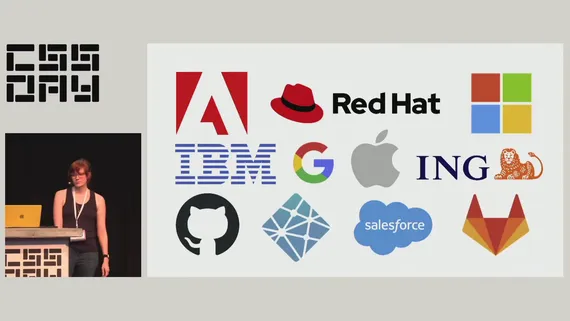
If you watch Cassondra Robert’s talk from CSS Day, there’s a nice slide with a lot of corporate logos attesting to web components’ penetration:

CSS Day talk screenshot showing Cassondra Roberts alongside a slide showing company logos of Adobe, RedHat, Microsoft, IBM, Google, Apple, ING, GitHub, Netlify, Salesforce, GitLab
If this isn’t enough, you could also look at Oracle, SAP, ServiceNow… the list goes on and on.

What you’ll notice is that a lot of big companies (like the one I work for) are quietly using web components, especially in their design systems and component libraries. If you spend a lot of time on webdev social media, this might surprise you. It might also surprise you to learn that, by some measures, React is used on roughly 8% of page loads, whereas web components are used on 20%.

The thing is, a lot of big companies are not on social media (Twitter/X, Reddit, etc.) trying to sell you on web components or teach you how to use them. On the other hand, there are plenty of tech influencers on Twitter busily keeping up to date with every minor version of React and what’s new in that ecosystem. The reason for this is pretty simple: big companies tend to talk a lot internally, but not so much externally, whereas small companies (agencies, startups, freelancers, etc.) tend to be more active on social media relative to their company size. So if web components are more popular inside the enterprise than outside of it, you’d never know it from browsing Twitter all day.

So why are big enterprises so gaga for web components? For one thing, design systems based on web components work across a variety of environments. A big company might have frontends written in React, Angular, Ember, and static HTML, and they all have to play nicely with the company’s theming and branding. The big rewrite (as described above) may be a fun exercise for your average startup, but it’s just not practical in the enterprise world.

Having a lot of consumers of your codebase, and having to think on longer timescales, just leads to different technical decisions. And to me, this points to the main reason enterprises love web components: stability and longevity.

Think about your average React codebase, and how updating any dependency (React Router, Redux, React itself, etc.) can lead to a weeks-long effort of rewriting your code to accommodate all the breaking changes. Cue the inevitable appearance of Hyrum’s Law at enterprise scale, where even a tiny change can cause a butterfly effect that breaks thousands of components, and even bumping a minor version can lead to weeks of testing, validating, and documenting. In this world, your average React minor version bump is an ordeal – a major version bump is a disaster.

Compare this to the backwards-compatibility guarantees of the web platform, where the venerable Space Jam website from 1996 still works to this day. Web components hook into this stability story, which is a huge plus for any company that doesn’t have the luxury of rewriting their frontend every couple years.

When you use a web component, connectedCallback is just connectedCallback – it’s not going to change. And shadow DOM style scoping, with all of its subtleties, is not going to change either. Whatever code you can delegate to the browser, that’s code you’re not having to maintain or validate over the years; you’ve effectively outsourced that responsibility to Google, Apple, and Mozilla.

Enterprises are slow, cautious, and risk-averse – just like the web platform. No wonder web components have taken the enterprise world by storm.

Downsides of web components

All of the pluses of web components should be weighed against their weaknesses. And web components have their fair share:

  • Server-side rendering (SSR). I would argue that this is still not a solved problem in web-components-land. Sure, we have Declarative Shadow DOM, but that’s just one part of the puzzle. There’s no standard for rendering web components on the server, so every framework does it a bit differently. The fact that Lit SSR is still under “Lit Labs” should tell you something. Maybe in the future, when you can render 3 different web component frameworks on the server, and they compose together and hydrate nicely, then I’ll consider this solved. But I think we’re a few years away from that, at least.
  • Accessibility. You can’t have ARIA references that easily cross shadow boundaries, and dialogs and focus can be tricky. At the very least, if you don’t want to mess up accessibility, then you have to think really carefully about your component structure from day one. There’s a lot of ongoing work to solve this, but I’d say it’s definitely rough out there in 2023.

Aside from that, there are also problems of lock-in (e.g. meta-frameworks, bundlers, test runners), the ongoing legacy of IE11 (some folks are scarred for life; the last thing they want to do is #useThePlatform), and overall platform exhaustion (“I learned React, it works, I don’t want to learn something else”). Not everyone is going to be sold on web components, and I’m fine with that. The web is a big tent, and everybody is using it for different things; that’s part of what makes it so amazing.

Conclusion

Use web components. Or don’t use them. Or come back and check in again in a few years, when the features and web standards are a bit more fleshed out.

I think web components are cool, but I understand that not everyone feels the same way. I don’t feel like I need to go around evangelizing for their adoption. They’re just another tool in the toolbelt; the trick is leveraging their strengths while avoiding their pitfalls.

The thing I like about web components, and web standards in general, is that I get to outsource a bunch of boring problems to the browser. How do I compose components? How do I scope styles? How do I pass data around? Who cares – just take whatever the browser gives you. That way, I can spend more time on the problems that actually matter to my end-users, like performance, accessibility, security, etc.

Too often, in web development, I feel like I’m wrestling with incidental complexity that has nothing to do with the actual problem at hand. I’m wrangling npm dependencies, or debugging my state manager, or trying to figure out why my test runner isn’t playing nicely with my linter. Some people really enjoy this kind of stuff, and I find myself getting sucked into it sometimes too. But I think ultimately it’s a kind of fake-work that feels good but doesn’t accomplish much, because your end-user doesn’t care if your bundler is up-to-date with your TypeScript transpiler.

That said, in 2023, choosing web components comes with its own baggage of incidental complexity, such as the aforementioned problems of SSR and accessibility. Compromising on either of those things could actively harm your end-users in ways that actually matter to them, so the tradeoff may not be worth it to you.

I think the tradeoff is often worth it, but again, there are nuances here. “Use web components for what they’re good at” isn’t catchy, but it’s a good way to think about it in 2023.

Thanks to Westbrook Johnson for feedback on a draft of this blog post.

My talk on CSS runtime performance

A few months ago, I gave a talk on CSS performance at performance.now in Amsterdam. The recording is available online:

Play: CSS runtime performance | Nolan Lawson | performance.now() 2022

(You can also read the slides.)

This is one of my favorite talks I’ve ever given. It was the product of months (honestly, years) of research, prompted by a couple questions:

  1. What is the fastest way to implement scoped styles? (Surprisingly few people seem to ask this question.)
  2. Does using shadow DOM improve style performance? (Short answer: yes.)

To answer these questions (and more), I did a bunch of research into how browsers work under the hood. This included combing through old Servo discussions from 2013, reaching out to browser developers like Manuel Rego Casasnovas and Emilio Cobos Alvarez, reading browser PRs, and writing lots of benchmarks.

In the end, I’m pretty satisfied with the talk. My main goal was to shine a light on all the heroic work that browser vendors have done over the years to make CSS so performant. Much of this stuff is intricate and arcane (like Bloom filters), but I hoped that with some simple diagrams and animations, I could bring this work to life.

The two outcomes I’d love to see from this talk are:

  1. Web developers spend more time thinking about and measuring CSS performance. (Pssst, check out the SelectorStats section of my guide to Chrome tracing!)
  2. Browser vendors provide better DevTools to understand CSS performance. (In the talk, I pitch this as a SQL EXPLAIN for CSS.)

What I didn’t want to do in this talk was rain on anybody’s parade who is trying to do sophisticated things with CSS. More and more, I am seeing ambitious usage of new CSS features like :has and container queries, and I don’t want people to feel like they should avoid these techniques and limit themselves to classes and IDs. I just want web developers to consider the cost of CSS, and to get more comfortable with using the DevTools to understand which kinds of CSS patterns may be slowing down their website.

I also got some good feedback from browser DevTools folks after my talk, so I’m hopeful for the future of CSS performance. As techniques like shadow DOM and native CSS scoping become more widespread, it may even mitigate a lot of my worries about CSS perf. In any case, it was a fascinating topic to research, and I hope that folks were intrigued and entertained by my talk.

A beginner’s guide to Chrome tracing

I’ve been doing web performance for a while, so I’ve spent a lot of time in the Performance tab of the Chrome DevTools. But sometimes when you’re debugging a tricky perf problem, you have to go deeper. That’s where Chrome tracing comes in.

Chrome tracing (aka Chromium tracing) lets you record a performance trace that captures low-level details of what the browser is doing. It’s mostly used by Chromium engineers themselves, but it can also be helpful for web developers when a DevTools trace is not enough.

This post is a short guide on how to use this tool, from a web developer’s point of view. I’m not going to cover everything – just the bare minimum to get up and running.

Setup

First off, as described in this helpful post, you’re going to want a clean browser window. The tracing tool measures everything going on in the browser, including background tabs and extensions, which just adds unnecessary noise.

You can launch a fresh Chrome window using this command (on Linux):

google-chrome \
  --user-data-dir="$(mktemp -d)" --disable-extensions

Or on macOS:

/Applications/Google\ Chrome.app/Contents/MacOS/Google\ Chrome \
  --user-data-dir="$(mktemp -d)" --disable-extensions

Or if you’re lazy (like me), you can install a standalone browser like Chrome Canary and run that.

Record

Next, go to about:tracing in the URL bar. (chrome:tracing or edge:tracing will also work, depending on your browser.) You’ll see a screen like this:

Screenshot of tracing tool with arrow pointing at Record

Click “Record.”

Next, you’ll be given a bunch of options. Here’s where it gets interesting.

Screenshot of tracing tools showing Edit categories with an arrow pointing at it

Usually “Web developer” is a fine default. But sometimes you want extra information, which you can get by clicking “Edit categories.” Here are some of the “cheat codes” I’ve discovered:

  • Check blink.user_timing to show user timings (i.e. performance.measures) in the trace. This is incredibly helpful for orienting yourself in a complex trace.
  • Check blink.debug to get SelectorStats, i.e. stats on slow CSS selectors during style calculation.
  • Check v8.runtime_stats for low-level details on what V8 is doing.

Note that you probably don’t want to go in here and check boxes with wild abandon. That will just make the trace slower to load, and could crash the tab. Only check things you think you’ll actually be using.

Next, click “Record.”

Now, switch over to another tab and do whatever action you want to record – loading a page, clicking a button, etc. Note that if you’re loading a page, it’s a good idea to start from about:blank to avoid measuring the unload of the previous page.

When you’re done recording, switch back and click “Stop.”

Analyze

Screenshot of tracing tool showing arrows pointing at Processes, None, and the Renderer process

In the tracing UI, the first thing you’ll want to do is remove the noise. Click “Processes,” then “None,” then select only the process you’re interested in. It should say “Renderer” plus the title of the tab where you ran your test.

Moving around the UI can be surprisingly tricky. Here is what I usually do:

  • Use the WASD keys to move left, right, or zoom in and out. (If you’ve played a lot of first-person shooters, you should feel right at home.)
  • Click-and-drag on any empty space to pan around.
  • Use the mousewheel to scroll up and down. Use ⌥/Alt + mousewheel to zoom in and out.

You’ll want to locate the CrRendererMain thread. This is the main thread of the renderer process. Under “Ungrouped Measure,” you should see any user timings (i.e. performance.measures) that you took in the trace.

In this example, I’ve located the Document::updateStyle slice (i.e. style calculation), as well as the SelectorStats right afterward. Below, I have a detailed table that I can click to sort by various columns. (E.g. you can sort by the longest elapsed time.)

Screenshot of tracing tool with arrows pointing to CrRendererMain, UpdateStyle, SelectorStats, and table of selectors

Note that I have a performance.measure called “total” in the above trace. (You can name it whatever you want.)

General strategy

I mostly use Chrome tracing when there’s an unexplained span of time in the DevTools. Here are some cases where I’ve seen it come in handy:

  • Time spent in IndexedDB (the IndexedDB flag can be helpful here).
  • Time spent in internal subsystems, such as accessibility or spellchecking.
  • Understanding which CSS selectors are slowest (see SelectorStats above).

My general strategy is to first run the tool with the default settings (plus blink.user_timing, which I almost always enable). This alone will often tell you more than the DevTools would.

If that doesn’t provide enough detail, I try to guess which subsystem of the browser has a performance problem, and tick flags related to that subsystem when recording. (For instance, skia is related to rendering, blink_style and blink.invalidation are probably related to style invalidation, etc.) Unfortunately this requires some knowledge of Chromium’s internals, along with a lot of guesswork.

When in doubt, you can always file a bug on Chromium. As long as you have a consistent repro, and you can demonstrate that it’s a Chromium-only perf problem, then the Chromium engineers should be able to route it to the right team.

Conclusion

The Chrome tracing tool is incredibly complex, and it’s mostly designed for browser engineers. It can be daunting for a web developer to pick up and use. But with a little practice, it can be surprisingly helpful, especially in odd perf edge cases.

There is also a new UI called Perfetto that some may find easier to use. I’m a bit old-school, though, so I still prefer the old UI for now.

I hope this short guide was helpful if you ever find yourself stuck with a performance problem in Chrome and need more insight into what’s going on!

See also: “Chrome Tracing for Fun and Profit” by Jeremy Rose.

Style performance and concurrent rendering

I was fascinated recently by “Why we’re breaking up with CSS-in-JS” by Sam Magura. It’s a great overview of some of the benefits and downsides of the “CSS-in-JS” pattern, as implemented by various libraries in the React ecosystem.

What really piqued my curiosity, though, was a link to this guide by Sebastian Markbåge on potential performance problems with CSS-in-JS when using concurrent rendering, a new feature in React 18.

Here is the relevant passage:

In concurrent rendering, React can yield to the browser between renders. If you insert a new rule in a component, then React yields, the browser then have to see if those rules would apply to the existing tree. So it recalculates the style rules. Then React renders the next component, and then that component discovers a new rule and it happens again.

This effectively causes a recalculation of all CSS rules against all DOM nodes every frame while React is rendering. This is VERY slow.

This concept was new and confusing to me, so I did what I often do in these cases: I wrote a benchmark.

Let’s benchmark it!

This benchmark is similar to my previous shadow DOM vs style scoping benchmark, with one twist: instead of rendering all “components” in one go, we render each one in its own requestAnimationFrame. This is to simulate a worst-case scenario for React concurrent rendering – where React yields between each component render, allowing the browser to recalculate style and layout.

In this benchmark, I’m rendering 200 “components,” with three kinds of stylesheets: unscoped (i.e. the most unperformant CSS I can think of), scoped-ala-Svelte (i.e. adding classes to every selector), and shadow DOM.

The “unscoped” CSS tells the clearest story:

Screenshot of Chrome DevTools showing style/layout calculation costs steadily increasing over time

In this Chrome trace, you can see that the style calculation costs steadily increase as each component is rendered. This seems to be exactly what Markbåge is talking about:

When you add or remove any CSS rules, you more or less have to reapply all rules that already existed to all nodes that already existed. Not just the changed ones. There are optimizations in browsers but at the end of the day, they don’t really avoid this problem.

In other words: not only are we paying style costs as every component renders, but those costs actually increase over time.

If we batch all of our style insertions before the components render, though, then we pay much lower style costs on each subsequent render:

Screenshot of Chrome DevTools, showing low and roughly consistent style/layout calculation costs over time

To me, this is similar to layout thrashing. The main difference is that, with “classic” layout thrashing, you’re forcing a style/layout recalculation by calling some explicit API like getBoundingClientRect or offsetLeft. Whereas in this case, you’re not explicitly invoking a recalc, but instead implicitly forcing a recalc by yielding to the browser’s normal style/layout rendering loop.

I’ll also note that the second scenario could still be considered “layout thrashing” – the browser is still doing style/layout work on each frame. It’s just doing much less, because we’ve only invalidated the DOM elements and not the CSS rules.

Here are the benchmark results for multiple browsers (200 components, median of 25 samples, 2014 Mac Mini):

Chart data, see table below

Click for table
Scenario Chrome 106 Firefox 106 Safari 16
Unscoped 20807.3 13589 14958
Unscoped – styles in advance 3392.5 3357 3406
Scoped 3330 3321 3330
Scoped – styles in advance 3358.9 3333 3339
Shadow DOM 3366.4 3326 3327

As you can see, injecting the styles in advance is much faster than the pay-as-you-go system: 20.8s vs 3.4s in Chrome (and similar for other browsers).

It also turns out that using scoped CSS mitigates the problem – there is little difference between upfront and per-component style injection. And shadow DOM doesn’t have a concept of “upfront styles” (the styles are naturally scoped and attached to each component), so it benefits accordingly.

Is scoping a panacea?

Note though, that scoping only mitigates the problem. If we increase the number of components, we start to see the same performance degradation:

Screenshot of Chrome DevTools showing style/layout calculation costs steadily getting worse over time, although not as bad as in the other screenshot

Here are the benchmark results for 500 components (skipping “unscoped” this time around – I didn’t want to wait!):

Chart data, see table below

Click for table
Scenario Chrome 106 Firefox 106 Safari 16
Scoped 12490.6 8972 11059
Scoped – styles in advance 8413.4 8824 8561
Shadow DOM 8441.6 8949 8695

So even with style scoping, we’re better off injecting the styles in advance. And shadow DOM also performs better than “pay-as-you-go” scoped styles, presumably because it’s a browser-native scoping mechanism (as opposed to relying on the browser’s optimizations for class selectors). The exception is Firefox, which (in a recurring theme), seems to have some impressive optimizations in this area.

Is this something browsers could optimize more? Possibly. I do know that Chromium already weighs some tradeoffs with optimizing for upfront rendering vs re-rendering when stylesheets change. And Firefox seems to perform admirably with whatever CSS we throw at it.

So if this “inject and yield” pattern were prevalent enough on the web, then browsers might be incentivized to target it. But given that React concurrent rendering is somewhat new-ish, and given that the advice from React maintainers is already to batch style insertions, this seems somewhat unlikely to me.

Considering concurrent rendering

Unmentioned in either of the above posts is that this problem largely goes away if you’re not using concurrent rendering. If you do all of your DOM writes in one go, then you can’t layout thrash unless you’re explicitly calling APIs like getBoundingClientRect – which would be something for component authors to avoid, not for the framework to manage.

(Of course, in a long-lived web app, you could still have steadily increasing style costs as new CSS is injected and new components are rendered. But it seems unlikely to be quite as severe as the “rAF-based thrashing” above.)

I assume this, among other reasons, is why many non-React framework authors are skeptical of concurrent rendering. For instance, here’s Evan You (maintainer of Vue):

The pitfall here is not realizing that time slicing can only slice “slow render” induced by the framework – it can’t speed up DOM insertions or CSS layout. Also, staying responsive != fast. The user could end up waiting longer overall due to heavy scheduling overhead.

(Note that “time slicing” was the original name for concurrent rendering.)

Or for another example, here’s Rich Harris (maintainer of Svelte):

It’s not clear to me that [time slicing] is better than just having a framework that doesn’t have these bottlenecks in the first place. The best way to deliver a good user experience is to be extremely fast.

I feel a bit torn on this topic. I’ve seen the benefits of a “time slicing” or “debouncing” approach even when building Svelte components – for instance, both emoji-picker-element and Pinafore use requestIdleCallack (as described in this post) to improve responsiveness when typing into the text inputs. I found this improved the “feel” when typing, especially on a slower device (e.g. using Chrome DevTool’s 6x CPU throttling), even though both were written in Svelte. Svelte’s JavaScript may be fast, but the fastest JavaScript is no JavaScript at all!

That said, I’m not sure if this is something that should be handled by the framework rather than the component author. Yielding to the browser’s rendering loop is very useful in certain perf-sensitive scenarios (like typing into a text input), but in other cases it can worsen the overall performance (as we see with rendering components and their styles).

Is it worth it for the framework to make everything concurrent-capable and try to get the best of both worlds? I’m not so sure. Although I have to admire React for being bold enough to try.

Afterword

After this post was published, Mark Erikson wrote a helpful comment pointing out that inserting DOM nodes is not really something React does during “renders” (at least, in the context of concurrent rendering). So the benchmark would be more accurate if it inserted <style> nodes (as a “misbehaving” CSS-in-JS library would), but not component nodes, before yielding to the browser.

So I modified the benchmark to have a separate mode that delays inserting component DOM nodes until all components have “rendered.” To make it a bit fairer, I also pre-inserted the same number of initial components (but without style) – otherwise, the injected CSS rules wouldn’t have many DOM nodes to match against, so it wouldn’t be terribly representative of a real-world website.

As it turns out, this doesn’t really change the conclusion – we still see gradually increasing style costs in a “layout thrashing” pattern, even when we’re only inserting <style>s between rAFs:

Chrome DevTools screenshot showing gradually increasing style costs over time

The main difference is that, when we front-load the style injections, the layout thrashing goes away entirely, because each rAF tick is neither reading from nor writing to the DOM. Instead, we have one big style cost at the start (when injecting the styles) and another at the end (when injecting the DOM nodes):

Chrome DevTools screenshot showing large purple style blocks at the beginning and end and little JavaScript slices in the middle

(In the above screenshot, the occasional purple slices in the middle are “Hit testing” and “Pre-paint,” not style or layout calculation.)

Note that this is still a teensy bit inaccurate, because now our rAF ticks aren’t doing anything, since this benchmark isn’t actually using React or virtual DOM. In a real-world example, there would be some JavaScript cost to running a React component’s render() function.

Still, we can run the modified benchmark against the various browsers, and see that the overall conclusion has not changed much (200 components, median of 25 samples, 2014 Mac Mini):

Chart data, see table below

Click for table
Scenario Chrome 106 Firefox 106 Safari 16
Unscoped 26180 17622 17349
Unscoped – styles in advance 3958.3 3663 3945
Scoped 3394.6 3370 3358
Scoped – styles in advance 3476.7 3374 3368
Shadow DOM 3378 3370 3408

So the lesson still seems to be: invalidating global CSS rules frequently is a performance anti-pattern. (Even moreso than inserting DOM nodes frequently!)

Afterword 2

I asked Emilio Cobos Álvarez about this, and he gave some great insights from the Firefox perspective:

We definitely have optimizations for that […] but the worst case is indeed “we restyle the whole document again”.

Some of the optimizations Firefox has are quite clever. For example, they optimize appending stylesheets (i.e. appending a new <style> to the <head>) more heavily than inserting (i.e. injecting a <style> between other <style>s) or deleting (i.e. removing a <style>).

Emilio explains why:

Since CSS is source-order dependent, insertions (and removals) cause us to rebuild all the relevant data structures to preserve ordering, while appends can be processed more easily.

Some of this work was apparently done as part of optimizations for Facebook.com back in 2017. I assume Facebook was appending a lot of <style>s, but not inserting or deleting (which makes sense – this is the dominant pattern I see in JavaScript frameworks today).

Firefox also has some specific optimizations for classes, IDs, and tag names (aka “local names”). But despite their best efforts, there are cases where everything needs to be marked as invalid.

So as a web developer, keeping a mental model of “when styles change, everything must be recalculated” is still accurate, at least for the worst case.

SPAs: theory versus practice

I’ve been thinking a lot recently about Single-Page Apps (SPAs) and Multi-Page Apps (MPAs). I’ve been thinking about how MPAs have improved over the years, and where SPAs still have an edge. I’ve been thinking about how complexity creeps into software, and why a developer may choose a more complex but powerful technology at the expense of a simpler but less capable technology.

I think this core dilemma – complexity vs simplicity, capability vs maintainability – is at the heart of a lot of the debates about web app architecture. Unfortunately, these debates are so often tied up in other factors (a kind of web dev culture war, Twitter-stoked conflicts, maybe even a generational gap) that it can be hard to see clearly what the debate is even about.

At the risk of grossly oversimplifying things, I propose that the core of the debate can be summed up by these truisms:

  1. The best SPA is better than the best MPA.
  2. The average SPA is worse than the average MPA.

The first statement should be clear to most seasoned web developers. Show me an MPA, and I can show you how to make it better with JavaScript. Added too much JavaScript? I can show you some clever ways to minimize, defer, and multi-thread that JavaScript. Ran into some bugs, because now you’ve deviated from the browser’s built-in behavior? There are always ways to fix it! You’ve got JavaScript.

Whereas with an MPA, you are delegating some responsibility to the browser. Want to animate navigations between pages? You can’t (yet). Want to avoid the flash of white? You can’t, until Chrome fixes it (and it’s not perfect yet). Want to avoid re-rendering the whole page, when there’s only a small subset that actually needs to change? You can’t; it’s a “full page refresh.”

My second truism may be more controversial than the first. But I think time and experience have shown that, whatever the promises of SPAs, the reality has been less convincing. It’s not hard to find examples of poorly-built SPAs that score badly on a variety of metrics (performance, accessibility, reliability), and which could have been built better and more cheaply as a bog-standard MPA.

Example: subsequent navigations

To illustrate, let’s consider one of the main value propositions of an SPA: making subsequent navigations faster.

Rich Harris recently offered an example of using the SvelteKit website (SPA) compared to the Astro website (MPA), showing that page navigations on the Svelte site were faster.

Now, to be clear, this is a bit of an unfair comparison: the Svelte site is preloading content when you hover over links, so there’s no network call by the time you click. (Nice optimization!) Whereas the Astro site is not using a Service Worker or other offlining – if you throttle to 3G, it’s even slower relative to the Svelte site.

But I totally believe Rich is right! Even with a Service Worker, Astro would have a hard time beating SvelteKit. The amount of DOM being updated here is small and static, and doing the minimal updates in JavaScript should be faster than asking the browser to re-render the full HTML. It’s hard to beat element.innerHTML = '...'.

However, in many ways this site represents the ideal conditions for an SPA navigation: it’s small, it’s lightweight, it’s built by the kind of experts who build their own JavaScript framework, and those experts are also keen to get performance right – since this website is, in part, a showcase for the framework they’re offering. What about real-world websites that aren’t built by JavaScript framework authors?

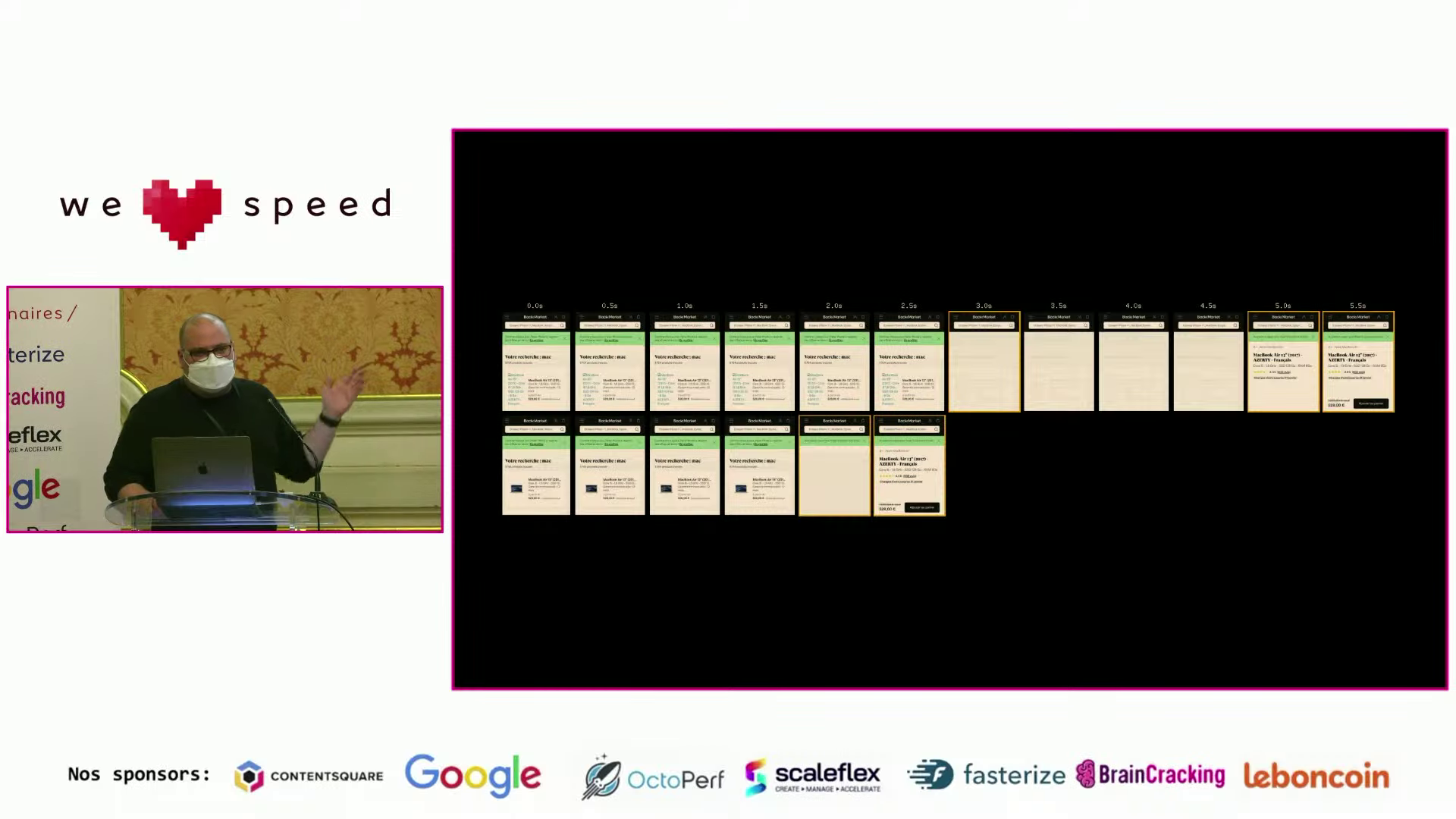
Anthony Ricaud recently gave a talk (in French – apologies to non-Francophones) where he analyzed the performance of real-world SPAs. In the talk, he asks: What if these sites used standard MPA navigations?

To answer this, he built a proxy that strips the site of its first-party JavaScript (leaving the kinds of ads and trackers that, sadly, many teams are not allowed to forgo), as well as another version of the proxy that doesn’t strip any JavaScript. Then, he scripted WebPageTest to click an internal link, measuring the load times for both versions (on throttled 4G).

So which was faster? Well, out of the three sites he tested, on both mobile (Moto G4) and desktop, the MPA was either just as fast or faster, every time. In some cases, the WebPageTest filmstrips even showed that the MPA version was faster by several seconds. (Note again: these are subsequent navigations.)

On top of that, the MPA sites gave immediate feedback to the user when clicking – showing a loading indicator in the browser chrome. Whereas some of the SPAs didn’t even manage to show a “skeleton” screen before the MPA had already finished loading.

Screenshot from conference talk showing a speaker on the left and a WebPageTest filmstrip on the right. The filmstrip compares two sites: the first takes 5.5 seconds and the second takes 2.5 seconds
Screenshot from Anthony Ricaud’s talk. The SPA version is on top (5.5s), and the MPA version is on bottom (2.5s).

Now, I don’t think this experiment is perfect. As Anthony admits, removing inline <script>s removes some third-party JavaScript as well (the kind that injects itself into the DOM). Also, removing first-party JavaScript removes some non-SPA-related JavaScript that you’d need to make the site interactive, and removing any render-blocking inline <script>s would inherently improve the visual completeness time.

Even with a perfect experiment, there are a lot of variables that could change the outcome for other sites:

  • How fast is the SSR?
  • Is the HTML streamed?
  • How much of the DOM needs to be updated?
  • Is a network request required at all?
  • What JavaScript framework is being used?
  • How fast is the client CPU?
  • Etc.

Still, it’s pretty gobsmacking that JavaScript was slowing these sites down, even in the one case (subsequent navigations) where JavaScript should be making things faster.

Exhausted developers and clever developers

Now, let’s return to my truisms from the start of the post:

  1. The best SPA is better than the best MPA.
  2. The average SPA is worse than the average MPA.

The cause of so much debate, I think, is that two groups of developers may look at this situation, agree on the facts on the ground, but come to two different conclusions:

“The average SPA sucks? Well okay, I should stop building SPAs then. Problem solved.” – Exhausted developer

“The average SPA sucks? That’s just because people haven’t tried hard enough! I can think of 10 ways to fix it.” – Clever developer

Let’s call these two archetypes the exhausted developer and the clever developer.

The exhausted developer has had enough with managing the complexity of “modern” web sites and web applications. Too many build tools, too many code paths, too much to think about and maintain. They have JavaScript fatigue. Throw it all away and simplify!

The clever developer is similarly frustrated by the state of modern web development. But they also deeply understand how the web works. So when a tool breaks or a framework does something in a sub-optimal way, it irks them, because they can think of a better way. Why can’t a framework or a tool fix this problem? So they set out to find a new tool, or to build it themselves.

The thing is, I think both of these perspectives are right. Clever developers can always improve upon the status quo. Exhausted developers can always save time and effort by simplifying. And one group can even help the other: for instance, maybe Parcel is approachable for those exhausted by Webpack, but a clever developer had to go and build Parcel first.

Conclusion

The disparity between the best and the average SPA has been around since the birth of SPAs. In the mid-2000s, people wanted to build SPAs because they saw how amazing GMail was. What they didn’t consider is that Google had a crack team of experts monitoring every possible problem with SPAs, right down to esoteric topics like memory leaks. (Do you have a team like that?)

Ever since then, JavaScript framework and tooling authors have been trying to democratize SPA tooling, bringing us the kinds of optimizations previously only available to the Googles and the Facebooks of the world. Their intentions have been admirable (I would put my own fuite on that pile), but I think it’s fair to say the results have been mixed.

An expert developer can stand up on a conference stage and show off the amazing scores for their site (perfect performance! perfect accessibility! perfect SEO!), and then an excited conference-goer returns to their team, convinces them to use the same tooling, and two years later they’ve built a monstrosity. When this happens enough times, the same conference-goer may start to distrust the next dazzling demo they see.

And yet… the web dev community marches forward. Today I can grab any number of “starter” app toolkits and build something that comes out-of-the-box with code-splitting, Service Workers, tree-shaking, a thousand different little micro-optimizations that I don’t even have to know the names of, because someone else has already thought of it and gift-wrapped it for me. That is a miracle, and we should be grateful for it.

Given enough innovation in this space, it is possible that, someday, the average SPA could be pretty great. If it came batteries-included with proper scroll, focus, and screen reader announcements, tooling to identify performance problems (including memory leaks), progressive DOM rendering (e.g. Jake Archibald’s hack), and a bunch of other optimizations, it’s possible that developers would fall into the “pit of success” and consistently make SPAs that outclass the equivalent MPA. I remain skeptical that we’ll get there, and even the best SPA would still have problems (complexity, performance on slow clients, etc.), but I can’t fault people for trying.

At the same time, browsers never stop taking the lessons from userland and upstreaming them into the browser itself, giving us more lines of code we can potentially delete. This is why it’s important to periodically re-evaluate the assumptions baked into our tooling.

Today, I think the core dilemma between SPAs and MPAs remains unresolved, and will maybe never be resolved. Both SPAs and MPAs have their strengths and weaknesses, and the right tool for the job will vary with the size and skills of the team and the product they’re trying to build. It will also vary over time, as browsers evolve. The important thing, I think, is to remain open-minded, skeptical, and analytical, and to accept that everything in software development has tradeoffs, and none of those tradeoffs are set in stone.

Style scoping versus shadow DOM: which is fastest?

Update: this post was updated with some new benchmark numbers in October 2022.

Last year, I asked the question: Does shadow DOM improve style performance? I didn’t give a clear answer, so perhaps it’s no surprise that some folks weren’t sure what conclusion to draw.

In this post, I’d like to present a new benchmark that hopefully provides a more solid answer.

Shadow DOM and style performance

To recap: shadow DOM has some theoretical benefits to style calculation, because it allows the browser to work with a smaller DOM size and smaller CSS rule set. Rather than needing to compare every CSS rule against every DOM node on the page, the browser can work with smaller “sub-DOMs” when calculating style.

However, browsers have a lot of clever optimizations in this area, and userland “style scoping” solutions have emerged (e.g. Vue, Svelte, and CSS Modules) that effectively hook into these optimizations. The way they typically do this is by adding a class or an attribute to the CSS selector: e.g. * { color: red } becomes *.xxx { color: red }, where xxx is a randomly-generated token unique to each component.

After crunching the numbers, my post showed that class-based style scoping was actually the overall winner. But shadow DOM wasn’t far behind, and it was the more consistently fast option.

These nuances led to a somewhat mixed reaction. For instance, here’s one common response I saw (paraphrasing):

The fastest option overall is class-based scoped styles, ala Svelte or CSS Modules. So shadow DOM isn’t really that great.

But looking at the same data, you could reach another, totally reasonable, conclusion:

With shadow DOM, the performance stays constant instead of scaling with the size of the DOM or the complexity of the CSS. Shadow DOM allows you to use whatever CSS selectors you want and not worry about performance.

Part of it may have been people reading into the data what they wanted to believe. If you already dislike shadow DOM (or web components in general), then you can read my post and conclude, “Wow, shadow DOM is even more useless than I thought.” Or if you’re a web components fan, then you can read my post and think, “Neat, shadow DOM can improve performance too!” Data is in the eye of the beholder.

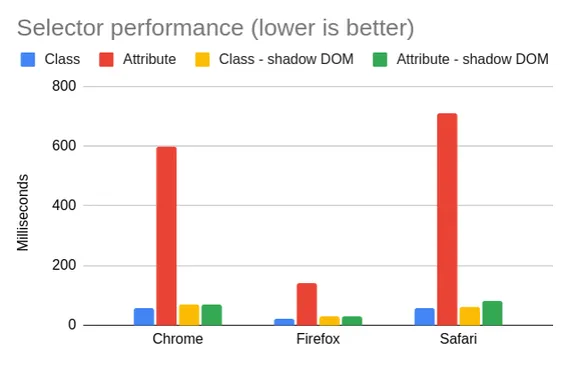
To drive this point home, here’s the same data from my post, but presented in a slightly different way:

Chart image, see table below for the same data

Click for details

This is 1,000 components, 10 rules per component.

Selector performance (ms) Chrome Firefox Safari
Class selectors 58.5 22 56
Attribute selectors 597.1 143 710
Class selectors – shadow DOM 70.6 30 61
Attribute selectors – shadow DOM 71.1 30 81

As you can see, the case you really want to avoid is the second one – bare attribute selectors. Inside of the shadow DOM, though, they’re fine. Class selectors do beat shadow DOM overall, but only by a rounding error.

My post also showed that more complex selectors are consistently fast inside of the shadow DOM, even if they’re much slower at the global level. This is exactly what you would expect, given how shadow DOM works – the real surprise is just that shadow DOM doesn’t handily win every category.

Re-benchmarking

It didn’t sit well with me that my post didn’t draw a firm conclusion one way or the other. So I decided to benchmark it again.

This time, I tried to write a benchmark to simulate a more representative web app. Rather than focusing on individual selectors (ID, class, attribute, etc.), I tried to compare a userland “scoped styles” implementation against shadow DOM.

My new benchmark generates a DOM tree based on the following inputs:

  • Number of “components” (web components are not used, since this benchmark is about shadow DOM exclusively)
  • Elements per component (with a random DOM structure, with some nesting)
  • CSS rules per component (randomly generated, with a mix of tag, class, attribute, :not(), and :nth-child() selectors, and some descendant and compound selectors)
  • Classes per component
  • Attributes per component

To find a good representative for “scoped styles,” I chose Vue 3’s implementation. My previous post showed that Vue’s implementation is not as fast as that of Svelte or CSS Modules, since it uses attributes instead of classes, but I found Vue’s code to be easier to integrate. To make things a bit fairer, I added the option to use classes rather than attributes.

One subtlety of Vue’s style scoping is that it does not scope ancestor selectors. For instance:

/* Input */
div div {}

/* Output - Vue */
div div[data-v-xxx] {}

/* Output - Svelte */
div.svelte-xxx div.svelte-xxx {}

(Here is a demo in Vue and a demo in Svelte.)

Technically, Svelte’s implementation is more optimal, not only because it uses classes rather than attributes, but because it can rely on the Bloom filter optimization for ancestor lookups (e.g. :not(div) div → .svelte-xxx:not(div) div.svelte-xxx, with .svelte-xxx in the ancestor). However, I kept the Vue implementation because 1) this analysis is relevant to Vue users at least, and 2) I didn’t want to test every possible permutation of “scoped styles.” Adding the “class” optimization is enough for this blog post – perhaps the “ancestor” optimization can come in future work. (Update: this is now covered below.)

Methodology

I ran this benchmark on a 2021 MacBook Pro (M1), running macOS Monterey 12.4. The M1 is perhaps not ideal for this, since it’s a very fast computer, but I used it because it’s the device I had, and it can run all three of Chrome, Firefox, and Safari. This way, I can get comparable numbers on the same hardware.

In the test, I used the following parameters:

Parameter Value
Number of components 1000
Elements per component 10
CSS rules per component 10
Classes per element 2
Attributes per element 2

I chose these values to try to generate a reasonable “real-world” app, while also making the app large enough and interesting enough that we’d actually get some useful data out of the benchmark. My target is less of a “static blog” and more of a “heavyweight SPA.”

There are certainly more inputs I could have added to the benchmark: for instance, DOM depth. As configured, the benchmark generates a DOM with a maximum depth of 29 (measured using this snippet). Incidentally, this is a decent approximation of a real-world app – YouTube measures 28, Reddit 29, and Wikipedia 17. But you could certainly imagine more heavyweight sites with deeper DOM structures, which would tend to spend more time in descendant selectors (outside of shadow DOM, of course – descendant selectors cannot cross shadow boundaries).

For each measurement, I took the median of 5 runs. I didn’t bother to refresh the page between each run, because it didn’t seem to make a big difference. (The relevant DOM was being blown away every time.) I also didn’t randomize the stylesheets, because the browsers didn’t seem to be doing any caching that would require randomization. (Browsers have a cache for stylesheet parsing, as I discussed in this post, but not for style calculation, insofar as it matters for this benchmark anyway.)

Although the benchmark has some randomness, I used random-seedable with a consistent seed to ensure reproducible results. (Not that the randomness was enough to really change the numbers much, but I’m a stickler for details.)

The benchmark uses a requestPostAnimationFrame polyfill to measure style/layout/paint performance (see this post for details). To focus on style performance only, a DOM structure with only absolute positioning is used, which minimizes the time spent in layout and paint.

And just to prove that the benchmark is actually measuring what I think it’s measuring, here’s a screenshot of the Chrome DevTools Performance tab:

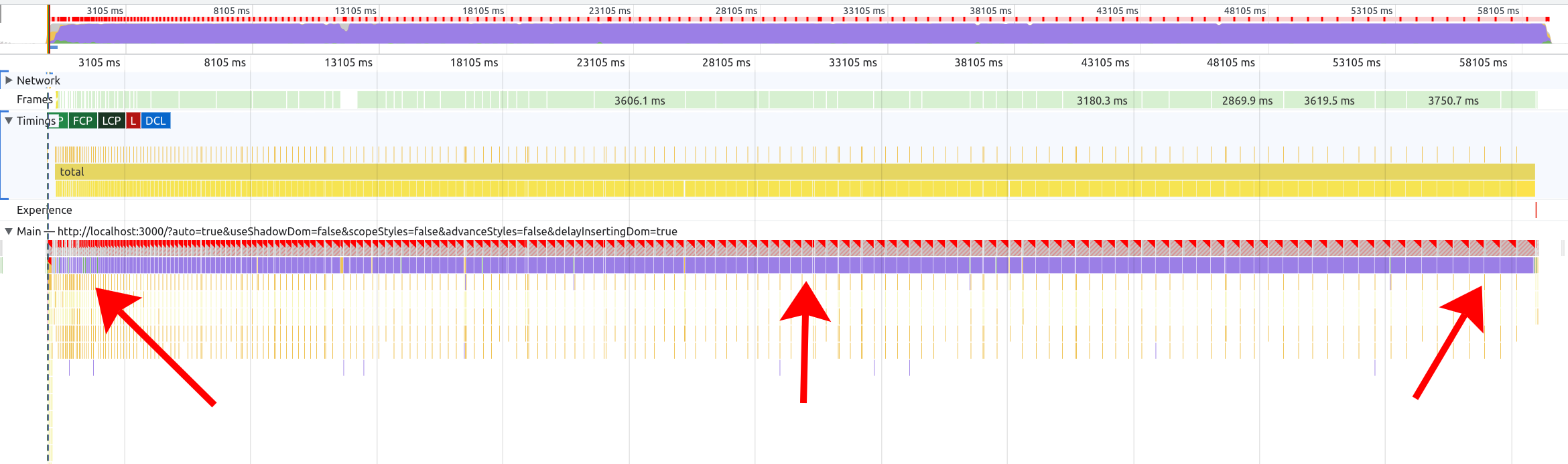
Screenshot of Chrome DevTools showing a large amount of time taken up by the User Timing called "total" with most of that containing a time slice called "Recalculate style"

Note that the measured time (“total”) is mostly taken up by “Recalculate Style.”

Results

When discussing the results, it’s much simpler to go browser-by-browser, because each one has different quirks.

One of the things I like about analyzing style performance is that I see massive differences between browsers. It’s one of those areas of browser performance that seems really unsettled, with lots of work left to do.

That is… unless you’re Firefox. I’m going to start off with Firefox, because it’s the biggest outlier out of the three major browser engines.

Firefox

Firefox’s Stylo engine is fast. Like, really fast. Like, so fast that, if every browser were like Firefox, there would be little point in discussing style performance, because it would be a bit like arguing over the fastest kind of for-loop in JavaScript. (I.e., interesting minutia, but irrelevant except for the most extreme cases.)

In almost every style calculation benchmark I’ve seen over the past five years, Firefox smokes every other browser engine to the point where it’s really in a class of its own. Whereas other browsers may take over 1,000ms in a given scenario, Firefox will take ~100ms for the same scenario on the same hardware.

So keep in mind that, with Firefox, we’re going to be talking about really small numbers. And the differences between them are going to be even smaller. But here they are:

Chart data, see details in table below

Click for table
Scenario Firefox 101
Scoping – classes 30
Scoping – attributes 38
Shadow DOM 26
Unscoped 114

Note that, in this benchmark, the first three bars are measuring roughly the same thing – you end up with the same DOM with the same styles. The fourth case is a bit different – all the styles are purely global, with no scoping via classes or attributes. It’s mostly there as a comparison point.

My takeaway from the Firefox data is that scoping with either classes, attributes, or shadow DOM is fine – they’re all pretty fast. And as I mentioned, Firefox is quite fast overall. As we move on to other browsers, you’ll see how the performance numbers get much more varied.

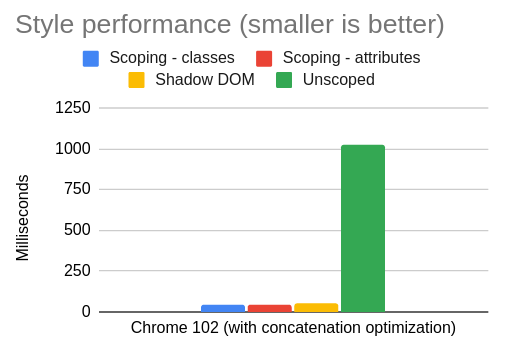
Chrome

The first thing you should notice about Chrome’s data is how much higher the y-axis is compared to Firefox. With Firefox, we were talking about ~100ms at the worst, whereas now with Chrome, we’re talking about an order of magnitude higher: ~1,000ms. (Don’t feel bad for Chrome – the Safari numbers will look pretty similar.)

Chart data, see details in table below

Click for table
Scenario Chrome 102
Scoping – classes 357
Scoping – attributes 614
Shadow DOM 49
Unscoped 1022

Initially, the Chrome data tells a pretty simple story: shadow DOM is clearly the fastest, followed by style scoping with classes, followed by style scoping with attributes, followed by unscoped CSS. So the message is simple: use Shadow DOM, but if not, then use classes instead of attributes for scoping.

I noticed something interesting with Chrome, though: the performance numbers are vastly different for these two cases:

  • 1,000 components: insert 1,000 different <style>s into the <head>
  • 1,000 components: concatenate those styles into one big <style>

As it turns out, this simple optimization greatly improves the Chrome numbers:

Chart data, see details in table below

Click for table
Scenario Chrome 102 – separate styles Chrome 102 – concatenated
Classes 357 48
Attributes 614 43

When I first saw these numbers, I was confused. I could understand this optimization in terms of reducing the cost of DOM insertions. But we’re talking about style calculation – not DOM API performance. In theory, it shouldn’t matter whether there are 1,000 stylesheets or one big stylesheet. And indeed, Firefox and Safari show no difference between the two:

Chart data, see details in table below

Click for table
Scenario Firefox 101 – separate styles Firefox 101 – concatenated
Classes 30 29
Attributes 38 38

Chart data, see details in table below

Click for table
Scenario Safari 15.5 – separate styles Safari 15.5. – concatenated
Classes 75 73
Attributes 812 820

This behavior was curious enough that I filed a bug on Chromium. According to the Chromium engineer who responded (thank you!), this is because of a design decision to trade off some initial performance in favor of incremental performance when stylesheets are modified or added. (My benchmark is a bit unfair to Chrome, since it only measures the initial calculation. A good idea for a future benchmark!)

This is actually a pretty interesting data point for JavaScript framework and bundler authors. It seems that, for Chromium anyway, the ideal technique is to concatenate stylesheets similarly to how JavaScript bundlers do code-splitting – i.e. trying to concatenate as much as possible, while still splitting in some cases to optimize for caching across routes. (Or you could go full inline and just put one big <style> on every page.) Keep in mind, though, that this is a peculiarity of Chromium’s current implementation, and it could go away at any moment if Chromium decides to change it.

In terms of the benchmark, though, it’s not clear to me what to do with this data. You might imagine that it’s a simple optimization for a JavaScript framework (or meta-framework) to just concatenate all the styles together, but it’s not always so straightforward. When a component is mounted, it may call getComputedStyle() on its own DOM nodes, so batching up all the style insertions until after a microtask is not really feasible. Some meta-frameworks (such as Nuxt and SvelteKit) leverage a bundler to concatenate the styles and insert them before the component is mounted, but it feels a bit unfair to depend on that for the benchmark.

To me, this is one of the core advantages of shadow DOM – you don’t have to worry if your bundler is configured correctly or if your JavaScript framework uses the right kind of style scoping. Shadow DOM is just performant, all of the time, full stop. That said, here is the Chrome comparison data with the concatenation optimization applied:

Chart data, see details in table below

Click for table
Scenario Chrome 102 (with concatenation optimization)
Scoping – classes 48
Scoping – attributes 43
Shadow DOM 49
Unscoped 1022

The first three are close enough that I think it’s fair to say that all of the three scoping methods (class, attribute, and shadow DOM) are fast enough.

Safari

In our final tour of browsers, we arrive at Safari:

Chart data, see details in table below

Click for table
Scenario Safari 15.5
Scoping – classes 75
Scoping – attributes 812
Shadow DOM 94
Unscoped 840

To me, the Safari data is the easiest to reason about. Class scoping is fast, shadow DOM is fast, and unscoped CSS is slow. The one surprise is just how slow attribute selectors are compared to class selectors. Maybe WebKit has some more optimizations to do in this space – compared to Chrome and Firefox, attributes are just a much bigger performance cliff relative to classes.

This is another good example of why class scoping is superior to attribute scoping. It’s faster in all the engines, but the difference is especially stark in Safari. (Or you could use shadow DOM and not worry about it at all.)

Conclusion

Performance shouldn’t be the main reason you choose a technology like scoped styles or shadow DOM. You should choose it because it fits well with your development paradigm, it works with your framework of choice, etc. Style performance usually isn’t the biggest bottleneck in a web application, although if you have a lot of CSS or a large DOM size, then you may be surprised by the amount of “Recalculate Style” costs in your next performance trace.

One can also hope that someday browsers will advance enough that style calculation becomes less of a concern. As I mentioned before, Stylo exists, it’s very good, and other browsers are free to borrow its ideas for their own engines. If every browser were as fast as Firefox, I wouldn’t have a lot of material for this blog post.

Chart data, see details in table below
This is the same data presented in this post, but on a single chart. Just notice how much Firefox stands out from the other browsers.
Click for table
Scenario Chrome 102 Firefox 101 Safari 15.5
Scoping – classes 357 30 75
Scoping – attributes 614 38 812
Shadow DOM 49 26 94
Unscoped 1022 114 840
Scoping – classes – concatenated 48 29 73
Scoping – attributes – concatenated 43 38 820

For those who dislike shadow DOM, there is also a burgeoning proposal in the CSS Working Group for style scoping. If this proposal were adopted, it could provide a less intrusive browser-native scoping mechanism than shadow DOM, similar to the abandoned <style scoped> proposal. I’m not a browser developer, but based on my reading of the spec, I don’t see why it couldn’t offer the same performance benefits we see with shadow DOM.

In any case, I hope this blog post was interesting, and helped shine light on an odd and somewhat under-explored space in web performance. Here is the benchmark source code and a live demo in case you’d like to poke around.

Thanks to Alex Russell and Thomas Steiner for feedback on a draft of this blog post.

Afterword – more data

Updated June 23, 2022

After writing this post, I realized I should take my own advice and automate the benchmark so that I could have more confidence in the numbers (and make it easier for others to reproduce).

So, using Tachometer, I re-ran the benchmark, taking the median of 25 samples, where each sample uses a fresh browser session. Here are the results:

Chart data, see details in table below

Click for table
Scenario Chrome 102 Firefox 101 Safari 15.5
Scoping – classes 277.1 45 80
Scoping – attributes 418.8 54 802
Shadow DOM 56.80000001 67 82
Unscoped 820.4 190 857
Scoping – classes – concatenated 44.30000001 42 80
Scoping – attributes – concatenated 44.5 51 802
Unscoped – concatenated 251.3 167 865

As you can see, the overall conclusion of my blog post doesn’t change, although the numbers have shifted slightly in absolute terms.

I also added “Unscoped – concatenated” as a category, because I realized that the “Unscoped” scenario would benefit from the concatenation optimization as well (in Chrome, at least). It’s interesting to see how much of the perf win is coming from concatenation, and how much is coming from scoping.

If you’d like to see the raw numbers from this benchmark, you can download them here.

Second afterword – even more data

Updated June 25, 2022

You may wonder how much Firefox’s Stylo engine is benefiting from the 10 cores in that 2021 Mac Book Pro. So I unearthed my old 2014 Mac Mini, which has only 2 cores but (surprisingly) can still run macOS Monterey. Here are the results:

Chart data, see details in table below

Click for table
Scenario Chrome 102 Firefox 101 Safari 15.5
Scoping – classes 717.4 107 187
Scoping – attributes 1069.5 162 2853
Shadow DOM 227.7 117 233
Unscoped 2674.5 452 3132
Scoping – classes – concatenated 189.3 104 188
Scoping – attributes – concatenated 191.9 159 2826
Unscoped – concatenated 865.8 422 3148

(Again, this is the median of 25 samples. Raw data.)

Amazingly, Firefox seems to be doing even better here relative to the other browsers. For “Unscoped,” it’s 14.4% of the Safari number (vs 22.2% on the MacBook), and 16.9% of the Chrome number (vs 23.2% on the MacBook). Whatever Stylo is doing, it’s certainly impressive.

Third update – scoping strategies

Updated October 8, 2022

I was curious about which kind of scoping strategy (e.g. Svelte-style or Vue-style) performed best in the benchmark. So I updated the benchmark to generate three “scoped selector” styles:

  1. Full selector: ala Svelte, every part of the selector has a class or attribute added (e.g. div div becomes div.xyz div.xyz)
  2. Right-hand side (RHS): ala Vue, only the right-hand side selector is scoped with a class or attribute (e.g. div div becomes div div.xyz)
  3. Tag prefix: ala Enhance, the tag name of the component is prefixed (e.g. div div becomes my-component div div)

Here are the results, taking the median of 25 iterations on a 2014 Mac Mini (raw data):

Chart data, see table below

Same chart with “Unscoped” removed

Chart data, see table below

Table
Scenario Chrome 106 Firefox 105 Safari 16
Shadow DOM 237.1 120 249
Scoping – classes – RHS 643.1 110 190
Scoping – classes – full 644.1 111 193
Scoping – attributes – RHS 954.3 152 200
Scoping – attributes – full 964 146 204
Scoping – tag prefix 1667.9 163 316
Unscoped 9767.5 3436 6829

Note that this version of the benchmark is slightly different from the previous one – I wanted to cover more selector styles, so I changed how the source CSS is generated to include more pseudo-classes in the ancestor position (e.g. :nth-child(2) div). This is why the “unscoped” numbers are higher than before.

My first takeaway is that Safari 16 has largely fixed the problem with attribute selectors – they are now roughly the same as class selectors. (This optimization seems to be the reason.)

In Firefox, classes are still slightly faster than attributes. I actually reached out to Emilio Cobos Álvarez about this, and he explained that, although Firefox did make an optimization to attribute selectors last year (prompted by my previous blog post), class selectors still have “a more micro-optimized code path.” To be fair, though, the difference is not enormous.

In Chrome, class selectors comfortably outperform attribute selectors, and the tag prefix is further behind. Note though, that these are the “unconcatenated” numbers – when applying the concatenation optimization, all the numbers decrease for Chrome:

Chart data, see table below

Same chart with “Unscoped” removed

Chart data, see table below

Table
Scenario Chrome 106 Firefox 105 Safari 16
Shadow DOM 237.1 120 249
Scoping – classes – RHS – concatenated 182 107 192
Scoping – classes – full – concatenated 183.6 107 190
Scoping – attributes – RHS – concatenated 185.8 148 198
Scoping – attributes – full – concatenated 187.1 142 204
Scoping – tag prefix – concatenated 288.7 159 315
Unscoped – concatenated 6476.3 3526 6882

With concatenation, the difference between classes and attributes is largely erased in Chrome. As before, concatenation has little to no impact on Firefox or Safari.

In terms of which scoping strategy is fastest, overall the tag prefix seems to be the slowest, and classes are faster than attributes. Between “full” selector scoping and RHS scoping, there does not seem to be a huge difference. And overall, any scoping strategy is better than unscoped styles. (Although do keep in mind this is a microbenchmark, and some of the selectors it generates are a bit tortured and elaborate, e.g. :not(.foo) :nth-child(2):not(.bar). In a real website, the difference would probably be less pronounced.)

I’ll also note that the more work I do in this space, the less my work seems to matter – which is a good thing! Between blogging and filing bugs on browsers, I seem to have racked up a decent body count of browser optimizations. (Not that I can really take credit; all I did was nerd-snipe the relevant browser engineers.) Assuming Chromium fixes the concatenation perf cliff, there won’t be much to say except “use some kind of CSS scoping strategy; they’re all pretty good.”

Dialogs and shadow DOM: can we make it accessible?

Last year, I wrote about managing focus in the shadow DOM, and in particular about modal dialogs. Since the <dialog> element has now shipped in all browsers, and the inert attribute is starting to land too, I figured it would be a good time to take another look at getting dialogs to play nicely with shadow DOM.

This post is going to get pretty technical, especially when it comes to the nitty-gritty details of accessibility and web standards. If you’re into that, then buckle up! The ride may be a bit bumpy.

Quick recap

Shadow DOM is weird. On paper, it doesn’t actually change what you can do in the DOM – with open mode, at least, you can access any element on the page that you want. In practice, though, shadow DOM upends a lot of web developer expectations about how the DOM works, and makes things much harder.

Image of Lisa Simpson in front of a sign saying "Keep out. Or enter, I'm a sign not a cop."
I credit Brian Kardell for this description of open shadow DOM, which is maybe the most perfect distillation of how it actually works.

For accessibility reasons, modal dialogs need to implement a focus trap. However, the DOM doesn’t have an API for “give me all the elements on the page that the user can Tab through.” So web developers came up with creative solutions, most of which amount to:

dialog.querySelectorAll('button, input, a[href], ...')

Unfortunately this is the exact thing that doesn’t work in the shadow DOM. querySelectorAll only grabs elements in the current document or shadow root; it doesn’t deeply traverse.

Like a lot of things with shadow DOM, there is a workaround, but it requires some gymnastics. These gymnastics are hard, and have a complexity and (probably) performance cost. So a lot of off-the-shelf modal dialogs don’t handle shadow DOM properly (e.g. a11y-dialog does not).

A constructive dialog

“But what about <dialog>?”, you might ask. “The dang thing is called <dialog>; can’t we just use that?”

If you had asked me a few years ago, I would have pointed you to Scott O’Hara’s extensive blog post on the subject, and said that <dialog> had too many accessibility gotchas to be a practical solution.

If you asked me today, I would again point you to the same blog post. But this time, there is a very helpful 2022 update, where Scott basically says that <dialog> has come a long way, so maybe it’s time to give it a second chance. (For instance, the issue with returning focus to the previously-focused element is now fixed, and the need for a polyfill is much reduced.)

To be clear: <dialog> still doesn’t give you 100% of what you’d need to implement a dialog (e.g. you’d need to lock the background scroll), and there are still some lingering discussions about how to handle initial focus. For that reason, Scott still recommends just using a battle-tested library like a11y-dialog.

As always, though, shadow DOM makes things more complicated. And in this case, <dialog> actually has some compelling superpowers:

  1. It automatically limits focus to the dialog, with correct Tab order, even in shadow DOM.
  2. It works with closed shadow roots as well, which is impossible in userland solutions.
  3. It also works with user-agent shadow roots. (E.g. you can Tab through the buttons in a <video controls> or <audio controls>.) This is also impossible in userland, since these elements function effectively like closed shadow roots.
  4. It correctly returns focus to the previously-focused element, even if that element is in a closed shadow root. (This is possible in userland, but you’d need an API contract with the closed-shadow component.)
  5. The Esc key correctly closes the modal, even if the focus is in a user-agent shadow root (e.g. the pause button is focused when you press Esc). This is also not possible in userland.

Here is a demo:

So should everybody just switch over to <dialog>? Not so fast: it actually doesn’t perfectly handle focus, per the WAI ARIA Authoring Practices Guide (APG), because it allows focus to escape to the browser chrome. Here’s what I mean:

  • You reach the last tabbable element in the dialog and press Tab.
    • Correct: focus moves to the first tabbable element in the dialog.
    • Incorrect (<dialog>): focus goes to the URL bar or somewhere else in the browser chrome.
  • You reach the first tabbable element in the dialog and press Shift+Tab.
    • Correct: focus moves to the last tabbable element in the dialog.
    • Incorrect (<dialog>): focus goes to the URL bar or somewhere else in the browser chrome.

This may seem like a really subtle difference, but the consensus of accessibility experts seems to be that the WAI ARIA APG is correct, and <dialog> is wrong.

So we’ve reached (yet another!) tough decision with <dialog>. Do we accept <dialog>, because at least it gets shadow DOM right, even though it gets some other stuff wrong? Do we try to build our own thing? Do we quit web development entirely and go live the bucolic life of a potato farmer?

Inert matter

While I was puzzling over this recently, it occurred to me that inert may be a step forward to solving this problem. For those unfamiliar, inert is an attribute that can be used to mark sections of the DOM as “inert,” i.e. untabbable and invisible to screen readers:

<main inert></main>
<div role="dialog"></div>
<footer inert></footer>

In this way, you could mark everything except the dialog as inert, and focus would be trapped inside the dialog.

Here is a demo:

As it turns out, this works perfectly for tabbing through elements in the shadow DOM, just like <dialog>! Unfortunately, it has exactly the same problem with focus escaping to the browser chrome. This is no accident: the behavior of <dialog> is defined in terms of inert.

Can we still solve this, though? Unfortunately, I’m not sure it’s possible. I tried a few different techniques, such as listening for Tab events and checking if the activeElement has moved outside of the modal, but the problem is that you still, at some point, need to figure out what the “first” and “last” tabbable elements in the dialog are. To do this, you need to traverse the DOM, which means (at the very least) traversing open shadow roots, which doesn’t work for closed or user-agent shadow roots. And furthermore, it involves a lot of extra work for the web developer, who has probably lost focus at this point and is daydreaming about that nice, quiet potato farm.

Conclusion

Until the spec and browser issues have been ironed out (e.g. browsers change their behavior so that focus doesn’t escape to the browser chrome, or they give us some entirely different “focus trap” primitive), I can see two reasonable options:

  1. Use something like a11y-dialog, and don’t use shadow DOM or user-agent shadow components like <video controls> or <audio controls>. (Or do some nasty hacks to make it partially work.)
  2. Use shadow DOM, but don’t bother solving the “focus escapes to the browser chrome” problem. Use <dialog> (or a library built on top of it) and leave it at that.

For my readers who were hoping that I’d drop some triumphant “just npm install nolans-cool-dialog and it will work,” I’m sorry to disappoint you. Browsers are still rough around the edges in this area, and there aren’t a lot of great options. Maybe there is some mad-science way to actually solve this, but even that would likely involve a lot of complexity, so it wouldn’t be ideal.

Alternatively, maybe some of you are thinking that I’m focusing too much on closed and user-agent shadow roots. As long as you’re only using open shadow DOM (which, recall, is like the sign that says “I’m a sign, not a cop”), you can do whatever you want. So there’s no problem, right?

Personally, though, I like using <video controls> and <audio controls> (why ship a bunch of JavaScript to do something the browser already does?). And furthermore, I find it odd that if you put a <video controls> inside a <dialog>, you end up with something that’s impossible to make accessible per the WAI ARIA APG. (Is it too much to ask for a little internal consistency in the web platform?)

In any case, I hope this blog post was helpful for others tinkering around with the same problems. I’ll keep an eye on the browsers and standards space, and update this post if anything promising emerges.

State is hard: why SPAs will persist

When I write about web development, sometimes it feels like the parable of the blind men and the elephant. I’m out here eagerly describing the trunk, someone else protests that no, it’s a tail, and meanwhile the person riding on its back is wondering what all the commotion is down there.

We’re all building so many different types of products using web technology – e-commerce sites, productivity apps, blogs, streaming sites, video games, hybrid mobile apps, dashboards on actual spaceships – that it gets difficult to even have a shared vocabulary to describe what we’re doing. And each sub-discipline of web development is so deep that it’s easy to get tunnel-visioned and forget that other people are working with different tools and constraints.

This is what I like about blogging, though: it can help solve the problem of “feeling out the elephant.” I can offer my own perspective, even if flawed, and summon the human hive-mind to help describe the rest of the beast.

My last two posts have been a somewhat clumsy fumbling toward a new definition of SPAs (Single-Page Apps) and MPAs (Multi-Page Apps), and why you’d choose one versus the other when building a website. As it turns out, there is probably enough here to fill a book, but my goal is just to bring my own point of view (and bias) to the table and let others fill in the gaps with their comments and feedback.

I have a few main biases on this topic:

  1. I usually prize performance over ergonomics. I’ll go for the more performant solution, even if it’s awkward or unintuitive.
  2. I like understanding how browsers work, and relying on the “browser-y” way of doing things rather than inventing my own prosthetic solution.
  3. I don’t pay nearly enough attention to what’s happening in “user land” – I like to stay “close to the metal” and see the world from the browser’s perspective. Show me your compiled code, not your source code!

In thinking about this topic and reading what others have written on it, one thing that struck me is that a big attraction for SPAs is the same thing that can cause so many problems: state. People who like SPAs often celebrate the fact than an SPA maintains state between navigations. For instance:

  1. You have a search input. You type into it, click somewhere else to navigate, and the next page still has the text in the input.
  2. You have a scrollable sidebar. You scroll halfway down, click on something, and the next page still has the sidebar at the last scroll position.
  3. You have a list of expandable cards. You expand one of them, click somewhere else, and the next page still has the one card expanded.

Managing state is one of the hardest things about writing software. And in many ways, this aspect of state management is a great boon to SPAs. In particular, you don’t have to think about persisting state between navigations; it just happens automatically. In an MPA, you would have to serialize this state into some persistent format (LocalStorage, IndexedDB, etc.) when the page unloads, and then rehydrate on page load.

On the other hand, the fact that the state never gets blown away is exactly what leads to memory leaks – a problem endemic to SPAs that I’ve already documented ad nauseam. Plus, the further that the state can veer from a known good initial value, the more likely you are to run into bugs, which is why a misbehaving SPA often just needs a good refresh.

Interestingly, though, it’s not always the case that an MPA navigation lands on a fresh state. As mentioned in a previous post, the back-forward cache (now implemented in all browsers) makes this discussion more nuanced.

Cache contents

A quick refresher: in modern browsers, the back-forward cache (or BF cache for short) keeps a cache of the previous and next page when navigating between pages on the same origin. This vastly reduces load times when navigating back and forth through standard MPA pages.

But how exactly does this cache work? Even an MPA page can be very dynamic. What if the page has been dynamically modified, or the DOM state has changed, or the JavaScript state has changed? What does the browser actually cache?

To test this out, I wrote a simple test page. On this page, you can set state in a variety of ways: DOM state, JavaScript heap state, scroll state. Then you can click a link to another page, press the back button, and see what the browser remembers.

As it turns out, the browser remembers a lot. I tested this in various browsers (Chrome/Firefox/Safari on desktop, Chrome/Firefox on Android, Safari on iOS), and saw the same result in all of them: the full page state is maintained after pressing the back button. Here is a video demonstration:

Note that the scroll positions on both the main document and the subscroller are preserved. More impressively, JavaScript state that isn’t even represented in the DOM (here, the number of times a button was clicked) is also preserved.

Now, to be clear: this doesn’t solve the problem of maintaining state in normal forward navigations. Everything I said above about MPAs needing to serialize their state would apply to any navigation that isn’t cached. Also, this behavior may vary subtly between browsers, and their heuristics might not work for your website. But it is impressive that the browser gives you so much out-of-the-box.

Conclusion

There are dozens of reasons to reach for an SPA technology, MPA technology, or some blend of the two. Everything depends on the needs and constraints of what you’re trying to build.

In these past few posts, I’ve tried to shed light on some interesting changes to MPAs that have happened under our very feet, while we might not have noticed. These changes are important, and may shift the calculus when trying to decide between an SPA or MPA architecture. To be fair, though, SPAs haven’t stopped moving either: experimental browser APIs like the Navigation API are even trying to solve longstanding problems of focus and scroll management. And of course, frameworks are still innovating on both SPAs and MPAs.

The fact that SPAs neatly simplify so many aspects of application development – keeping state in one place, on the main thread, persistent across navigations – is one of their greatest strengths as well as a predictable wellspring of problems. Performance and accessibility wonks can continue harping on the problems of SPAs, but at the end of the day, if developers find it easier to code an SPA than the equivalent MPA, then SPAs will continue to be built. Making MPAs more capable is only one way of solving the problem: approaching things from the other end – such as improved tooling, guidance, and education for SPA developers – can also work toward the same end goal.

As tempting as it may be to pronounce one set of tools as dead and another as ascendant, it’s important to remain humble and remember that everyone is working under a different set of constraints, and we all have a different take on web development. For that reason, I’ve come around to the conclusion that SPAs are not going anywhere anytime soon, and will probably remain a compelling development paradigm for as long as the web is around. Some developers will choose one perspective, some will choose another, and the big, beautiful elephant will continue lumbering forward.

Next in this series: SPAs: theory versus practice