Author Archive

Your Froyo users are an army of testers

The error reports page in the Android Market Developer Console is one of my favorite additions to Android 2.2 (Froyo):
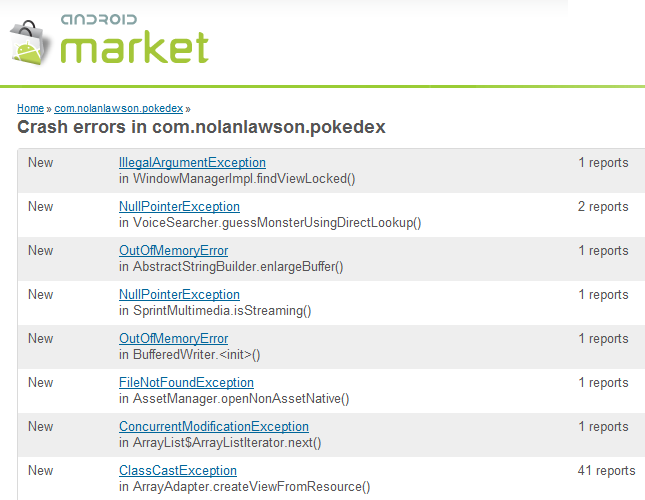
It gives you a nice, organized view of the stacktraces reported by users when your app has crashed or frozen. This is great because, for the most part, users are not particularly eloquent when describing bugs. Usually they just say something like “Doesn’t work anymore, please fix.” And when they do give more information, it’s often tantalizingly incomplete: “When I go to Settings I get a force close.”

Stacktraces, on the other hand, don’t beat around the bush:

java.lang.RuntimeException: Failure delivering result ResultInfo{who=null, request=0, result=-1, data=Intent { (has extras) }} to activity {com.nolanlawson.pokedex/com.nolanlawson.pokedex.PokedexActivity}: java.lang.NullPointerException
      at android.app.ActivityThread.deliverResults(ActivityThread.java:3515)
      at android.app.ActivityThread.handleSendResult(ActivityThread.java:3557)
      at android.app.ActivityThread.access$2800(ActivityThread.java:125)
      at android.app.ActivityThread$H.handleMessage(ActivityThread.java:2063)
      at android.os.Handler.dispatchMessage(Handler.java:99)
      at android.os.Looper.loop(Looper.java:123)
      at android.app.ActivityThread.main(ActivityThread.java:4627)
      at java.lang.reflect.Method.invokeNative(Native Method)
      at java.lang.reflect.Method.invoke(Method.java:521)
      at com.android.internal.os.ZygoteInit$MethodAndArgsCaller.run(ZygoteInit.java:868)
      at com.android.internal.os.ZygoteInit.main(ZygoteInit.java:626)
      at dalvik.system.NativeStart.main(Native Method)
Caused by: java.lang.NullPointerException
      at com.nolanlawson.pokedex.VoiceSearcher.guessMonsterUsingDirectLookup(VoiceSearcher.java:132)
      at com.nolanlawson.pokedex.PokedexActivity.receiveVoiceResults(PokedexActivity.java:1206)
      at com.nolanlawson.pokedex.PokedexActivity.onActivityResult(PokedexActivity.java:1178)
      at android.app.Activity.dispatchActivityResult(Activity.java:3890)
      at android.app.ActivityThread.deliverResults(ActivityThread.java:3511)
 ... 11 more

NullPointerException. Bam. Go to the line in the code, figure out what’s null, and fix it. Nothing clarifies a bug like a good old-fashioned stacktrace.

Before Android 2.2, you had to get this kind of information from users by having them download a Logcat app and go through all the tedious effort of recording the log, reproducing the bug, and sending the stacktrace to you. Users can hardly be blamed for a lack of enthusiasm about this process. When you’re trying to complete a task and an app force-closes on you, the last thing you think is “Oh goody! I should tell the developer about this!”

Oh goody!

So Froyo’s error reporting framework is a godsend. From the user’s point of view, it’s a lot less painful to just click the “Report” button than to go through the rigamarole of downloading a Logcat app and emailing the developer. (Although, there is a splendid little Logcat app out there.) And from the developer’s point of view, your users have become an army of testers – and good ones, at that! They give you stacktraces and everything!

Plus, even when the stacktrace is not enough information, the additional comments from users are sometimes enough to squash the bug. For instance, I recently had an ArrayIndexOutOfBoundsException that was reported by almost a hundred Pokédroid users after the release of version 1.4.4. Try as I might, though, I couldn’t reproduce it. Then I noticed the user comments:

  • 셋팅 클릭시 프로그램 종료됨
  • Every time I open settings it shuts it self down. Galaxy ACE
  • se cierra al entrar en “Settings”
  • 렉 너무걸린다
  • När man ska gå in på inställningar så hänger programet sig
  • Happens every time I go to the settings
  • whenever I go to settings, the program crashes
  • I has updated this app and now when i want to change settings that not working! I mean i cant change settings! :-( sorry about my bad english :-(
  • It crashes while I try to enter the settings
  • trying to open settings. always happens. samsung galaxy s. android 2.2
  • when click on settings freeze
  • Telkens als ik naar settings wil gaan dan flipt ie
  • i was trying to go to the settings-screen… crashes whenever i try it…
  • Opened settings

Hmm… there sure are a lot of non-English comments here. So I set my phone to French and, aha! It turned out the bug only occurred if your phone’s language was set to something other than English. The bug was fixed and I shipped out 1.4.5 that same day. (Another great thing about the Android Market – no review process!)

When you have an app with a lot of downloads, though (like Pokédroid, which just hit 250,000), you start seeing some strange little bugs:

java.lang.NullPointerException
     at com.lge.media.SprintMultimedia.isStreaming(SprintMultimedia.java:27)
     at android.media.MediaPlayer.setDataSource(MediaPlayer.java:738)

Caused by: android.database.sqlite.SQLiteDatabaseCorruptException: database disk image is malformed
     at android.database.sqlite.SQLiteQuery.native_fill_window(Native Method)

java.lang.NullPointerException
     at com.motorola.android.widget.TextViewHelper.drawCursorHalo(TextViewHelper.java:306)
     at android.widget.TextView.onDraw(TextView.java:4175)
     at android.view.View.draw(View.java:6742)

Caused by: java.io.FileNotFoundException: res/drawable-hdpi/ic_dialog_alert.png
     at android.content.res.AssetManager.openNonAssetNative(Native Method)

Most of these just aren’t worth the effort to fix. For instance, they might only be reported by one or two users, and reflect situations that you, as a developer, don’t have a lot of control over (“database disk image is malformed”?). Others may be bugs in proprietary builds of Android, like the Motorola and Sprint bugs above. Obviously, I’m not going to go out and buy every flavor of Android phone just to test a few stray bugs.

If you’re lucky, you may also run into the Bigfoot of Android bugs:

java.lang.RuntimeException: Unable to get provider com.nolanlawson.pokedex.PokedexContentProvider: java.lang.ClassNotFoundException: com.nolanlawson.pokedex.PokedexContentProvider in loader dalvik.system.PathClassLoader[/mnt/asec/com.nolanlawson.pokedex-1/pkg.apk]
     at android.app.ActivityThread.installProvider(ActivityThread.java:4969)
     at android.app.ActivityThread.installContentProviders(ActivityThread.java:4696)
     at android.app.ActivityThread.handleBindApplication(ActivityThread.java:4652)
     at android.app.ActivityThread.access$3000(ActivityThread.java:140)
     at android.app.ActivityThread$H.handleMessage(ActivityThread.java:2225)
     at android.os.Handler.dispatchMessage(Handler.java:99)
     at android.os.Looper.loop(Looper.java:143)
     at android.app.ActivityThread.main(ActivityThread.java:5097)
     at java.lang.reflect.Method.invokeNative(Native Method)
     at java.lang.reflect.Method.invoke(Method.java:521)
     at com.android.internal.os.ZygoteInit$MethodAndArgsCaller.run(ZygoteInit.java:868)
     at com.android.internal.os.ZygoteInit.main(ZygoteInit.java:626)
     at dalvik.system.NativeStart.main(Native Method)
Caused by: java.lang.ClassNotFoundException: com.nolanlawson.pokedex.PokedexContentProvider in loader dalvik.system.PathClassLoader[/mnt/asec/com.nolanlawson.pokedex-1/pkg.apk]
     at dalvik.system.PathClassLoader.findClass(PathClassLoader.java:243)
     at java.lang.ClassLoader.loadClass(ClassLoader.java:573)
     at java.lang.ClassLoader.loadClass(ClassLoader.java:532)
     at android.app.ActivityThread.installProvider(ActivityThread.java:4954)
... 12 more

I want to believe.

I call this the Bigfoot Bug because, if you Google it, you will find a lot of puzzled developers saying that they’ve only ever seen this bug reported in the Android Market, and they can’t reproduce it themselves. I mean, “ClassNotFoundException”? The class is right there! I was stumped by this bug myself, until I saw one developer suggest:

AFAICT, the installation process sometimes leaves the app in a corrupt state leading to weird errors like this.

So apparently, this bug is just one of those unavoidable parts of life, like sitting through red lights or having the sushi fall apart when you dip it in the soy sauce. You just have to put up with it.

Still, if you can manage to not get overwhelmed by the sheer number of reported bugs (Pokédroid has gotten over 500), and if you can prioritize them based on how many users they affect, the Froyo error reports can be an invaluable tool in making your app more stable. For instance, I had a layout-related bug a few months ago that I could not reproduce. It was reported by enough users, though, that I finally decided to rewrite that bit of the code and do some long-overdue optimizations. I haven’t seen the bug since.

Why it’s still your bug, even when it’s not

In the previous post, I talked about a workaround for a bug that occurs when integrating with the Facebook Android app. It brings up an interesting question: when software A integrates with software B, and software B has a bug, whose responsibility is it to fix it?

Intuitively, you might answer B. “It’s B’s fault. The developer of A can wash his/her hands of the whole matter and go to bed with a clean conscience.” Justice prevails, right?

But I disagree. In my opinion, the responsibility falls on whomever the user chooses to blame. Because when it comes down to it, the user does not care whose bug it is. They just want someone to fix it, or else heads will roll.

Case in point: the Facebook ACTION_SEND bug. To recap, the ACTION_SEND Intent is used to send arbitrary text from one app to another. Many apps answer the call – Facebook, Gmail, Twitter, Yammer – any app that may be interested in the text. Intuitively, Facebook should let you share the text as a status update, like Twitter and Yammer do, but instead they stubbornly interpret it as a URL. If it’s not a URL, then it barfs up an error.

In my own apps, I could have just used the ACTION_SEND Intent as-is. Let Facebook clean up their own mess – my hands are clean. But obviously, because I’m one man and because Facebook is Facebook, users would assume the bug is mine. So here’s what would have happened if I had chosen to ignore it: I’d get a ton of emails and Android Market comments saying, “Facebook doesn’t work” or “4 stars until you fix Facebook.”

Maybe then I would have smugly responded, “It’s Facebook’s bug, not mine.” Or, if the comments persisted, I might have added a popup saying, “Facebook doesn’t work correctly, due to a bug in their app. Please avoid Facebook.” But as we know from a previous post, users don’t read anything. So I would have continued getting angry comments and emails, and I would just have to respond to each one with a triumphant “Not my bug.” In the end, my users would be unhappy, but hey – at least I stood up for myself, right? At least I’d have the satisfaction of knowing I did the right thing.

But this is not the right thing. At least, not if you believe that the point of software is to make people happy. In fact, there’s a grand tradition of unsung heroes in software development fighting to fix the other guy’s bug. Once again, my main man Joel Spolsky explains:

[I heard this] from one of the developers of the hit game SimCity, who told me that there was a critical bug in his application: it used memory right after freeing it, a major no-no that happened to work OK on DOS but would not work under Windows where memory that is freed is likely to be snatched up by another running application right away. The testers on the Windows team were going through various popular applications, testing them to make sure they worked OK, but SimCity kept crashing. They reported this to the Windows developers, who disassembled SimCity, stepped through it in a debugger, found the bug, and added special code that checked if SimCity was running, and if it did, ran the memory allocator in a special mode in which you could still use memory after freeing it.

From Microsoft’s point of view, they had a good reason for doing this. If a customer was upgrading from DOS to Windows, and suddenly all their favorite applications stopped working, they’d simply return Windows. Microsoft would bear the fallout from the other guy’s mistake. Once again, the one who gets blamed is not necessarily at fault, but it’s still his/her responsibility to fix the bug.

In Android development the most infamous instance of this occurs in the Android Market, and it’s the bane of Android developers everywhere:

“Error 18” occurs when the Android Market fails to download and install an app. And even though it has nothing to do with the app itself, this is the most common bug you will see reported by users. In fact, I’ve gotten so many reports of this bug that I’ve created a “canned response” in Gmail that I send out to all of them. I believe I recall reading that Arron La, the developer of the immensely popular Advanced Task Killer app, has said that he simply stopped responding to these kinds of emails, because he gets too many of them.

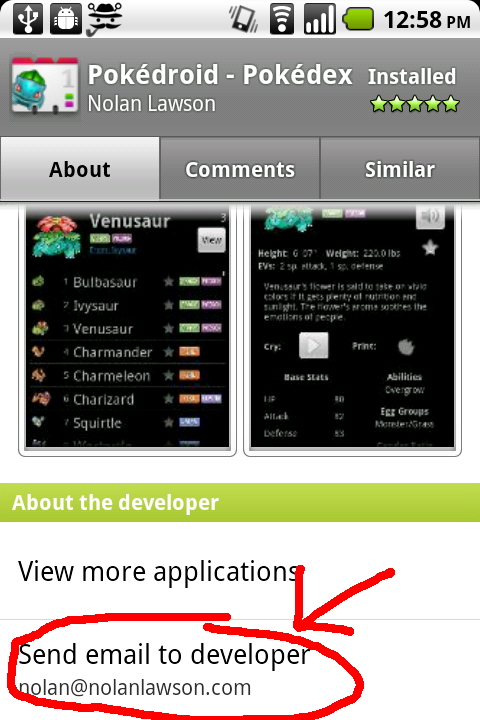
The reason that poor schmucks like Arron and me get inundated with these emails is due to the interface of the Android Market itself. When an app fails to install, the user will be on this page:

It may as well say, “Direct your frustration here.” And from the user’s point of view, this is understandable. When they get an error like this, whom are they supposed to ask for help? Google is not famous for their tech support. So, as the quaint proverb goes, shit rolls downhill. And it hits the developer first.

So we’ve established that the one who gets blamed is not necessarily the one at fault. But how do you determine who gets blamed? In the case of SimCity, it was the OS rather than the app. In the case of “Error 18,” it’s the app rather than the OS. I think the explanation for this is pretty simple.

In the smartphone world, your OS is wedded to your phone, and your phone is very dear to you. Perhaps you even consider it an extension of your psyche, the way some people might feel about a trendy haircut or designer jeans. So if an app breaks on your phone, you return the $2 app, rather than the $500, psyche-extending phone. In Microsoft’s case, the OS was not very closely tied to the hardware back in the 90’s, and the cost of an application was about the same as that of the OS. Or at least, the gap wasn’t as steep as $2 vs. $500. So in that case, it’s Windows that would get returned.

I think this can all be generalized as follows. The bug becomes your bug if:

  1. You are more accessible than the other guy, e.g. they represent understaffed call centers in far-flung corners of the world, whereas you represent a single ordinary person (who must have oodles of spare time to answer emails, if you can afford to waste it writing apps).
  2. You are more visible when the problem occurs, e.g. the bug pops up when you use the other guy’s library, and that library is invisible to the user.
  3. You will suffer the most from the blame. I think this is the big one. Even if user opinion is split 50/50 on whose fault it is, it becomes your bug if the blame hurts you more than the other guy. The Android Market bug is an instance of this, since “Error 18” might cause a developer to lose a sale, but it hardly affects Google’s bottom line.

Unfortunately for me, even though the “Error 18” bug is my bug by this definition, there’s not a whole lot I can do about it. There’s nothing I can change in the software that would stop the error from occurring, or lessen the pain for the user. So the best I can do is keep responding to these emails.

Or, if I’m feeling snarky, maybe I can link them here.

Share and share alike – just not with Facebook

Edit: Facebook has fixed this bug in the latest version of their app.

Here’s a common situation when you’re writing an Android app: you’ve got some text (a link, a test result, a poem you wrote about your love for Android) and you want to allow the user to “share” it with others. And if you’re lazy like me, you’ll quickly discover the fastest way to do it:

Intent intent = new Intent(Intent.ACTION_SEND);
intent.setType("text/plain");
intent.putExtra(android.content.Intent.EXTRA_SUBJECT, "Android, oh Android.");
intent.putExtra(android.content.Intent.EXTRA_TEXT, "Wherefore art thou, Android?");
startActivity(Intent.createChooser(intent , "Share"));

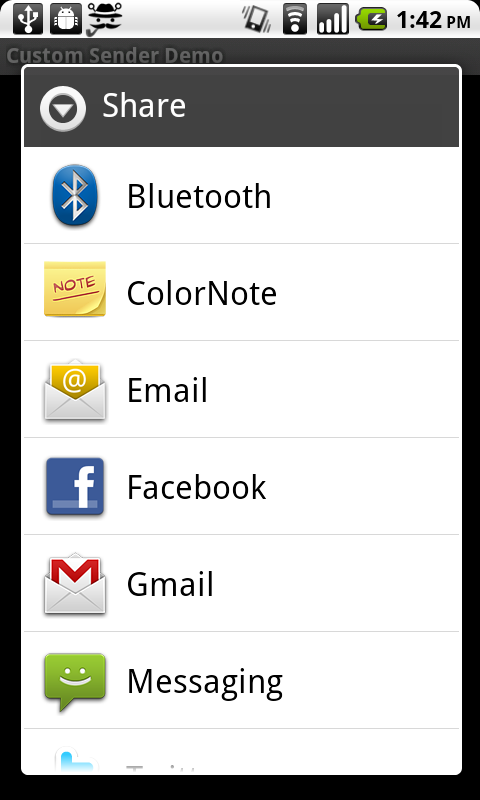
This generates a screen that looks like this:

Isn’t that nice? And it only cost you five lines of code! But oh, if only it were so easy…

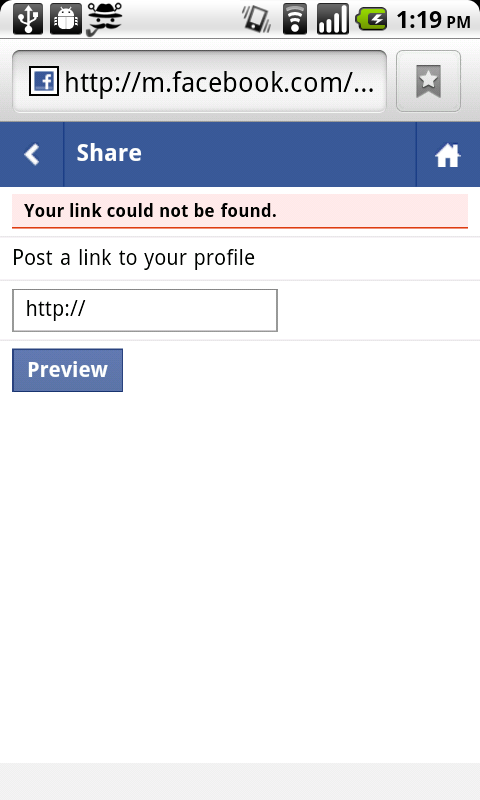
See, the problem is with the fourth guy there – Facebook. The Facebook Android app only supports sharing URLs, not arbitrary text. Most other apps work fine, but when you click on Facebook, you get this sad, broken-looking page:

For my own apps where I wanted to enable sharing (Japanese Name Converter and CatLog), I could have just left this as-is. I mean, this is Facebook’s bug – not mine, right? But then I realized that, whether it’s my fault or not, my users would see this ugly page and assume it was a bug in my app. So I had to get Facebook out of there.

After some Googling, I found this discussion, which pointed me in the right direction. In the thread, one of the posters basically gives you all the tools you need to build your own custom SEND_ACTION chooser. However, I found it was a non-trivial amount of effort to co-opt their code to do what I wanted it to do.

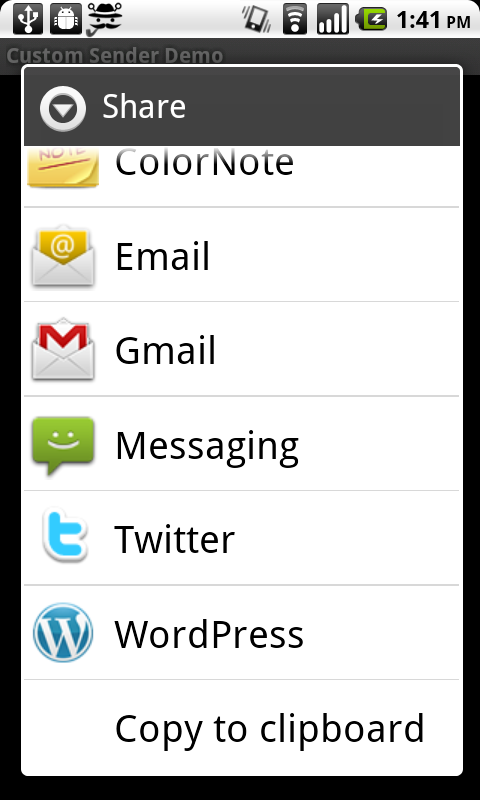
So I built a more easily extensible version.  Here’s the final product, based off that poster’s original Launchables class.  It uses the PackageManager to find all apps that respond to SEND_ACTION, then filters out Facebook and displays the rest in a simple ListAdapter.  The code is open source; do whatever you’d like with it. All you have to do is copy SenderAppAdapter.java and the resource files into your app, and then use it as in DemoActivity.java. It will create an AlertDialog like this:

It looks almost exactly the same as the default chooser, but Facebook is gone! Plus, I threw in a “copy to clipboard” action as a little bonus. This way, the user can always post her lovely poem to Facebook by copying the text, opening up the Facebook app, and pasting in the damn text manually.

And most importantly, no one will blame you for Facebook’s oversight.

Download the source code

Respect your users by treating them like idiots

Working on Pokédroid in the middle of a huge boom in its popularity (it’s gaining 3,000 installs a day – not downloads, but cumulative installs) while reading Joel Spolsky’s User Interface Design for Programmers is teaching me a lot about designing UIs.  You can read some chapters of the book for free online; I especially like this post. I’m learning that Joel is absolutely right about many things, but especially this:

  1. Users don’t read anything.
  2. You must assume that users will not give your app their full attention.

Spolsky explains:

What does it mean to make something easy to use? One way to measure this is to see what percentage of real-world users are able to complete tasks in a given amount of time. For example, suppose the goal of your program is to allow people to convert digital camera photos into a web photo album. If you sit down a group of average users with your program and ask them all to complete this task, then the more usable your program is, the higher the percentage of users that will be able to successfully create a web photo album. To be scientific about it, imagine 100 real world users. They are not necessarily familiar with computers. They have many diverse talents, but some of them distinctly do not have talents in the computer area. Some of them are being distracted while they try to use your program. The phone is ringing. WHAT? The baby is crying. WHAT? And the cat keeps jumping on the desk and batting around the mouse. I CAN’T HEAR YOU!

Now, even without going through with this experiment, I can state with some confidence that some of the users will simply fail to complete the task, or will take an extraordinary amount of time doing it. I don’t mean to say that these users are stupid. Quite the contrary, they are probably highly intelligent, or maybe they are accomplished athletes, but vis-à-vis your program, they are just not applying all of their motor skills and brain cells to the usage of your program. You’re only getting about 30% of their attention, so you have to make do with a user who, from inside the computer, does not appear to be playing with a full deck.

The scroll thumb in Pokédroid

I’ve seen this “not playing with a full deck” situation play out over and over.  Recently, I had a user send me a very polite, carefully-worded email asking if I could make it easier to scroll to the new Black/White Pokémon, which are about 500 down from the top of the list. I was perplexed.  I wrote back and told him that, on my Nexus One, I can scroll down to the new Pokémon in about one second using the fast scroll thumb.  In fact, I implemented the fast scroll thumb to solve this exact problem. Was the fast scroll thumb not working on his phone?

Nope.  It turned out he just hadn’t noticed it.  He didn’t read the popup explaining the new feature, and he didn’t notice the scroll thumb at the right, even though it pops in and out as you scroll and is about 15% the width of the screen.  Now, it’s not that this person wasn’t intelligent – from reading the email, I could tell that he was highly literate.  It’s just that he wasn’t giving the app his full attention, because that’s what users do.

Several other users complained in the Android Market comments that there were no Black/White Pokémon:

  • Would be 5 stars but I can’t find the unova pokemon srry
  • Unova Pokemon don’t so up after update but all together its a good app
  • I just got the update and it had all of the improvements but it didn’t have the Black/White Pokemon
  • Huh?I updated but unova pokemon didn’t come out.HTC legend

This is because they’re updating from an older version of Pokédroid, and their game version is still set on HeartGold/SoulSilver, or some other version.  I told them in the initial popup that they needed to switch it.  I told them in the Android Market description that they needed to switch it.  I even put it at the top of the description preceded by the word “NOTE” in all caps.  Did it work?  Nope.  I still see these comments.

Of course, this is totally predictable given that, as Spolsky puts it so succinctly, “users don’t read anything.”  Again he explains:

This may sound a little harsh, but you’ll see, when you do usability tests, that there are quite a few users who simply do not read words that you put on the screen. If you pop up an error box of any sort, they simply will not read it. This may be disconcerting to you as a programmer, because you imagine yourself as conducting a dialog with the user. Hey, user! You can’t open that file, we don’t support that file format! Still, experience shows that the more words you put on that dialog box, the fewer people will actually read it.

The Black/White popup

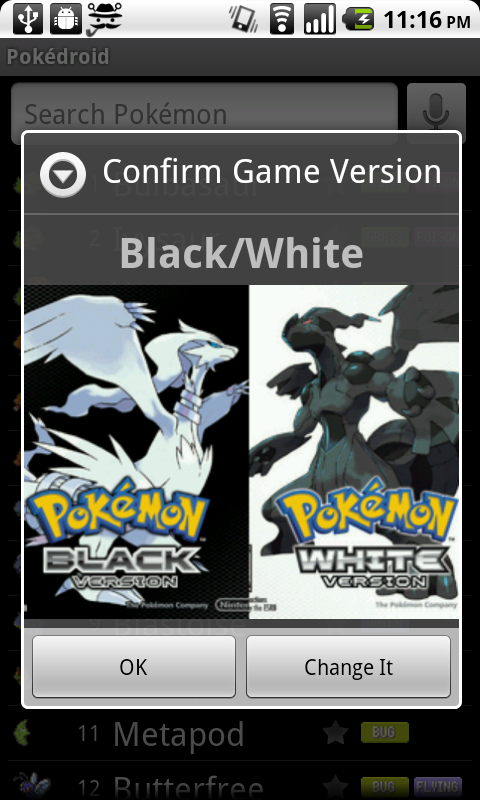
So in the upcoming version, I’m implementing a popup to ask the user to confirm their game version when the app starts up.  Now, I know that users don’t read text, and I know that they hate popups, so I’m using some relaxing visuals instead – the box art from the games.  “Confirm Game Version: HeartGold/SoulSilver” pops up with a huge box art in their face.  Bam.  No confusion.  Except there is.  I realized as I was toying around with it that when it says “Confirm Game Version: Black/White,” I felt like I wanted to click on either the Black box art or the White box art.  I felt like it was asking me whether I wanted Black or White.  It was confusing to have to hit “OK” instead.  Which one am I confirming?

So I realized this: most users are going to assume that the game version is Black/White.  Why would they want anything else? Black/White is the most recent game.  If there are older Pokémon games with fewer creatures and different move sets, they sure as hell don’t want to know about it.  They just want to see some damn Pokémon, and they couldn’t care less whether I show the move sets from HeartGold, LeafGreen, or HotCherryPassion. Hardcore Pokémaniacs might scour all the settings and figure it out, but casual users won’t.

So my solution is to only show the popup if they’re on something other than Black/White. Normally, users expect popups when something is wrong, not when everything is A-OK. So new users, whose game version will default to Black/White anyway, would just be confused by a popup. “What happened?  Did I do something wrong?” So I figure: why even show it, if they’re already on the newest version of the game? This way, I can solve the immediate problem (people stuck on HeartGold/SoulSilver) without interrupting the majority of my users.

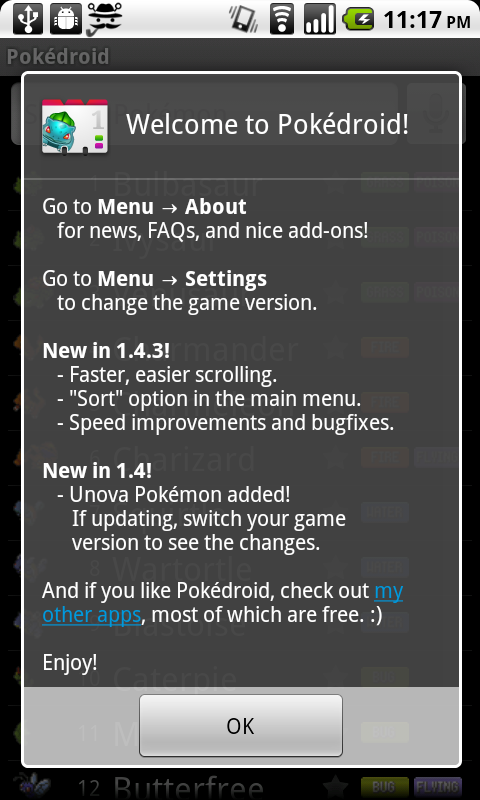
Another change I’m making is to shorten the introductory dialog and add pictures.  Given that the introductory dialog has traditionally been a wall of text, I should be surprised if users read anything in there.

Old intro popup

Just look at my pretentious little dialog, with its list of chores for the user to complete.  Are they really going to want to learn about the settings before they’ve even used the app?  Or where the “About” section can be found? I thought about it, and realized that there are only three pieces of information I need to convey in that dialog:

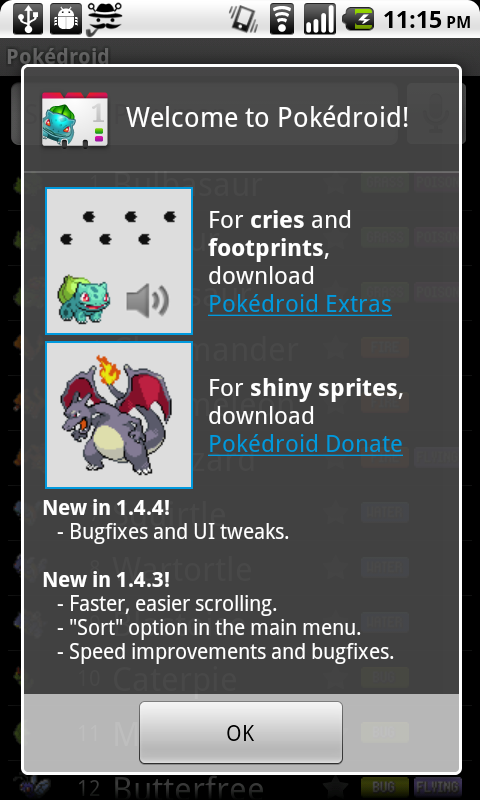
  1. You can download Pokédroid Extras to get footprints and cries.
  2. You can download Pokédroid Donate to get shiny sprites.
  3. The most recent changelog, for the 10% of users who want to know what’s updated and will actually read it.

Anything else, the user will only seek out on a need-to-know basis.  For the most part, they will just plow through the app and assume they can figure out how to use it as they go.  They don’t want pedantic lectures explaining how to change the settings or where to go for more information.  If they want information, they’ll come to me.

Pokédroid Extras and Pokédroid Donate are the only non-obvious components to the app, because you can’t get them in the app itself.  They require a separate download.  So I figure I’ll slap some pictures on the introductory dialog explaining what Extras and Donate do, and hope that the user’s eye will be attracted to the pictures, which will motivate them to read the 6-7 words to the right. They should be able to get the gist of the popup in one glance. They shouldn’t have to break out a cup of coffee and their reading glasses just to start the damn app.

New intro popup

This whole discussion may make it sound like I don’t respect my users.  But the beautiful thing, as Spolsky explains, is that by assuming my users are going to act like airheads, I actually am respecting them.  I’m saying, “I know you don’t care about this app nearly as much as I do.  I know you’re not interested in lectures about how I optimized the database, or all the cool little features I put in and why.  You’re a busy person, and you have better things to do.  You will put in the bare minimum of intellectual effort to understand my app, so that you can complete whatever task you’re trying to complete.  And that’s great.  I’ll be here to help you complete your task, and the rest of the time I’ll try to stay out of your way.”  What I’m doing is showing humility, and respecting my users’ valuable time.

Also, a lot of my conclusions about user behavior come from observations I’ve made about the way I use software (since reading Spolsky’s book, anyway). The fact is, I drive my phone like a reckless drunk drives a semi.  I pound the OK button to skip long dialogs.  I spam the back key to get out of an app.  I never read the changelog, the “About” section, or the manual – or maybe I glance through it, reading in an “F” shape (horizontal at first, then vertical down to the bottom).  If there’s a non-obvious Android feature that I actually use (holding down the home button to see recent apps, holding down the menu button to bring up the keyboard), it’s only because I’m an Android developer myself, so I saw it in the documentation.  It’s certainly not because I read the manual to either of my phones, because I didn’t.

When I download a new app, I usually just try to use it to accomplish one very specific task.  If I can’t figure out how to do that in ten seconds, I uninstall it.  For instance, I recently wanted an app that would let me uninstall other apps by clicking a widget on my home screen.  So I downloaded two or three of those “Task Killer”-type apps and tried to figure out how to do what I wanted.  When I couldn’t, I gave up and uninstalled them.  Each app probably spent all of sixty seconds alive on my phone before I flushed it down the memory hole.

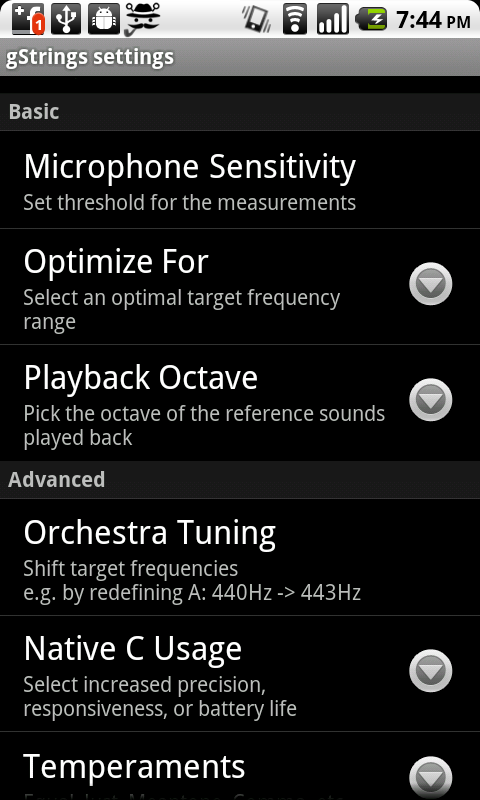
When I manage to accomplish a task in a downloaded app, I rarely fiddle with the settings and just assume that the defaults are okay.  Sometimes this gets me in trouble.  A great example is the gStrings tuner app, which I use to tune my guitar.  The app is wonderful, and I’m happy to have downloaded the premium version to help support the developer.  The guy obviously knows his stuff – the settings are full of fancy options like “Playback Octave,” “Use Orchestra Tuning,” and “Use Harmonic Product Spectrum.”  Of course, I’m not going to change any of these, because they might as well be in Hebrew, but at least they inspire confidence that the developer is a real pro.

gStrings' settings

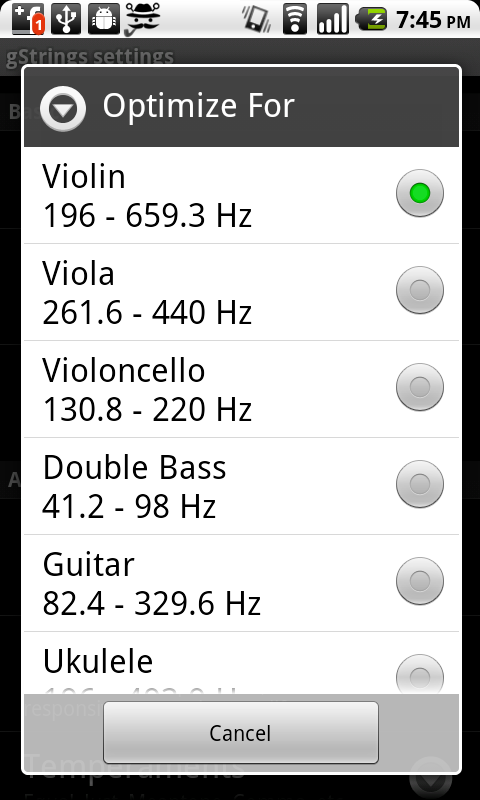
"Optimize For"

However, buried within those options is one called “Optimize For,” with the very scary-sounding description of “select an optimal target frequency range.” After you click on it, it gives you a choice between violin, viola, cello, double bass, guitar, and ukulele, with violin as the default.  When I discovered this, I was surprised.  I figured that, if anything, the guitar would be the default – everybody and their dog plays the guitar, but almost nobody plays the violin.  Also, who in their right mind would actually click on this option in the first place?  The only reason I discovered it myself is that I was evaluating my purchase of gStrings, and I wanted to see the differences between the premium and the free version.

Unfortunately for users of gStrings, this is exactly like my Black/White situation.  Everyone is going to assume that the default setting is guitar – if they even imagine that such a setting exists.  And nobody is going to cuddle up and read the settings menu, slogging through wordy descriptions like “shift target frequencies e.g. by redefining A: 440Hz -> 443Hz,” to figure out if they should change it.  I’m sure if the developer of gStrings did a random survey of 10 users, he or she  would discover that 7 of them play the guitar, but 6 of them have their app set on violin.  The other 3 users play the ukelele, the cello, and the violin, but none of them managed to find the “Optimize For” setting at all. So only two lucky users get to actually have the setting that’s right for their instrument.

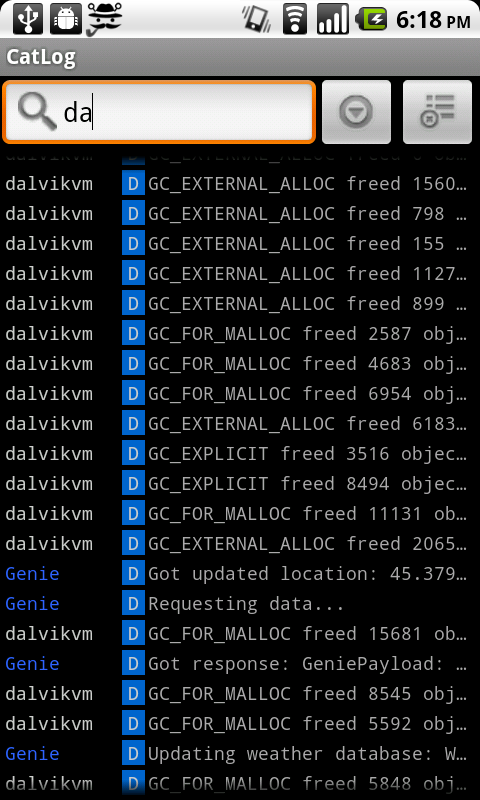
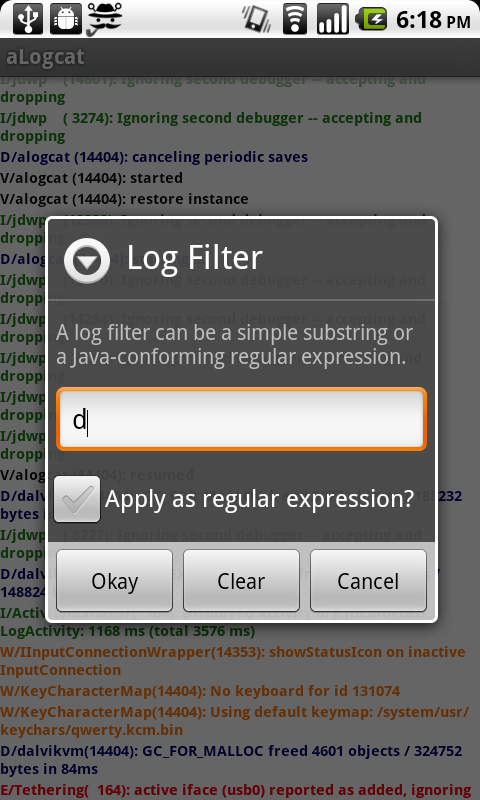
Now that I’ve read Joel Spolsky’s book, I’m starting to see dumb programmer mistakes in every app I use.  Descriptions that are too long and complicated. Unhelpful popups that interrupt the workflow. Optimizing for edge-case usages (like searching by regular expressions), while ignoring common use cases (like just punching in a single letter and searching by the first character).

Searching logs in Catlog. Just start typing and it filters as you go.


Searching logs in aLogcat. Hit Menu, hit Filter, then get a free lesson on how your regular expressions need to conform to Java.

I’m starting to see it in my own apps as well, which is especially frustrating, because I had no idea I was making such elementary mistakes. The most egregious of these is probably App Tracker, which is so bad it deserves a post of its own.

Well, from now on at least, I’m going to work to make simpler, easier-to-use UIs for my apps. Hopefully it will result in a better experience for my users, because they are are all idiots. Just like me.

Building an English-to-Japanese name converter

Update: I made a Japanese Name Converter web site!

The Japanese Name Converter was the first Android app I ever wrote.  So for me, it was kind of a “hello world” app, but in retrospect it was a doozy of a “hello world.”

The motivation for the app was pretty simple: what was something I could build to run on an Android phone that 1) lots of people would be interested in and 2) required some of my unique NLP expertise?  Well, people love their own names, and if they’re geeks like me, they probably think Japanese is cool.  So is there some way, I wondered, of writing a program that could automatically transliterate any English name into Japanese characters?

The task

The problem is not trivial.  Japanese phonemics and phonotactics are both very restrictive, and as a result any loanword gets thoroughly mangled as it passes through the gauntlet of Japanese sound rules.  Some examples are below:

beer = biiru (/bi:ru/)
heart = haato (/ha:to/)
hamburger = hanbaagaa (/hanba:ga:/)
strike (i.e. in baseball) = sutoraiku (/sutoraiku/)
volleyball = bareebooru (/bare:bo:ru/)
helicopter = herikoputaa (/herikoputa:/)

English names go through the same process:

Nolan = nooran (/no:ran/)
Michael = maikeru (/maikeru/)
Stan = sutan (/sutan/)

(Note for IPA purists: the Japanese /r/ is technically an alveolar flap, and therefore would be represented phonetically as [ɾ].  The /u/ is an unrounded [ɯ].)

Whole lotta changes going on here.  To just pick out some of the highlights, notice that:

  1. “l” becomes “r” – Japanese, like most non-Indo-European languages, makes no distinction between the two.
  2. Japanese phonotactics only allow one coda – “n.”  So no syllables can end on any consonant other than “n,” and no consonant clusters are allowed except for those starting with “n.”  All English consonant clusters have to be epenthesized with vowels, usually “u” but sometimes “i.”
  3. English syllabic “r” (aka the rhotacized schwa, sometimes written [ɚ]) becomes a double vowel /a:/.  Yep, they use the British, r-less pronunciation.  Guess they didn’t concede everything to us Americans just because we occupied ’em.

All this is just what I’d have to do to convert the English names into romanized Japanese (roomaji).  I still haven’t even mentioned having to convert this all into katakana, i.e. the syllabic alphabet Japanese uses for foreign words!  Clearly I had my work cut out for me.

Initial ideas

The first solution that popped into my head was to use Transformation-Based Learning (aka the Brill tagger).  My idea was that you could treat each individual letter in the English input as the observation and the corresponding sequence in the Japanese output as the class label, and then build up rules to transform them based on the context.  It seemed reasonable enough.  Plus, I would benefit from the fact that the output labels come from the same set as the input labels (if I used English letters, anyway).  So for instance, “nolan” and “nooran” could be aligned as:

n:n
o:oo
l:r
a:a
n:n

Three of the above pairs are already correct before I even do anything.  Off to a good start!

Plus, once the TBL is built, executing it would be dead simple.  All of the rules just need to be applied in order, amounting to a series of string replacements.  Even the limited phone hardware could handle it, unlike what I would be getting with a Markov model.  Sweet!  Now what?

Well, the first thing I needed was training data.  After some searching, I eventually found a calligraphy web site that listed about 4,000 English-Japanese name pairs, presumably so that people could get tattoos they’d regret later.  After a little wget action and some data massaging, I had my training data.

By the way, let’s take a moment to give a big hand to those unsung heroes of machine learning – the people who take the time to build up huge, painstaking corpora like these.  Without them, nothing in machine learning would be possible.

First Attempt

My first attempt started out well.  I began by writing a training algorithm that would generate rules (such as “convert X to Y when preceded by Z”) or (“convert A to B when followed by C”) from each of the training pairs.  Each rule was structured as follows:

Antecedent: a single character in the English string
Consequence: any substring in the Japanese string (with some limit on max substring length)
Condition(s): none and/or following letter and/or preceding letter and/or is a vowel etc.

Then I calculated the gain (in terms of total Levenshtein, or edit distance improvement across the training data) for each rule.  Finally, ala Brill, it was just a matter of taking the best rule at each iteration, applying it to all the strings, and continuing until some breaking point.  The finished model would just be the list of rules, applied in order.

Unfortunately, this ended up failing because the rules kept mangling the input data to the point where the model was unable to recover, since I was overwriting the string with each rule.  So, for instance, the first rule the model learned was “l” -> “r”.  Great!  That makes perfect sense, since Japanese has no “l.”  However, this caused problems later on, because the model now had no way of distinguishing syllable-final “l” from “r,” which makes a huge difference in the transliteration.  Ending English “er” usually becomes “aa” in Japanese (e.g. “spencer” -> “supensaa”), but ending “el” becomes “eru” (e.g. “mabel” -> “meeberu”).  Since the model had overwritten all l’s with r’s, it couldn’t tell the difference. So I scrapped that idea.

Second Attempt

My Brill-based converter was lightweight, but maybe I needed to step things up a bit?  I wondered if the right approach here would be to use something like a sequential classifier or HMM.  Ignoring the question of whether or not that could even run on a phone (which was unlikely), I tried to run an experiment to see if it was even a feasible solution.

The first problem I ran into here was that of alignment.  With the Brill-based model, I could simply generate rules where the antecedent was any character in the English input and the consequence was any substring of the Japanese input.  Here, though, you’d need the output to be aligned with the input, since the HMM (or whatever) has to emit a particular class label at each observation.  So, for instance, rather than just let the Brill algorithm discover on its own that “o” –> “oo” was a good rule for transliterating “nolan” to “nooran” (because it improved edit distance), I’d need to write the alignment algorithm myself before inputting it to the sequential learner.

I realized that what I was trying to do was similar to parallel corpus alignment (as in machine translation), except that in my case I was aligning letters rather than words.  I tried to brush up on the machine translation literature, but it mostly went over my head.  (Hey, we never covered it in my program.)  So I tried a few different approaches.

I started by thinking of it like an HMM, in which case I’m trying to predict the the output Japanese sequence (j) given the input English sequence (e), where I could model the relationship like so:

P(j|e) = \frac{P(e|j) P(j)}{P(e)} (by Bayes’ Law)

And, since we’re just trying to maximize P(j|e), we can simplify this to:

argmax(P(j|e))\hspace{3 mm}\alpha\hspace{3 mm}argmax(P(e|j) P(j))

Or, in English (because I hate looking at formulas too): The probability of a Japanese string given an English string is proportional to the probability of the English string given the Japanese string multiplied by the probability of the Japanese string.

But I’m not building a full HMM – I’m just trying to figure out the partitioning of the sequence, i.e. the P(e|j) part.  So I modeled that as:

P(e|j) = P(e_0|j_0) P(e_1|j_1) ... P(e_n|j_n)

Or, in English: The probability of the English string given the Japanese string equals the product of all the probabilities of each English character given the probability of its corresponding Japanese substring.

Makes sense so far, right?  All I’m doing is assuming that I can multiply the probabilities of the individual substrings together to get the total probability. This is pretty much the exact same thing you do with Naive Bayes, where you assume that all the words in a document are conditionally independent and just multiply their probabilities together.

And since I didn’t know j_0 through j_n (i.e. the Japanese substring partitionings, e.g n|oo|r|a|n), my task boiled down to just generating every possible partitioning, calculating the probability for each one, and then taking the max.

But how to model P(e_n|j_n), i.e. the probability of an English letter given a Japanese substring?  Co-occurrence counts seemed like the most intuitive choice here – just answering the question “how likely am I to see this English character, given the Japanese substring I’m aligning it with?”  Then I could just take the product of all of those probabilities.  So, for instance, in the case of “nolan” -> “nooran”, the ideal partitioning would be n|oo|r|a|n, and to figure that out I would calculate count(n,n)/count(n) * count(o,oo)/count(o) * count(l,r)/count(l) * count(a,a)/count(a) * count(n,n)/count(n), which should be the highest-scoring partitioning for that pair.

But since this formula had a tendency to favor longer Japanese substrings (because they are rarer), I leveled the playing field a bit by also multiplying the conditional probabilities of all the substrings of those substrings.  (Edit: only after reading this do I realize my error was in putting count(e) in the denominator, rather than count(j).  D’oh.) There!  Now I finally had my beautiful converter, right?

Well, the pairings of substrings were fine – my co-occurrence heuristic seemed to find reasonable inputs and outputs.  The final model, though, failed horribly.  I used Minorthird to build up a Maximum Entropy Markov Model (MEMM) trained on the input 4,000 name pairs (with Minorthird’s default Feature Extractor), and the model performed even worse than the Brill one!  The output just looked like random garbage, and didn’t seem to correspond to any of the letters in the input.  The main problem appeared to be that there were just too many class labels, since an English letter in the input could correspond to many Japanese letters in the output.

For instance, the most extreme case I found is the name “Alex,” which transliterates to “arekkusu.”  The letter “x” here corresponds to no less than five letters in the output – “kkusu.”  Now imagine how many class labels there must have been, if “kkusu” was one of them.  Yeah, it was ridiculous. Classification tends to get dicey when you have more than ten labels. I’d argue that even three is pushing it, since the sweet spot is really two (binary classification).

Also, it was at this point that I realized that trying to do MEMM decoding on the underpowered hardware of a phone was pretty absurd as it is.  Was I really going to bundle the entire Minorthird JAR with my app and just hope it would work without throwing an OutOfMemoryError?

Third Attempt

So for my third attempt, I went back to the drawing board with the Brill tagger.  But this time, I had an insight.  Wasn’t my whole problem before that the training algorithm was destroying the string at each step?  Why not simply add a condition to the rule that referenced the original character in the English string?  For instance, even if the first rule converts all l’s to r’s, the model could still “see” the original “l,” and thus later on down the road it could discover useful rules like ‘convert “er” to “eru” when the original string was “el”, but convert  “er” to “aa” when the original string was “er”‘.  I immediately noticed a huge difference in the performance after adding this condition to the generated rules.

That was basically the model that led me all the way to my final, finished product.  There were a few snafus – like how the training algorithm takes up an ungodly amount of memory, so I had to optimize since I was running it on my laptop with only 2GB of memory. I also only used a few rule templates and I even cut the training data from 4,000 to little over 1,000 entries, based on which names were more popular in US census data.  But ultimately, I think the final model was pretty good.  Below are my test results, using a test set of 47 first and last names that were not in the training data (and which I mostly borrowed from people I know).

holly -> horii (gold: hoorii)
anderson -> andaason
damon -> damon (gold: deemon)
clinton -> kurinton
lambert -> ranbaato
king -> kingu
maynard -> meinaado (gold: meenaado)
lawson -> rooson
bellow -> beroo
butler -> butoraa (gold: batoraa)
vorwaller -> boowaraa
parker -> paakaa
thompson -> somupson (gold: tompuson)
potter -> pottaa
hermann -> haaman
stacia -> suteishia
maevis -> maebisu (gold: meebisu)
gerald -> jerarudo
hartleben -> haatoreben
hanson -> hannson (gold: hanson)
brubeck -> buruubekku
ferrel -> fereru
poolman -> puoruman (gold: puuruman)
bart -> baato
smith -> sumisu
larson -> raason
perkowitz -> paakooitsu (gold: paakowitsu)
boyd -> boido
nancy -> nanshii
meliha -> meria (gold: meriha)
berzins -> baazinsu (gold: baazinzu)
manning -> maningu
sanders -> sandaasu (gold: sandaazu)
durup -> duruppu (gold: durupu)
thea -> sia
walker -> waokaa (gold: wookaa)
johnson -> jonson
bardock -> barudokku (gold: baadokku)
beal -> beru (gold: biiru)
lovitz -> robitsu
picard -> pikaado
melville -> merubiru
pittman -> pitman (gold: pittoman)
west -> wesuto
eaton -> iaton (gold: iiton)
pound -> pondo
eustice -> iasutisu (gold: yuusutisu)
pope -> popu (gold: poopu)

Baseline (i.e. just using the English strings without applying the model at all):
Accuracy: 0.00
Total edit distance: 145

Model score:
Accuracy: 0.5833333333333334
Total edit distance: 28

(I print out “gold” and the correct answer only for the incorrect ones.)

The accuracy’s not very impressive, but as I kept tweaking the features, what I was really aiming for was low edit distance, and 28 was the lowest I was able to achieve on the test set.  So this means that, even when it makes mistakes, the mistakes are usually very small, so the results are still reasonable.  “Meinaado,” for instance, isn’t even a mistake – it’s just two ways of writing the same long vowel (“mei” vs. “mee”).

Anyway, many of the mistakes can be corrected by just using postprocessing heuristics (e.g. final “nn” doesn’t make any sense in Japanese, and “tm” is not a valid consontant cluster).  I decided I was satisfied enough with this model to leave it as it is for now – especially given I had already spent weeks on this whole process.

This is the model that I ultimately included with the Japanese Name Converter app.  The app processes any name that is not found in the built-in dictionary of 4,000 names, spits out the resulting roomaji, applies some postprocessing heuristics to obey the phonotactics of Japanese (like in the “nn” example above), converts the roomaji to katakana, and displays the result on the screen.

Of course, because it only fires when a name is outside the set of 4,000 relatively common names, the average user may actually never see the output from my TBL model. However, I like having it in the app because I think it adds something unique.  I looked around at other “your name in Japanese” apps and websites, but none of them are capable of transliterating any old arbitrary string.  They always give an error when the name doesn’t happen to be in their database.  At least with my app, you’ll always get some transliteration, even if it’s not a perfect one.

The Japanese Name Converter is currently my third most popular Android app, after Pokédroid and Chord Reader, which I think is pretty impressive given that I never updated it.  The source code is available at Github.