
Archive for December, 2025

2025 book review

A stack of books on a shelf, most of which are mentioned in this post

My reading appetite has been weak again this year, which I blame on two things: 1) Slay the Spire being way too good of a video game, and 2) starting a new job, and thus having more of my mental energy focused on that.

But I did manage to read some stuff! So without further ado, here are the book reviews:

Quick links

Great Maria by Cecilia Holland

Like last year, I read quite a few Cecilia Holland books. I still think she’s an extraordinary writer of historical fiction, and her ability to conjure up so many vivid worlds across so many different eras and cultures is remarkable.

This book, though, I had a really hard time getting into. It’s simply a lot slower-paced than her other books I’ve read, which focus on male characters and are more about swashbuckling action, war, etc. Maybe I’m just a simple-headed man, but I like that kind of stuff.

The main character here is (somewhat unusually for Holland) a woman, and it’s mostly about how she asserts control over her life despite the domineering men around her (who are in fact doing a lot of warring and swashbuckling, often off-screen).

The most interesting bit for me (as in Jerusalem below) is about the clash of cultures between east and west – in this case, Normans in Sicily (which is a thing I had no idea happened) colliding with Muslims in the same region (another thing I was ignorant of – blame my American education!).

My mom and sister absolutely adore this book, and I can’t say I wouldn’t recommend it, but it’s kind of a slow burn compared to Holland’s other books.

Antichrist: A Novel Of The Emperor Frederick II by Cecilia Holland

This is another great medieval tale, also featuring a clash of civilizations between Christian and Muslim, but featuring the larger-than-life character of Frederick II, who apparently had plenty of enemies on the Christian side and a lot of sympathy for the Muslim side. A polymath who reportedly spoke six languages (including Arabic and Greek), he spends much of the book trying to dream up a Crusade mostly for his own glory, while still being labeled a heretic and “antichrist” by the Pope. He’s a big bombastic character, full of contradictions, containing multitudes.

I knew very little about Frederick II before reading this book, so I really enjoyed the way Holland brought him to life. I’ll definitely never see the character the same way again when I decide to play as the Holy Roman Empire in Civ.

Jerusalem by Cecilia Holland

Perhaps unsurprisingly, since I said I love Holland’s more action-packed books focused on clashes of civilizations, this is perhaps my all-time favorite book of hers. I just find the Crusades fascinating overall (the apocalyptic mindset of the crusaders, the strangeness and surprising tolerance of the Muslims compared to their European counterparts, the religious fervor on both sides).

I knew very little about the “Crusader kingdoms” of the Middle Ages and was surprised to learn that there used to be a French-speaking king in Jerusalem. Just one of the many surprises and vivid details you get from Cecilia Holland’s work.

More Everything Forever: AI Overlords, Space Empires, and Silicon Valley’s Crusade to Control the Fate of Humanity by Adam Becker

I read enough tech journalism that most of this book didn’t surprise me, but I still enjoyed it. I mostly appreciated the realist perspective on how silly the idea is of terraforming Mars, or that we should forgo generosity for existing humans in favor of trillions of unborn theoretical humans (“longtermism”). I get the feeling that a lot of the tech elite have watched a little too much Star Trek and would benefit from rounding out their education with a bit more physics, ecology, and philosophy.

Meditations by Marcus Aurelius

…Which leads us to the next book I read. I’ve been getting more and more interested in religion and philosophy lately (Bart Ehrman‘s writings on Christianity started that), and I wanted to read one of the “founding” books of stoicism by the 2nd-century Roman emperor.

I admit I struggled to find much in this book that I could apply to my own life (at one point he says “avoid looking on your slaves with lust” – okay Marc, I’ll remember that), but it is always interesting to read primary documents and understand how the ancients actually thought. The other jarring thing is the contrast between his chill, thoughtful philosophy and the relentless warmongering of his actual emperorship. I guess like Frederick II, a lot of historical figures contained multitudes.

Roadside Picnic by Arkady and Boris Strugatsky

A few years ago I made an effort to read the greatest hits of sci-fi and dystopian fiction, and somehow I missed this one. It’s a short and really fun read, with lots of vivid characters and surprising twists. I would hate to spoil anything about it, but I’d say that if you enjoyed the Annihilation series, you’ll love this one.

Gandhi’s Passion: The Life and Legacy of Mahatma Gandhi by Stanley Wolpert

I haven’t finished this book yet, but I’ll optimistically add it to this year’s list. I happened to re-watch Richard Attenborough’s Gandhi this year, and I found myself riveted. Gandhi to me is more interesting as a religious or philosophical figure than a historical one, but I wanted to learn a bit more about his life since the film is just a summary (and has been accused of skipping important details and indulging in hagiography).

So far, the most interesting part for me is how much of Gandhi’s philosophy was informed by Christianity and Christian thinkers (the sermon on the mount was a huge inspiration for him) as well as his vegetarianism, which seems to have effectively been the start of his career in community organizing and advocacy (as he struggled to find meatless dishes in London). As a vegetarian myself, I find a lot of his perspective persuasive, although I doubt I could subject myself to the monk-like discipline that he tries to achieve.
An experiment in vibe coding

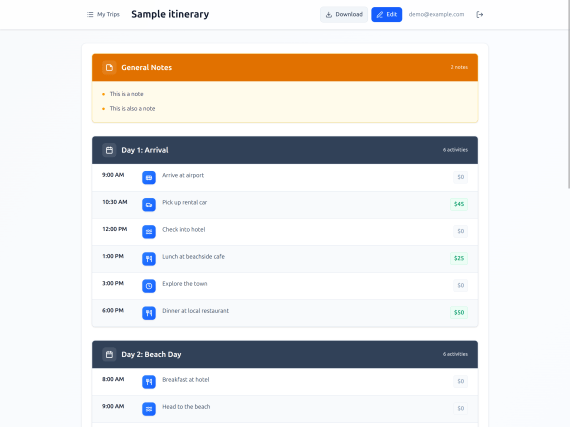
For the holidays, I gave myself a little experiment: build a small web app for my wife to manage her travel itineraries. I challenged myself to avoid editing the code myself and just do it “vibe” style, to see how far I could get.

In the end, the app was built with a $20 Claude “pro” plan and maybe ~5 hours of actual hands-on-keyboard work. Plus my wife is happy with the result, so I guess it was a success.

Screenshot of a travel itinerary app with a basic UI that looks like a lot of other CRUD apps, with a list of itinerary agenda items, dates and costs, etc.

There are still a lot of flaws with this approach, though, so I thought I’d gather my experiences in this post.

The good

The app works. It looks okay on desktop and mobile, it works as a PWA, it saves her itineraries to a small PocketBase server running on Railway for $1 a month, and I can easily back up the database whenever I feel like it. User accounts can only be created by an admin user, which I manage with the PocketBase UI.

I first started with Bolt.new but quickly switched to Claude Code. I found that Bolt was fine for the first iteration but quickly fell off after that. Every time I asked it to fix something and it failed (slowly), I thought “Claude Code could do this better.” Luckily you can just export from Bolt whenever you feel like it, so that’s what we did.

Bolt set up a pretty basic SPA scaffolding with Vite and React, which was fine, although I didn’t like its choice of Supabase, so I had Claude replace it with PocketBase. Claude was very helpful here with the ideation – I asked for some options on a good self-hosted database and went with PocketBase because it’s open-source and has the admin/auth stuff built-in. Plus it runs on SQLite, so this gave me confidence that import/export would be easy.

Claude also helped a lot with the hosting – I was waffling between a few different choices and eventually landed on Railway per Claude’s suggestion (for better or worse, this seems like a prime opportunity for ads/sponsorships in the future). Claude also helped me decipher the Railway interface and get the app up-and-running, in a way that helped me avoid reading their documentation altogether – all I needed to do was post screenshots and ask Claude where to click.

The app also uses Tailwind, which seems to come with decent CSS styles that look like every other website on the internet. I didn’t need this to win any design awards, so that was fine.

Note I also ran Claude in a Podman container with --dangerously-skip-permissions (aka “yolo mode”) because I didn’t want to babysit it whenever it wanted permission to install or run something. Worst case scenario, an attacker has stolen the app code (meh), so hopefully I kept the lethal trifecta in check.

The bad

Vibe-coding tools are decidedly not ready for non-programmers yet. Initially I tried to just give Bolt to my wife and have her vibe her way through it, but she quickly got frustrated, despite having some experience with HTML, CSS, and WordPress. The LLM would make errors (as they do), but it would get caught in a loop, and nothing she tried could break it out of the cycle.

Since I have a lot of experience building web apps, I could look at the LLM’s mistakes and say, “Oh, this problem is in the backend.” Or “Oh, it should write a parser test for this.” Or, “Oh, it needs a screenshot so it can see why the CSS is wrong.” If you don’t have extensive debugging experience, then you might not be able to succinctly express the problem to an LLM like this. Being able to write detailed bug reports, or even have the right vocabulary to describe the problem, is an invaluable skill here.

After handing it over from Bolt to Claude Code and taking the reigns myself, though, I still ran into plenty of problems. First off, LLMs still suck at accessibility – lots of <div>s with onClick all over the place. My wife is a sighted mouse user so it didn’t really matter, but I still have some professional pride even around vibe-coded garbage, so I told Claude to correct it. (At which point it promptly added excessive aria-labels where they weren’t needed, so I told it to dial it back.) I’m not the first to note this, but this really doesn’t bode well for accessible vibe-coded apps.

Another issue was performance. Even on a decent laptop (my Framework 13 with AMD Ryzen 5), I noticed a lot of slow interactions (typing, clicking) due to React re-rendering. This required a lot of back-and-forth with the agent, copy-pasting from the Chrome DevTools Performance tab and React DevTools Profiler, to get it to understand the problem and fix it with memoization and nested components.

At some point I realized I should just enable the React Compiler, and this may have helped but didn’t fully solve the problem. I’m frankly surprised at how bad React is for this use case, since a lot of people seem convinced that the framework wars are over, since LLMs are so “good” at writing React. The next time I try this, I might use a framework like Svelte or Solid where fine-grained reactivity is built-in, and you don’t need a lot of manual optimizations for this kind of stuff.

Other than that, I didn’t run into any major problems that couldn’t be solved with the right prompting. For instance, to add PWA capabilities, it was enough to tell the LLM: “Make an icon that kind of looks like an airplane, generate the proper PNG sizes, here are the MDN docs on PWA manifests.” I did need to follow up by copy-pasting some error messages from the Chrome DevTools (which required even knowing to look in the Application tab), but that resolved itself quickly. I got it to generate a CSP in a similar way.

The only other annoying problem was the token limits – this is something I don’t have to deal with at work, and I was surprised how quickly I ran into limits using Claude as a side project. It made me tempted to avoid “plan mode” even when it would have been the better choice, and I often had to just set Claude aside and wait for my limit to “reset.”

The ugly

The ugliest part of all this is, of course, the cheapening of the profession as well as all the other ills of LLMs and GenAI that have been well-documented elsewhere. My contribution to this debate is just to document how I feel, which is that I’m somewhat horrified by how easily this tool can reproduce what took me 20-odd years to learn, but I’m also somewhat excited because it’s never been easier to just cobble together some quick POCs or lightweight hobby apps.

After a couple posts on this topic, I’ve decided that my role is not to try to resist the overwhelming onslaught of this technology, but instead to just witness and document how it’s shaking up my worldview and my corner of the industry. Of course some will label me a collaborator, but I think those voices are increasingly becoming marginalized by an industry that has just normalized the use of generative AI to write code.

When I watch some of my younger colleagues work, I am astounded by how “AI-native” their behavior is. It infuses parts of their work where I still keep a distance. (E.g. my IDE and terminal are sacred to me – I like Claude Code in its little box, not in a Warp terminal or as inline IDE completions.)

Conclusion

The most interesting part of this whole experiment, to me, is that throwing together this hobby app has removed the need for my wife to try some third-party service like TripIt or Wanderlog. She tried those apps, but immediately became frustrated with bugs, missing features, and ad bloat. Whereas the app I built works exactly to her specification – and if she doesn’t like something, I can plug her feedback into Claude Code and have it fixed.

My wife is a power user, and she’s spent a lot of time writing emails to the customer support departments of various apps, where she inevitably gets a “your feedback is very important to us” followed by zilch. She’s tried a lot of productivity/todo/planning apps, and she always finds some awful showstopper bugs (like memory leaks, errors copy/pasting, etc.), which I blame on our industry just not taking quality very seriously. Whereas if there’s a bug in this app, it’s a very small codebase, it’s got extensive unit/end-to-end tests, and so Claude doesn’t have many problems fixing tiny quality-of-life bugs.

I’m not saying this is the death-knell of small note-taking apps or whatever, but I definitely think that vibe-coded hobby apps have some advantages in this space. They don’t have to add 1,000 features to satisfy 1,000 different users (with all the bugs that inevitably come from the combinatorial explosion of features) – they just have to make one person happy. I still think that generative UI is kind of silly, because most users don’t want to wait seconds (or even minutes) for their UI to be built, but it does work well in this case (where your husband is a professional programmer with spare time during the holidays).

For my regular dayjob, I have no intention to do things fully “vibe-coded” (in the sense that I barely look at the code) – that’s just too risky and irresponsible in my opinion. When the code is complex, your teammates need to understand it, and you have paying customers, the bar is just a lot higher. But vibe coding is definitely useful for hobby or throwaway projects.

For better or worse, the value of code itself seems to be dropping precipitously, to be replaced by measures like how well an LLM can understand the codebase (CLAUDE.md, AGENTS.md) or how easily it can test its “fixes” (unit/integration tests). I have no idea what coding will look like next year, but I know how my wife will be planning our next vacation.

How I use AI agents to write code

Yes, this is the umpteenth article about AI and coding that you’ve seen this year. Welcome to 2025.

Some people really find LLMs distasteful, and if that’s you, then I would recommend that you skip this post. I’ve heard all the arguments, and I’m not convinced anymore.

I used to be a fairly hard-line anti-AI zealot, but with the release of things like Claude Code, OpenAI Codex, Gemini CLI, etc., I just can’t stand athwart history and yell “Stop!” anymore. I’ve seen my colleagues make too much productive use of this technology to dismiss it as a fad or mirage. It writes code better than I can a lot of the time, and that’s saying something because I’ve been doing this for 20 years and I have a lot of grumpy, graybeard opinions about code quality and correctness.

But you have to know how to use AI agents correctly! Otherwise, they’re kind of like a finely-honed kitchen knife attached to a chainsaw: if you don’t know how to wield it properly, you’re gonna hurt yourself.

Basic setup

I use Claude Code. Mostly because I’m too lazy to explore all the other options. I have colleagues who swear by Gemini or Codex or open-source tools or whatever, but for me Claude is good enough.

First off, you need a good CLAUDE.md (or AGENTS.md). Preferably one for the project you’re working in (the lay of the land, overall project architecture, gotchas, etc.) and one for yourself (your local environment and coding quirks).

This seems like a skippable step, but it really isn’t. Think about your first few months at a new job – you don’t know anything about how the code works, you don’t know the overall vision or design, so you’re just fumbling around the code and breaking things left and right. Ideally you need someone from the old guard, who really knows the codebase’s dirty little secrets, to write a good CLAUDE.md that explains the overall structure, which parts are stable, which parts are still under development, which parts have dragons, etc. Otherwise the LLM is just coming in fresh to the project every time and it’s going to wreak havoc.

As for your own personal CLAUDE.md (i.e. in ~/.claude), this should just be for your own coding quirks. For example, I like the variable name _ in map() or filter() functions. It’s like my calling card; I just can’t do without it.

Overall strategy

I’ve wasted a lot of time on LLMs. A lot of time. They are every bit as dumb as their critics claim. They will happily lead you down the garden path and tell you “Great insight!” until you slowly realize that they’ve built a monstrosity that barely works. I can see why some people try them out and then abandon them forever in disgust.

There are a few ways you can make them more useful, though:

  1. Give them a feedback loop, usually through automated tests. Automated tests are a good way for the agent to go from “I’ve fixed the problem!” to “Oh wait, no I didn’t…” and actually circle in on a working solution.
  2. Use the “plan mode” for more complicated tasks. Just getting the agent to “think” about what it’s doing before it executes is useful for something simpler than a pure refactor or other rote task.

For example, one time I asked an agent to implement a performance improvement to a SQL query. It immediately said “I’ve found a solution!” Then I told it to write a benchmark and use a SQL EXPLAIN, and it immediately realized that it actually made things slower. So the next step was to try 3 different variants of the solution, testing each against the benchmark, and only then deciding on the way forward. This is eerily similar to my own experience writing performance optimizations – the biggest danger is being seduced by your own “clever” solution without actually rigorously benchmarking it.

This is why I’ve found that coding agents are (currently) not very good at doing UI. You end up using something like the Playwright or Chrome DevTools MCP/skill, and this either slurps up way too many tokens, or it just slows things down considerably because the agent has to inspect the DOM (tokens galore) or write a Playwright script and take a screenshot to inspect it (slooooooow). I’ve watched Claude fumble over closing a modal dialog too often to have patience for this. It’s only worthwhile if you’re willing to let the agent run over your lunch break or something.

The AI made a mistake? Add more AI

This one should be obvious but it’s surprisingly not. AIs tend to make singular, characteristic mistakes:

  1. Removing useful comments from previous developers – “this is a dumb hack that we plan to remove in version X” either gets deleted or becomes some Very Official Sounding Comment that obscures the original meaning.
  2. Duplicating code. Duplicating code. I don’t know why agents love duplicating code so much, but they do. It’s like they’ve never heard of the DRY principle.
  3. Making subtle “fixes” when refactoring code that actually break the original intent. (E.g. “I’ll just put an extra null check in here!”)

Luckily, there’s a pretty easy solution to this: you shut down Claude Code, start a brand-new session, and tell the agent “Hey, diff against origin/main. This is supposed to be a pure refactor. Is it really though? Check for functional bugs.” Inevitably, the agent will find some errors.

This seems to work better if you don’t tell the agent that the code is yours (presumably because it would just try to flatter you about how brilliant your code is). So you can lie and say you’re reviewing a colleague’s PR or something if you want.

After this “code review” agent runs, you can literally just shut down Claude Code and run the exact same prompt again. Run it a few times until you’re sure that all the bugs have been shaken out. This is shockingly effective.

Get extra work done while you sleep

One of the most addictive things about Claude Code is that, when I sign off from work. I can have it iterate on some problem while I’m off drinking a beer, enjoying time with my family, or hunkering down for a snooze. It doesn’t get tired, it doesn’t take holidays, and it doesn’t get annoyed at trying 10 different solutions to the same problem.

In a sense then, it’s like my virtual Jekyll-and-Hyde doppelganger, because it’s getting work done that I never would have done otherwise. Sometimes the work is a dud – I’ll wake up and realize that the LLM got off on some weird tangent that didn’t solve the real problem, so I’ll git reset --hard and start from scratch. (Often I’ll use my own human brain for this stuff, since this situation is a good hint that it’s not the right job for an LLM.)

I’ve found that the biggest limiting factor in these cases is not the LLM itself, but rather just that Claude Code asks for permission on every little thing, to where I’ve developed an automation blindness where I just skim the command and type “yes.” This scares me, so I’ve started experimenting with running Claude Code in a Podman container in yolo mode. Due to the lethal trifecta, though, I’m currently only comfortable doing this with side projects where I don’t care if my entire codebase gets sent to the dark web (or whatever it is misbehaving agents might do).

This unfortunately leads to a situation where the agent invades my off-work hours, and I’m tempted to periodically check on its progress and either approve it or point it in another direction. But this becomes more a problem of work-life balance than of human-agent interaction – I should probably just accept that I should enjoy my hobbies rather than supervising a finicky agent round-the-clock!

Conclusion

I still kind of hate AI agents and feel ambivalent toward them. But they work. When I read anti-AI diatribes nowadays, my eyes tend to glaze over and I think of the quote from Galileo: “And yet, it moves.” All your arguments make a lot of sense, they resonate with me a lot, and yet, the technology works. I write an insane amount of code these days in a very short number of hours, and this would have been impossible before LLMs.

I don’t use LLMs for everything. I’ve learned through bitter experience that they are just not very good at subtle, novel, or nebulous projects that touch a lot of disparate parts of the code. For that, I will just push Claude to the side and write everything myself like a Neanderthal. But those cases are becoming fewer and further between, and I find myself spending a lot of time writing specs, reviewing code, or having AIs write code to review other AIs’ code (like some bizarre sorcerer’s apprentice policing another sorcerer’s apprentice).

In some ways, I compare my new role to that of a software architect: the best architects I know still get their hands dirty sometimes and write code themselves, if for no other reason than to remember the ground truth of the grunts in the trenches. But they’re still mostly writing design documents and specs.

I also don’t use AI for my open-source work, because it just feels… ick. The code is “mine” in some sense, but ultimately, I don’t feel true ownership over it, because I didn’t write it. So it would feel weird to put my name on it and blast it out on the internet to share with others. I’m sure I’m swimming against the tide on this one, though.

If I could go back in time and make it so LLMs were never a thing… I might still do it. I really had a lot more fun writing all the code myself, although I am having a different sort of fun now, so I can’t completely disavow it.

I’m reminded of game design – if you create a mechanic that’s boring, but which players can exploit to consistently win the game (e.g. hopping on turtle shells for infinite 1-Ups), then they’ll choose that strategy, even if they end up hating the game and having less fun. LLMs are kind of like that – they’re the obvious optimal strategy, and although they’re less fun, I’ll keep choosing them.

Anyway, I may make a few enemies with this post, but I’ve long accepted that what I write on the internet will usually attract some haters. Meanwhile I think the vast majority of developers have made their peace with AI and are just moving on. For better or worse, I’m one of them.

The <time> element should actually do something

A common UI pattern is something like this:

Post published 4 hours ago

People do lots of stuff with that “4 hours ago.” They might make it a permalink:

Post published <a href="/posts/123456">4 hours ago</a>

Or they might give it a tooltip to show the exact datetime upon hover/focus:

Post published
<Tooltip content="December 14, 2025 at 11:30 AM PST">
  4 hours ago
</Tooltip>

Note: I’m assuming some Tooltip component written in your favorite framework, e.g. React, Svelte, Vue, etc. There’s also the bleeding-edge popover="hint" and Interest Invokers API, which would give us a succinct way to do this in native HTML/CSS.

If you’re a pedant about HTML though (like me), then you might use the <time> element:

Post published
<time datetime="2025-12-14T19:30:00.000Z">
  4 hours ago
</time>

This is great! We now have a semantic way to express the exact timestamp of a date. So browsers and screen readers should use this and give us a way to avoid those annoying manual tooltips and… oh wait, no. The <time> element does approximately nothing.

I did some research on this and couldn’t find any browser or assistive technology that actually makes use of the <time> element, besides, you know, rendering it. (Whew!) This is despite the fact that <time> is used on roughly 8% of pageloads per Chrome’s usage tracker.

Update: Léonie Watson helpfully reports that the screen readers NVDA and Narrator actually do read out the timestamp in a human-readable format! So <time> does have an impact on accessibility (although arguably not a positive one).

So what does <time> actually do? As near as I can tell, it’s used by search engines to show date snippets in search results. However, I can’t find any guidelines from Google that specifically advocate for the <time> element, although there is a 2023 post from Search Engine Journal which quotes a Google Search liaison:

Google doesn’t depend on a single date factor because all factors can be prone to issues. That’s why our systems look at several factors to determine our best estimate of when a page was published or significantly updated.

In fact, the only Google documentation I found doesn’t mention <time> at all, and instead recommends using Schema.org’s datePublished and dateModified fields. (I.e., not even HTML.)

So there it is. <time> is a neat idea in theory, but in practice it feels like an unfulfilled promise of semantic HTML. A 2010 CSS Tricks article has a great quote about this from Bruce Lawson (no relation):

The uses of unambiguous dates in web pages aren’t hard to imagine. A browser could offer to add events to a user’s calendar. A Thai-localised browser could offer to transform Gregorian dates into Thai Buddhist era dates. A Japanese browser could localise to “16:00時”.

This would be amazing, and I’d love to see browsers and screen readers make use of <time> like this. But for now, it’s just kind of an inert relic of the early HTML5 days. I’ll still use it, though, because (as Marge Simpson would say), I just think it’s neat.