Author Archive

Using distributed search handlers in Solr 3.6.2

TL;DR: disable lazy-loading on the /spell handler if you’re using Solr 3.6.2 and distributed (i.e. sharded) search.

I discovered an interesting bug in Solr 3.6.2 the other day, so I thought I’d share it here.

While upgrading a distributed Solr system from version 3.5.0 to 3.6.2, everything worked as expected with minimal changes to the configuration, except for the /spell search handler.

The other search handlers I’d defined (the standard /select and a /suggest for autosuggestions) responded just fine, but a distributed /spell failed with a mysterious error in the logs:

Server returned HTTP response code: 400 for URL: 
http://localhost:8080/solr-search/shard2/spell
    ?shards=localhost%3A8080%2Fsolr-search%2Fshard1%2Clocalhost%3A8080%2Fsolr-search%2Fshard2
    &shards.qt=%2Fspell[...]

The logs from the server side weren’t any more helpful:

SEVERE: org.apache.solr.common.SolrException: Bad Request

Bad Request

request: http://localhost:8080/solr-search/shard1/spell
 at org.apache.solr.client.solrj.impl.CommonsHttpSolrServer.request(CommonsHttpSolrServer.java:427)
 at org.apache.solr.client.solrj.impl.CommonsHttpSolrServer.request(CommonsHttpSolrServer.java:249)
 at org.apache.solr.handler.component.HttpShardHandler$1.call(HttpShardHandler.java:129)
 at org.apache.solr.handler.component.HttpShardHandler$1.call(HttpShardHandler.java:103)
 at java.util.concurrent.FutureTask$Sync.innerRun(FutureTask.java:303)
 at java.util.concurrent.FutureTask.run(FutureTask.java:138)
 at java.util.concurrent.Executors$RunnableAdapter.call(Executors.java:439)
 at java.util.concurrent.FutureTask$Sync.innerRun(FutureTask.java:303)
 at java.util.concurrent.FutureTask.run(FutureTask.java:138)
 at java.util.concurrent.ThreadPoolExecutor$Worker.runTask(ThreadPoolExecutor.java:895)
 at java.util.concurrent.ThreadPoolExecutor$Worker.run(ThreadPoolExecutor.java:918)
 at java.lang.Thread.run(Thread.java:680)

Running Wireshark to capture HTTP requests on localhost dug up the following silent error message from Tomcat:

HTTP Status 400 - isShard is only acceptable with search handlers
    type: Status report
    message: isShard is only acceptable with search handlers
    description: The request sent by the client was syntactically 
        incorrect (isShard is only acceptable with search handlers).

Huh!  I could have sworn it was a SearchHandler.  Checking the configuration for the /spell handler in solrconfig.xml, I indeed found the following:

<requestHandler name="/spell" class="solr.SearchHandler" lazy="true">
...
</requestHandler>

After some fruitless fiddling with the configuration, I finally gave up and launched a remote debugger in Eclipse.  Grepping the Solr 3.6.2 source code showed that the exception was thrown from SolrCore.java lines 1373-1374:

if (req.getParams().getBool(ShardParams.IS_SHARD,false) 
        && !(handler instanceof SearchHandler))
  throw new SolrException(SolrException.ErrorCode.BAD_REQUEST,
        "isShard is only acceptable with search handlers");

In the Eclipse debugger, I saw that when this line was invoked, the handler object was actually a LazyRequestHandlerWrapper (an internal class in 3.6.2) rather than a SearchHandler, causing the if statement to evaluate to false.  According to the LazyRequestHandlerWrapper documentation:

  /**
   * The <code>LazyRequestHandlerWrapper</core> wraps any {@link SolrRequestHandler}.  
   * Rather then instanciate and initalize the handler on startup, this wrapper waits
   * until it is actually called.  This should only be used for handlers that are
   * unlikely to be used in the normal lifecycle.
   * 
   * You can enable lazy loading in solrconfig.xml using:
   * 
   * <pre>
   *  &lt;requestHandler name="..." class="..." startup="lazy"&gt;
   *    ...
   *  &lt;/requestHandler&gt;
   * </pre>
   * 
   * This is a private class - if there is a real need for it to be public, it could
   * move
   * 
   * @version $Id: RequestHandlers.java 1306137 2012-03-28 03:30:52Z dsmiley $
   * @since solr 1.2
   */

Aha! So that’s why my /spell handler was behaving strangely – it was the only one using lazy loading.

Well, I never needed the lazy loading that badly anyway. Setting lazy="false" in the XML configuration immediately corrected the problem.

Interestingly, it appears that the offending code has been commented out in Solr 4.3.0 (SolrCore.java:1812-1814):

// TODO: this doesn't seem to be working correctly and causes problems with the example server and distrib (for example /spell)
// if (req.getParams().getBool(ShardParams.IS_SHARD,false) && !(handler instanceof SearchHandler))
//   throw new SolrException(SolrException.ErrorCode.BAD_REQUEST,"isShard is only acceptable with search handlers");

I suspect that the reason this code backfires is that, in example/solr/collection1/conf/solrconfig.xml, the /spell handler is defined as lazy="true". This would mean that the commented code could be fixed by simply publicizing the LazyRequestHandlerWrapper class and accounting for handler wrapping in the if statement:

SolrRequestHandler trueHandler = handler instanceof LazyRequestHandlerWrapper 
        ? ((LazyRequestHandlerWrapper)handler).getWrappedHandler()
        : handler;

if (req.getParams().getBool(ShardParams.IS_SHARD,false) && !(trueHandler instanceof SearchHandler))
  throw new SolrException(SolrException.ErrorCode.BAD_REQUEST,"isShard is only acceptable with search handlers");

I’ve already submitted this as a patch to Solr. We’ll see if the developers agree with my hunch.

JavaScript development and the paradox of choice

There are a lot of folks trying to sell their miracle cure for the problem of writing efficient, testable, maintainable JavaScript. And there’s an equal number of folks decrying the proliferation of almost-there libraries and flash-in-the-pan frameworks.

Bootstrap. Backbone. Handlebars. Angular. I’ve spent so much time hearing snatches of conversation about these tools, and trying to make sense of them, that after awhile it all starts to sound like some crazy beat poetry.

Listen:

angular backbone bootstrap cordova handlebars lawnchair underscore jasmine karma testacular grunt yeoman blueprint ember bower require sencha dojo mootools phonegap modernizr prototype meteor…

If you shouted that on a street corner while wielding a bottle of bourbon, you wouldn’t look out of place. I’ve seen the best minds of my generation destroyed trying to understand this mess.

Police Chief Wiggum and a raving derelict, from Simpsons episode 3F02.

Pictured: a seasoned JavaScript developer.

A good JavaScript is hard to find

Part of the reason there are so many snake-oil salesmen is that the cure is so badly needed. Web development is both 1) hard and 2) absolutely crucial. Facebook and Gmail have set the bar high enough that nowadays everyone expects beautiful, responsive, browser-based applications that take milliseconds to download and work on every rectangular-shaped device you can throw at it. It’s a tall order.

And the reason it feels like snake oil is that none of these tools solves the entire problem. I’ve tried many of them, hoping that I had finally found the JavaScript silver bullet, and I’ve always felt vaguely disappointed afterwards. The medicine tastes good going down, I get excited watching YouTube tutorials and reading GitHub pages and coding in a new paradigm, and then afterwards I still end up sweating feverishly over the Chrome Developer Tools, trying to center a disobedient div or figure out why my event isn’t firing. I exchange one set of problems for another.

And then I lay awake at night wondering, “Well, maybe instead of JQuery UI, I should have used YUI or Bootstrap or…”? Then it’s back for another dose of the same old medicine.

Grandpa Simpson selling some 'revitalizing tonic,' from Simpsons episode 2F07.

Step right up and put some fury in your JQuery, some zest in your CSS!

Another world is possible

This situation really frustrates me, primarily because I come from a Java background. And in Java Land, the platform is mature enough that there’s a basic suite of components that have emerged as the brain-dead, obvious solutions to common problems.

  • Need to test your app? Duh, use JUnit.
  • Need basic HTTP operations? Double duh, use Apache HTTP Client.
  • Need ORM? What are you, stupid? Use Hibernate.
  • Need a package manager? Cripes, it’s the 21st century: use Maven. Or Ivy, if you want something even simpler.

And if you use modern Java-based frameworks like Android or Grails, you’ll see that a lot of these third-party tools are already baked in: e.g. JUnit and HTTP Client for Android; Ivy, Hibernate, and JUnit for Grails. New Java developers pick up stuff like JUnit without thinking about it, as if it were just part of the language. And it practically is.

Even Java itself is mature enough that I’ve honestly felt satisfied since Java 6, and haven’t seen much need to upgrade. String switches in Java 7? Yawn, I’ve been using Enums since Java 5. Lambdas in Java 8? No need, Google Guava has me covered.

No silver JS bullet

JavaScript, on the other hand, is anything but mature. There is no “obvious” choice for third-party components – with the exception of JQuery, which is so omnipresent nowadays that it almost is JavaScript.

But aside from JQuery, there’s no one-stop solution that everyone rallies behind. For each of my “easy” questions for Java above, you get a forest of forked decision trees in JavaScript:

Mr. Burns contemplates Ketchup vs. Catsup, from Simpsons episode 2F07.

Ketchup or catsup? Karma or Selenium?

The paradox of choice

When you’ve got dozens of popular frameworks, many of them with overlapping or even conflicting goals, the choices can be overwhelming. And even after you choose one, it’s easy to end up second-guessing yourself and fretting endlessly over your decision. It’s a familiar case of the phenomenon popularly known as the paradox of choice.

So what’s a poor JavaScript developer to do?

Let’s say, for instance, that your boss tells your team that you need to write a mobile webapp. Do you choose JQuery Mobile, Sencha Touch, or Dojo Mobile? And what if you need to write a regular data-driven Ajax app? Do you choose Angular, Ember, or Backbone? Each of them has a snazzy self-laudatory website and fierce partisans on Stack Overflow. Looks like you’ve got some reading to do!

I’m new to web development, but I’ve come to believe that the only surefire solution to the problem of competing frameworks is to try them all. Not for a mission-critical project, of course – instead, you should just write a stub app. That way, you’ll discover each framework’s strengths and shortcomings, you’ll understand the problems it’s trying to solve, and you’ll be able to make an informed decision when it really counts.

In my opinion, it’s better to have three developers on your team take a week to write stub apps in three different frameworks, rather than blindly embark down a single path based on the attractiveness of a documentation page or the charisma of a YouTube evangelist.

My own stub app

I decided to try this approach recently with three frameworks I was curious about – Angular, Bootstrap, and PhoneGap. They seemed to have orthogonal goals, so in theory they should play nicely together.

My objective was to write a webapp with nice MVC features (Angular) that would look pretty (Bootstrap) and could work as a native Android or iOS app (PhoneGap). For the task itself, I chose to write an end-of-game score calculator for one of my favorite Euro-style board games, Imperial. This had the benefit of being a well-defined problem that scratched a personal itch, and plus it gave me something to show off to my board gamer buddies.

For the feature specifications, the usual suspects applied. I needed to persist user data, because presumably users would want to see their saved games, or resume a game if they accidentally closed the tab. The design had to be responsive in order to accomodate multiple screen sizes, because you could imagine using this app in your browser as well as on a smartphone. It had to support deep-linking, because what if you wanted to share the game results with your friends? And of course, the UI had to present the data in a useful way: who’s in first place, who came in second, are there any ties, etc.

When I first described this project to one of my coworkers, his reaction was “that sounds like way more than a stub app.” Which is true – as soon as you exceed a certain level of complexity, you run into interesting problems, for which the frameworks are supposed to provide useful solutions. This is exactly the point of writing the app.

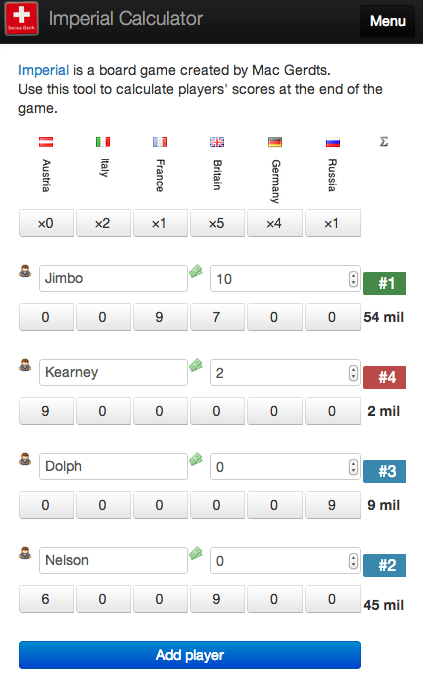
The end result of this experiment is the Imperial Score Calculator. It’s available as both a mobile-friendly webapp and an Android app (iOS version coming soon). And of course the source code is on GitHub.

Imperial Score Calculator desktop-sized screenshot

Imperial Score Calculator

I’ve learned something today

In the end, I’m very satisfied with the project. Not because the app itself is the best I’ve ever written (it’s not), but because it taught me some hard lessons that I’ll take with me to my next web project. For instance, here are some of the lessons learned:

  • Bootstrap does not magically make everything responsive. Do not design for the desktop and then hope that when you resize the viewport everything will “just work.” Some assembly required.
  • Angular is a godsend. It’s as if someone stepped out of a time machine and showed us what HTML6 will look like, today. I initially wrote the app in JQuery; a naïve Angular rewrite resulted in about 20% less code.
  • That being said, Angular does not instantly replace JQuery, unless you really grok directives. I still had to fall back on the good ol’ $ from time to time.
  • Lawnchair is a cool idea, but it’s poorly documented, and the asynchronous approach means you can’t save user data in the onbeforeunload event. In the end, I just went with LocalStorage.
  • PhoneGap is awesome. But man oh man, do not try debugging it without Weinre, unless you like pulling your hair out.

These are all opinions that I hold after working on this app. And I don’t expect you, dear reader, to swallow any of them just based on my say-so. The only way you can learn these lessons is to build a stub app yourself.

And perhaps you’ll have a totally different experience and come to totally different conclusions. Your mileage may vary. But you won’t know until you take the car out for a test drive.

Imperial Score Calculator mobile-sized screenshot

I ended up using a completely different layout for the mobile version.

Conclusion

JavaScript development is hard. The community is going through some growing pains, with everyone defending their cherished framework. The only solution to this problem of fragmentation and “There’s More Than One Million Ways To Do It” is time.

I do see some rays of hope in projects like Meteor and Yeoman, which are very opinionated meta-frameworks that attempt to combine multiple “best of class” JavaScript solutions into one easy package for web developers. In a sense, they’re trying to solve the problem that’s already been solved in Java Land.

But since Java Land is an increasingly irrelevant, fading power next to the ascendant hegemony that is the People’s Republic of JavaScript, the solution can’t come soon enough. In the meantime, I’ll keep writing stub apps.

KeepScore version 1.2.2: you asked for it, you got it

My favorite part about working on a software project with real-world users is the feedback I get. It’s often said by industry veterans that you don’t know what kind of app you’re building until your users actually get their hands on it, and the wisdom of this statement has proven itself to me over and over.

With KeepScore, the app itself is pretty simple – it just keeps score. And each time I write an update, I tell myself, “Welp, that’s about all it’ll ever need.” Then I get an email from an interested user with a cool new use case, and I just can’t help but code it up.

So the app keeps growing and growing, but at each step I have to be extra-careful to keep the UI itself streamlined, simple, and dead-easy to use. With KeepScore version 1.2.2 (released today), I think I’ve managed to strike a good balance between functionality and usability.

Here are the new features:

Share

As many of you requested, you can now share your KeepScore games with a friend. You can send a single game, specific games, or all your games.

Just choose the games you want, hit the “Share” button up top, and KeepScore will create a special XML file that a friend can open with KeepScore on their own device.

The "Share" feature.

The “Share” feature.

This feature also allows you to back up your saved games to Dropbox, Google Drive, or your favorite cloud storage service.

Automatic backups

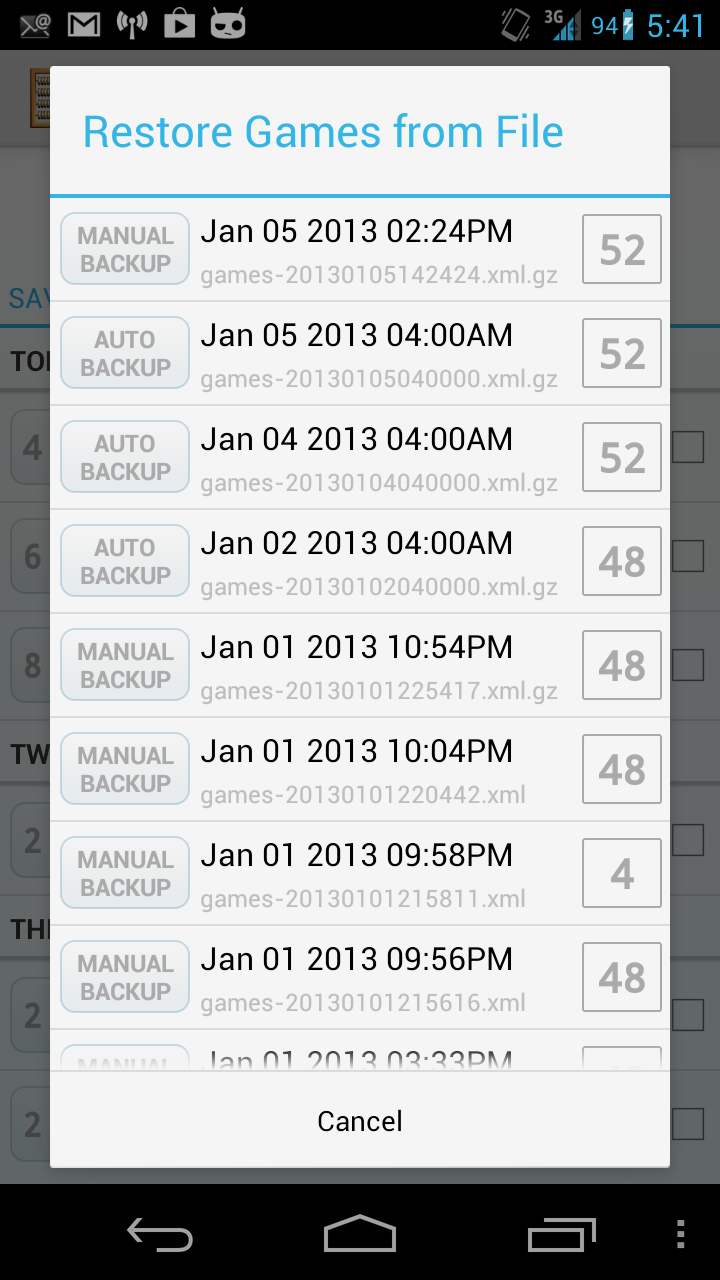
Speaking of backups, there’s no more do-it-yourself! KeepScore automatically saves a backup whenever you start a new game. Look for them in the “Restore” popup.

All your games are automatically backed up.

All your games are automatically backed up.

These files are gzipped, so they take up a minimal amount of space on your external storage.

Export spreadsheet

As board gamers, we’re geeks. And as geeks, we love analyzing our board game habits in a number of different ways. Who wins the most games? Who’s scored the most points? What games do we play the most often?

The "Export Spreadsheet" feature.

The “Export Spreadsheet” feature.

Rather than create a separate screen to answer each of these questions, KeepScore now offers an “Export Spreadsheet” feature. The spreadsheet may be imported into Excel, LibreOffice, Google Docs, or any document editor that accepts CSV files.

Data nerds rejoice.

Data nerds rejoice.

Once you’ve opened up the spreadsheet, you can slice and dice the data to your geeky heart’s content.

More Holo goodness

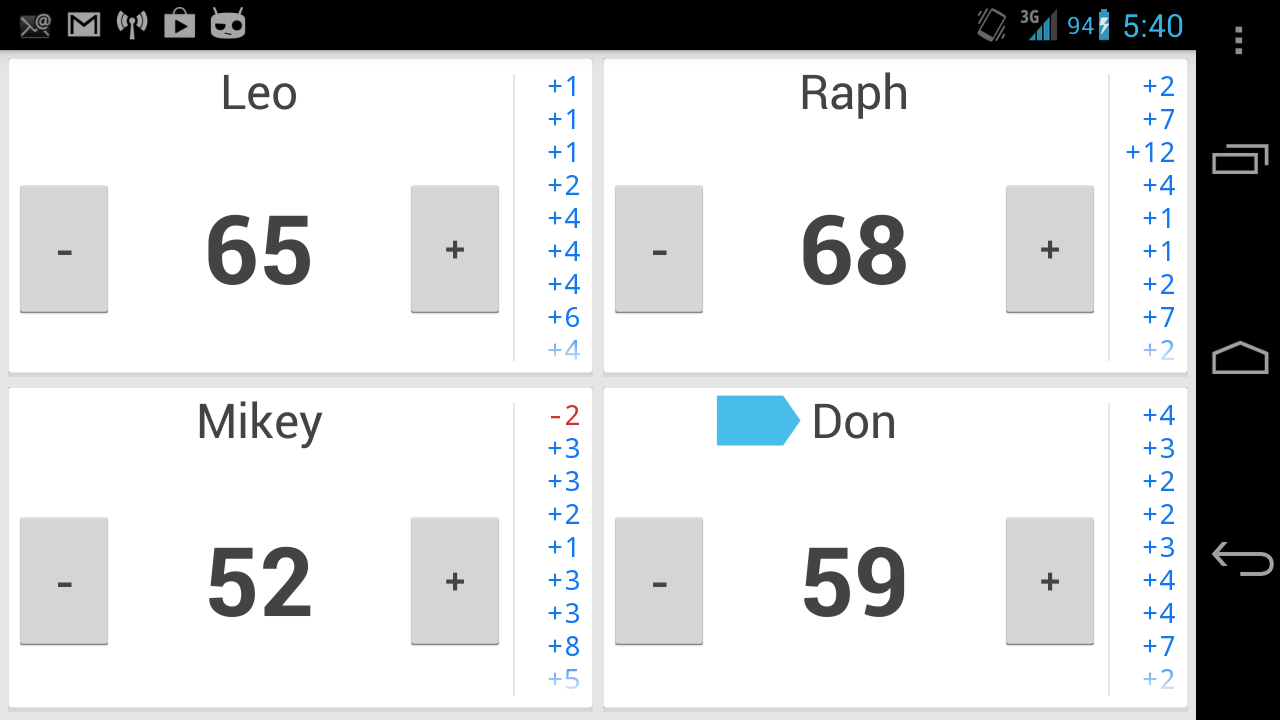
KeepScore 1.2.2 expands support for the Android “Holo” theme, which means it will look more beautiful and more consistent across different Android devices.

Holo everywhere.

Holo everywhere.

Additionally, I’ve revamped the default “Light” theme to be more clean and minimalist. It’s inspired by the “card” interface from Google Now, which I adore.

The new, Holo-style look.

The new, Holo-style look.

And if you’re scared by change, the old look is still available in the settings under Color Scheme -> Classic Light.

The classic look.

The classic look.

Whose turn is it?

A perennial complaint from users is that it’s hard to know if you’ve forgotten to add a player’s score. For round-based games (like Hearts) or games where the scoring order is important (like cribbage) this can be a real nuisance.

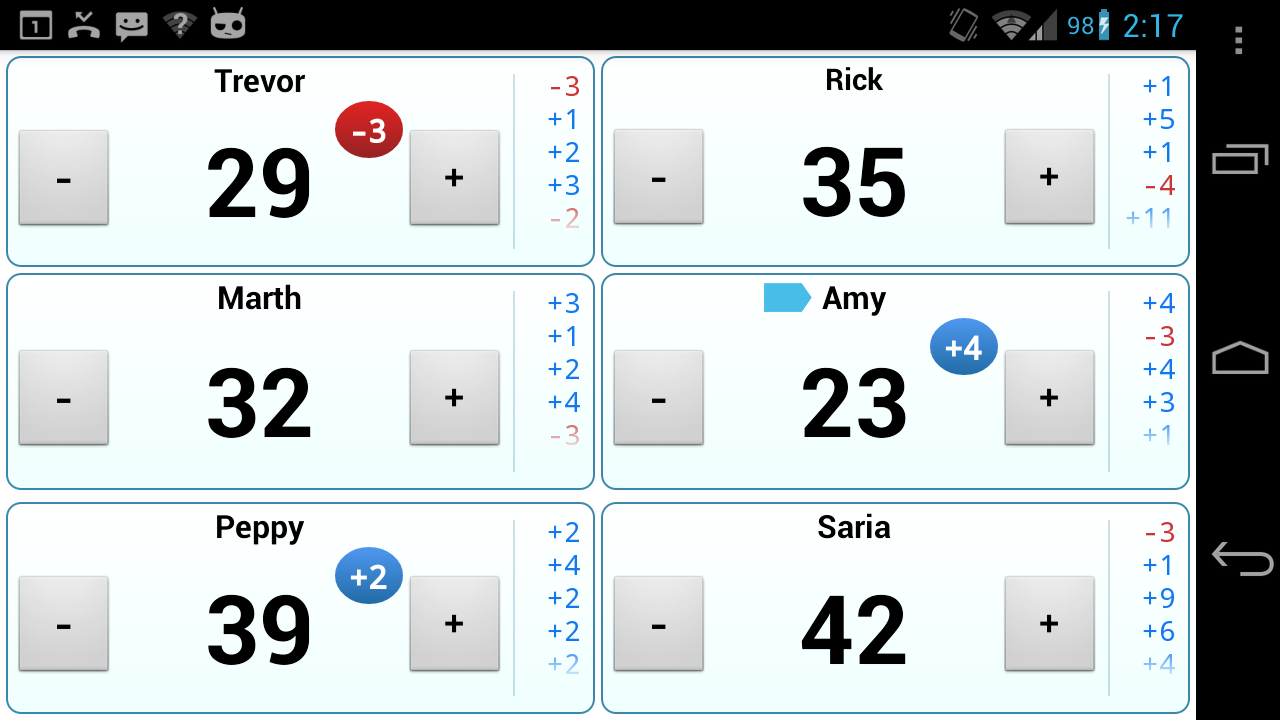
KeepScore 1.2.2 solves this problem using a clever suggestion from my buddy Alex Lougheed: add a little bullet icon to show which player was updated last. This means you can go player-by-player, totaling up the individual scores, without ever losing your place.

The blue bullet indicates who was scored last.

The blue bullet indicates who was scored last.

And if you’re playing a game where the player order doesn’t matter, you can disable the bullet in the settings.

Zoom in on the chart

On many devices, the history chart doesn’t show up very well, because it either gets cut off or it’s too small to see. Rather than fiddle with the presets for every possible screen size, I’ve added some handy zoom in/zoom out buttons.

Zoom in, out, and all around.

Zoom in, out, and all around.

Of course, pinch-to-zoom would be even nicer, but this works in a pinch (no pun intended!).

Internationalization

As always, KeepScore is localized into French and Japanese by yours truly. The German translation is out of date, though, and no other languages are currently supported.

Parlez-vous nippon?

Parlez-vous nippon?

According to the Play Store statistics, the top languages of KeepScore users are:

  1. English (United States)
  2. English (United Kingdom)
  3. French (France)
  4. English (Canada)
  5. German (Germany)
  6. English (Australia)
  7. Japanese (Japan)
  8. Dutch (Netherlands)
  9. Italian (Italy)

So if you speak German, Dutch, or Italian, and if you have some free time, please offer a translation!

Donate

This isn’t really a new feature, but I’ve added a Donate version of KeepScore to the Google Play store for $2.99.

Since I started work on this app, many people have asked where they could throw some change in my jar. But I resisted adding a Donate button, because after all, it’s just a counting app.

Recently, though, I noticed that the number of code commits to the KeepScore repository has actually surpassed any other Android app I’ve written (even CatLog and Pokédroid!). So I’ve had to admit to myself that this little counting app has morphed into quite the serious project.

So if you’d like to support KeepScore, you can download the Donate version from the Google Play Store, or just donate via PayPal.

Rest assured, though, that I will continue working on KeepScore regardless of your donations. For me, it’s just a fun app to write, and plus there’s still a lot of work to do. Next up: colors per player and battery-saving enhancements.

Personal password security that actually works

I’ve been thinking a lot about password security recently. Not because I’m paranoid, but because I’m a geek, and geeks love to optimize their lives.

Passwords are interesting, because they’re absolutely essential in the 21st century world, and almost all of us are doing it wrong. I’m not even talking about the fact that 91% of people use the 1000 most common passwords. Savvier folks using common substitutions like “MyP4ssw0rd1” are vulnerable too. And don’t even get me started on how parents always choose their kids’ names as their password. (I’m looking at you, Mom!)

As pointed out in this Wired article, even strong passwords can be insecure, because all an attacker needs is access to your email, and then they can use password recovery systems to get everything else – bank accounts, photos, blogs, you name it. It’s a scary prospect.

However, I disagree with the author’s conclusion, that passwords themselves are inherently flawed. There is always a tension between security and accessibility, and his alternatives are too impractical to ever actually gain currency. (Have the web site snap a photo of me, email the photo to three friends, and then ask at least one of them to confirm my identity? Excuse my editorial laugh.)

The inherent vulnerability in most people’s password systems is just that they use the same password everywhere. Which is understandable, because unless you’ve got a superhuman memory, you can’t remember your user name and password for the dozens of sites you use on a regular basis. Hence the convention of providing your email address as your universal login, and using the same password everywhere, which gives an attacker who cracks any rinky-dink site immediate access to your email. And thus, everything.

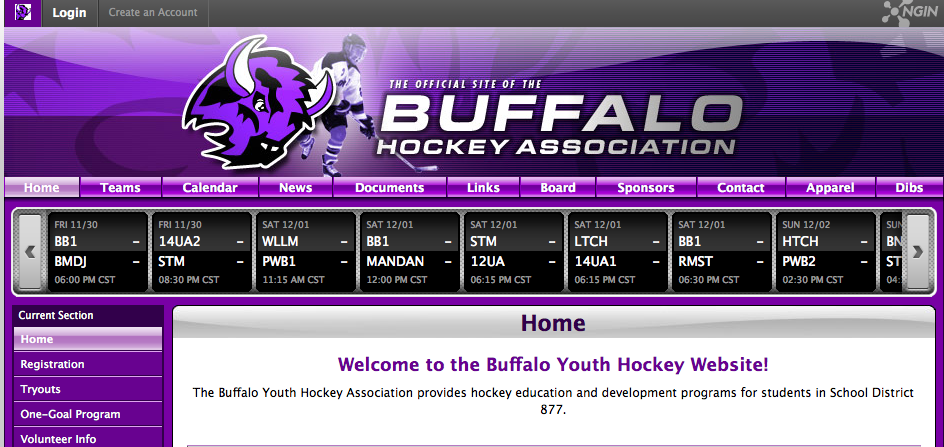
Think about that for a second. When you sign up with, say, the Buffalo Youth Hockey Association, you give them your email and probably the same password to access that email. And then you do the same thing for dozens of other sites. Does that make you feel secure?

Buffalo Youth Hockey Association site.  Totally secure.

The Buffalo Youth Hockey Association. No doubt a fine organization, but what about all the other ones?

My solution

So here’s my method, which I think is a nice compromise between security and convenience. It’s based on Joel Spolsky’s approach, although I use GitHub instead of DropBox.

Essentially, I keep a PasswdSafe database file with one strong master password stored in GitHub, and my GitHub account is protected with another strong password. I don’t use either of these two passwords anywhere else, and I haven’t written them down or anything. They only exist in my head.

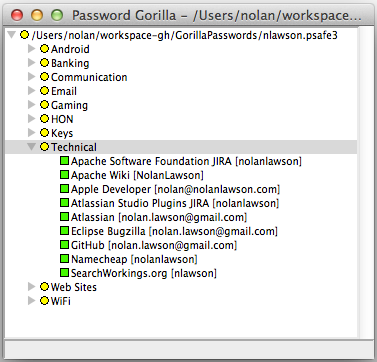
I sync the database file across my Linux laptop, MacBook, and Android phone using Git, and then I use PasswordGorilla and PasswdSafe for Android to read and edit the file. That way I can keep all my devices up to date as I add and change passwords.

My password file.

My password file.

All of my passwords are in this single file. I use a different password across each of the sites I commonly access (email, shopping, banking, etc.), and each one is a random 16-character alphanumeric string generated by PasswordGorilla. When I need a password, I just open PasswordGorilla, enter my master password, double-click the password I want to copy, and then paste it into the web site.

Of course, this creates a single point of failure, which may seem insecure at first glance. But let’s see what a potential attacker would actually have to do to gain access to these passwords.

Smart method (unlikely)

First off, an attacker would need to get their hands on my database file. And to do this, they’d have to hack into my GitHub account.

This is just basic password guessing, and although I’m using what I consider a strong password (based on the “correct horse battery staple” system), let’s assume for the sake of argument that the attacker manages to guess it, and that they manage to guess it before GitHub starts locking them out.

Now that they have my database file, they’d have to guess my second, equally strong master password. In this case, they won’t ever be locked out, and since the file is local, they can use whatever hardware they want. So a brute-force attack seems like a good approach.

But considering that PasswordGorilla uses key stretching, this means that a brute-force attacker would have to patiently wait one or two seconds to test each password in sequence. And according to HowSecureIsMyPassword, even a weak password like “MyPassword” would take 4 billion years to crack this way (assuming 1 calculation per second).

So even if our attacker somehow made it to my second gated entrance, it’s unlikely they would ever get past it.

Dumb method (more likely)

Unfortunately, the blind spot in all this is that there’s a much easier way for an attacker to get my passwords: just get my computer. An attacker doesn’t need access to my GitHub account if the files are already on all my laptops and smartphone. They just need to steal one of those devices.

As for the master password, once they have physical access to my computer, they can simply install a keylogger. Then, as soon as I type out my master password in PasswordGorilla, all my secrets are as good as cracked.

Permit me to postulate that this second scenario is much more likely than the first. It’s easy, it’s simple, and it doesn’t require much technical knowledge – only physical access to my devices.

Extra security measures

So in truth, the weakest link in this entire password system is just my devices themselves. Upon realizing this, I took some extra measures to ensure that my laptops and phone were sufficiently secured.

For my laptops, it was as easy as choosing a strong password and setting a timeout lock on the screensaver. OS X didn’t do this by default, but Ubuntu did.

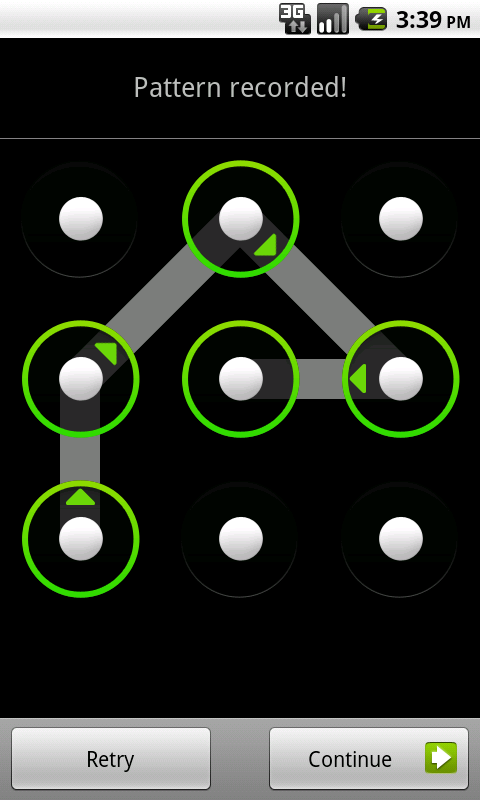
As for my Android phone, I switched from a pattern-based lock screen to a pin-based lock screen. This is because, as we now know, patterns can easily be cracked by just holding a phone up to the light and looking at the smudges.

You may think it's safe, but your oily thumbs betray you.

You may think it’s safe, but your oily thumbs betray you.

I now use a 6-digit numeric code, with lock-out after 5 tries. At first, it was quite a bit slower than my pattern-based lock screen, but once I got used to it, I could punch in the code almost as fast as before. And now my phone is much more secure.

What’s the point?

At the end of the day, password security is only as important as the stuff you’re securing. Unlike the author of the Wired article above, I’m a pretty unknown small-time developer, so my WordPress and Twitter accounts are not terribly interesting. And as a fresh-out-of-debt college grad, there’s not a whole lot in my bank accounts, either. So my convoluted security system is protecting a largely empty treasure chest.

But passwords are essential to Internet services, and increasingly our lives are lived online in the cloud. In twenty years, I can’t imagine how many hundreds more passwords I’ll have, and what kinds of stuff they’ll be protecting. The habits I build now could really help me out in the future.

Plus, I find that my new system is actually easier to use than the old one. How could I remember whether my user name was “nlawson” or “nolanlawson” or “NolanLawson” on all the forums where I was signed up? I’d inevitably have to try a few different combinations, or use the password recovery system, which took time.

Now I just open up PasswordGorilla, double-click, and paste. Nothing could be simpler. This is a system that even Mom could use. (And you should, Mom!)

Most importantly, now I can sleep soundly knowing that I’ve done the utmost to protect my online identity. Because I would hate to imagine that my account at the Buffalo Youth Hockey Association could ever compromise my account at the bank.

Note: sorry to pick on Buffalo hockey fans. You guys are all right.

Make your workplace more fun with a Jenkins alarm system

At every development team I’ve worked with, we’ve used Jenkins to notify us when the build broke. (Or Hudson, as it was called before Kohsuke Kawaguchi nailed a proclamation to the church wall.) Everyone on the team would receive an email when a unit test failed, or when someone forgot to commit a file, or when some other random blunder occurred.

Jenkins is really invaluable for finding problems early. And of course, publicly shaming the guilty party is always a great source of fun. The Continuous Integration Game plugin is even better for this.

But at my current employer, my colleague Alexandre Masselot had a singularly brilliant idea: instead of just firing off an email, why not add a visual cue as well? So he set up a physical flag system, attached to a USB servo device, with a cron script that would raise the flag whenever a Jenkins build failed. It looked like this:

Everyone on the dev team loved it. If the flag was raised when we walked into the office in the morning, the first question at the scrum meeting would be, “Who broke the build?” And as soon as the flag started to rise, you could hear the servo cranking, and the guilty developer would announce, “That was me!” A good time was had by all.

But could we do better?

The developers on the far side of the room couldn’t always hear the cranking sound, so they often didn’t notice when the flag was raised. So we decided to add an audio cue as well. Every time the build was broken, the machine would play the Star Wars “Imperial March” (aka Darth Vader’s theme), using the Unix beep command, since this particular machine had no speakers. It sounded like this:

And every time the build was fixed, it would play the main theme of Star Wars, to celebrate the joyous occasion:

This solved the immediate problem. The cacophonous beeping that signaled a build failure could be heard on the far side of the room. And beyond, where even the non-devs in the office could enjoy the sweet sound of pure geekiness.

But could we do better?

Whenever Darth Vader thundered his beeping fanfare, all the developers would immediately stop and check Jenkins to see which component broke. We didn’t have a quick way to know “whodunnit.”

So we added a new feature: an Android phone attached via USB, plus a simple text-to-speech app that would announce the name of the guilty party and the component that he or she broke.

The end result is that whenever the build is broken: the following events occur:

  1. The flag goes up
  2. The dreaded “Imperial March” sounds
  3. A robotic voice says “So-and-so broke the build, in the project such-and-such.”

The final system looks like this:


Then, when the build is back to normal, the system announces who fixed it, and all is forgiven:


So nowadays, whenever we start to hear the infernal beeping from our Jenkins machine, everyone takes off their headphones and patiently waits to hear who broke the build. Possibly with some apologies/excuses/complaints from the accused individual. (“It’s because the downstream project built before I was ready!”)

In any case, it makes our office much more melodious and much more fun. And luckily, the nearest non-dev is a Star Wars geek, so she doesn’t mind our antics.

Do it yourself

If you’d like to recreate our setup, it will only cost you about 40 bucks and a little bit of development time. You’ll need:

  1. A Yocto-Servo device ($25)
  2. A micro USB cable to connect it ($6)
  3. A micro servo to work the flag ($8)
  4. The flag itself (we used a Canadian flag, because it’s what I had, eh)
  5. The cron script to call Jenkins and raise the alarm
  6. The SimpleTalker app, if you have an Android device available. We use an old HTC Magic.

Bonus features

We also experimented with a few other features. If you use this excellent Python script to convert MIDI files into beep format, for instance, you can find any MIDI you like and make it into euphonious beep music. Here’s what this Super Mario Bros. theme from VGMusic.com sounds like:

And you could use the Mario “game over” theme for a build failure:

Alternatively, the Android app I wrote supports specifying an MP3 file on the device’s storage, in addition to the text-to-speech. Maybe each of your developers prefers a personalized “failure” and “success” theme? The sky’s the limit.

And if the beeping sound isn’t annoying enough, I will humbly point out that Yoctopuce also offers USB modules to operate an emergency rotating light. I take no responsibility for the mental health of your office-mates if you actually install such a device.

Summary

Programming is fun. And in our office, we’ve found that turning programming into an audiovisual experience makes it even more fun. I hope you’ll get a kick out of the code we’ve written, and that your boss won’t think it’s a waste of time. (Ours didn’t, although she keeps the door to her office firmly closed now.)

Better synonym handling in Solr

Update: Download the plugin on Github.

It’s a pretty common scenario when working with a Solr-powered search engine: you have a list of synonyms, and you want user queries to match documents with synonymous terms. Sounds easy, right? Why shouldn’t queries for “dog” also match documents containing “hound” and “pooch”? Or even “Rover” and “canis familiaris”?

A Rover by any other name would taste just as sweet.

As it turns out, though, Solr doesn’t make synonym expansion as easy as you might like. And there are lots of good ways to shoot yourself in the foot.

The SynonymFilterFactory

Solr provides a cool-sounding SynonymFilterFactory, which can be a fed a simple text file containing comma-separated synonyms. You can even choose whether to expand your synonyms reciprocally or to specify a particular directionality.

For instance, you can make “dog,” “hound,” and “pooch” all expand to “dog | hound | pooch,” or you can specify that “dog” maps to “hound” but not vice-versa, or you can make them all collapse to “dog.” This part of the synonym handling is very flexible and works quite well.

Where it gets complicated is when you have to decide where to fit the SynonymFilterFactory: into the query analyzer or the index analyzer?

Index-time vs. query-time

The graphic below summarizes the basic differences between index-time and query-time expansion. Our problem is specific to Solr, but the choice between these two approaches can apply to any information retrieval system.

Index-time vs. query-time expansion.

Your first, intuitive choice might be to put the SynonymFilterFactory in the query analyzer. In theory, this should have several advantages:

  1. Your index stays the same size.
  2. Your synonyms can be swapped out at any time, without having to update the index.
  3. Synonyms work instantly; there’s no need to re-index.

However, according to the Solr docs, this is a Very Bad Thing to Do(™), and apparently you should put the SynonymFilterFactory into the index analyzer instead, despite what your instincts would tell you. They explain that query-time synonym expansion has two negative side effects:

  1. Multi-word synonyms won’t work as phrase queries.
  2. The IDF of rare synonyms will be boosted, causing unintuitive results.
  3. Multi-word synonyms won’t be matched in queries.

This is kind of complicated, so it’s worth stepping through each of these problems in turn.

Multi-word synonyms won’t work as phrase queries

At Health On the Net, our search engine uses MeSH terms for query expansion. MeSH is a medical ontology that works pretty well to provide some sensible synonyms for the health domain. Consider, for example, the synonyms for “breast cancer”:

breast neoplasm
breast neoplasms
breast tumor
breast tumors
cancer of breast
cancer of the breast


So in a normal SynonymFilterFactory setup with expand=”true”, a query for “breast cancer” becomes:

+((breast breast breast breast breast cancer cancer) (cancer neoplasm neoplasms tumor tumors) breast breast)


…which matches documents containing “breast neoplasms,” “cancer of the breast,” etc.

However, this also means that, if you’re doing a phrase query (i.e. “breast cancer” with the quotes), your document must literally match something like “breast cancer breast breast” in order to work.

Huh? What’s going on here? Well, it turns out that the SynonymFilterFactory isn’t expanding your multi-word synonyms the way you might think. Intuitively, if we were to represent this as a finite-state automaton, you might think that Solr is building up something like this (ignoring plurals):

What you reasonably expect.

But really it’s building up this:

The spaghetti you actually get.

And your poor, unlikely document must match all four terms in sequence. Yikes.

Similarly, the mm parameter (minimum “should” match) in the DisMax and EDisMax query parsers will not work as expected. In the example above, setting mm=100% will require that all four terms be matched:

+((breast breast breast breast breast cancer cancer) (cancer neoplasm neoplasms tumor tumors) breast breast)~4


The IDF of rare synonyms will be boosted

Even if you don’t have multi-word synonyms, the Solr docs mention a second good reason to avoid query-time expansion: unintuitive IDF boosting. Consider our “dog,” “hound,” and “pooch” example. In this case, a query for any one of the three will be expanded into:

+(dog hound pooch)


Since “hound” and “pooch” are much less common words, though, this means that documents containing them will always be artificially high in the search results, regardless of the query. This could create havoc for your poor users, who may be wondering why weird documents about hounds and pooches are appearing so high in their search for “dog.”

Index-time expansion supposedly fixes this problem by giving the same IDF values for “dog,” “hound,” and “pooch,” regardless of what the document originally said.

Multi-word synonyms won’t be matched in queries

Finally, and most seriously, the SynonymFilterFactory will simply not match multi-word synonyms in user queries if you do any kind of tokenization. This is because the tokenizer breaks up the input before the SynonymFilterFactory can transform it.

For instance, the query “cancer of the breast” will be tokenized by the StandardTokenizationFactory into [“cancer”, “of”, “the”, “breast”], and only the individual terms will pass through the SynonymFilterFactory. So in this case no expansion will take place at all, assuming there are no synonyms for the individual terms “cancer” and “breast.”

Edit: I’ve been corrected on this. Apparently, the bug is in the Lucene query parser (LUCENE-2605) rather than the SynonymFilterFactory.

Other problems

I initially followed Solr’s suggestions, but I found that index-time synonym expansion created its own issues. Obviously there’s the problem of ballooning index sizes, but besides that, I also discovering an interesting bug in the highlighting system.

When I searched for “breast cancer,” I found that the highlighter would mysteriously highlight “breast cancer X Y,” where “X” and “Y” could be any two words that followed “breast cancer” in the document. For instance, it might highlight “breast cancer frauds are” or “breast cancer is to.”

Highlighting bug.

After reading through this Solr bug, I discovered it’s because of the same issue above concerning how Solr expands multi-word synonyms.

With query-time expansion, it’s weird enough that your query is logically transformed into the spaghettified graph above. But picture what happens with index-time expansion, if your document contains e.g. “breast cancer treatment options”:

Your mangled document.

This is literally what Lucene thinks your document looks like. Synonym expansion has bought you more than you bargained for, with some Dada-esque results! “Breast tumor the options” indeed.

Essentially, Lucene now believes that a query for “cancer of the breast” (4 tokens) is the same as “breast cancer treatment options” (4 tokens) in your original document. This is because the tokens are just stacked one on top of the other, losing any information about which term should be followed by which other term.

Query-time expansion does not trigger this bug, because Solr is only expanding the query, not the document. So Lucene still thinks “cancer of the breast” in the query only matches “breast cancer” in the document.

Update: there’s a name for this phenomenon! It’s called “sausagization.”

Back to the drawing board

All of this wackiness led me to the conclusion that Solr’s built-in mechanism for synonym expansion was seriously flawed. I had to figure out a better way to get Solr to do what I wanted.

In summary, index-time expansion and query-time expansion were both unfeasible using the standard SynonymFilterFactory, since they each had separate problems:

Index-time

  • Index size balloons.
  • Synonyms don’t work instantly; documents must be re-indexed.
  • Synonyms cannot be instantly replaced.
  • Multi-word synonyms cause arbitrary words to be highlighted.

Query-time

  • Phrase queries do not work.
  • IDF values for rare synonyms are artificially boosted.
  • Multi-word synonyms won’t be matched in queries.

I began with the assumption that the ideal synonym-expansion system should be query-based, due to the inherent downsides of index-based expansion listed above. I also realized there’s a more fundamental problem with how Solr has implemented synonym expansion that should be addressed first.

Going back to the “dog”/”hound”/”pooch” example, there’s a big issue usability-wise with treating all three terms as equivalent. A “dog” is not exactly the same thing as a “pooch” or a “hound,” and certain queries might really be looking for that exact term (e.g. “The Hound of the Baskervilles,” “The Itchy & Scratchy & Poochy Show”). Treating all three as equivalent feels wrong.

Also, even with the recommended approach of index-time expansion, IDF weights are thrown out of whack. Every document that contains “dog” now also contains “pooch”, which means we have permanently lost information about the true IDF value for “pooch”.

In an ideal system, a search for “dog” should include documents containing “hound” and “pooch,” but it should still prefer documents containing the actual query term, which is “dog.” Similarly, searches for “hound” should prefer “hound,” and searches for “pooch” should prefer “pooch.” (I hope I’m not saying anything controversial here.) All three should match the same document set, but deliver the results in a different order.

Solution

My solution was to move the synonym expansion from the analyzer’s tokenizer chain to the query parser. So instead of expanding queries into the crazy intercrossing graphs shown above, I split it into two parts: the main query and the synonym query. Then I combine the two with separate, configurable weights, specify each one as “should occur,” and then wrap them both in a “must occur” boolean query.

So a search for “dog” is parsed as:

+((dog)^1.2 (hound pooch)^1.1)


The 1.2 and the 1.1 are the independent boosts, which can be configured as input parameters. The document must contain one of “dog”, “hound,” or “pooch”, but “dog” is preferred.

Handling synonyms in this way also has another interesting side effect: it eliminates the problem of phrase queries not working. In the case of “breast cancer” (with the quotes), the query is parsed as:

+(("breast cancer")^1.2 (("breast neoplasm") ("breast tumor") ("cancer ? breast") ("cancer ? ? breast"))^1.1)


(The question marks appear because of the stopwords “of” and “the.”)

This means that a query for “breast cancer” (with the quotes) will also match documents containing the exact sequence “breast neoplasm,” “breast tumor,” “cancer of the breast,” and “cancer of breast.”

I also went one step beyond the original SynonymFilterFactory and built up all possible synonym combinations for a given query. So, for instance, if the query is “dog bite” and the synonyms file contains:

dog,hound,pooch
bite,nibble


… then the query will be expanded into:

dog bite
hound bite
pooch bite
dog nibble
hound nibble
pooch nibble


Try it yourself!

The code I wrote is a simple extension of the ExtendedDisMaxQueryParserPlugin, called the SynonymExpandingExtendedDisMaxQueryParserPlugin (long enough name?). I’ve only tested it to work with Solr 3.5.0, but it ought to work with any version that has EDisMax.

Edit: the instructions below are deprecated. Please follow the “Getting Started” guide on the Github page instead.

Here’s how you can use the parser:

  1. Drop this jar into your Solr’s lib/ directory.
  2. Add this definition to your solrconfig.xml:
  3. <queryParser name="synonym_edismax" class="solr.SynonymExpandingExtendedDismaxQParserPlugin">
      <!-- TODO: figure out how we wouldn't have to define this twice -->
      <str name="luceneMatchVersion">LUCENE_34</str>
      <lst name="synonymAnalyzers">
        <lst name="myCoolAnalyzer">
          <lst name="tokenizer">
            <str name="class">solr.StandardTokenizerFactory</str>
          </lst>
          <lst name="filter">
            <str name="class">solr.ShingleFilterFactory</str>
            <str name="outputUnigramsIfNoShingles">true</str>
            <str name="outputUnigrams">true</str>
            <str name="minShingleSize">2</str>
            <str name="maxShingleSize">4</str>
          </lst>
          <lst name="filter">
            <str name="class">solr.SynonymFilterFactory</str>
            <str name="tokenizerFactory">solr.KeywordTokenizerFactory</str>
            <str name="synonyms">my_synonyms_file.txt</str>
            <str name="expand">true</str>
            <str name="ignoreCase">true</str>
          </lst>
        </lst>
        <!-- add more analyzers here, if you want -->
      </lst>
    </queryParser>
    

    The analyzer you see defined above is the one used to split the query into all possible alternative synonyms. Synonyms that are exactly the same as the original query will be ignored, so feel free to use expand=true if you like.

    This particular configuration (StandardTokenizerFactory + ShingleFilterFactory + SynonymFilterFactory) is just the one that I found worked the best for me. Feel free to try a different configuration, but something really fancy might break the code, so I don’t recommend going too far.

    For instance, you can configure the ShingleFilterFactory to output shingles (i.e. word N-grams) of any size you want, but I chose shingles of size 1-4 because my synonyms typically aren’t longer than 4 words. If you don’t have any multi-word synonyms, you can get rid of the ShingleFilterFactory entirely.

    (I know that this XML format is different from the typical one found in schema.xml, since it uses lst and str tags to configure the tokenizer and filters. Also, you must define the luceneMatchVersion a second time. I’ll try to find a way to fix these problems in a future release.)

  4. Add defType=synonym_edismax to your query URL parameters, or set it as the default in solrconfig.xml.
  5. Add the following query parameters. The first one is required:
  6. Param Type Default Summary
    synonyms boolean false Enable or disable synonym expansion entirely. Enabled if true.
    synonyms.analyzer String null Name of the analyzer defined in solrconfig.xml to use. (E.g. in the example above, it’s myCoolAnalyzer). This must be non-null, if you define more than one analyzer.
    synonyms.originalBoost float 1.0 Boost value applied to the original (non-synonym) part of the query.
    synonyms.synonymBoost float 1.0 Boost value applied to the synonym part of the query.
    synonyms.disablePhraseQueries boolean false Enable or disable synonym expansion when the user input contains a phrase query (i.e. a quoted query).

Future work

Note that the parser does not currently expand synonyms if the user input contains complex query operators (i.e. AND, OR, +, and ). This is a TODO for a future release.

I also plan on getting in contact with the Solr/Lucene folks to see if they would be interested in including my changes in an upcoming version of Solr. So hopefully patching won’t be necessary in the future.

In general, I think my approach to synonyms is more principled and less error-prone than the built-in solution. If nothing else, though, I hope I’ve demonstrated that making synonyms work in Solr isn’t as cut-and-dried as one might think.

As usual, you can fork this code on GitHub!

KeepScore version 1.2: more style, more substance

KeepScore v1.2

I had always thought of KeepScore as a fairly simple app. Functional, yes. But beautiful? Meh.

It’s a counting app. Counting apps only have to do one thing right, and that’s count. This is not brain surgery, people. Just keep it simple, and you’re already 95% of the way there.

A few weeks ago, though, I decided to make KeepScore my guinea pig for trying out some new design elements from the “Holo” theme, introduced in Android 3.0. At the same time, I also added some fit-and-finish features that were sorely needed, giving the app a much more coherent feel.

The result is KeepScore version 1.2, probably the biggest update I’ve ever written for the app. It looks and functions so differently now, I feel like I barely recognize my own app.

What I like most about this update, though, is that it adds a fresh coat of paint without subtracting anything from the usability. In fact, I think KeepScore is actually much easier to use than it was before, to the point where I feel a little embarrassed for having bragged about it in previous posts.

New home screen

The new home screen is a design I’ve been wanting to do for awhile. Here’s a side-by-side comparison of the old and new looks:

Out with the old, in with the new.

The new design basically takes the “Load Game” screen and transplants it onto the welcome screen. I find it’s a huge improvement. There was a ton of wasted space with the old design, and plus it took two clicks to get to your saved games. Now everything the user needs is front and center, without sacrificing any usability or app branding.

I also wanted to make sure that the new design wasn’t so cluttered that it would confuse first-time users. Their experience is still pretty streamlined: there’s a big “New Game” button the size of a barn that you can’t possibly miss.

Big gray squares. Your thumb is drawn to them.

The new home screen also makes use of the “Action Bar” paradigm, which was introduced in Android 3.0 and back-ported thanks to the wonderful Action Bar Sherlock library.

The in-game view

In-game, not a whole lot has changed. If it ain’t broke, why fix it? All I added was a very small graphical flourish:

Never change, KeepScore. Never change.

Did ya miss it? The last score in the score history now has a “fade-out” gradient, to indicate that the list has been cut off at the bottom.

This is to solve a common problem I heard from users, which is that they could never remember whether the list was ordered top-down or bottom-up. Hell, I kept forgetting myself! So hopefully this subtle change will make that clearer.

Rematch button

This is something I struggled with for a long time. In early versions of KeepScore, I had a “Reset” button, which prompted the user with “Overwrite game or start new game with same players?” Knowing that users don’t read anything, though, I was unsatisfied with this dialog.

The old, confusing dialog.

In later versions, I replaced it with “Reset” and “Copy Game”:

“Reset” and “Copy Game” buttons.

Now I’ve combined them both into “Rematch”:

New “Rematch” button.

What I realized about “Reset” and “Copy Game” is that they’re an inelegant solution to a common problem. 99% of the time, if you’re still using the app after the game is over, it’s because you want to start a new game with the same players. However, I didn’t want users to overwrite their old scores, because then they’d lose all their history from the previous game. Hence the option of copying the game before resetting it.

“Rematch” captures this concept much more succinctly than “Copy Game” and “Reset.” And plus, it makes it more difficult for users to shoot themselves in the foot, i.e. by overwriting their scores.

Unfortunately I can’t take the credit for this idea. I borrowed it from Rounds, which is a pretty slick round-based score keeper that was actually originally built on KeepScore’s source code. When I saw the “Rematch” button in that app, I slapped myself on the forehead and wondered how I’d never thought of it.

Edit Players

This is a pretty nifty new feature. In the previous versions, I had an “Add Player” button and a “Shuffle” button, but there was no way to manually reorder players or delete players.

Every day I’m shuffling, and adding, players.

Now all of that is handled in a separate “Edit Players” screen, which makes it a breeze to change players mid-game. You can even touch and drag to get the order exactly right.

Clearly, Storm Eagle should go after Mega Man.

This screen also makes it easier to change players’ names. Previously, the only way to do that was to long-press on a player’s name, which is kind of low on discoverability. But hopefully the button with the pencil icon is a lot easier to figure out.

A tip of my hat goes to Carl Bauer for the drag-and-drop list implementation.

History chart

One occasionally-requested feature was a line chart to show the players’ scores over time. Well, ask and ye shall receive:

Fact: nerds love data. And gamers are all nerds.

Players’ scores are on the Y axis, rounds on the X axis. It’s probably useless for any non-round-based game, but kind of neat nonetheless.

I realize the history chart is probably the most unpolished out of the new visual features I added. The colors are pretty bland, and it’s all very MS Paint-esque, because Android has no native graphing library, so I had to whip this up from scratch. But I’m not too concerned, since most people don’t bother going into the History anyway. And for those that do, I think it’s a nice little feature.

Other new features

Besides all the UI changes, I also added some new functionality:

  • Backup/restore. Back up your games to an XML file on USB storage, and load them later. Duplicates are handled automatically based on unique game IDs.
  • Undo/redo. Self-explanatory. Any action in-game can be undone or redone, i.e. scores subtracted, scores added, etc.
  • Better German translations. Germany is the Mecca of modern-day board gaming, so this has got to be worth something. The app is already available in French and Japanese.
  • Dropped support for pre-Eclair devices. Android 1.5 and 1.6 only account for 0.5% of the user base, and the new backup/restore feature required some XML libraries from Eclair. Sorry, Cupcake and Donut! You were delicious while you lasted.

So there you have it. KeepScore v1.2 has a fresh new look, a better UI, and it’s still free and open-source. So go grab it from the Google Play Store!

Relatedness Calculator: Part Deux

Recently I added a ton of features and improvements to the Relatedness Calculator. Not only is the new app faster, lighter, prettier, and lower-cholesterol, but it’s also made me a savvier web developer in the process. How about that! I find myself actually learning a lot about web development, and slowly correcting my shameful n00b errors from the first version.

Version One

Now, I think the first version of the Relatedness Calculator was pretty cool. Neato, even. It solved the original problem that got me excited about this project in the first place, which was:

How closely related am I to my grandma’s cousin’s daughter?

— A dude on a message board

Answering this question in an automated way required writing a parser, defining a hell of a lot of English relationships, and writing an algorithm to calculate the relatedness coefficient for arbitrarily chained relationships (e.g. “X’s X’s X’s (…) X”).

Grandma's cousin's daughter

Nothing could be simpler.

As it turns out, there’s a lot you have to know about genealogy in order to write such a system. At the minimum, you have to read something like Richard Dawkins’ essay on genesmanship from The Selfish Gene. But then there are also a lot of non-obvious things you learn that go beyond genealogy 101.

For instance, I learned that there’s a whole class of relationships that can be expressed with “half” – it’s not just half-brothers and half-sisters. There are half-cousins, half-uncles, half-second cousins, and even half-great-nieces too. What they all have in common is having two common ancestors in the family tree, which get reduced to just one in the “half” versions. Neat, huh?

There’s also a sort of “relatedness addition” that goes into calculating the relatedness coefficients for chained relations. If, for instance, I was parsing “uncle’s daughter,” I discovered I could take the common ancestors for “uncle” and the common ancestors for “daughter,” then use what the math geeks call matrix addition to get the right set of common ancestors. And it worked! I have no idea if it’s justified mathematically, but it made my unit tests pass, so that’s all I care about. (Man, am I a computer programmer, or what?)

There are also some relations that don’t make sense when you chain them together – for instance, “cousin’s brother” or “father’s son.” Examples like these kept screwing up the relatedness addition, because in fact they were redundant ways of expressing a much simpler concept. I.e., “cousin’s brother” is really just a cousin, and “father’s son” is really just you, or possibly your brother. The app had to handle all these errors to avoid barfing up nonsensical results, such as arbitrarily reduced relatedness coefficients for “father’s son’s father’s son’s father’s son’s…” etc.

So essentially, version one was an academic exercise. I barely paid any attention to the UI, and instead just made sure that the core logic was bulletproof. But all that changed with the second version.

User Confusion

From looking at the logs, I could see that users were typing a lot of unexpected queries that completely broke the system:

  • step-cousin twice removed on my mother’s side
  • john’s uncle’s wife
  • identical twin
  • father’s 2nd wife’s son
  • 4th great-grandfather’s granddaughter

The worst part about a user typing something the system doesn’t understand is that they get a big fat error page. Most users will probably leave the site the first time something like that happens. After all, they went to all the trouble of typing a query out, and the system puked. Who would want to waste their time on a site like that?

Yes, my anonymous Internet application knows all about your friend John.

Obviously some of these queries are things I can fix – “identical twin” and “twice removed” are all features I added in version two. But other things don’t really make any sense in terms of calculating relatedness. Who is “John”? How am I supposed to know if you’re biologically related to his wife? And you’re not biologically related to your step-cousins, either!

I decided the biggest problem here was not that the system was throwing error messages, but rather that users didn’t know what kind of input the system expected. This is a classic autocompletion problem. People hate staring at a blank page. So starting with version two, I added a nice little autocomplete box.

Showing the space of possible queries goes a long way to help increase the user’s comprehension of the system. “Do I have to start with the word ‘my’?” “Do I have to put a space after the word ‘great’?” “Do I have to type ‘grandfather’ or can I just put ‘gramps’?” All these questions are answered in real time, as you type. It also makes playing around with the system rewarding and fun.

Memory usage

One of the biggest problems I ran into after adding autocompletion was OutOfMemoryErrors. I had used a simple trie object to suggest autocompletions, but this was really taxing the available memory on my Amazon EC2 Micro instance (613 MB).

So the first thing I did was add a 1G swap file on the OS. This had the effect of degrading the performance, while avoiding a complete application crash. I knew I still had some work to do.

I deduced that the new trie object was the culprit, given that the system didn’t crash until after the first autocomplete request was made. So using NetBeans to profile the memory usage, I slowly started slimming down the trie.

The original trie used a classic node-based data structure, similar to a linked list:

public class Trie<T> {
    private TrieNode root = new TrieNode();

    private class TrieNode {

        T value;
        Map<Character, TrieNode> next = Maps.newHashMap();

    }

A parameterized Trie<T> could hold any object in the T, and out of laziness I was storing the entire String that led to a leaf TrieNode. So first off I axed that, since the String itself could just be reconstructed from the breadcrumb trail of Characters anyway.

Next, I cut the memory usage of the Trie roughly in half by replacing all instances of HashMap<Character, TrieNode> with a custom SparseCharArray<TrieNode>. My SparseCharArray is basically just an Object array that has some of the behavior of a Map when I need it. I had already used a similar data structure for my Japanese Name Converter.

In the end, the new trie greatly improved the memory usage of the application, to the point where I didn’t even really need the swap space anymore. (But it’s nice to keep, just in case!)

Browser optimization

Having very little experience in building webapps, I didn’t have the faintest clue how to optimize one. Luckily there are a lot of smart folks who have already figured most of this stuff out, and who publish nice, condensed best-practice guides. Also, the debugging tools are incredibly slick these days, and between Firebug and Chrome’s Developer Tools, I had everything I needed to get under the hood and start tinkering around.

As it turned out, the biggest drain on the application’s performance was just resource management. Grails automates a lot of that, and it’s nice when it works, but when it doesn’t, you have to get your hands dirty. I eventually noticed I had a misbehaving plugin that was requesting Javascript resources that didn’t exist, so I was getting 302 (“moved temporarily”) redirects. On my teensy Micro instance running in Oregon, halfway across the globe from me, this was adding a nearly half-second roundtrip for each request. Once I fixed the links, though, the resources could be cached in the browser and therefore loaded in almost 0 time after the first request.

Another basic problem with redirects came from the root of the app itself. Linking to “/relatedness-calculator” instead of “/relatedness-calculator/” (i.e. without the slash), amazingly, also added about half a second to the request, which would occur anytime the user clicked the logo. So the addition of a single character saved me half a second of response time.

De-uglification

I don’t think there’s much that needs to be said here. Just take a look at the before and after pictures:

Before.

After.

Yep, I finally broke down and learned how to use Gimp. Bubbly, glossy Web 2.0 text for the win!

Another subtle visual change I made was to the family tree graph. To make the relationships in the graph clearer, I added emphasis to the nodes that were most relevant to the user’s query. For instance, in the case of “grandpa’s cousin,” the system draws a green border around “you,” “your grandpa,” and “your grandpa’s cousin.”

I don’t think I’ve ever met a single one of my grandpa’s cousins.

Conclusion

In the end, I’m pretty pleased with the changes I made to the Relatedness Calculator, and I’m proud of the end product. The only thing I find that I’m missing is the thrill I always got from Android development, from getting my code immediately into users’ hands and finding out whether an app was a winner or a dud. With Android development, users always seemed to quickly find my apps and give me feedback on them, even if I never did any marketing.

For instance, even my all-time least popular app, App Tracker, has 4,000 downloads, 50 ratings, 30 comments, and a handful of emails I’ve received from interested users. But with the Relatedness Calculator, it’s been out for three months and I haven’t heard a peep about it. It doesn’t seem to rank highly in Google’s search results, and according to the logs it’s only gotten about 250 query hits.

So I suppose the next step with the Relatedness Calculator is to figure out how to get people to use the damn thing. “Search engine optimization” and all that. My first instinct is to start emailing around to genealogy sites to see if any of them would be interested in linking to me, or maybe even running a standalone version on their own servers.

Alternatively, I could just make an Android version and see if my clout on the Play Store helps push it up in the search results. But I’m hesitant to do that, because this isn’t a product that makes a whole lot of sense as a mobile app. And plus, the mobile site works just fine.

In any case, I don’t plan on abandoning the Relatedness Calculator anytime soon. It’s a nice, simple project that gives me an opportunity to write some gnarly regexes while learning a thing or two about web development. And anyway, I’ve got an app that can figure out your relatedness to your identical twin’s children. How cool is that?

CatLog jives with Jelly Bean, goes open-source

CatLog

CatLog is an app I’ve always been immensely proud of. I wrote the initial version in the span of a weekend, and yet it grew to be my second-biggest Android app, after the now-defunct Pokédroid. Even though it’s a pretty esoteric app, and nobody except developers will find it very useful, I’m glad I could contribute something valuable to the Android community and help make Android development a bit less of a pain. It’s cool to see fan-made instructional videos on YouTube and all the forum posts where people say, “Just download CatLog and send me a log report.”

But lo, all is not well in CatLog Land. As of the newest version of Android (4.1 Jelly Bean), Android apps can no longer read each other’s logs using the READ_LOGS permission. You’re limited to your own logs, unless you’re a system app or you gain root privileges. Uh oh.

Now, this is a defensible position on Google’s part. After all, there was a pretty high-profile security hole found in the Facebook Android SDK due to developers carelessly writing sensitive information to the system log. And in general, most apps don’t need to read each other’s logs, so the change is understandable. Stay in your own sandbox and all that.

This change is going to have a big impact on certain varieties of apps, though. Not only will it affect log-reading apps (like CatLog and aLogcat), but also apps that rely on log-reading in some way. For instance, you can say goodbye to the various “app lock”-type programs that rely on reading the system log to determine when other apps are being launched. If you don’t believe me, check out the permissions page for those apps. See where it says “read sensitive log data”? That’s the death knell for these types of apps, unless somebody figures out a smarter way to detect when another app is launched. (My own AppTracker works in the same way. So it’s toast as well.)

So what does this mean for CatLog? Well, in the future, it means it will only work on rooted phones, which basically limits its appeal to developers and root-happy techies. Until now, it had also come in handy for end users, since it gave them a way to easily submit bug reports (in cases where, for whatever reason, the default reporting mechanism wasn’t available). But starting with Jelly Bean, CatLog will require root access, which means it’s basically worthless for Joe Android User now.

So given that this is more or less CatLog’s swan song, I’m taking a pretty radical step with it. I’m open-sourcing it. Yep, CatLog is now free to remix and re-use, released under the ultra-permissive WTFPL license, just like my other apps.

Why such a permissive license? Well, because I honestly don’t care. CatLog was always a free app, and although I’m grateful for the nice pocket change I make from the donate version (about $20 per month), I doubt open-sourcing it will affect the donations much, and anyway the app was never about making money for me. So there’s really no reason to lock down the source code. I mean, yeah, there are already some copycat apps out there that stand to benefit, but they’re not really doing anyone any harm hanging out in sixth or seventh place in the search results. CatLog’s main advantage is its reputation on the Google Play Store.

On the other hand, if you do want to re-use CatLog’s code, the only thing I ask for is attribution. Sure, the WTFPL doesn’t require it, but this is just one of those “don’t-be-a-jerk” requests.

I have another strong reason for wanting to open-source CatLog: I’m bored of it. Frankly, I haven’t been able to give it much attention lately, because I think 99% of its useful features are finished, and everything that’s left is just flourishes and fine-tuning. It needs a facelift and probably some tweaks to the filter syntax, but with the enthusiasm I’ve shown for the app lately, I’m obviously just not the one to do it.

Also, I find myself turning away from Android development in general. I started writing Android apps when the system was still in its infancy, with only two phones available – the HTC Dream and the Magic. I found it a lot more fun when Android was still simple and untamed, when the market wasn’t flooded with glitzy, polished apps all competing for users’ mind-share. Back in those days, you could even write a simple Pokémon app with an ugly UI and people would love you for it. Development was easy, and the exposure was fun.

Nowadays the Play Store is much more crowded, and Android development is more difficult in general, what with supporting hundreds of devices with multiple form factors (including tablets), and multiple Android versions stretching from 1.5 Cupcake to 4.1 Jelly Bean. The APIs have grown incredibly complicated, and I can’t count the number of times I’ve discovered bugs that only appeared on a certain Android version or on a certain phone. It’s a huge headache trying to maintain all this compatibility, which is why I still haven’t updated any of my apps to the new “Holo” theme from ICS.

However, my lack of enthusiasm shouldn’t limit CatLog’s potential. When you’ve lost interest in a software project, I think it’s your duty to make it open-source, so that somebody else has a chance to grab the baton and run with it. And that’s exactly what I’m doing with CatLog. So if you have any features or bugfixes you’d like to write, fork me on GitHub and go nuts!

Introducing the Relatedness Calculator

I’m releasing a new open-source app today. It’s called the Relatedness Calculator. It’s a pretty simple app: what it does is take the name of a relative, written in plain English, and calculate the relatedness coefficient for that relative. It even accepts complex English descriptions, like “father’s half-brother’s granddaughter.” Plus, it draws a family tree, so that you can visualize the relationship. It’s pretty fun if you’re into genealogy!

Why did I write this app? Well, the inspiration actually came from a strange place: a message board. On this message board, a guy was wondering if anyone though it would be weird to date a distant relative of his. He said she was his grandma’s cousin’s daughter, and although that’s a pretty big distance in the family tree, he was worried about the social stigma if the two of them were to get married. Having a layman’s interest in genetics, I did the math for him and told him that he was only 1.5% related to her. And if he compared that to cousins (12.5%), which is kind of the borderline of acceptability for most cultures, he could see that it’s not really a big deal.

Doing the math for such a far-flung relation, though, was kind of tough. I had to go back and re-read some of Richard Dawkin’s excellent The Selfish Gene to brush up on the calculations. And then I wanted to make sure that my math was right, so I wrote some Java classes to help me out. Then I started writing unit tests. Then I started writing a parser, and… well, sometimes when you’re moderately autistic, as many programmers are, you start to get carried away. So I did, and that became a standalone Java library.

At this point I knew I wanted to make an app out of this project, because I thought it was neat enough to interest a lot of people (and not just those who want to date their relatives). I could have easily built an Android app out of it, but I’ve already written 8 Android apps, and anyway I didn’t think it was the right platform. Nobody’s going to download such a trivial app to their phone. Also, there didn’t seem to be any general-purpose relatedness calculators on the web, so I thought: why not make my own?

This is my first published webapp, so in many ways it’s kind of a “hello world” for me. I used Grails, because it seemed like a nice framework, and Groovy is close to Java. Astute Grails fans will notice that I didn’t even bother to change the default theming, but that’s typically what I do when I write apps. I don’t have a head for design, so even with my Android apps I’ve always just used the default theme. I prefer focusing on functionality over flash.

To deploy the app was a bit complicated. I hesitated between choosing Google App Engine and Amazon EC2, but in the end I decided to go with the latter, because as it turned out I needed full OS access in order to run Graphviz on the command line in a separate process, which I don’t believe is supported by GAE.

I registered for an Amazon EC2 Micro instance because it’s free for one year, so we’ll see how it holds up. Even though the app is pretty lightweight – no persistence, no heavy computation, most everything cached – I’ve already seen some significant slowdown. Since the server is free, though, I can’t really complain.

The biggest difference I find with developing webapps versus Android apps is just the barrier to entry. When it comes to costs, being an Android developer will only run you the $25 signup fee, and then after that Google takes care of the rest. For a webapp, though, I need to pay $10-15/year for the domain name, and then my micro EC2 instance (after the first free year) will cost at least $15/month, plus more if the app is popular. That’s pretty steep for hobby apps like mine, which don’t even bring in any money.

As for deployment, you also don’t need to know how to set up a LAMP stack on Android, or how to build a WAR file, or even how to use the command line. You just submit your app to Google using the web interface, and you’re done.

Plus, of course, the project structure itself is much simpler. Android apps are just Java and XML, whereas with a modern webapp, you need to make sure your Javascript plays nice with your CSS, and that your HTML plays nice with whatever’s generating it on the server side – Java, Groovy, Perl, Python, Ruby, etc. That’s a lot to take in at once.

When it comes to Android, I think an undergrad, with one or two intro Java courses under their belt, could probably build a decent app just by reading the Android tutorials. Building a webapp, on the other hand, requires a lot of additional specialized knowledge. Having come from a server-side background, and having had to figure this stuff out myself by trial and error, I can definitely say that web development is not for the faint of heart. It’s a global standard, and the W3C has tried to please everybody, so much of it feels like a Frankenstein’s monster of barely compatible compromises, rather than a holistic framework built from the ground up, like what Google did with Android.

And yet, web development is so… satisfying. I love that I can build this app, and now anybody with a browser can just point themselves to my site and make use of my code. It even works on mobile! Just play around with the CSS a bit, and you can turn your webapp into a perfectly functional, cross-platform mobile application. I suppose these observations seem pretty banal to folks who have been doing web development for forever, but for me, it’s still kind of amazing.

Anyway, the Relatedness Calculator is live now, so go check it out. And if you have improvements to make, fork it on GitHub!