Author Archive

Comparing boost methods in Solr

Note: I decided to put the summary and conclusion first, for the benefit of people stumbling across this article from a search engine. You guys might not want to read a wall of text. For everyone else who’s interested in the justification for these conclusions, keep reading.


Summary of boost methods

Boost Method, with Example Type Input Works With
{!boost b} Multiplicative Function  lucene
 dismax
 edismax
q={!boost b=myBoostFunction()}myQuery
{!boost b} with variables Multiplicative Function  lucene
 dismax
 edismax
q={!boost b=$myboost v=$qq}
  &myboost=myBoostFunction()
  &qq=myQuery
bq (boost query) Additive Query  dismax
 edismax
q=myQuery
  &bq=_val_:”myBoostFunction()
bf (boost function) Additive Function  dismax
 edismax
q=myQuery
  &bf=myBoostFunction()

boost
Multiplicative Function  edismax
q=myQuery
  &boost=myBoostFunction()

Conclusions (TL;DR)

  1. Prefer multiplicative boosting to additive boosting.
  2. Be careful not to confuse queries with functions.


Recently I inherited a Solr project.  Having never used Solr or Lucene before, but being well-versed in the dark arts of computational linguistics (from ye olde university days, anyway), I was eager to roll up my sleeves and get acquainted with it.  I’d seen the formulas and proofs and squiggly stuff before – now I wanted to get my hands on something that really works.

And as I turns out, Lucene/Solr is a pretty slick piece of software.  After over 10 years of development, it’s basically become a Swiss army knife for anything related to information retrieval. It’s got a bazillion different methods for parsing your queries, caching search results, tokenizing your stored text…  It slices, it dices.  But like any mature open-source project, it’s also got some inconsistencies and odd bits of historical baggage. Some of this is clear from the documentation, some of it isn’t.

One area that was especially unclear to me was “query boosting.”  It’s a common scenario when building a search engine: you want to apply a boost function based on some static document attribute.  For instance, maybe you want to give more preference to recent documents, or maybe you want to apply a PageRank score.  The goal is to give your query results a gentle “nudge” in a certain direction, without completely throwing the TF-IDF score out with the bathwater.

As it turns out, there’s a good way of doing this in Solr.  In fact, there’s more than one way.  Let me explain.

In the Solr FAQs, the primary means for boosting queries is given as the following:

q={!boost b=myBoostFunction()}myQuery

It would be straightforward enough if this were the only method. But the DisMax query parser docs also mention bq, the “boost query” parameter, and bf, the “boost function” parameter. Furthermore, the ExtendedDisMax parser docs mention a third parameter, simply called boost, which they boast is “a multiplier rather than an addend, improving your boost results.” They also assert backwards compatibility with bq and bf.

At this point, my head was spinning. The Javadoc for Lucene’s Similarity.java describes just one simple boost function. The formulas in that document make for pretty thick reading, but if you have some experience in IR, it’s at least something you can wrap your head around. But now it looks like we’ve got 4 different boost functions. Which one should you pick?

Well, in the code base I inherited, we wanted to boost the logarithm of a static attribute called “relevancy score,” which was a precomputed, query-independent value attached to each document. To boost this value, the previous developer had decided to use the {!boost b} syntax.  So for the query “foo,” our parameter q would be:

{!boost b=log(relevancy_score)}foo

This seemed to work reasonably well, but I wanted to experiment with the other methods. In particular, I wanted to see if I could abstract away the boost and keep it in a separate parameter, rather than doing ugly string manipulation of the q variable.

So I set up a simple test to compare all the different ways of applying boosts in Solr. These tests were run on Solr 3.5.0, using an index with about 4 million documents crawled from the web. I tested the three most popular query parsers – lucene, dismax, and edismax – and tried all four boost methods. For good measure, I also threw in a slightly different formulation of the {!boost b} method, which looks like this:

q={!boost b=$boostParam v=$qq}
&boostParam=...
&qq=...

… where boostParam and qq can be any string; they’re just variable references.

For each boost method, I queried 1000 documents and took the MD5 sum of each result set, in order to figure out which queries were identical. I tested several queries to ensure that my findings were consistent. The script I wrote is on GitHub if you want to check my work.

Below are my results for the query “diabetes” (my documents were healthcare-related), plus color-coding to show which result sets were identical. I also tried to give meaningful names to the result sets, based on what I could gleam from the Solr documentation.

Boost Method Lucene
Parser
DisMax
Parser
EDisMax
Parser
Basic (no boost) No change No change No change
q=diabetes
{!boost b} Multiplicative
boost
Multiplicative
boost
Multiplicative
boost
q={!boost b=log(relevancy_score)}diabetes
{!boost b} with variables Multiplicative
boost
Multiplicative
boost
Multiplicative
boost
q={!boost b=$myboost v=$qq}
  &myboost=log(relevancy_score)
  &qq=diabetes
bq (boost query) No change Additive boost Some other
additive boost?
q=diabetes
  &bq=log(relevancy_score)
bf (boost function) No change Boost function,
additive
Boost function,
additive
q=diabetes
  &bf=log(relevancy_score)
boost No change No change Multiplicative
boost
q=diabetes
  &boost=log(relevancy_score)


(Don’t worry about the “multiplicative” and “additive” stuff – we’ll get to that later.) Using debugQuery=on, we can see how Solr is parsing these queries. This helps make a lot more sense out of the results pattern:

Boost Method Parsed Query
Basic text:diabetes
{!boost b} or boost BoostedQuery(boost( text:diabetes, log(double(relevancy_score))))
bq with DisMax +DisjunctionMaxQuery( (text:diabetes)) () text:log text:relevancy_score
bq with EDisMax +DisjunctionMaxQuery( (text:diabetes)) (text:log text:relevancy_score)
bf with DisMax/EDisMax +DisjunctionMaxQuery( (text:diabetes)) FunctionQuery(log(double(relevancy_score)))


A few insights leap out from looking at these tables. First off, it’s a relief to see that {!boost b} does indeed work the same with or without the variables. I think the variables are nice, because they abstract away the boost function from the query. The syntax is a little verbose, though.

Second, I was obviously barking up the wrong tree with bq (“boost query”), because it parses my function like a query. I.e., it’s literally looking for text containing “log” and “relevancy_score.” I realized later that this is because bq takes a query, not a function. Now, bq may be useful for cases where you’d want to boost a particular query – for instance, say you’ve got a sweetheart deal with Sony, so you want to add bq=manufacturer:sony^2. But it’s not useful for boosting static attributes.

Also, according to this thread on the Solr mailing list, bq and bf are essentially two sides of the same coin. Any query can be expressed as a function (using _val_:"..."), and any function can be expressed as a query (using query({!v=...})). So bq and bf are functionally equivalent, and historically one was just a shortcut to the other. Chris Hostetter, an original Solr contributor, fills us in on the story:

[T]he existence is entirely historic. I added bq because i needed it, and then i added bf because the _val_:”…” syntax was anoying [sic].

Third, it’s interesting to note that bq actually behaves differently with the DisMax parser vs. the EDisMax parser. The Lucid Imagination documentation suggests that they should be the same:

the additive boost functions of DisMax (bf and bq) are also supported

… but apparently, EDisMax behaves slightly differently from DisMax, because it automatically conjoins the “log” and “relevancy_score” tokens, which changes the results. That’s something worth considering if you’re already making use of bq.

So finally, that just leaves a proper analysis of the “multiplicative boost” (shown in green) and the “boost function, additive” (shown in blue). Both seem reasonable, so which one is the right solution?

From looking at the parsed queries, it seems that here we’ve finally found the multiplicative/additive split alluded to in the documentation. The bf (“boost function”) simply runs two separate queries – the main query and the boost query – and then takes the disjunction of the two using DisjunctionMaxQuery. That is, it just adds the scores together.

The {!boost b} and boost methods, on the other hand, apply a true multiplicative boost, using BoostedQuery. That is, they multiply the boost function’s score by whatever score would normally be spit out. This method is more faithful to the Lucene Javadoc for Similarity.java, and it seems to be the recommended choice, given how dismissively the word “additive” is tossed around in the documentation.

So basically, this is the boost you’re looking for. If you’re using the default lucene parser or the dismax parser, go with the {!boost b} method. If you’re using edismax, though, take advantage of the nice boost parameter and use that instead.

A slight makeover for KeepScore

Recently I went to the trouble of de-uglifying the “Load Games” screen for KeepScore. The whole screen is just one big ListView, so taking a cue from my own recent post, I added some fast scroll sections divided by date. I think the effect is more pleasing to the eye, and it also makes it easier to navigate through your past games.

The old version of the UI is on the left, and the new one is on the right:

There. Isn’t that much nicer? The important information (i.e. the player names) pops right out, whereas the other stuff is banished to a light gray subtitle. The icons to the left give the user the feeling that each row refers to some tangible object, saved somewhere, and the checkmarks on the right are useful for doing bulk-delete operations.

Here are some more screenshots:

I’m especially proud of the little row of buttons there at the bottom. They pop up when any boxes are checked, and gracefully recede when the boxes are unchecked, similar to the Gmail app. It was really tough to get them to actually hover over the ListView as they animate upwards, and then have the ListView concede screen space once the animation is complete. I report with some satisfaction that even the Gmail app (version 2.3.5.2) doesn’t do this – when the animation starts, the ListView jumps upward, leaving an awkward little white space for the buttons to pop over.

Awkward white space in Gmail

No awkward space in KeepScore

Overall, the new UI is cleaner, prettier, and more usable. And the code is open source for anyone who wants to borrow it.

Spruce up your ListView by dividing it into sections

If there’s one piece of the core Android framework that every Android dev struggles with, it’s ListView. ListView is incredibly flexible and complex, and you’ll probably find you need it more than once in any decent-sized app. If you haven’t already slammed your keyboard and screamed at ListView before, you probably haven’t been writing Android apps very long. It’s so important, Google even had a whole session about it at their I/O conference in 2010.

ListView is the crucible, the teeth-cutting, the rite of passage for all aspiring Androidians. It’s like Luke seeing Darth Vader in the cave on Dagobah. Once you’ve battled with ListView and emerged from the cave victorious, you’ll know you’re a true Android developer.

This is just one story about ListView.

When I was writing Pokédroid, I came across an interesting problem. The first screen of the app was just a huge list of creatures, but it was too difficult to navigate through. Depending on what game you had, you were only interested in the ones numbered 1-151 (first generation), 152-251 (second gen), 252-386 (third gen), 387-493 (fourth gen), or 494-649 (fifth gen). This meant that the newer (and therefore more interesting) Pokémon were at the bottom, where they were hard to get at. But assuming the National Pokédex numbering, this was just the proper order.

Problem: there were too many goddamn Pokémon.

Too goddamn many.

The solution I came up with was to make the list more navigable by showing “fast scroll” overlays with the names of the various Pokémon generations. Named after the games’ regions, they go “Kanto,” “Johto,” “Hoenn,” etc. That way, the user could immediately know what section of the list they were in, and they could quickly scroll between sections.

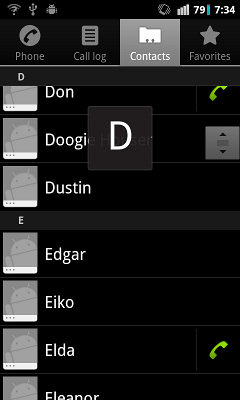
Lots of Android apps do a similar thing. The Contacts and Music apps, for instance, show overlays to let you know which part of the alphabet you’re on:

This is made possible by the use of the “fast scroll thumb,” i.e the little grooved square to the right. It allows you to zoom through your list contents and hone in on the item you want. It’s like blasting down the highway and watching the exit signs, versus crawling down a suburban street, inspecting each house number one-by-one. It’s a much better user experience.

So the fast scroll thumb is awesome. And to use it, all you have to do is add fastScrollEnabled=”true” to your ListView’s XML. The only catch? If you want to use it for anything other than alphabetical sorting, your section overlays are going to look like this:

Bleccch.

Yup, the overlay has a fixed width, so you can only really use it for single characters. What’s a poor Android developer to do?

As it turns out, the only way to fix this problem is to implement your own version of the Contacts app’s internal FastScrollView and hack it yourself. I wasn’t the first to discover this, but I did post some snippets of the solution to Stack Overflow back when I first implemented it in Pokédroid. Since then, I’ve been getting some questions and clarification requests on the original post, so I decided to go ahead and write a full demo app to show how it works. After all, Pokédroid is and will probably always remain closed-source, but this code at least is probably worth sharing.

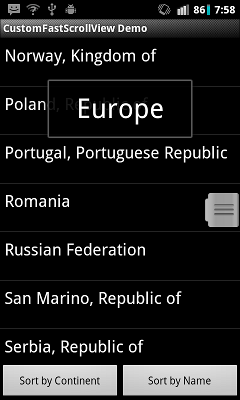
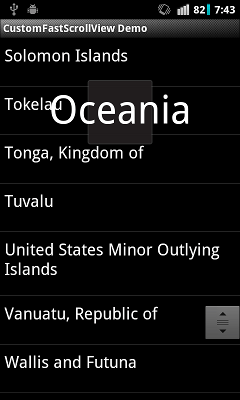
The demo app is on GitHub. Since Pokémon is kind of an esoteric subject, I decided to go with the topic of countries and continents instead. In this example, we’ve got a big list of countries, sorted either by continent or by country name. When you use continent-sorting, you can see overlays of the continents:

…and when you sort by the country name, you see alphabetic overlays instead:

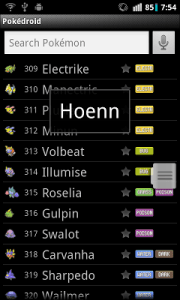
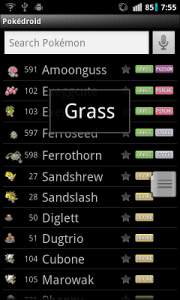
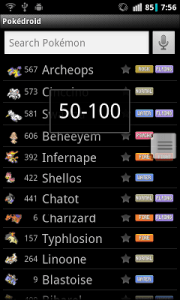
Of course, if you wanted to get really fancy, you could vary the width of the overlay based on what kind of sorting you’re using. But it should be clear enough how to do that from the source code. In any case, with Pokédroid, I had a handful of different sorting mechanisms, but the most common ones had rather long titles, so I just kept the width the same for all of them. In the end, it looked like this:

That’s Pokémon sorted by generation, type, and base HP. The possibilities are pretty endless. You can take your ListView and sort it, divide it, slice-n-dice it however you want.

The important thing is that “fast scroll” sections make for a better user experience. ListViews can hold a lot of data, but that doesn’t mean you should let your list get bloated and then leave all the hard scrolling up to the user. I have an app on my phone where the developer uses an unsectioned ListView with over 200 items. Two hundred! It takes almost five seconds just to scroll from top to bottom! That may not sound like much, but in the UI world, five seconds is an eternity.
Just imagine your poor users, holding their phone in one hand and flipping your ListView with the other hand, over and over again, like they’re trying to light a wet match. Then reflect on how much you could improve that experience with some fast scroll sections.

Well, ListView-abusing Android developers (you know who you are): now you have no excuse. The CustomFastScrollView code is public and open-source, so go use it. Get cracking!

App Tracker and Chord Reader go open-source

I recently open-sourced two of my Android apps – App Tracker and Chord Reader. You can find the code on GitHub.

I open-sourced them for very different reasons, although the catalyzing events were similar. In both cases, I had a request from a fellow dev for more information about the app, which made me question why I was keeping it closed-source in the first place. And in both cases, I couldn’t find a good reason to keep the code private.

App Tracker

But in a broader sense, the two apps mean very different things to me. App Tracker was a project that I poured a lot of effort into, but which turned into an unmitigated failure, with only 294 active users (and less than 4,000 downloads) after almost two years on the Android Market. It’s kind of embarrassing to admit now, but at the time I was writing it, I actually thought App Tracker would be my ticket into doing freelance app development as a full-time gig – hence the laughable premium version. Ultimately, though, the app suffered from bad design and bad marketing (can you guess what it does from the name and icon?), and it never really took off. So in this case, opening up the source means acknowledging my failure and cutting my losses. It’s a humbling moment.

Chord Reader

Chord Reader, on the other hand, was an app that I barely put any effort into, and against my expectations became pretty successful, with over 35,000 downloads (and 10,000 active users) after about a year. It’s even made me a modest amount of money from the AdMob campaign (about $100), although I put in the ads more out of curiosity than anything. I never really found the time or interest to keep maintaining this app, though, so it ended up becoming something of a neglected stepchild to me. There were lots of requests for new features (autoscroll, set lists, bluetooth integration), but for some reason I just couldn’t muster up the enthusiasm to implement them. So in this case, opening up the source means releasing my app to the community, where hopefully it will find more dedicated contributors. It also means getting rid of the ads (since there’s no point in having ads in an open-source app), which I’m actually relieved to do, because they weren’t making me enough money to justify uglifying up the UI.

Of course, a lot of code gets open-sourced, and a lot of it gets lost in the abyss of endless cyberspace. There’s no point in making a big show about releasing this code without explaining a bit about why anyone should bother looking at it. So here’s my brief run-down:

App Tracker reads the system logs (“logcat”) in a background Service and notes when other apps are being launched, which allows it to keep usage statistics. It should be interesting for anyone looking to write an app to detect when a third-party app has been started (which was the question from a fellow dev that prompted me to open-source it). For instance, all of the various “protect my apps with a password” security apps use this technique. Be forewarned, though: these methods are faulty, given that the Android OS treats with suspicion any Service that tries to run 24/7, and may kill your Service without warning.

Chord Reader reads chord charts downloaded from sites like AZChords.com and UltimateGuitar.com, parses the text, and displays information about the chords, including various guitar fingerings. The most interesting part is the system of regexes (really, a grammar) to parse the chords and determine, for instance, that “Abmaj7” and “G#M7” both mean the same thing: “A-flat, major quality, 7th added.” A good place to see this in action is the unit tests. Music geeks should get a kick out of it. And of course, anyone who just wants to contribute to the project (like the dev who first contacted me and suggested open-sourcing it) is welcome to create branches and pull requests on GitHub.

Oh, and in case I haven’t made it clear elsewhere, when I open-source something on GitHub, please assume that the license is the WTFPL license, or some other very permissive open-source license. I honestly don’t care what you do with the code, although hopefully you’ll be nice about it and give me credit. Happy coding!

One-star reviews are lousy bug reports

Puzzling over cryptic bug reports is a frustrating and unavoidable part of being a developer. When users want to complain to you about a bug, they just usually don’t think through all the pieces of data that might help solve the problem.

What OS are you using? What version of the software? What were you doing to cause the bug? When users are angry, they don’t want to deal with such tedious details. They just want to vent.

This happens with large software companies, small software companies, and indie developers alike. It’s such a common gripe among developers that it’s not even worth describing any further. Any seasoned dev knows what I’m talking about.

In the Android world, dealing with bug reports is even more frustrating, because they usually come in the form of 1-star reviews on the Android Market. 1-star reviews provide all the cathartic venting that users desire, without any of the useful information that could actually solve the problem.

Here are some actual 1- and 2-star reviews I’ve gotten on the Android Market:

  • didn’t open… gutted
  • There is no sound on moment would give higher rating when fixed
  • always forced close on samsung galaxy s. I have to uninstall it.

Yeah, not so helpful. Figuring out a bug from comments like these is like trying to solve a detective story with half the pages torn out.

Worst of all, these kinds of comments are dispiriting for developers, because star ratings are so crucial to getting your application to be highly ranked in the Market. My own recent app KeepScore had only 4- and 5-star reviews, and was starting to get ranked pretty highly, before receiving an onslaught of these nasty little comments:

Angry? Yes. Helpful? No.

KeepScore is designed to save scores automatically. In particular, it’s supposed to automatically save your scores whenever the app leaves the foreground, as shown here in the source code.

I couldn’t reproduce the data loss described in these reviews. Even when an incoming call disrupts an ongoing game, KeepScore gracefully exits and displays a comforting message saying, “Game automatically saved.” I’ve never seen it lose data.

So what happened here? Did the Android system kill the app before it could call the onPause() method and save the data (which, according to the Android Activity Lifecycle, shouldn’t happen)? Did the users just accidentally create a new game, so that it replaced the old one in the “Resume Last Game” section, making them think that the data had been lost? Who knows. Without a proper bug report, I have no idea what to make of this.

Bad reviews make the author feel better, but they rarely lead to better applications. I’m going to try not to let these reviews sour my experience with KeepScore, though, or discourage me from putting more effort into it. I want to get to the root of this problem.

So, loyal KeepScore users, have any of you run into this particular issue? If so, please report it on the GitHub page, and let’s squash this bug! Oh, and if I do manage to fix it, please leave a nice little comment for my trouble, will ya? It’d be nice to have some good reviews to offset all these bug reports.

CatLog now supports external Intents

As of version 1.3.2, you can now start up the main CatLog activity using an external Intent, with parameters for filter text and log level.

For Android developers, the idea is that you can just put a switch in your app where, if some debug variable is enabled, you can press a button or access a menu item to start up CatLog and search for text related to your app. This should make it less painful to do debugging, in situations where you don’t have access to adb logcat.

I’ve written a simple demo app on GitHub to show how to use the new Intent.  But the basic gist is that you want to paste something like this into your code:

Intent intent = new Intent("com.nolanlawson.logcat.intents.LAUNCH");

intent.putExtra("filter", myFilterText);
intent.putExtra("level", myLevelText);

startActivity(intent);

That’s it! Full documentation is below.

Intent

com.nolanlawson.logcat.intents.LAUNCH

Parameters

filter

Text to filter by.  Case doesn’t matter, and you can search for either process ids, tags, or log text.

level

Log level to set CatLog to, case insensitive.  One of:

  • E (error)
  • W (warn)
  • I (info)
  • D (debug)
  • V (verbose)
  • F (what a terrible failure)

CatLog is #1!

My goal with CatLog was to write the best darned Logcat app for Android, and in that regard I think I succeeded. But as long as the adequate but inferior aLogcat was ahead in the search results for “logcat,” I felt like my work was incomplete. After all, most people will just download the first app in the list without trying any others. How can I really say that I’ve written the “best Logcat app for Android,” when it’s not most people’s first choice?

Starting sometime this month, though, it finally happened – CatLog now shows up first in a search for “logcat” on the Android Market:

I’m ecstatic that my app is finally getting the recognition I think it deserves, but, to be honest, I’m also kind of puzzled as to why it suddenly managed to nudge ahead of aLogcat. Comparing the Market statistics of the two apps side-by-side, it’s not clear what makes CatLog stand out:

CatLog aLogcat
Released: Aug. 2010 Nov. 2009 (?)
Downloads: 10,000-50,000 100,000-500,000
Reviews: 587 1,683
Rating: 4.7 4.6
Updated: August 14, 2011 March 6, 2011
Android Version: 1.5 and up 1.5 and up
Category: Tools Tools
Size: 323k 39k
Price: Free Free
Content Rating: Everyone Everyone

There doesn’t seem to be a big difference in the ratings (4.7 vs. 4.6), and aLogcat has a considerably higher number of downloads and reviews. So what changed? I think this blog post might provide a clue. It seems that, besides downloads and ratings, Google’s ranking algorithm also takes into consideration the retention rate of an app – i.e. how many users actually keep the app installed, as opposed to those who just download it.

It’s impossible for me to know what aLogcat’s retention rate is, because Google doesn’t make that information public. But I do know that CatLog has 40,834 downloads and 15,487 active users, which gives it a retention rate of 38%. This is the highest retention rate out of my most popular apps (30% for Chord Reader, 18% for Japanese Name Converter, and 20% for Pokédroid), so I’m guessing it’s also higher than whatever aLogcat has. Considering that aLogcat was released almost a year before CatLog, maybe it initially attracted a large user base that later started flocking to my app? Who knows.

Alternatively, it could be the fact that I’ve recently updated CatLog, whereas aLogcat hasn’t been updated since March of 2011. If that’s the case, then aLogcat could quickly regain the lead by just releasing an update. This seems unlikely, though, given that such a system would be easily gameable by just releasing a new update every day. As I noted in a previous post, those kinds of shenanigans made the “Just In” section of the Android Market practically useless, so Google eventually nipped that practice in the bud.

Whatever the reason, it’s nice to see that quality apps do eventually drift to the top. Similarly, I’ve watched one of my other apps, KeepScore, jump from 11th to 3rd in a search for “score keeper.” I’m hoping that, by just being the quiet valedictorian in the back of the class, it can eventually make it to the top. CatLog proves that that’s possible.

State of the Android app union

I thought it might be useful to report on how all my apps are doing on the Android Market, in terms of downloads and active users. Hopefully this information will be helpful for someone looking to write their own app, or wondering what their chances of success are.

It’s worth mentioning that I’ve never marketed any of my apps, except for a short “house ad” campaign I did in Chord Reader to promote KeepScore. App development is a hobby for me, so I’ve found it more interesting to just release my apps into the wild and see whether they sink or swim. I’ve relied almost solely on the Android Market and word-of-mouth to build up my user base.

This may have worked better when I first started writing apps, which was around March of 2010, when Android was still in its infancy. Back then, the Android Market had less than 20,000 total apps, so you could get a decent amount of visibility by simply publishing your app. Today, the Android Market boasts over 250,000 apps, so it’s much easier to get lost in the crowd.

My Personality Type

For instance, when I released my second app, My Personality Type, in March of 2010, it was able to gain 3,000 downloads in a single week without any advertising. Most likely this is just because personality tests are fun, mine was free, and it was also only the second or third of its kind to be released on the Market. The app was later removed due to a takedown request from psychologist David Keirsey, so there’s no way of knowing if it could have maintained that stellar rate of growth, but it’s pretty impressive nonetheless. (Yes, Pokédroid was not my first run-in with copyright issues. I tried to work out a licensing agreement with Dr. Keirsey, but eventually he stopped responding to my emails.)

By comparison, my most recent app, KeepScore, has grown much more slowly. KeepScore only broke 1,000 downloads very recently, even though it’s been on the Market for almost two months, and despite the fact that I promoted it through house ads (where it got 8,091 impressions and 243 clicks). I’m guessing this is because the Android Market is already saturated with tons of score-keeping apps, so KeepScore doesn’t even show up in the top 10 in a search for “score,” “score keeper”, etc. Even though it’s the best of the bunch, it’s hard to stand out over apps that have been around longer, with more downloads and more reviews.

In general, though, I’ve found that the best determiners of an app’s success in the Market are 1) search engine optimization, 2) constant updates, and 3) short, easily understandable app summaries. I’ll describe each one in turn.

Search results for "score keeper."

Search engine optimization is important for the obvious reasons. Most users are going to discover your app by searching for some problem they’re trying to solve – “save battery,” “calorie counter,” “weather widget,” etc. Try to think of what need your app fulfills, and be sure to include those terms in your Android Market description. I always just add a section at the end where I write “seo:” and then list a bunch of terms related to the app.

Constant updating might not be something you’d imagine would contribute much to an app’s success, but anyone who’s worked in Android development long enough can testify to this. Back in the old days, this technique was enormously effective, because the Android Market app had a prominent “Just In” page that simply listed the most recently released or updated apps. For this reason, you’d often see spam apps (such as “Sexy Hot Girl #12”) releasing a new version every day, perhaps under the imaginative title of “version-20100614”. Anybody could just change a string, release a new version of their app, and watch the number of downloads spike.

Google seems to have cracked down on this practice since then, and the new Market app doesn’t even include a “Just In” page. Instead we now have “Top New Paid,” “Top New Free,” and “Trending,” which seem relatively free of spam. But updating from time to time can still be a boon to your app’s success. Users love getting updates, and when the updates stop rolling in, they tend to lose interest in your app and uninstall it. Go long enough without any updates, and you may even start hemorrhaging users. (We’ll see an example of this later.)

Search results for "logcat."

And finally, short, easily understandable app summaries are a crucial part of promoting your app through the Market. I believe most users will decide whether or not to install your app based on a glance at the search results, which means the icon and the name are key. The description, the reviews, and even the star rating are of secondary importance, in my opinion. (The star rating is almost meaningless, because all halfway decent apps will have at least 4 stars.)

So when you design your app, you need to ask yourself: 1) Is the icon attractive, and does it hint at the app’s functionality? and 2) Is the name simple, and does it effectively communicate what the app does? For illustration, I’ll point out that aLogcat beats out my own app, CatLog, by this measure. CatLog has a cute icon (which many users have complimented me on!), but I’ll admit it requires a little bit of extra mental effort to figure out what the app does. CatLog still has fewer downloads than aLogcat.

All of these are just tips based on my own personal experience, which means they’re mostly hunches and guesswork. Make of them what you will. But of course, the Android Market also provides us with some wonderful reporting tools, so I have some hard data to offer as well!

So without further ado, here’s the current state of all my apps in Android Market, in the order I wrote them. I report the total number of downloads, as well as the number of active users (i.e. installed copies of the app). Each graph shows the change in active users since January of 2011, which is when Google started providing these detailed statistics. You can ignore sudden spikes in the graph – I think those are bugs in the reporting tool.

Japanese Name Converter

Released March 2010
39,144 downloads
7,464 active users (19%)

My first app, which I never updated beyond version 1.0, is still fairly popular. Its popularity also seems to be pretty constant, since I imagine most people download it, get a kick out of it, and then uninstall it soon afterwards. That doesn’t bother me much, though, since this was basically just a “Hello World” app for me.

My Personality Type

Released March 2010
3,286 downloads
287 active users (8%)

As I noted above, My Personality Type only spent one week on the Android Market, due to a takedown notice from the author of the test. (I actually based this app on an assignment from one of my undergraduate computer science classes, so I didn’t know the test was under copyright.) Given it’s been off the Market for a year, I’m kind of amazed the app still has any active users at all.

Pokédroid

Released April 2010
451,492 downloads
125,576 active users (27%)


This chart still breaks my heart a little. The sudden bump in March corresponds to when I released the update for Pokémon Black/White, and the dip in June, of course, corresponds to when I removed the app from the Android Market due to a takedown notice from The Pokémon Company. At its height, it had 170,000 active users.

Offline Browser

Released June 2010
17,032 downloads
2,820 active users (16 %)

I wrote this app while I was attending the 2010 NAACL conference, because I wanted to be able to browse the conference proceedings, which were distributed as raw HTML and PDF files, on my phone. This app didn’t hold much interest for me afterwards, so I never looked back. (By the way, here’s my paper from that conference.)

App Tracker

Released July 2010
3,183 downloads
344 active users (10%)

With only 3,000 downloads over the course of a full year, App Tracker is a certified dud. As I was developing it, I actually believed it was going to be my breakthrough app, and that the revenue from the Premium version would allow me to quit my day job and do app development full-time. Unfortunately, the graveyard of lost ambitions is littered with such failures, and App Tracker never really got off the ground.

CatLog

Released August 2010
24,614 downloads
10,330 active users (41%)

Ah, CatLog – the phoenix that rose from the ashes of App Tracker. After App Tracker’s failure, I refashioned its log-reading component into a straight-up Logcat app, and now CatLog perseveres as my third-most popular app. In fact, it’s probably the app I’m most proud of after Pokédroid.

Chord Reader

Released October 2010
30,533 downloads
11,607 active users (38 %)

It’s a shame I never found this app very compelling to work on, because it’s actually my most popular app on the Market (now that Pokédroid is gone). I’m not really sure why it started bleeding users in late June, but if I had to guess, I’d say it’s because I haven’t updated it much over the past year. Like I mentioned above, users tend to lose interest when you don’t update, and I think that’s especially true when there are much-needed features they keep clamoring for. (In my case, users keep asking for an auto-scroll feature and setlists.)

KeepScore

Released June 2011
1,207 downloads
873 active users (72 %)

I would really, really like to see this app succeed more than it has. My goal with KeepScore was to create the end-all be-all best score keeper for Android, and in a sense I’ve failed simply because the app still doesn’t have much visibility in the Android Market. As I mentioned above, it doesn’t even come up in the top 10 in searches for “score” or “score keeper,” meaning that most users will probably never find it, and instead settle for an inferior app. I’m not sure what to do, though, other than wait for it to gain more downloads and ratings. I have no control over Google’s search rankings.

So that concludes my app-by-app report. But because it’s a lot of data to take in individually, I also created some charts comparing all the apps side by side:

Total downloads and active users

Total downloads and active users

This chart shows the total number of downloads and active users (as of today) per app. Obviously Pokédroid is an order of magnitude more popular than my other apps, so I also created a log-based version of the same chart:

Total downloads and active users (log)

Total downloads and active users (log)

Here it’s a little easier to compare the non-Pokédroid apps. Chord Reader, CatLog, and Japanese Name Converter are all reasonably successful, whereas Offline Browser and App Tracker are less so. With KeepScore and My Personality Type, it’s difficult to compare, because they’ve spent much less time on the Market than the others. So I also went ahead and created a chart showing the total number of downloads and active users divided by the approximate number of days spent in the Market:

Downloads and active users per day spent in Market

Here it’s easier to see which apps were more popular on a day-to-day basis. The most surprising finding is that My Personality Type apparently had more potential than I thought. Even though it was only on the Market for one week, it looks like it could have been as popular as Pokédroid if it hadn’t been taken down. (Funny that my most successful apps are also the ones that get targeted for copyright infringement! Take note, kids: you walk a fine line when you reuse other people’s content.)

And here’s the same graph with a log-based y-axis:

Downloads and active users per day spent in Market (log)

So there you have it. Of the apps I still have on the Market, Chord Reader, Japanese Name Converter, and CatLog are the most popular. Offline Browser and KeepScore take up the second tier, whereas App Tracker is an unmitigated failure. (I couldn’t even show App Tracker’s active users per day on this chart, because the value was less than 1, meaning the log value actually went negative.)

I wish I could say there was a way to know in advance whether an app is going to be a hit or a miss, but I think the Android Market is just too unpredictable for that. You really can’t know how popular an app is going to be until you put it out there. For me, though, this is the excitement of app development. More so than with any other kind of software development, you get immediate confirmation of whether or not people find your app useful. So if nothing else, it’s fun to throw darts at the board and see what sticks.

Update on Pokédroid

I’m still getting lots of comments and emails about Pokédroid, which was taken down from the Android Market last month due to a DMCA notice from The Pokémon Company. (See these posts.) Most of my blog traffic still seems to come from Pokédroid-related searches, which is not surprising given the more limited appeal of my other apps. (What – you guys aren’t as excited about my system log reader?) So I thought I’d do a little round-up of the commentary on Pokédroid and get everyone up to speed on where the app currently stands.

Tim Oliver, the developer of iPokédex, informs us that the app removal process for iPhone Pokédexes has now begun. The timing seems about right, given that the TPC lawyer I spoke to said that Apple’s process takes a bit longer than Google’s. Tim and other iOS developers are in talks with TPC right now, but if their experience is anything like mine, we can expect iPhone apps to be removed shortly.

None of this should be surprising, given that TPC is now venturing into territory previously occupied by fan developers. The recently released Pokédex 3D app for 3DS, although not a true strategy guide like Pokédroid, makes it clear why TPC would start to view fan-made apps as unwanted competition. The rhythm-action Pokémon games coming to Android and iPhone make this point even less ambiguously.

Liam Pomfret, the head of Bulbagarden, has been my most helpful contact point throughout this whole process, and he has an interesting editorial on Bulbanews laying out TPC’s case for taking down Pokédex apps. It’s very persuasive, and if nothing else it splashes some cold water on the impulsively negative fan reaction. He points out that all fan-made media (including Bulbagarden itself) is in violation of TPC’s copyrights, and so TPC is within its legal rights to selectively allow or disallow whatever content it wants. It’s debatable whether or not taking down Pokédex apps is actually in TPC’s own self-interest (I’ve argued it’s not), but the legal case is pretty difficult to dispute.

And in fact, even if Pokédex developers like myself did have a good case, we probably wouldn’t be doing ourselves any favors by taking it up in court. Recently there was the case of the Miles Davis afficionado who ended up paying $30,000 for a copyrighted photo he used in a tribute album. This was without any admission of guilt, and despite the fact that his lawyers thought they would have had a decent case if they had actually pursued it. The $30,000 settlement was simply the least expensive option available to him.

Now this may surprise you, but Pokédroid, as a hobby app, is not worth $30,000 to me. And if you think I could just get 30,000 of my 150,000 active users to each chip in a buck and cover my legal expenses, then you’ve never developed a mobile app before.

This is why I’ve rejected requests to open-source Pokédroid. As Liam pointed out above, open-source licenses still presume ownership of the IP content in the code, which means I’d be making myself a legal target just by publishing the code base. Even though I’m a die-hard Linux user who loves open-source, I have to admit that this isn’t really the time or place for it.

Anyway, I’ve been on good terms with TPC so far, so I have no incentive to do anything to try and spite them. Everyone I’ve spoken to at TPC has been very courteous and respectful towards me, and they’ve taken obvious care to explain their point of view and avoid any misunderstandings. They’ve even mentioned reading my blog posts (hullo out there!), so they’ve obviously got their finger on the pulse of the fanbase, and aren’t acting hastily or thoughtlessly.

My hope right now is just that they will offer to license Pokédroid or rebrand it as an official Pokémon app. In my ideal world, they would also let me open-source it, possibly in exchange for my help with the rebranding process. That way, I could gracefully hand the reins over to other fan developers (who would probably be more hardcore Pokémaniacs than me, and thus more diligent contributors), but the app would still remain an officially licensed product. TPC could continue to disallow unofficial apps on the Android Market if they wanted, but anybody would be able to contribute to the official app. The same community involvement that made Bulbapedia strong could make Pokédroid the best Pokémon resource on any mobile platform.

Admittedly, this scenario is a little starry-eyed. But even if TPC wasn’t keen on the open-source idea, I still have 19,000 lines of code that could save them a ton of time if they decided to build their own Android Pokédex app. Hopefully they’ll take me up on my offer, so that Pokédroid can get back in the Market, and back in the hands of the fans who find it so useful.

A small improvement for KeepScore

This week at the pub I took KeepScore for its first test run in a little game of four-person cribbage. It got high marks from my friends, who agreed that KeepScore was better than the other Android scoring apps we had tried. (But of course my friends would say that.) Still, I also received some useful criticism that informed an update I wrote later in the week.

It seems the biggest problem was that the bolded history items were too small, and therefore difficult to read. In light of this, I considered just upping the text size on all the history items, but then I realized: the only history item you’re usually interested in is the most recent one. When you’re trying to tap the button 7 times to add 7 points, you want to verify that you’ve actually added 7, instead of 6 or 8. But after you’ve given the player his/her points, you tend to stop paying attention until the next time you need to add points.

Before

After

So instead of the bold text, I decided to use little “badges” over the numbers (or “blibbets,” as we called them at my old company). I think they’re pretty neat looking, and they also make it dead simple to tell how many points you’ve added. After 10 seconds of inactivity, the badges disappear and move over to the history column instead. This has the added benefit of drawing a clear distinction between the modifiable and unmodifiable parts of the history.

Something else I noticed was that, in the long-press popup, the buttons were also too small and too hard to read. So I simply enlarged the text and gave the buttons more space relative to the EditText (which no one at the table used anyway).

Before

After

Both of these problems stemmed from the fact that I had only tested the app with the phone held in my hand, rather than flat on a table within reach of multiple people – which is how it’s actually used. Held in my hand, all the text on the screen is perfectly easy to read, but in the middle of a dimly-lit bar table, it’s another story.

In the end, this turned out to be one of those slap-yourself-on-the-forehead-it’s-so-obvious kinds of problems that you can only really discover through usability testing.