Archive for the ‘web components’ Category

Avoiding unnecessary cleanup work in disconnectedCallback

In a previous post, I said that a web component’s connectedCallback and disconnectedCallback should be mirror images of each other: one for setup, the other for cleanup.

Sometimes, though, you want to avoid unnecessary cleanup work when your component has merely been moved around in the DOM:

div.removeChild(component)
div.insertBefore(component, null)

This can happen when, for example, your component is one element in a list that’s being re-sorted.

The best pattern I’ve found for handling this is to queue a microtask in disconnectedCallback before checking this.isConnected to see if you’re still disconnected:

async disconnectedCallback() {
  await Promise.resolve()
  if (!this.isConnected) {
    // cleanup logic
  }
}

Of course, you’ll also want to avoid repeating your setup logic in connectedCallback, since it will fire as well during a reconnect. So a complete solution would look like:

connectedCallback() {
  // setup logic
  this._isSetUp = true
}

async disconnectedCallback() {
  await Promise.resolve()
  if (!this.isConnected && this._isSetUp) {
    // cleanup logic
    this._isSetUp = false
  }
}

For what it’s worth, Solid, Svelte, and Vue all use this pattern when compiled as web components.

If you’re clever, you might think that you don’t need the microtask, and can merely check this.isConnected. However, this only works in one particular case: if your component is inserted (e.g. with insertBefore/appendChild) but not removed first (e.g. with removeChild). In that case, isConnected will be true during disconnectedCallback, which is quite counter-intuitive:

However, this is not the case if removeChild is called during the “move”:

You can’t really predict how your component will be moved around, so sadly you have to handle both cases. Hence the microtask.

In the future, this may change slightly. There is a proposal to add a new moveBefore method, which would invoke a special connectedMoveCallback. However, this is still behind a flag in Chromium, and the API has not been finalized, so I’ll avoid commenting on it further.

This post was inspired by a discussion in the Web Components Community Group Discord with Filimon Danopoulos, Justin Fagnani, and Rob Eisenberg.

Web components are okay

Every so often, the web development community gets into a tizzy about something, usually web components. I find these fights tiresome, but I also see them as a good opportunity to reach across “the great divide” and try to find common ground rather than another opportunity to dunk on each other.

Ryan Carniato started the latest round with “Web Components Are Not the Future”. Cory LaViska followed up with “Web Components Are Not the Future — They’re the Present”. I’m not here to escalate, though – this is a peace mission.

I’ve been an avid follower of Ryan Carniato’s work for years. This post and the steady climb of LWC on the js-framework-benchmark demonstrate that I’ve been paying attention to what he has to say, especially about performance and framework design. The guy has single-handedly done more to move the web framework ecosystem forward in the past 5 years than anyone else I can think of.

That said, I also heavily work with web components, both on the framework side and as a component author. I’ve participated in the Web Components Community Group and Accessibility Object Model group, and I’ve written extensively on shadow DOM, custom elements, and web component accessibility in this blog.

So obviously I’m going to be interested when I see a post from Ryan Carniato on web components. And it’s a thought-provoking post! But I also think he misses the mark on a few things. So let’s dive in:

Performance

[T]he fundamental problem with Web Components is that they are built on Custom Elements.

[…] [E]very interface needs to go through the DOM. And of course this has a performance overhead.

This is completely true. If your goal is to build the absolute fastest framework you can, then you want to minimize DOM nodes wherever possible. This means that web components are off the table.

I fully believe that Ryan knows how to build the fastest possible framework. Again, the results for Solid on the js-framework-benchmark are a testament to this.

That said – and I might alienate some of my friends in the web performance community by saying this – performance isn’t everything. There are other tradeoffs in software development, such as maintainability, security, usability, and accessibility. Sometimes these things come into conflict.

To make a silly example: I could make DOM rendering slightly faster by never rendering any aria-* attributes. But of course sometimes you have to render aria-* attributes to make your interface accessible, and nobody would argue that a couple milliseconds are worth excluding screen reader users.

To make an even sillier example: you can improve performance by using for loops instead of .forEach(). Or using var instead of const/let. Typically, though, these kinds of micro-optimizations are just not worth it.

When I see this kind of stuff, I’m reminded of speedrunners trying to shave milliseconds off a 5-minute run of Super Mario Bros using precise inputs and obscure glitches. If that’s your goal, then by all means: backwards long jump across the entire stage instead of just having Mario run forward. I’ll continue to be impressed by what you’re doing, but it’s just not for me.

Minimizing the use of DOM nodes is a classic optimization – this is the main idea behind virtualization. That said, sometimes you can get away with simpler approaches, even if it’s not the absolute fastest option. I’d put “components as elements” in the same bucket – yes it’s sub-optimal, but optimal is not always the goal.

Similarly, I’ve long argued that it’s fine for custom elements to use different frameworks. Sometimes you just need to gradually migrate from Framework A to Framework B. Or you have to compose some micro-frontends together. Nobody would argue that this is the fastest possible interface, but fine – sometimes tradeoffs have to be made.

Having worked for a long time in the web performance space, I find that the lowest-hanging fruit for performance is usually something dumb like layout thrashing, network waterfalls, unnecessary re-renders, etc. Framework authors like myself love to play performance golf with things like the js-framework-benchmark, and it’s a great flex, but it just doesn’t usually matter in the real world.

That said, if it does matter to you – if you’re building for resource-constrained environments where every millisecond counts: great! Ditch web components! I will geek out and cheer for every speedrunning record you break.

The cost of standards

More code to ship and more code to execute to check these edge cases. It’s a hidden tax that impacts everyone.

Here’s where I completely get off the train from Ryan’s argument. As a framework author, I just don’t find that it’s that much effort to support web components. Detecting props versus attributes is a simple prop in element check. Outputting web components is indeed painful, but hey – nobody said you have to do it. Vue 2 got by with a standalone web component wrapper library, and Remount exists without any input from the React team.

As a framework author, if you want to freeze your thinking in 2011 and code as if nothing new was added to the web platform since then, you absolutely can! And you can still write a great framework! This is the beauty of the web. jQuery v1 is still chugging away on plenty of websites, and in fact it gets faster and faster with every new browser release, since browser perf teams are often targeting whatever patterns web developers used ~5 year ago in an endless cat-and-mouse game.

But assuming you don’t want to freeze your brain in amber, then yes: you do need to account for new stuff added to the web platform. But this is also true of things like Symbols, Proxys, Promises, etc. I just see it as part of the job, and I’m not particularly bothered, since I know that whatever I write will still work in 10 years, thanks to the web’s backwards compatibility guarantees.

Furthermore, I get the impression that a wide swath of the web development community does not care about web components, does not want to support them, and you probably couldn’t convince them to. And that’s okay! The web is a big tent, and you can build entire UIs based on web components, or with a sprinkling of HTML web components, or with none at all. If you want to declare your framework a “no web components” zone, then you can do that and still get plenty of avid fans.

That said, Ryan is right that, by blessing something as “the standard,” it inherently becomes a mental default that needs to be grappled with. Component authors must decide whether their <slot>s should work like native <slot>s. That’s true, but again, you could say this about a lot of new browser APIs. You have to decide whether IntersectionObserver or <img loading="lazy"> is worth it, or whether you’d rather write your own abstraction. That’s fine! At least we have a common point of reference, a shared vocabulary to compare and contrast things.

And just because something is a web standard doesn’t mean you have to use it. For the longest time, the classic joke about JavaScript: The Good Parts was how small it is compared to JavaScript: The Definitive Guide. The web is littered with deprecated (but still supported) APIs like document.domain, with, and <frame>s. Take it or leave it!

Conclusion

[I]n a sense there are nothing wrong with Web Components as they are only able to be what they are. It’s the promise that they are something that they aren’t which is so dangerous.

Here I totally agree with Ryan. As I’ve said before, web components are bad at a lot of things – Server-Side Rendering, accessibility, even interop in some cases. They’re good at plenty of things, but replacing all JavaScript frameworks is not one of them. Maybe we can check back in 10 years, but for now, there are still cases where React, Solid, Svelte, and friends shine and web components flounder.

Ryan is making an eminently reasonable point here, as is the rest of the post, and on its own it’s a good contribution to the discourse. The title is a bit inflammatory, which leads people to wield it as a bludgeon against their perceived enemies on social media (likely without reading the piece), but this is something I blame on social media, not on Ryan.

Again, I find these debates a bit tiresome. I think the fundamental issue, as I’ve previously said, is that people are talking past each other because they’re building different things with different constraints. It’s as if a salsa dancer criticized ballet for not being enough like salsa. There is more than one way to dance!

From my own personal experience: at Salesforce, we build a client-rendered app, with its own marketplace of components, with strict backwards-compatibility guarantees, where the intended support is measured in years if not decades. Is this you? If not, then maybe you shouldn’t build your entire UI out of web components, with shadow DOM and the whole kit-n-kaboodle. (Or maybe you should! I can’t say!)

What I find exciting about the web is the sheer number of people doing so many wild and bizarre things with it. It has everything from games to art projects to enterprise SaaS apps, built with WebGL and Wasm and Service Workers and all sorts of zany things. Every new capability added to the web platform isn’t a limitation on your creativity – it’s an opportunity to express your creativity in ways that nobody imagined before.

Web components may not be the future for you – that’s great! I’m excited to see what you build, and I might steal some ideas for my own corner of the web.

Update: Be sure to read Lea Verou’s and Baldur Bjarnason’s excellent posts on the topic.

Is it okay to make connectedCallback async?

One question I see a lot about web components is whether this is okay:

async connectedCallback() {
  const response = await fetch('/data.json')
  const data = await response.json()
  this._data = data
}

The answer is: yes. It’s fine. Go ahead and make your connectedCallbacks async. Thanks for reading.

What? You want a longer answer? Most people would have tabbed over to Reddit by now, but sure, no problem.

The important thing to remember here is that an async function is just a function that returns a Promise. So the above is equivalent to:

connectedCallback() {
  return fetch('/data.json')
    .then(response => response.json())
    .then(data => {
      this._data = data
    })
}

Note, though, that the browser expects connectedCallback to return undefined (or void for you TypeScript-heads). The same goes for disconnectedCallback, attributeChangedCallback, and friends. So the browser is just going to ignore whatever you return from those functions.

The best argument against using this pattern is that it kinda-sorta looks like the browser is going to treat your async function differently. Which it definitely won’t.

For example, let’s say you have some setup/teardown logic:

async connectedCallback() {
  await doSomething()
  window.addEventListener('resize', this._onResize)
}

async disconnectedCallback() {
  await undoSomething()
  window.removeEventListener('resize', this._onResize)
}

You might naïvely think that the browser is going to run these callbacks in order, e.g. if the component is quickly connected and disconnected:

div.appendChild(component)
div.removeChild(component)

However, it will actually run the callbacks synchronously, with any async operations as a side effect. So in the above example, the awaits might resolve in a random order, causing a memory leak due to the dangling resize listener.

So as an alternative, you might want to avoid async connectedCallback just to make it crystal-clear that you’re using side effects:

connectedCallback() {
  (async () => {
      const response = await fetch('/data.json')
      const data = await response.json()
      this._data = data
  })()
}

To me, though, this is ugly enough that I’ll just stick with async connectedCallback. And if I really need my async functions to execute sequentially, I might use the sequential Promise pattern or something.

Web component gotcha: constructor vs connectedCallback

A common mistake I see in web components is this:

class MyComponent extends HTMLElement {
  constructor() {
    super()
    setupLogic()
  }
  disconnectedCallback() {
    teardownLogic()
  }
}

This setupLogic() can be just about anything – subscribing to a store, setting up event listeners, etc. The teardownLogic() is designed to undo those things – unsubscribe from a store, remove event listeners, etc.

The problem is that constructor is called once, when the component is created. Whereas disconnectedCallback can be called multiple times, whenever the element is removed from the DOM.

The correct solution is to use connectedCallback instead of constructor:

class MyComponent extends HTMLElement {
  connectedCallback() {
    setupLogic()
  }
  disconnectedCallback() {
    teardownLogic()
  }
}

Unfortunately it’s really easy to mess this up and to not realize that you’ve done anything wrong. A lot of the time, a component is created once, inserted once, and removed once. So the difference between constructor and connectedCallback never reveals itself.

However, as soon as your consumer starts doing something complicated with your component, the problem rears its ugly head:

const component = new MyComponent()  // constructor

document.body.appendChild(component) // connectedCallback
document.body.removeChild(component) // disconnectedCallback

document.body.appendChild(component) // connectedCallback again!
document.body.removeChild(component) // disconnectedCallback again!

This can be really subtle. A JavaScript framework’s diffing algorithm might remove an element from a list and insert it into a different position in the list. If so: congratulations! You’ve been disconnected and reconnected.

Or you might call appendChild() on an element that’s already appended somewhere else. Technically, the DOM considers this a disconnect and a reconnect:

// Calls connectedCallback
containerOne.appendChild(component)

// Calls disconnectedCallback and connectedCallback
containerTwo.appendChild(component)

The bottom line is: if you’re doing something in disconnectedCallback, you should do the mirror logic in connectedCallback. If not, then it’s a subtle bug just lying in wait for the right moment to strike.

Note: See also “You’re (probably) using connectedCallback wrong” by Hawk Ticehurst, which offers similar advice.

Shadow DOM and the problem of encapsulation

Web components are kind of having a moment right now. And as part of that, shadow DOM is having a bit of a moment too. Or it would, except that much of the conversation seems to be about why you shouldn’t use shadow DOM.

For example, “HTML web components” are based on the idea that you should use most of the goodness of web components (custom elements, lifecycle hooks, etc.), while dropping shadow DOM like a bad habit. (Another name for this is “light DOM components.”)

This is a perfectly fine pattern for certain cases. But I also think some folks are confused about the tradeoffs with shadow DOM, because they don’t understand what shadow DOM is supposed to accomplish in the first place. In this post, I’d like to clear up some of the misconceptions by explaining what shadow DOM is supposed to do, while also weighing its success in actually achieving it.

What the heck is shadow DOM for

The main goal of shadow DOM is encapsulation. Encapsulation is a tricky concept to explain, because the benefits are not immediately obvious.

Let’s say you have a third-party component that you’ve decided to include on your website or webapp. Maybe you found it on npm, and it solved some use case very nicely. Let’s say it’s something simple, like a dropdown component.

Blue button that says click and has a downward-pointing chevron icon

You know what, though? You really don’t like that caret character – you’d rather have a 👇 emoji. And you’d really prefer rounded corners. And the theme color should be red instead of blue. So you hack together some CSS:

.dropdown {
  background: red;
  border-radius: 8px;
}
.dropdown .caret::before {
  content: '👇';
}

Red button that says click and has a downward-pointing index finger emoji icon

Great! You get the styling you want. Ship it.

Except that 6 months later, the component has an update. And it’s to fix a security vulnerability! Your boss is pressuring you to update the component as fast as possible, since otherwise the website won’t pass a security audit anymore. So you go to update, and…

Everything’s broken.

It turns out that the component changed their internal class name from dropdown to picklist. And they don’t use CSS content for the caret anymore. And they added a wrapper <div>, so the border-radius needs to be applied to something else now. Suddenly you’re in for a world of hurt, just to get the component back to the way it used to look.

Global control is great until it isn’t

CSS gives you an amazing superpower, which is that you can target any element on the page as long as you can think of the right selector. It’s incredibly easy to do this in DevTools today – a lot of people are trained to right-click, “Inspect Element,” and rummage around for any class or attribute to start targeting the element. And this works great in the short term, but it affects the long-term maintainability of the code, especially for components you don’t own.

This isn’t just a problem with CSS – JavaScript has this same flaw due to the DOM. Using document.querySelector (or equivalent APIs), you can traverse anywhere you want in the DOM, find an element, and apply some custom behavior to it – e.g. adding an event listener or changing its internal structure. I could tell the same story above using JavaScript rather than CSS.

This openness can cause headaches for component authors as well as component consumers. In a system where the onus is on the component author to ship new versions (e.g. a monorepo, a platform, or even just a large codebase), component authors can effectively get frozen in time, unable to ship any internal refactors for fear of breaking their downstream consumers.

Shadow DOM attempts to solve these problems by providing encapsulation. If the third-party dropdown component were using shadow DOM, then you wouldn’t be able to target arbitrary content inside of it (except with elaborate workarounds that I don’t want to get into).

Of course, by closing off access to global styling and DOM traversal, shadow DOM also greatly limits a component’s customizability. Consumers can’t just decide they want a background to be red, or a border to be rounded – the component author has to provide an explicit styling API, using tools like CSS custom properties or parts. E.g.:

snazzy-dropdown {
  --dropdown-bg: red;
}

snazzy-dropdown::part(caret)::before {
  content: '👇';
}

By exposing an explicit styling API, the risk of breakage across component upgrades is heavily reduced. The component author is effectively declaring an API surface that they intend to support, which limits what they need to keep stable over time. (This API can still break, as with a major version bump, but that’s another story.)

Tradeoffs

When people complain about shadow DOM, they seem to mostly be complaining about style encapsulation. They want to reach in and add a rounded corner on some component, and roll the dice that the component doesn’t change in the future. Depending on what kind of website you’re building, this can be a perfectly acceptable tradeoff. For example:

  • A portfolio site
  • A news article with interactive charts
  • A marketing site for a Super Bowl campaign
  • A landing page that will be rewritten in 2 years anyway

In all of these cases, long-term maintenance is not really a big concern. The page either has a limited shelf life, or it’s just not important to keep its dependencies up to date. So if the dropdown component breaks in a year or two, nobody cares.

Of course, there is also the opposite world where long-term maintenance matters a lot:

  • An interactive productivity app
  • A design system
  • A platform with its own app store for UI components
  • An online multiplayer game

I could go on, but the point is: the second group cares a lot more about long-term maintainability than the first group. If you’ve spent your entire career working on the first group, then you may indeed find shadow DOM to be baffling. You can’t possibly understand why you should be prevented from globally styling whatever you want.

Conversely, if you’ve spent your entire career in the second group, then you may be equally baffled by people who want global access to everything. (“Are they trying to shoot themselves in the foot?”) This is why I think people are often talking past each other about this stuff.

But does it work

So now that we’ve established the problem shadow DOM is trying to solve, there’s the inevitable question: does it actually solve it?

This is an important question, because I think it’s the source of the other major tension with shadow DOM. Even people who understand the problem are not in agreement that shadow DOM actually solves it.

If you want to get a good sense of people’s frustrations with shadow DOM, there are two massive GitHub threads you can check out:

There are a lot of potential solutions being tossed around in those threads (including by me), but I’m not really convinced that any one of them is the silver bullet that is going to solve people’s frustrations with shadow DOM. And the reason is that the core problem here is a coordination problem, not a technical problem.

For example, take “open-stylable shadow roots.” The idea is that a shadow root can inherit the styles from its parent context (exactly like light DOM). But then of course, we get into the coordination problem:

  • Will every web component on npm need to enable open-stylable shadow roots?
  • Or will page authors need a global mechanism to force every component into this mode?
  • What if a component author doesn’t want to be opted-in? What if they prefer the lower maintenance costs of a small API surface?

There’s no right answer here. And that’s because there’s an inherent conflict between the needs of the component author and the page author. The component author wants minimal maintenance costs and to avoid breaking their downstream consumers with every update, and the page author wants to style every component on the page to pixel-perfect precision, while also never being broken.

Stated that way, it sounds like an unsolvable problem. In practice, I think the problem gets solved by favoring one group over the other, which can make some sense depending on the context (largely based on whether your website is in group one or group two above).

A potential solution?

If there is one solution I find promising, it’s articulated by my colleague Caridy Patiño:

Build building blocks that encapsulate logic and UI elements that are “fully” customizable by using existing mechanisms (CSS properties, parts, slots, etc.). Everything must be customizable from outside the shadow.

If a building block is using another building block in its shadow, it must do it as part of the default content of a well-defined slot.

Essentially, what Caridy is saying is that instead of providing a dropdown component to be used like this:

<snazzy-dropdown></snazzy-dropdown>

… you instead provide one like this:

<snazzy-dropdown>
  <snazzy-trigger>
    <button>Click ▼</button>
  </snazzy-trigger>
  <snazzy-listbox>
    <snazzy-option>One</snazzy-option>
    <snazzy-option>Two</snazzy-option>
    <snazzy-option>Three</snazzy-option>
  </snazzy-listbox>
</snazzy-dropdown>

In other words, the component should expose its “guts” externally (using <slot>s in this example) so that everything is stylable. This way, anything the consumer may want to customize is fully exposed to light DOM.

This is not a totally new idea. In fact, outside of the world of web components, plenty of component systems have run into similar problems and arrived at similar solutions. For example, so-called “headless” component systems (such as Radix UI, Headless UI, and Tanstack) have embraced this kind of design.

For comparison, here is an (abridged) example of the dropdown menu from the Radix docs:

<DropdownMenu.Root>
  <DropdownMenu.Trigger>
    <Button variant="soft">
      Options
      <CaretDownIcon />
    </Button>
  </DropdownMenu.Trigger>
  <DropdownMenu.Content>
    <DropdownMenu.Item shortcut="⌘ E">Edit</DropdownMenu.Item>
    <DropdownMenu.Item shortcut="⌘ D">Duplicate</DropdownMenu.Item>
    <!-- ... --->
  <DropdownMenu.Content>
<DropdownMenu.Root>

This is pretty similar to the web component sketch above – the “guts” of the dropdown are on display for all to see, and anything in the UI is fully customizable.

To me, though, these solutions are clearly taking the burden of complexity and shifting it from the component author to the component consumer. Rather than starting with the simplest case and providing a bare-bones default, the component author is instead starting with the complex case, forcing the consumer to (likely) copy-paste a lot of boilerplate into their codebase before they can start tweaking.

Now, maybe this is the right solution! And maybe the long-term maintenance costs are worth it! But I think the tradeoff should still be acknowledged.

As I understand it, though, these kinds of “headless” solutions are still a bit novel, so we haven’t gotten a lot of real-world data to prove the long-term benefits. I have no doubt, though, that a lot of component authors see this approach as the necessary remedy to the problem of runaway configurability – i.e. component consumers ask for every little thing to be configurable, all those configuration options get shoved into one top-level API, and the overall experience starts to look like recursive Swiss Army Knives. (Tanner Linsley gives a great talk about this, reflecting on 5 years of building React Table.)

Personally, I’m intrigued by this technique, but I’m not fully convinced that exposing the “guts” of a component really reduces the overall maintenance cost. It’s kind of like, instead of selling a car with a predefined set of customizations (color, window tint, automatic vs manual, etc.), you’re selling a loose set of parts that the customer can mix-and-match into whatever kind of vehicle they want. Rather than a car off the assembly line, it reminds me of a jerry-rigged contraption from Minecraft or Zelda.

Screenshot from Zelda Tears of the Kingdom showing Link riding a four-wheeled board with a ball and a fan glued to it

In Tears of the Kingdom, you can glue together just about anything, and it will kind of work.

I haven’t worked on such a component system, but I’d worry that you’d get bugs along the lines of, “Well, when I put the slider on the left it works, but when I put it on the right, the scroll position gets messed up.” There is so much potential customizability, that I’m not sure how you could even write tests to cover all the possible configurations. Although maybe that’s the point – there’s effectively no UI, so if the UI is messed up, then it’s the component consumer’s job to fix it.

Conclusion

I don’t have all the answers. At this point, I just want to make sure we’re asking the right questions.

To me, any proposed solution to the current problems with shadow DOM should be prefaced with:

  • What kind of website or webapp is the intended context?
  • Who stands to benefit from this change – the component author or page author?
  • Who needs to shift their behavior to make the whole thing work?

I’m also not convinced that any of this stuff is ripe enough for the standards discussion to begin. There are so many options that can be explored in userland right now (e.g. the “expose the guts” proposal, or a polyfill for open-stylable shadow roots), that it’s premature to start asking standards bodies to standardize anything.

I also think that the inherent conflict between the needs of component authors and component consumers has not really been acknowledged enough in the standards discussions. And the W3C’s priority of constituencies doesn’t help us much here:

User needs come before the needs of web page authors, which come before the needs of user agent implementors, which come before the needs of specification writers, which come before theoretical purity.

In the above formulation, there’s no distinction between component authors and component consumers – they are both just “web page authors.” I suppose conceptually, if we imagine the whole web platform as a “stack,” then we would place the needs of component consumers over component authors. But even that gets muddy sometimes, since component authors and component consumers can work on the same team or even be the same person.

Overall, what I would love to see is a thorough synopsis of the various groups involved in the web component ecosystem, how the existing solutions have worked in practice, what’s been tried and what hasn’t, and what needs to change to move forward. (This blog post is not it; this is just my feeble groping for a vocabulary to even start talking about the problem.)

In my mind, we are still chasing the holy grail of true component reusability. I often think back to this eloquent talk by Jan Miksovsky, where he explains how much has been standardized in the world of building construction (e.g. the size of windows and door frames), whereas us web developers are still stuck rebuilding the same thing over and over again. I don’t know if we’ll ever reach true component reusability (or if building construction is really as rosy as he describes – I can barely wield a hammer), but I do know that I still find the vision inspiring.
Rebuilding emoji-picker-element on a custom framework

In my last post, we went on a guided tour of building a JavaScript framework from scratch. This wasn’t just an intellectual exercise, though – I actually had a reason for wanting to build my own framework.

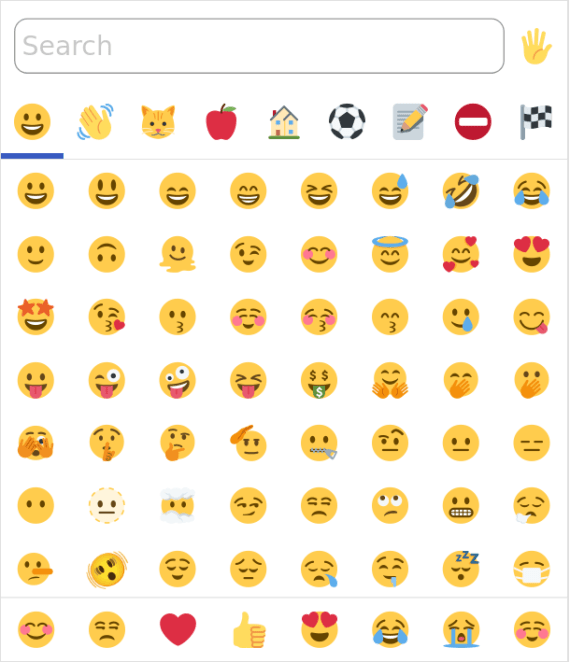
For a few years now, I’ve been maintaining emoji-picker-element, which is designed as a fast, simple, and lightweight web component that you can drop onto any page that needs an emoji picker.

Screenshot of an emoji picker showing a search box and a grid of emoji

Most of the maintenance work has been about simply keeping pace with the regular updates to the Unicode standard to add new emoji versions. (Shout-out to Emojibase for providing a stable foundation to build on!) But I’ve also worked to keep up with the latest Svelte versions, since emoji-picker-element is based on Svelte.

The project was originally written in Svelte v3, and the v4 upgrade was nothing special. The v5 upgrade was only slightly more involved, which is astounding given that the framework was essentially rewritten from scratch. (How Rich and the team managed to pull this off boggles my mind.)

I should mention at this point that I think Svelte is a great framework, and a pleasure to work with. It’s probably my favorite JavaScript framework (other than the one I work on!). That said, a few things bugged me about the Svelte v5 upgrade:

  • It grew emoji-picker-element‘s bundle size by 7.1kB minified (it was originally a bit more, but Dominic Gannaway graciously made improvements to the tree-shaking).
  • It dropped support for older browsers due to syntax changes, in particular Safari 12 (which is 0.25-0.5% of browsers depending on who you ask).

Now, neither of these things really ought to be a dealbreaker. 7.1kB is not a huge amount for the average webapp, and an emoji picker should probably be lazy-loaded most of the time anyway. Also, Safari 12 might not be worth worrying about (and if it is, it won’t be in a couple years).

I also don’t think there’s anything wrong with building a standalone web component on top of a JavaScript framework – I’ve said so in the past. There are lots of fiddly bits that are hard to get right when you’re building a web component, and 99 times out of 100, you’re much better off using something like Svelte, or Lit, or Preact, or petite-vue, than to try to wing it yourself in Vanilla JS and building a half-baked framework in the process.

That said… I enjoy building a half-baked framework. And I have a bit of a competitive streak that makes me want to trim the bundle size as much as possible. So I decided to take this as an opportunity to rebuild emoji-picker-element on top of my own custom framework.

The end result is more or less what you saw in the previous post: a bit of reactivity, a dash of tagged template literals, and poof! A new framework is born.

This new framework is honestly only slightly more complex than what I sketched out in that post – I ended up only needing 85 lines of code for the reactivity engine and 233 for the templating system (as measured by cloc).

Of course, to get this minuscule size, I had to take some shortcuts. If this were an actual framework I was releasing to the world, I would need to handle a long tail of edge cases, perf hazards, and gnarly tradeoffs. But since this framework only needs to support one component, I can afford to cut some corners.

So does this tiny framework actually cut the mustard? Here are the results:

  • The bundle size is 6.1kB smaller than the current implementation (and ~13.2kB smaller than the Svelte 5 version).
  • Safari 12 is still supported (without needing code transforms).
  • There is no regression in runtime performance (as measured by Tachometer).
  • Initial memory usage is reduced by 140kB.

Here are the stats:

Metric Svelte v4 Svelte v5 Custom
Bundle size (min) 42.6kB 49.7kB 36.5kB
↳ Delta +7.1kB (+17%) -6.1kB (-14%)
Bundle size (min+gz) 14.9kB 18.8kB 12.6kB
↳ Delta +3.9kB (+26%) -2.3kB (-15%)
Initial memory usage 1.23MB 1.5MB 1.09MB
↳ Delta +270kB (+22%) -140kB (-11%)

Note: I’m not trying to say that Svelte 5 is bad, or that I’m smarter than the Svelte developers. As mentioned above, the only way I can get these fantastic numbers is by seriously cutting a lot of corners. And I actually really like the new features in Svelte v5 (snippets in particular are amazing, and the benchmark performance is truly impressive). I also can’t fault Svelte for focusing on their most important consumers, who are probably building entire apps out of Svelte components, and don’t care much about a higher baseline bundle size.

So was it worth it? I dunno. Maybe I will get a flood of bug reports after I ship this, and I will come crawling back to Svelte. Or maybe I will find that it’s too hard to add new features without the flexibility of a full framework. But I doubt it. I enjoyed building my own framework, and so I think I’ll keep it around just for the fun of it.

Side projects for me are always about three things: 1) learning, 2) sharing something with the world, and 3) having fun while doing so. emoji-picker-element ticks all three boxes for me, so I’m going to stick with the current design for the time being.

Catching errors thrown from connectedCallback

Here’s a deep-in-the-weeds thing about web components that I ran into recently.

Let’s say you have a humble component:

class Hello extends HTMLElement {}
customElements.define('hello-world', Hello);

And let’s say that this component throws an error in its connectedCallback:

class Hello extends HTMLElement {
  connectedCallback() {
    throw new Error('haha!');
  }
}

Why would it do that? I dunno, maybe it needs to validate its props or something. Or maybe it’s just having a bad day.

In any case, you might wonder: how could you test this functionality? You might naïvely try a try/catch:

const element = document.createElement('hello-world');
try {
  document.body.appendChild(element);
} catch (error) {
  console.log('Caught?', error);
}

Unfortunately, this doesn’t work:

In the DevTools console, you’ll see:

Uncaught Error: haha!

Our elusive error is uncaught. So… how can you catch it? In the end, it’s fairly simple:

window.addEventListener('error', event => {
  console.log('Caught!', event.error);
});
document.body.appendChild(element);

This will actually catch the error:

As it turns out, connectedCallback errors bubble up directly to the window, rather than locally to where you called appendChild. (Even though appendChild is what caused connectedCallback to fire in the first place. For the spec nerds out there, this is apparently called a custom element callback reaction.)

Our addEventListener solution works, but it’s a little janky and error-prone. In short:

  • You need to remember to call event.preventDefault() so that nobody else (like your persnickety test runner) catches the error and fails your tests.
  • You need to remember to call removeEventListener (or AbortSignal if you’re fancy).

A full-featured utility might look like this:

function catchConnectedError(callback) {
  let error;
  const listener = event => {
    event.preventDefault();
    error = event.error;
  };
  window.addEventListener('error', listener);
  try {
    callback();
  } finally {
    window.removeEventListener('error', listener);
  }
  return error;
}

…which you could use like so:

const error = catchConnectedError(() => {
  document.body.appendChild(element);
});
console.log('Caught!', error);

If this comes in handy for you, you might add it to your testing library of choice. For instance, here’s a variant I wrote recently for Jest.

Hope this quick tip was helpful, and keep connectin’ and errorin’!

Update: This is also true of any other “callback reactions” such as disconnectedCallback, attributeChangedCallback, form-associated custom element lifecycle callbacks, etc. I’ve just found that, most commonly, you want to catch errors from connectedCallback.

Use web components for what they’re good at

Web components logo of two wrenches together

Dave Rupert recently made a bit of a stir with his post “If Web Components are so great, why am I not using them?”. I’ve been working with web components for a few years now, so I thought I’d weigh in on this.

At the risk of giving the most senior-engineer-y “It depends” answer ever: I think web components have strengths and weaknesses, and you have to understand the tradeoffs before deciding when to use them. So let’s explore some cases where web components really shine, before moving on to where they might fall flat.

Client-rendered leaf components

To me, this is the most unambiguously slam-dunk use case for web components. You have some component at the leaf of the DOM tree, it doesn’t need to be rendered server-side, and it doesn’t <slot> any content inside of it. Examples include: a rich text editor, a calendar widget, a color picker, etc.

At this point, you’ve already bypassed a bunch of tricky bits of web components, such as Server-Side Rendering (SSR), hydration, slotting, maybe even shadow DOM. If you’re not using a framework, or you’re using one that supports web components, you can just plop the <fancy-component> tag into your template or JSX and call it a day.

For instance, take my emoji-picker-element. It’s one line of HTML to import it:

<script type="module" href="https://cdn.jsdelivr.net/npm/emoji-picker-element@1/index.js"></script>

And one line to use it:

<emoji-picker></emoji-picker>

No bundler, no transpiler, no framework integration, just copy-paste. It’s almost like ye olde days of jQuery plugins. And yet, I’ve also seen it used in complex SPA projects – web components can run the gamut.

This is about as close as you can get to the original vision for web components, which is that using <fancy-element> should be as easy as using built-in HTML elements.

Glue code, or avoiding the big rewrite

Picture this: you’ve got a big React codebase, it’s served you well for a while, but now your team wants to move to Svelte. Time to rewrite the whole thing, right? Including finding new Svelte versions of every third-party component you’re using?

This is the way a lot of frontend devs think about frameworks, with all these huge switching costs when moving from one to the other. The biggest misconception I’ve seen about web components is that they’re just another flavor of the same story.

They’re not. The whole point of web components is to liberate us from this churn. If you decide to switch from Vue to Lit, or from Angular to Stencil (or whatever), and if you’re rewriting all your components in one go, then you’re signing up for a lot of unnecessary pain.

Just let your old code and your new code live side-by-side. Use web components as the interoperability later to glue the two together. You don’t need to rewrite everything all at once:

<old-component>
  <new-component>
  </new-component>
</old-component>

Web components can pass props/attributes down, and send events back up. (That’s kind of their whole thing.) If your framework supports web components, then this works out of the box. (And if not, you can write some lite glue code.)

Now, some people get squeamish at the idea of two frameworks living on the same page, but I think this is more gut-based than evidence-based. And to be fair, if you’re using a meta-framework to do SSR/hydration, then this partial migration may be easier said than done. But if web components are good at anything, it’s defining a high-level contract for composing two components together, on the client side anyway.

So if you’re tired of rewriting your whole UI every year (or your boss is tired of you doing it), then maybe web components are worth considering.

Design systems and enterprise

If you watch Cassondra Robert’s talk from CSS Day, there’s a nice slide with a lot of corporate logos attesting to web components’ penetration:

CSS Day talk screenshot showing Cassondra Roberts alongside a slide showing company logos of Adobe, RedHat, Microsoft, IBM, Google, Apple, ING, GitHub, Netlify, Salesforce, GitLab

If this isn’t enough, you could also look at Oracle, SAP, ServiceNow… the list goes on and on.

What you’ll notice is that a lot of big companies (like the one I work for) are quietly using web components, especially in their design systems and component libraries. If you spend a lot of time on webdev social media, this might surprise you. It might also surprise you to learn that, by some measures, React is used on roughly 8% of page loads, whereas web components are used on 20%.

The thing is, a lot of big companies are not on social media (Twitter/X, Reddit, etc.) trying to sell you on web components or teach you how to use them. On the other hand, there are plenty of tech influencers on Twitter busily keeping up to date with every minor version of React and what’s new in that ecosystem. The reason for this is pretty simple: big companies tend to talk a lot internally, but not so much externally, whereas small companies (agencies, startups, freelancers, etc.) tend to be more active on social media relative to their company size. So if web components are more popular inside the enterprise than outside of it, you’d never know it from browsing Twitter all day.

So why are big enterprises so gaga for web components? For one thing, design systems based on web components work across a variety of environments. A big company might have frontends written in React, Angular, Ember, and static HTML, and they all have to play nicely with the company’s theming and branding. The big rewrite (as described above) may be a fun exercise for your average startup, but it’s just not practical in the enterprise world.

Having a lot of consumers of your codebase, and having to think on longer timescales, just leads to different technical decisions. And to me, this points to the main reason enterprises love web components: stability and longevity.

Think about your average React codebase, and how updating any dependency (React Router, Redux, React itself, etc.) can lead to a weeks-long effort of rewriting your code to accommodate all the breaking changes. Cue the inevitable appearance of Hyrum’s Law at enterprise scale, where even a tiny change can cause a butterfly effect that breaks thousands of components, and even bumping a minor version can lead to weeks of testing, validating, and documenting. In this world, your average React minor version bump is an ordeal – a major version bump is a disaster.

Compare this to the backwards-compatibility guarantees of the web platform, where the venerable Space Jam website from 1996 still works to this day. Web components hook into this stability story, which is a huge plus for any company that doesn’t have the luxury of rewriting their frontend every couple years.

When you use a web component, connectedCallback is just connectedCallback – it’s not going to change. And shadow DOM style scoping, with all of its subtleties, is not going to change either. Whatever code you can delegate to the browser, that’s code you’re not having to maintain or validate over the years; you’ve effectively outsourced that responsibility to Google, Apple, and Mozilla.

Enterprises are slow, cautious, and risk-averse – just like the web platform. No wonder web components have taken the enterprise world by storm.

Downsides of web components

All of the pluses of web components should be weighed against their weaknesses. And web components have their fair share:

  • Server-side rendering (SSR). I would argue that this is still not a solved problem in web-components-land. Sure, we have Declarative Shadow DOM, but that’s just one part of the puzzle. There’s no standard for rendering web components on the server, so every framework does it a bit differently. The fact that Lit SSR is still under “Lit Labs” should tell you something. Maybe in the future, when you can render 3 different web component frameworks on the server, and they compose together and hydrate nicely, then I’ll consider this solved. But I think we’re a few years away from that, at least.
  • Accessibility. You can’t have ARIA references that easily cross shadow boundaries, and dialogs and focus can be tricky. At the very least, if you don’t want to mess up accessibility, then you have to think really carefully about your component structure from day one. There’s a lot of ongoing work to solve this, but I’d say it’s definitely rough out there in 2023.

Aside from that, there are also problems of lock-in (e.g. meta-frameworks, bundlers, test runners), the ongoing legacy of IE11 (some folks are scarred for life; the last thing they want to do is #useThePlatform), and overall platform exhaustion (“I learned React, it works, I don’t want to learn something else”). Not everyone is going to be sold on web components, and I’m fine with that. The web is a big tent, and everybody is using it for different things; that’s part of what makes it so amazing.

Conclusion

Use web components. Or don’t use them. Or come back and check in again in a few years, when the features and web standards are a bit more fleshed out.

I think web components are cool, but I understand that not everyone feels the same way. I don’t feel like I need to go around evangelizing for their adoption. They’re just another tool in the toolbelt; the trick is leveraging their strengths while avoiding their pitfalls.

The thing I like about web components, and web standards in general, is that I get to outsource a bunch of boring problems to the browser. How do I compose components? How do I scope styles? How do I pass data around? Who cares – just take whatever the browser gives you. That way, I can spend more time on the problems that actually matter to my end-users, like performance, accessibility, security, etc.

Too often, in web development, I feel like I’m wrestling with incidental complexity that has nothing to do with the actual problem at hand. I’m wrangling npm dependencies, or debugging my state manager, or trying to figure out why my test runner isn’t playing nicely with my linter. Some people really enjoy this kind of stuff, and I find myself getting sucked into it sometimes too. But I think ultimately it’s a kind of fake-work that feels good but doesn’t accomplish much, because your end-user doesn’t care if your bundler is up-to-date with your TypeScript transpiler.

That said, in 2023, choosing web components comes with its own baggage of incidental complexity, such as the aforementioned problems of SSR and accessibility. Compromising on either of those things could actively harm your end-users in ways that actually matter to them, so the tradeoff may not be worth it to you.

I think the tradeoff is often worth it, but again, there are nuances here. “Use web components for what they’re good at” isn’t catchy, but it’s a good way to think about it in 2023.

Thanks to Westbrook Johnson for feedback on a draft of this blog post.

Shadow DOM and accessibility: the trouble with ARIA

Shadow DOM is a kind of retcon for the web. As I’ve written in the past, shadow DOM upends a lot of developer expectations and invalidates many tried-and-true techniques that worked fine in the pre-shadow DOM world. One potentially surprising example is ARIA.

Quick recap: shadow DOM allows you to isolate parts of your DOM into encapsulated chunks – typically one per component. Meanwhile, ARIA is an accessibility primitive, which defines attributes like aria-labelledby and aria-describeddby that can reference other elements by their IDs.

Do you see the problem yet? If not, I don’t blame you ‒ this is a tricky intersection of various web technologies. Unfortunately though, if you want to use shadow DOM without breaking accessibility, then this is one of the things you will have to grapple with. So let’s dive in.

Sketch of the problem

In shadow DOM, element IDs are scoped to their shadow root. For instance, here are two components:

<custom-label>
  #shadow-root
    <label id="foo">Hello world</label>
</custom-label>

<custom-input>
  #shadow-root
    <input type="text" id="foo">
</custom-input>

In this case, the two elements have the same ID of "foo". And yet, this is perfectly valid in the world of shadow DOM. If I do:

document.getElementById('foo')

…it will actually return null, because these IDs are not globally scoped – they are locally scoped to the shadow root of each component:

document.querySelector('custom-label')
  .shadowRoot.getElementById('foo') // returns the <label>

document.querySelector('custom-input')
  .shadowRoot.getElementById('foo') // returns the <input>

So far, so good. But now, what if I want to use aria-labelledby to connect the two elements? I could try this:

<!-- NOTE: THIS DOES NOT WORK -->
<custom-input>
  #shadow-root
    <input type="text" aria-labelledby="foo">
</custom-input>

Why does this fail? Well, because the "foo" ID is locally scoped. This means that the <input> cannot reach outside its shadow DOM to reference the <label> from the other component. (Feel free to try this example in any browser or screen reader – it will not work!)

So how can we solve this problem?

Solution 1: janky workarounds

The first thing you might reach for is a janky workaround. For instance, you could simply copy the text content from the <label> and slam it into the <input>, replacing aria-labelledby with aria-label:

<custom-input>
  #shadow-root
    <input type="text" aria-label="Hello world">
</custom-input>

Now, though, you’ve introduced several problems:

  1. You need to set up a MutationObserver or similar technique to observe whenever the <label> changes.
  2. You need to accurately calculate the accessible name of the <label>, and many off-the-shelf JavaScript libraries do not themselves support shadow DOM. So you have to hope that the contents of the <label> are simple enough for the calculation to work.
  3. This works for aria-labelledby because of the corresponding aria-label, but it doesn’t work for other attributes like aria-controls, aria-activedescendant, or aria-describedby. (Yes there is aria-description, but it doesn’t have full browser support.)

Another workaround is to avoid using the <input> directly, and to instead expose semantics on the custom element itself. For instance:

<custom-input 
  role="textbox" 
  contenteditable="true"
  aria-labelledby="foo"
></custom-input>
<custom-label id="foo"></custom-label>

(ElementInternals, once it’s supported in all browsers, could also help here.)

At this point, though, you’re basically building everything from scratch out of <div>s, including styles, keyboard events, and ARIA states. (Imagine doing this for a radio button, with all of its various keyboard interactions.) And plus, it wouldn’t work with any kind of nesting – forget about having any wrapper components with their own shadow roots.

I’ve also experimented with even jankier workarounds that involve copying entire DOM trees around between shadow roots. It kinda works, but it introduces a lot of footguns, and we’re already well on our way to wild contortions just to replace a simple aria-labelledby attribute. So let’s explore some better techniques.

Solution 2: ARIA reflection

As it turns out, some smart folks at browser vendors and standards bodies have been hard at work on this problem for a while. A lot of this effort is captured in the Accessibility Object Model (AOM) specification.

And thanks to AOM, we have a (partial) solution by way of IDREF attribute reflection. If that sounds like gibberish, let me explain what it means.

In ARIA, there are a bunch of attributes that refer to other elements by their IDs (i.e. “IDREFs”). These are:

  • aria-activedescendant
  • aria-controls
  • aria-describedby
  • aria-details
  • aria-errormessage
  • aria-flowto
  • aria-labelledby
  • aria-owns

Historically, you could only use these as HTML attributes. But that carries with it the problem of shadow DOM and ID scoping.

So to solve that, we now have the concept of the ARIA mixin, which basically states that for every aria-* attribute, there is a corresponding aria* property on DOM elements, available via JavaScript. In the case of the IDREF attributes above, these would be:

  • ariaActiveDescendantElement
  • ariaControlsElements
  • ariaDescribedByElements
  • ariaDetailsElements
  • ariaErrorMessageElement
  • ariaFlowToElements
  • ariaLabelledByElements
  • ariaOwnsElements

This means that instead of:

input.setAttribute('aria-labelledby', 'foo')

… you can now do:

input.ariaLabelledByElements = [label]

… where label is the actual <label> element. Note that we don’t have to deal with the ID ("foo") at all, so there is no more issue with IDs being scoped to shadow roots. (Also note it accepts an array, because you can actually have multiple labels.)

Now, this spec is very new (the change was only merged in June 2022), so for now, these properties are not supported in all browsers. The patches have just started to land in WebKit and Chromium. (Work has not yet begun in Firefox.) As of today, these can only be used in WebKit Nightly and Chrome Canary (with the “experimental web platform features” flag turned on). So if you’re hoping to ship it into production tomorrow: sorry, it’s not ready yet.

2024 update: implementations have progressed a bit. Chromium has declared an intent to ship and Firefox an intent to prototype. Safari is still the only major browser to ship this API without a flag.

The even more unfortunate news, though, is that this spec does not fully solve the issue. As it turns out, you cannot just link any two elements you want – you can only link elements where the containing shadow roots are in an ancestor-descendant relationship (and the relationship can only go in one direction). In other words:

element1.ariaLabelledByElements = [element2]

In the above example, if one of the following is not true, then the linkage will not work and the browser will treat it as a no-op:

  • element2 is in the same shadow root as element1
  • element2 is in a parent, grandparent, or ancestor shadow root of element1

This restriction may seem confusing, but the intention is to avoid accidental leakage, especially in the case of closed shadow DOM. ariaLabelledByElements is a setter, but it’s also a getter, and that means that anyone with access to element1 can get access to element2. Now normally, you can freely traverse up the tree in shadow DOM, even if you can’t traverse down – which means that, even with closed shadow roots, an element can always access anything in its ancestor hierarchy. So the goal of this restriction is to prevent you from leaking anything that wasn’t already leaked.

Update: after this post was written, it was decided that ARIA element references could cross any shadow boundary within the same document, but only for ElementInternals, since that avoids leakage. This may be useful in narrow use cases (e.g. default ARIA semantics on a custom element host), but it doesn’t fully resolve the problem.

Another problem with this spec is that it doesn’t work with declarative shadow DOM, i.e. server-side rendering (SSR). So your elements will remain inaccessible until you can use JavaScript to wire them up. (Which, for many people, is a dealbreaker.)

Solution 3: cross-root ARIA

May 2025 update: the proposal described below has been superseded by Reference Target for Cross-Root ARIA, which is in an origin trial in Chromium as of this writing.

The above solutions are what work today, at least in terms of the latest HTML spec and bleeding-edge versions of browsers. Since the problem is not fully solved, though, there is still active work being done in this space. The most promising spec right now is cross-root ARIA (originally authored by my colleague Leo Balter), which defines a fully-flexible and SSR-compatible API for linking any two elements you want, regardless of their shadow relationships.

The spec is rapidly changing, but here is a sketch of how the proposal looks today:

<!-- NOTE: DRAFT SYNTAX -->

<custom-label id="foo">
  <template shadowroot="open" 
            shadowrootreflectsariaattributes="aria-labelledby">
    <label reflectedariaattributes="aria-labelledby">
      Hello world
    </label>
  </template>
</custom-label>

<custom-input aria-labelledby="foo">
  <template shadowroot="open" 
            shadowrootdelegatesariaattributes="aria-labelledby">
    <input type="text" delegatedariaattributes="aria-labelledby">
  </template>
</custom-input>

A few things to notice:

  1. The spec works with Declarative Shadow DOM (hence I’ve used that format to illustrate).
  2. There are no restrictions on the relationship between elements.
  3. ARIA attributes can be exported (or “delegated”) out of shadow roots, as well as imported (or “reflected”) into shadow roots.

This gives web authors full flexibility to wire up elements however they like, regardless of shadow boundaries, and without requiring JavaScript. (Hooray!)

This spec is still in its early days, and doesn’t have any browser implementations yet. However, for those of us using web components and shadow DOM, it’s vitally important. Westbrook Johnson put it succinctly in this year’s Web Components Community Group meeting at TPAC:

“Accessibility with shadow roots is broken.”

Westbrook Johnson

Given all the problems I’ve outlined above, it’s hard for me to quibble with this statement.

What works today?

With the specs still landing in browsers or still being drafted, the situation can seem dire. It’s hard for me to give a simple “just use this API” recommendation.

So what is a web developer with a deadline to do? Well, for now, you have a few options:

  1. Don’t use shadow DOM. (Many developers have come to this conclusion!)
  2. Use elaborate workarounds, as described above.
  3. If you’re building something sophisticated that relies on several aria-* attributes, such as a combobox, then try to selectively use light DOM in cases where you can’t reach across shadow boundaries. (I.e. put the whole combobox in a single shadow root – don’t break it up into multiple shadow roots.)
  4. Use an ARIA live region instead of IDREFs. (This is the same technique used by canvas-based applications, such as Google Docs.) This option is pretty heavy-handed, but I suppose you could use it as a last resort.

Unfortunately there’s no one-size-fits-all solution. Depending on how you’ve architected your web components, one or multiple of the above options may work for you.

Conclusion

I’m hoping this situation will eventually improve. Despite all its flaws, I actually kind of like shadow DOM (although maybe it’s a kind of Stockholm syndrome), and I would like to be able to use it without worrying about accessibility.

For that reason, I’ve been somewhat involved recently with the AOM working group. It helps that my employer (Salesforce) has been working with Igalia to spec and implement this stuff as well. (It also helps that Manuel Rego Casasnovas is a beast who is capable of whipping up specs as well as patches to both WebKit and Chromium with what seems like relative ease.)

If you’re interested in this space, and would like to see it improve, I would recommend taking a look at the cross-root ARIA spec on GitHub and providing feedback. Or, make your voice heard in the Interop 2022 effort – where web components actually took the top spot in terms of web developer desire for more consistency across browsers.

The web is always improving, but it improves faster if web developers communicate their challenges, frustrations, and workarounds back to browser vendors and spec authors. That’s one of my goals with this blog post. So even if it didn’t solve every issue you have with shadow DOM and accessibility (other than maybe to scare you away from shadow DOM forever!), I hope that this post was helpful and informative.

Thanks to Manuel Rego Casasnovas and Westbrook Johnson for feedback on a draft of this blog post.

Does shadow DOM improve style performance?

Update: I wrote a follow-up post on this topic.

Short answer: Kinda. It depends. And it might not be enough to make a big difference in the average web app. But it’s worth understanding why.

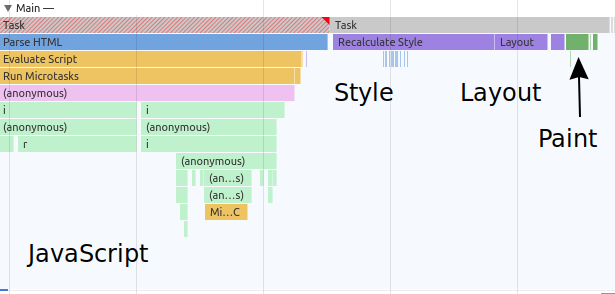
First off, let’s review the browser’s rendering pipeline, and why we might even speculate that shadow DOM could improve its performance. Two fundamental parts of the rendering process are style calculation and layout calculation, or simply “style” and “layout.” The first part is about figuring out which DOM nodes have which styles (based on CSS), and the second part is about figuring out where to actually place those DOM nodes on the page (using the styles calculated in the previous step).

Screenshot of Chrome DevTools showing a performance trace with JavaScript stacks followed by a purple Style/Layout region and green Paint region

A performance trace in Chrome DevTools, showing the basic JavaScript → Style → Layout → Paint pipeline.

Browsers are complex, but in general, the more DOM nodes and CSS rules on a page, the longer it will take to run the style and layout steps. One of the ways we can improve the performance of this process is to break up the work into smaller chunks, i.e. encapsulation.

For layout encapsulation, we have CSS containment. This has already been covered in other articles, so I won’t rehash it here. Suffice it to say, I think there’s sufficient evidence that CSS containment can improve performance (I’ve seen it myself), so if you haven’t tried putting contain: content on parts of your UI to see if it improves layout performance, you definitely should!

For style encapsulation, we have something entirely different: shadow DOM. Just like how CSS containment can improve layout performance, shadow DOM should (in theory) be able to improve style performance. Let’s consider why.

What is style calculation?

As mentioned before, style calculation is different from layout calculation. Layout calculation is about the geometry of the page, whereas style calculation is more explicitly about CSS. Basically, it’s the process of taking a rule like:

div > button {
  color: blue;
}

And a DOM tree like:

<div>
  <button></button>
</div>

…and figuring out that the <button> should have color: blue because its parent is a <div>. Roughly speaking, it’s the process of evaluating CSS selectors (div > button in this case).

Now, in the worst case, this is an O(n * m) operation, where n is the number of DOM nodes and m is the number of CSS rules. (I.e. for each DOM node, and for each rule, figure out if they match each other.) Clearly, this isn’t how browsers do it, or else any decently-sized web app would become grindingly slow. Browsers have a lot of optimizations in this area, which is part of the reason that the common advice is not to worry too much about CSS selector performance (see this article for a good, recent treatment of the subject).

That said, if you’ve worked on a non-trivial codebase with a fair amount of CSS, you may notice that, in Chrome performance profiles, the style costs are not zero. Depending on how big or complex your CSS is, you may find that you’re actually spending more time in style calculation than in layout calculation. So it isn’t a completely worthless endeavor to look into style performance.

Shadow DOM and style calculation

Why would shadow DOM improve style performance? Again, it’s because of encapsulation. If you have a CSS file with 1,000 rules, and a DOM tree with 1,000 nodes, the browser doesn’t know in advance which rules apply to which nodes. Even if you authored your CSS with something like CSS Modules, Vue scoped CSS, or Svelte scoped CSS, ultimately you end up with a stylesheet that is only implicitly coupled to the DOM, so the browser has to figure out the relationship at runtime (e.g. using class or attribute selectors).

Shadow DOM is different. With shadow DOM, the browser doesn’t have to guess which rules are scoped to which nodes – it’s right there in the DOM:

<my-component>
  #shadow-root
    <style>div {color: green}</style>
    <div></div>
<my-component>
<another-component>
  #shadow-root
    <style>div {color: blue}</style>
    <div></div>
</another-component>

In this case, the browser doesn’t need to test the div {color: green} rule against every node in the DOM – it knows that it’s scoped to <my-component>. Ditto for the div {color: blue} rule in <another-component>. In theory, this can speed up the style calculation process, because the browser can rely on explicit scoping through shadow DOM rather than implicit scoping through classes or attributes.

Benchmarking it

That’s the theory, but of course things are always more complicated in practice. So I put together a benchmark to measure the style calculation performance of shadow DOM. Certain CSS selectors tend to be faster than others, so for decent coverage, I tested the following selectors:

  • ID (#foo)
  • class (.foo)
  • attribute ([foo])
  • attribute value ([foo="bar"])
  • “silly” ([foo="bar"]:nth-of-type(1n):last-child:not(:nth-of-type(2n)):not(:empty))

Roughly, I would expect IDs and classes to be the fastest, followed by attributes and attribute values, followed by the “silly” selector (thrown in to add something to really make the style engine work).

To measure, I used a simple requestPostAnimationFrame polyfill, which measures the time spent in style, layout, and paint. Here is a screenshot in the Chrome DevTools of what’s being measured (note the “total” under the Timings section):

Screenshot of Chrome DevTools showing a "total" measurement in Timings which corresponds to style, layout, and other purple "rendering" blocks in the "Main" section

To run the actual benchmark, I used Tachometer, which is a nice tool for browser microbenchmarks. In this case, I just took the median of 51 iterations.

The benchmark creates several custom elements, and either attaches a shadow root with its own <style> (shadow DOM “on”) , or uses a global <style> with implicit scoping (shadow DOM “off”). In this way, I wanted to make a fair comparison between shadow DOM itself and shadow DOM “polyfills” – i.e. systems for scoping CSS that don’t rely on shadow DOM.

Each CSS rule looks something like this:

#foo {
  color: #000000;
}

And the DOM structure for each component looks like this:

<div id="foo">hello</div>

(Of course, for attribute and class selectors, the DOM node would have an attribute or class instead.)

Benchmark results

Here are the results in Chrome for 1,000 components and 1 CSS rule for each component:

Chart of Chrome with 1000 components and 1 rule. See tables for full data

Click for table
id class attribute attribute-value silly
Shadow DOM 67.90 67.20 67.30 67.70 69.90
No Shadow DOM 57.50 56.20 120.40 117.10 130.50

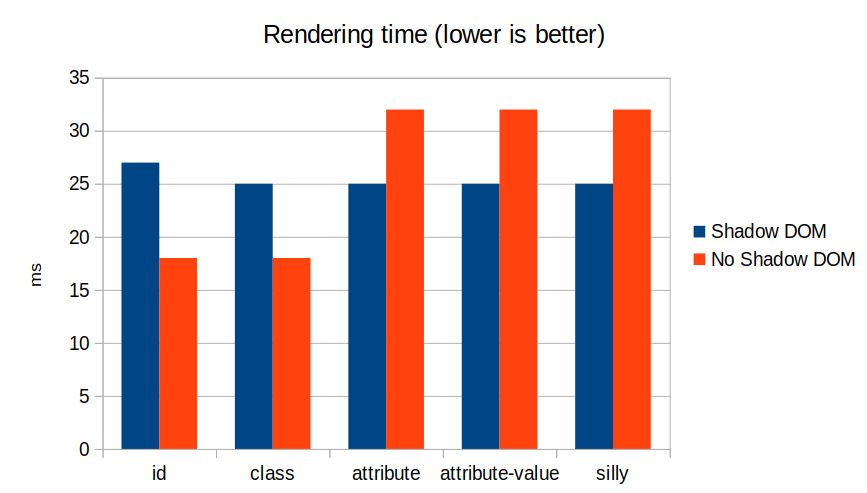
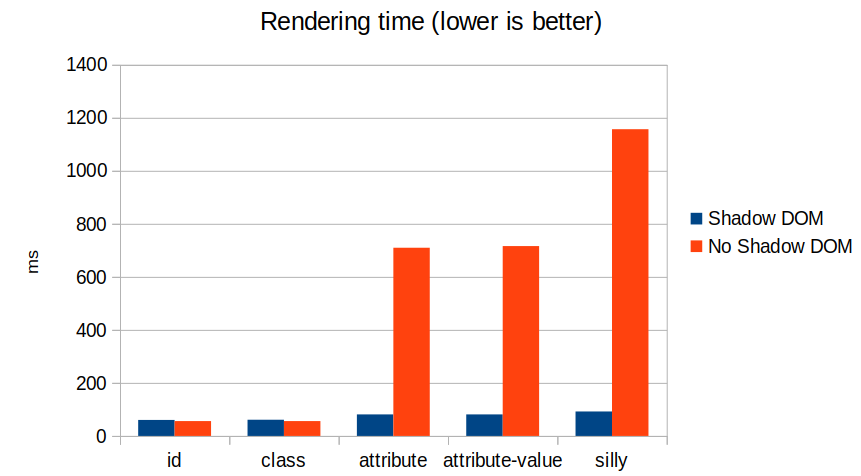
As you can see, classes and IDs are about the same with shadow DOM on or off (in fact, it’s a bit faster without shadow DOM). But once the selectors get more interesting (attribute, attribute value, and the “silly” selector), shadow DOM stays roughly constant, whereas the non-shadow DOM version gets more expensive.

We can see this effect even more clearly if we bump it up to 10 CSS rules per component:

Chart of Chrome with 1000 components and 10 rules. See tables for full data

Click for table
id class attribute attribute-value silly
Shadow DOM 70.80 70.60 71.10 72.70 81.50
No Shadow DOM 58.20 58.50 597.10 608.20 740.30

The results above are for Chrome, but we see similar numbers in Firefox and Safari. Here’s Firefox with 1,000 components and 1 rule each:

Chart of Firefox with 1000 components and 1 rule. See tables for full data

Click for table
id class attribute attribute-value silly
Shadow DOM 27 25 25 25 25
No Shadow DOM 18 18 32 32 32

And Firefox with 1,000 components, 10 rules each:

Chart of Firefox with 1000 components and 10 rules. See tables for full data

Click for table
id class attribute attribute-value silly
Shadow DOM 30 30 30 30 34
No Shadow DOM 22 22 143 150 153

And here’s Safari with 1,000 components and 1 rule each:

Chart of Safari with 1000 components and 1 rule. See tables for full data

Click for table
id class attribute attribute-value silly
Shadow DOM 57 58 61 63 64
No Shadow DOM 52 52 126 126 177

And Safari with 1,000 components, 10 rules each:

Chart of Safari with 1000 components and 10 rules. See tables for full data

Click for table
id class attribute attribute-value silly
Shadow DOM 60 61 81 81 92
No Shadow DOM 56 56 710 716 1157

All benchmarks were run on a 2015 MacBook Pro with the latest version of each browser (Chrome 92, Firefox 91, Safari 14.1).

Conclusions and future work

We can draw a few conclusions from this data. First off, it’s true that shadow DOM can improve style performance, so our theory about style encapsulation holds up. However, ID and class selectors are fast enough that actually it doesn’t matter much whether shadow DOM is used or not – in fact, they’re slightly faster without shadow DOM. This indicates that systems like Svelte, CSS Modules, or good old-fashioned BEM are using the best approach performance-wise.

This also indicates that using attributes for style encapsulation does not scale well compared to classes. So perhaps scoping systems like Vue would be better off switching to classes.

Another interesting question is why, in all three browser engines, classes and IDs are slightly slower when using shadow DOM. This is probably a better question for the browser vendors themselves, and I won’t speculate. I will say, though, that the differences are small enough in absolute terms that I don’t think it’s worth it to favor one or the other. The clearest signal from the data is just that shadow DOM helps to keep the style costs roughly constant, whereas without shadow DOM, you would want to stick to simple selectors like classes and IDs to avoid hitting a performance cliff.

As for future work: this is a pretty simple benchmark, and there are lots of ways to expand it. For instance, the benchmark only has one inner DOM node per component, and it only tests flat selectors – no descendant or sibling selectors (e.g. div div, div > div, div ~ div, and div + div). In theory, these scenarios should also favor shadow DOM, especially since these selectors can’t cross shadow boundaries, so the browser doesn’t need to look outside of the shadow root to find the relevant ancestors or siblings. (Although the browser’s Bloom filter makes this more complicated – see these notes for an good explanation of how this optimization works.)

Overall, though, I’d say that the numbers above are not big enough that the average web developer should start worrying about optimizing their CSS selectors, or migrating their entire web app to shadow DOM. These benchmark results are probably only relevant if 1) you’re building a framework, so any pattern you choose is magnified multiple times, or 2) you’ve profiled your web app and are seeing lots of high style calculation costs. But for everyone else, I hope at least that these results are interesting, and reveal a bit about how shadow DOM works.

Update: Thomas Steiner wondered about tag selectors as well (e.g. div {}), so I modified the benchmark to test it out. I’ll only report the results for the Shadow DOM version, since the benchmark uses divs, and in the non-shadow case it wouldn’t be possible to use tags alone to distinguish between different divs. In absolute terms, the numbers look pretty close to those for IDs and classes (or even a bit faster in Chrome and Firefox):

Click for table
Chrome Firefox Safari
1,000 components, 1 rule 53.9 19 56
1,000 components, 10 rules 62.5 20 58