Author Archive

An experiment in vibe coding

For the holidays, I gave myself a little experiment: build a small web app for my wife to manage her travel itineraries. I challenged myself to avoid editing the code myself and just do it “vibe” style, to see how far I could get.

In the end, the app was built with a $20 Claude “pro” plan and maybe ~5 hours of actual hands-on-keyboard work. Plus my wife is happy with the result, so I guess it was a success.

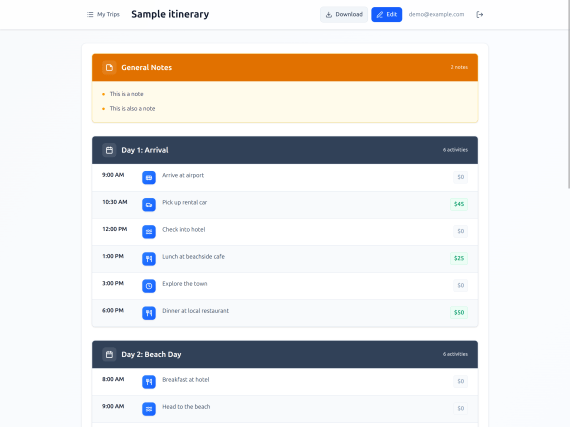
Screenshot of a travel itinerary app with a basic UI that looks like a lot of other CRUD apps, with a list of itinerary agenda items, dates and costs, etc.

There are still a lot of flaws with this approach, though, so I thought I’d gather my experiences in this post.

The good

The app works. It looks okay on desktop and mobile, it works as a PWA, it saves her itineraries to a small PocketBase server running on Railway for $1 a month, and I can easily back up the database whenever I feel like it. User accounts can only be created by an admin user, which I manage with the PocketBase UI.

I first started with Bolt.new but quickly switched to Claude Code. I found that Bolt was fine for the first iteration but quickly fell off after that. Every time I asked it to fix something and it failed (slowly), I thought “Claude Code could do this better.” Luckily you can just export from Bolt whenever you feel like it, so that’s what we did.

Bolt set up a pretty basic SPA scaffolding with Vite and React, which was fine, although I didn’t like its choice of Supabase, so I had Claude replace it with PocketBase. Claude was very helpful here with the ideation – I asked for some options on a good self-hosted database and went with PocketBase because it’s open-source and has the admin/auth stuff built-in. Plus it runs on SQLite, so this gave me confidence that import/export would be easy.

Claude also helped a lot with the hosting – I was waffling between a few different choices and eventually landed on Railway per Claude’s suggestion (for better or worse, this seems like a prime opportunity for ads/sponsorships in the future). Claude also helped me decipher the Railway interface and get the app up-and-running, in a way that helped me avoid reading their documentation altogether – all I needed to do was post screenshots and ask Claude where to click.

The app also uses Tailwind, which seems to come with decent CSS styles that look like every other website on the internet. I didn’t need this to win any design awards, so that was fine.

Note I also ran Claude in a Podman container with --dangerously-skip-permissions (aka “yolo mode”) because I didn’t want to babysit it whenever it wanted permission to install or run something. Worst case scenario, an attacker has stolen the app code (meh), so hopefully I kept the lethal trifecta in check.

The bad

Vibe-coding tools are decidedly not ready for non-programmers yet. Initially I tried to just give Bolt to my wife and have her vibe her way through it, but she quickly got frustrated, despite having some experience with HTML, CSS, and WordPress. The LLM would make errors (as they do), but it would get caught in a loop, and nothing she tried could break it out of the cycle.

Since I have a lot of experience building web apps, I could look at the LLM’s mistakes and say, “Oh, this problem is in the backend.” Or “Oh, it should write a parser test for this.” Or, “Oh, it needs a screenshot so it can see why the CSS is wrong.” If you don’t have extensive debugging experience, then you might not be able to succinctly express the problem to an LLM like this. Being able to write detailed bug reports, or even have the right vocabulary to describe the problem, is an invaluable skill here.

After handing it over from Bolt to Claude Code and taking the reigns myself, though, I still ran into plenty of problems. First off, LLMs still suck at accessibility – lots of <div>s with onClick all over the place. My wife is a sighted mouse user so it didn’t really matter, but I still have some professional pride even around vibe-coded garbage, so I told Claude to correct it. (At which point it promptly added excessive aria-labels where they weren’t needed, so I told it to dial it back.) I’m not the first to note this, but this really doesn’t bode well for accessible vibe-coded apps.

Another issue was performance. Even on a decent laptop (my Framework 13 with AMD Ryzen 5), I noticed a lot of slow interactions (typing, clicking) due to React re-rendering. This required a lot of back-and-forth with the agent, copy-pasting from the Chrome DevTools Performance tab and React DevTools Profiler, to get it to understand the problem and fix it with memoization and nested components.

At some point I realized I should just enable the React Compiler, and this may have helped but didn’t fully solve the problem. I’m frankly surprised at how bad React is for this use case, since a lot of people seem convinced that the framework wars are over, since LLMs are so “good” at writing React. The next time I try this, I might use a framework like Svelte or Solid where fine-grained reactivity is built-in, and you don’t need a lot of manual optimizations for this kind of stuff.

Other than that, I didn’t run into any major problems that couldn’t be solved with the right prompting. For instance, to add PWA capabilities, it was enough to tell the LLM: “Make an icon that kind of looks like an airplane, generate the proper PNG sizes, here are the MDN docs on PWA manifests.” I did need to follow up by copy-pasting some error messages from the Chrome DevTools (which required even knowing to look in the Application tab), but that resolved itself quickly. I got it to generate a CSP in a similar way.

The only other annoying problem was the token limits – this is something I don’t have to deal with at work, and I was surprised how quickly I ran into limits using Claude as a side project. It made me tempted to avoid “plan mode” even when it would have been the better choice, and I often had to just set Claude aside and wait for my limit to “reset.”

The ugly

The ugliest part of all this is, of course, the cheapening of the profession as well as all the other ills of LLMs and GenAI that have been well-documented elsewhere. My contribution to this debate is just to document how I feel, which is that I’m somewhat horrified by how easily this tool can reproduce what took me 20-odd years to learn, but I’m also somewhat excited because it’s never been easier to just cobble together some quick POCs or lightweight hobby apps.

After a couple posts on this topic, I’ve decided that my role is not to try to resist the overwhelming onslaught of this technology, but instead to just witness and document how it’s shaking up my worldview and my corner of the industry. Of course some will label me a collaborator, but I think those voices are increasingly becoming marginalized by an industry that has just normalized the use of generative AI to write code.

When I watch some of my younger colleagues work, I am astounded by how “AI-native” their behavior is. It infuses parts of their work where I still keep a distance. (E.g. my IDE and terminal are sacred to me – I like Claude Code in its little box, not in a Warp terminal or as inline IDE completions.)

Conclusion

The most interesting part of this whole experiment, to me, is that throwing together this hobby app has removed the need for my wife to try some third-party service like TripIt or Wanderlog. She tried those apps, but immediately became frustrated with bugs, missing features, and ad bloat. Whereas the app I built works exactly to her specification – and if she doesn’t like something, I can plug her feedback into Claude Code and have it fixed.

My wife is a power user, and she’s spent a lot of time writing emails to the customer support departments of various apps, where she inevitably gets a “your feedback is very important to us” followed by zilch. She’s tried a lot of productivity/todo/planning apps, and she always finds some awful showstopper bugs (like memory leaks, errors copy/pasting, etc.), which I blame on our industry just not taking quality very seriously. Whereas if there’s a bug in this app, it’s a very small codebase, it’s got extensive unit/end-to-end tests, and so Claude doesn’t have many problems fixing tiny quality-of-life bugs.

I’m not saying this is the death-knell of small note-taking apps or whatever, but I definitely think that vibe-coded hobby apps have some advantages in this space. They don’t have to add 1,000 features to satisfy 1,000 different users (with all the bugs that inevitably come from the combinatorial explosion of features) – they just have to make one person happy. I still think that generative UI is kind of silly, because most users don’t want to wait seconds (or even minutes) for their UI to be built, but it does work well in this case (where your husband is a professional programmer with spare time during the holidays).

For my regular dayjob, I have no intention to do things fully “vibe-coded” (in the sense that I barely look at the code) – that’s just too risky and irresponsible in my opinion. When the code is complex, your teammates need to understand it, and you have paying customers, the bar is just a lot higher. But vibe coding is definitely useful for hobby or throwaway projects.

For better or worse, the value of code itself seems to be dropping precipitously, to be replaced by measures like how well an LLM can understand the codebase (CLAUDE.md, AGENTS.md) or how easily it can test its “fixes” (unit/integration tests). I have no idea what coding will look like next year, but I know how my wife will be planning our next vacation.

How I use AI agents to write code

Yes, this is the umpteenth article about AI and coding that you’ve seen this year. Welcome to 2025.

Some people really find LLMs distasteful, and if that’s you, then I would recommend that you skip this post. I’ve heard all the arguments, and I’m not convinced anymore.

I used to be a fairly hard-line anti-AI zealot, but with the release of things like Claude Code, OpenAI Codex, Gemini CLI, etc., I just can’t stand athwart history and yell “Stop!” anymore. I’ve seen my colleagues make too much productive use of this technology to dismiss it as a fad or mirage. It writes code better than I can a lot of the time, and that’s saying something because I’ve been doing this for 20 years and I have a lot of grumpy, graybeard opinions about code quality and correctness.

But you have to know how to use AI agents correctly! Otherwise, they’re kind of like a finely-honed kitchen knife attached to a chainsaw: if you don’t know how to wield it properly, you’re gonna hurt yourself.

Basic setup

I use Claude Code. Mostly because I’m too lazy to explore all the other options. I have colleagues who swear by Gemini or Codex or open-source tools or whatever, but for me Claude is good enough.

First off, you need a good CLAUDE.md (or AGENTS.md). Preferably one for the project you’re working in (the lay of the land, overall project architecture, gotchas, etc.) and one for yourself (your local environment and coding quirks).

This seems like a skippable step, but it really isn’t. Think about your first few months at a new job – you don’t know anything about how the code works, you don’t know the overall vision or design, so you’re just fumbling around the code and breaking things left and right. Ideally you need someone from the old guard, who really knows the codebase’s dirty little secrets, to write a good CLAUDE.md that explains the overall structure, which parts are stable, which parts are still under development, which parts have dragons, etc. Otherwise the LLM is just coming in fresh to the project every time and it’s going to wreak havoc.

As for your own personal CLAUDE.md (i.e. in ~/.claude), this should just be for your own coding quirks. For example, I like the variable name _ in map() or filter() functions. It’s like my calling card; I just can’t do without it.

Overall strategy

I’ve wasted a lot of time on LLMs. A lot of time. They are every bit as dumb as their critics claim. They will happily lead you down the garden path and tell you “Great insight!” until you slowly realize that they’ve built a monstrosity that barely works. I can see why some people try them out and then abandon them forever in disgust.

There are a few ways you can make them more useful, though:

  1. Give them a feedback loop, usually through automated tests. Automated tests are a good way for the agent to go from “I’ve fixed the problem!” to “Oh wait, no I didn’t…” and actually circle in on a working solution.
  2. Use the “plan mode” for more complicated tasks. Just getting the agent to “think” about what it’s doing before it executes is useful for something simpler than a pure refactor or other rote task.

For example, one time I asked an agent to implement a performance improvement to a SQL query. It immediately said “I’ve found a solution!” Then I told it to write a benchmark and use a SQL EXPLAIN, and it immediately realized that it actually made things slower. So the next step was to try 3 different variants of the solution, testing each against the benchmark, and only then deciding on the way forward. This is eerily similar to my own experience writing performance optimizations – the biggest danger is being seduced by your own “clever” solution without actually rigorously benchmarking it.

This is why I’ve found that coding agents are (currently) not very good at doing UI. You end up using something like the Playwright or Chrome DevTools MCP/skill, and this either slurps up way too many tokens, or it just slows things down considerably because the agent has to inspect the DOM (tokens galore) or write a Playwright script and take a screenshot to inspect it (slooooooow). I’ve watched Claude fumble over closing a modal dialog too often to have patience for this. It’s only worthwhile if you’re willing to let the agent run over your lunch break or something.

The AI made a mistake? Add more AI

This one should be obvious but it’s surprisingly not. AIs tend to make singular, characteristic mistakes:

  1. Removing useful comments from previous developers – “this is a dumb hack that we plan to remove in version X” either gets deleted or becomes some Very Official Sounding Comment that obscures the original meaning.
  2. Duplicating code. Duplicating code. I don’t know why agents love duplicating code so much, but they do. It’s like they’ve never heard of the DRY principle.
  3. Making subtle “fixes” when refactoring code that actually break the original intent. (E.g. “I’ll just put an extra null check in here!”)

Luckily, there’s a pretty easy solution to this: you shut down Claude Code, start a brand-new session, and tell the agent “Hey, diff against origin/main. This is supposed to be a pure refactor. Is it really though? Check for functional bugs.” Inevitably, the agent will find some errors.

This seems to work better if you don’t tell the agent that the code is yours (presumably because it would just try to flatter you about how brilliant your code is). So you can lie and say you’re reviewing a colleague’s PR or something if you want.

After this “code review” agent runs, you can literally just shut down Claude Code and run the exact same prompt again. Run it a few times until you’re sure that all the bugs have been shaken out. This is shockingly effective.

Get extra work done while you sleep

One of the most addictive things about Claude Code is that, when I sign off from work. I can have it iterate on some problem while I’m off drinking a beer, enjoying time with my family, or hunkering down for a snooze. It doesn’t get tired, it doesn’t take holidays, and it doesn’t get annoyed at trying 10 different solutions to the same problem.

In a sense then, it’s like my virtual Jekyll-and-Hyde doppelganger, because it’s getting work done that I never would have done otherwise. Sometimes the work is a dud – I’ll wake up and realize that the LLM got off on some weird tangent that didn’t solve the real problem, so I’ll git reset --hard and start from scratch. (Often I’ll use my own human brain for this stuff, since this situation is a good hint that it’s not the right job for an LLM.)

I’ve found that the biggest limiting factor in these cases is not the LLM itself, but rather just that Claude Code asks for permission on every little thing, to where I’ve developed an automation blindness where I just skim the command and type “yes.” This scares me, so I’ve started experimenting with running Claude Code in a Podman container in yolo mode. Due to the lethal trifecta, though, I’m currently only comfortable doing this with side projects where I don’t care if my entire codebase gets sent to the dark web (or whatever it is misbehaving agents might do).

This unfortunately leads to a situation where the agent invades my off-work hours, and I’m tempted to periodically check on its progress and either approve it or point it in another direction. But this becomes more a problem of work-life balance than of human-agent interaction – I should probably just accept that I should enjoy my hobbies rather than supervising a finicky agent round-the-clock!

Conclusion

I still kind of hate AI agents and feel ambivalent toward them. But they work. When I read anti-AI diatribes nowadays, my eyes tend to glaze over and I think of the quote from Galileo: “And yet, it moves.” All your arguments make a lot of sense, they resonate with me a lot, and yet, the technology works. I write an insane amount of code these days in a very short number of hours, and this would have been impossible before LLMs.

I don’t use LLMs for everything. I’ve learned through bitter experience that they are just not very good at subtle, novel, or nebulous projects that touch a lot of disparate parts of the code. For that, I will just push Claude to the side and write everything myself like a Neanderthal. But those cases are becoming fewer and further between, and I find myself spending a lot of time writing specs, reviewing code, or having AIs write code to review other AIs’ code (like some bizarre sorcerer’s apprentice policing another sorcerer’s apprentice).

In some ways, I compare my new role to that of a software architect: the best architects I know still get their hands dirty sometimes and write code themselves, if for no other reason than to remember the ground truth of the grunts in the trenches. But they’re still mostly writing design documents and specs.

I also don’t use AI for my open-source work, because it just feels… ick. The code is “mine” in some sense, but ultimately, I don’t feel true ownership over it, because I didn’t write it. So it would feel weird to put my name on it and blast it out on the internet to share with others. I’m sure I’m swimming against the tide on this one, though.

If I could go back in time and make it so LLMs were never a thing… I might still do it. I really had a lot more fun writing all the code myself, although I am having a different sort of fun now, so I can’t completely disavow it.

I’m reminded of game design – if you create a mechanic that’s boring, but which players can exploit to consistently win the game (e.g. hopping on turtle shells for infinite 1-Ups), then they’ll choose that strategy, even if they end up hating the game and having less fun. LLMs are kind of like that – they’re the obvious optimal strategy, and although they’re less fun, I’ll keep choosing them.

Anyway, I may make a few enemies with this post, but I’ve long accepted that what I write on the internet will usually attract some haters. Meanwhile I think the vast majority of developers have made their peace with AI and are just moving on. For better or worse, I’m one of them.

The <time> element should actually do something

A common UI pattern is something like this:

Post published 4 hours ago

People do lots of stuff with that “4 hours ago.” They might make it a permalink:

Post published <a href="/posts/123456">4 hours ago</a>

Or they might give it a tooltip to show the exact datetime upon hover/focus:

Post published
<Tooltip content="December 14, 2025 at 11:30 AM PST">
  4 hours ago
</Tooltip>

Note: I’m assuming some Tooltip component written in your favorite framework, e.g. React, Svelte, Vue, etc. There’s also the bleeding-edge popover="hint" and Interest Invokers API, which would give us a succinct way to do this in native HTML/CSS.

If you’re a pedant about HTML though (like me), then you might use the <time> element:

Post published
<time datetime="2025-12-14T19:30:00.000Z">
  4 hours ago
</time>

This is great! We now have a semantic way to express the exact timestamp of a date. So browsers and screen readers should use this and give us a way to avoid those annoying manual tooltips and… oh wait, no. The <time> element does approximately nothing.

I did some research on this and couldn’t find any browser or assistive technology that actually makes use of the <time> element, besides, you know, rendering it. (Whew!) This is despite the fact that <time> is used on roughly 8% of pageloads per Chrome’s usage tracker.

Update: Léonie Watson helpfully reports that the screen readers NVDA and Narrator actually do read out the timestamp in a human-readable format! So <time> does have an impact on accessibility (although arguably not a positive one).

So what does <time> actually do? As near as I can tell, it’s used by search engines to show date snippets in search results. However, I can’t find any guidelines from Google that specifically advocate for the <time> element, although there is a 2023 post from Search Engine Journal which quotes a Google Search liaison:

Google doesn’t depend on a single date factor because all factors can be prone to issues. That’s why our systems look at several factors to determine our best estimate of when a page was published or significantly updated.

In fact, the only Google documentation I found doesn’t mention <time> at all, and instead recommends using Schema.org’s datePublished and dateModified fields. (I.e., not even HTML.)

So there it is. <time> is a neat idea in theory, but in practice it feels like an unfulfilled promise of semantic HTML. A 2010 CSS Tricks article has a great quote about this from Bruce Lawson (no relation):

The uses of unambiguous dates in web pages aren’t hard to imagine. A browser could offer to add events to a user’s calendar. A Thai-localised browser could offer to transform Gregorian dates into Thai Buddhist era dates. A Japanese browser could localise to “16:00時”.

This would be amazing, and I’d love to see browsers and screen readers make use of <time> like this. But for now, it’s just kind of an inert relic of the early HTML5 days. I’ll still use it, though, because (as Marge Simpson would say), I just think it’s neat.

The fate of “small” open source

By far the most popular npm package I’ve ever written is blob-util, which is ~10 years old and still gets 5+ million weekly downloads.

It’s a small collection of utilities for working with Blobs in JavaScript. I wrote it because I found that PouchDB users were endlessly confused about how to work with Blobs and how to convert them to strings, ArrayBuffers, etc.

Given that some 80% of developers are now using AI in their regular work, blob-util is almost certainly the kind of thing that most developers would just happily have an LLM generate for them. Sure, you could use blob-util, but then you’d be taking on an extra dependency, with unknown performance, maintenance, and supply-chain risks.

And sure enough, Claude will happily spit out whatever Blob utilities you need when prompted:

> Write me a utility function in TypeScript to convert a Blob to an ArrayBuffer. It should return a Promise.

function blobToArrayBuffer(blob: Blob): Promise<ArrayBuffer> {
  return new Promise((resolve, reject) => {
    const reader = new FileReader();

    reader.onload = () => {
      if (reader.result instanceof ArrayBuffer) {
        resolve(reader.result);
      } else {
        reject(new Error('Failed to read Blob as ArrayBuffer'));
      }
    };

    reader.onerror = () => {
      reject(reader.error);
    };

    reader.readAsArrayBuffer(blob);
  });
}

Claude’s version is pretty close to the blob-util version (unsurprising, since it was probably trained on it!). Although it’s much more verbose, unnecessarily checking if readAsArrayBuffer actually gives you an ArrayBuffer (although this does make TypeScript happy). To be fair, it also improves on my implementation by directly rejecting with an error rather than the more awkward onerror event.

Note: for anyone wondering, yes Claude did suggest the new Blob.arrayBuffer() method, but it also generated the above for “older environments.”

I suppose some people would see this as progress: fewer dependencies, more robust code (even if it’s a bit more verbose), quicker turnaround time than the old “search npm, find a package, read the docs, install it” approach.

I don’t have any excessive pride in this library, and I don’t particularly care if the download numbers go up or down. But I do think something is lost with the AI approach. When I wrote blob-util, I took a teacher’s mentality: the README has a cutesy and whimsical tutorial featuring Kirby, in all his blobby glory. (I had a thing for putting Nintendo characters in all my stuff at the time.)

The goal wasn’t just to give you a utility to solve your problem (although it does that) – the goal was also to teach people how to use JavaScript effectively, so that you’d have an understanding of how to solve other problems in the future.

I don’t know which direction we’re going in with AI (well, ~80% of us; to the remaining holdouts, I salute you and wish you godspeed!), but I do think it’s a future where we prize instant answers over teaching and understanding. There’s less reason to use something like blob-util, which means there’s less reason to write it in the first place, and therefore less reason to educate people about the problem space.

Even now there’s a movement toward putting documentation in an llms.txt file, so you can just point an agent at it and save your brain cells the effort of deciphering English prose. (Is this even documentation anymore? What is documentation?)

Conclusion

I still believe in open source, and I’m still doing it (in fits and starts). But one thing has become clear to me: the era of small, low-value libraries like blob-util is over. They were already on their way out thanks to Node.js and the browser taking on more and more of their functionality (see node:glob, structuredClone, etc.), but LLMs are the final nail in the coffin.

This does mean that there’s less opportunity to use these libraries as a springboard for user education (Underscore.js also had this philosophy), but maybe that’s okay. If there’s no need to find a library to, say, group the items in an array, then maybe learning about the mechanics of such libraries is unnecessary. Many software developers will argue that asking a candidate to reverse a binary tree is pointless, since it never comes up in the day-to-day job, so maybe the same can be said for utility libraries.

I’m still trying to figure out what kinds of open source are worth writing in this new era (hint: ones that an LLM can’t just spit out on command), and where education is the most lacking. My current thinking is that the most value is in bigger projects, more inventive projects, or in more niche topics not covered in an LLM’s training data. For example, I look back on my work on fuite and various memory-leak-hunting blog posts, and I’m pretty satisfied that an LLM couldn’t reproduce this, because it requires novel research and creative techniques. (Although who knows: maybe someday an agent will be able to just bang its head against Chrome heap snapshots until it finds the leak. I’ll believe it when I see it.)

There’s been a lot of hand-wringing lately about where open source fits in in a world of LLMs, but I still see people pushing the boundaries. For example, a lot of naysayers think there’s no point in writing a new JavaScript framework, since LLMs are so heavily trained on React, but then there goes the indefatigable Dominic Gannaway writing Ripple.js, yet another JavaScript framework (and with some new ideas, to boot!). This is the kind of thing I like to see: humans laughing in the face of the machine, going on with their human thing.

So if there’s a conclusion to this meandering blog post (excuse my squishy human brain; I didn’t use an LLM to write this), it’s just that: yes, LLMs have made some kinds of open source obsolete, but there’s still plenty of open source left to write. I’m excited to see what kinds of novel and unexpected things you all come up with.

Why do browsers throttle JavaScript timers?

Even if you’ve been doing JavaScript for a while, you might be surprised to learn that setTimeout(0) is not really setTimeout(0). Instead, it could run 4 milliseconds later:

const start = performance.now()
setTimeout(() => {
  // Likely 4ms
  console.log(performance.now() - start)
}, 0)

Nearly a decade ago when I was on the Microsoft Edge team, it was explained to me that browsers did this to avoid “abuse.” I.e. there are a lot of websites out there that spam setTimeout, so to avoid draining the user’s battery or blocking interactivity, browsers set a special “clamped” minimum of 4ms.

This also explains why some browsers would bump the throttling for devices on battery power (16ms in the case of legacy Edge), or throttle even more aggressively for background tabs (1 second in Chrome!).

One question always vexed me, though: if setTimeout was so abused, then why did browsers keep introducing new timers like setImmediate (RIP), Promises, or even new fanciness like scheduler.postTask()? If setTimeout had to be nerfed, then wouldn’t these timers suffer the same fate eventually?

I wrote a long post about JavaScript timers back in 2018, but until recently I didn’t have a good reason to revisit this question. Then I was doing some work on fake-indexeddb, which is a pure-JavaScript implementation of the IndexedDB API, and this question reared its head. As it turns out, IndexedDB wants to auto-commit transactions when there’s no outstanding work in the event loop – in other words, after all microtasks have finished, but before any tasks (can I cheekily say “macro-tasks”?) have started.

To accomplish this, fake-indexeddb was using setImmediate in Node.js (which shares some similarities with the legacy browser version) and setTimeout in the browser. In Node, setImmediate is kind of perfect, because it runs after microtasks but immediately before any other tasks, and without clamping. In the browser, though, setTimeout is pretty sub-optimal: in one benchmark, I was seeing Chrome take 4.8 seconds for something that only took 300 milliseconds in Node (a 16x slowdown!).

Looking out at the timer landscape in 2025, though, it wasn’t obvious what to choose. Some options included:

  • setImmediate – only supported in legacy Edge and IE, so that’s a no-go.
  • MessageChannel.postMessage – this is the technique used by afterframe.
  • window.postMessage – a nice idea, but kind of janky since it might interfere with other scripts on the page using the same API. This approach is used by the setImmediate polyfill though.
  • scheduler.postTask – if you read no further, this was the winner. But let’s explain why!

To compare these options, I wrote a quick benchmark. A few important things about this benchmark:

  1. You have to run several iterations of setTimeout (and friends) to really suss out the clamping. Technically, per the HTML specification, the 4ms clamping is only supposed to kick in after a setTimeout has been nested (i.e. one setTimeout calls another) 5 times.
  2. I didn’t test every possible combination of 1) battery vs plugged in, 2) monitor refresh rates, 3) background vs foreground tabs, etc., even though I know all of these things can affect the clamping. I have a life, and although it’s fun to don the lab coat and run some experiments, I don’t want to spend my entire Saturday doing that.

In any case, here are the numbers (in milliseconds, median of 101 iterations, on a 2021 16-inch MacBook Pro):

Browser setTimeout MessageChannel window scheduler.postTask
Chrome 139 4.2 0.05 0.03 0.00
Firefox 142 4.72 0.02 0.01 0.01
Safari 18.4 26.73 0.52 0.05 Not implemented

Note: this benchmark was tricky to write! When I first wrote it, I used Promise.all to run all the timers simultaneously, but this seemed to defeat Safari’s nesting heuristics, and made Firefox’s fire inconsistently. Now the benchmark runs each timer independently.

Don’t worry about the precise numbers too much: the point is that Chrome and Firefox clamp setTimeout to 4ms, and the other three options are roughly equivalent. In Safari, interestingly, setTimeout is even more heavily throttled, and MessageChannel.postMessage is a tad slower than window.postMessage (although window.postMessage is still janky for the reasons listed above).

This experiment answered my immediate question: fake-indexeddb should use scheduler.postTask (which I prefer for its ergonomics) and fall back to either MessageChannel.postMessage or window.postMessage. (I did experiment with different priorities for postTask, but they all performed almost identically. For fake-indexeddb‘s use case, the default priority of 'user-visible' seemed most appropriate, and that’s what the benchmark uses.)

None of this answered my original question, though: why exactly do browsers bother to throttle setTimeout if web developers can just use scheduler.postTask or MessageChannel instead? I asked my friend Todd Reifsteck, who was co-chair of the Web Performance Working Group back when a lot of these discussions about “interventions” were underway.

He said that there were effectively two camps: one camp felt that timers needed to be throttled to protect web devs from themselves, whereas the other camp felt that developers should “measure their own silliness,” and that any subtle throttling heuristics would just cause confusion. In short, it was the standard tradeoff in designing performance APIs: “some APIs are quick but come with footguns.”

This jibes with my own intuitions on the topic. Browser interventions are usually put in place because web developers have either used too much of a good thing (e.g. setTimeout), or were blithely unaware of better options (the touch listener controversy is a good example). In the end, the browser is a “user agent” acting on the user’s behalf, and the W3C’s priority of constituencies makes it clear that end-user needs always trump web developer needs.

That said, web developers often do want to do the right thing. (I consider this blog post an attempt in that direction.) We just don’t always have the tools to do it, so instead we grab whatever blunt instrument is nearby and start swinging. Giving us more control over tasks and scheduling could avoid the need to hammer away with setTimeout and cause a mess that calls for an intervention.

My prediction is that postTask/postMessage will remain unthrottled for the time being. Out of Todd’s two “camps,” the very existence of the Scheduler API, which offers a whole slew of fine-grained tools for task scheduling, seems to point toward the “pro-control” camp as the one currently steering the ship. Although Todd sees the API more as a compromise between the two groups: yes, it offers a lot of control, but it also aligns with the browser’s actual rendering pipeline rather than random timeouts.

The pessimist in me wonders, though, if the API could still be abused – e.g. by carelessly using the user-blocking priority everywhere. Perhaps in the future, some enterprising browser vendor will put their foot more firmly on the throttle (so to speak) and discover that it causes websites to be snappier, more responsive, and less battery-draining. If that happens, then we may see another round of interventions. (Maybe we’ll need a scheduler2 API to dig ourselves out of that mess!)

I’m not involved much in web standards anymore and can only speculate. For the time being, I’ll just do what most web devs do: choose whatever API accomplishes my goals today, and hope that browsers don’t change too much in the future. As long as we’re careful and don’t introduce too much “silliness,” I don’t think that’s a lot to ask.

Thanks to Todd Reifsteck for feedback on a draft of this post.

Note: everything I said about setTimeout could also be said about setInterval. From the browser’s perspective, these are nearly the same APIs.

Note: for what it’s worth, fake-indexeddb is still falling back to setTimeout rather than MessageChannel or window.postMessage in Safari. Despite my benchmarks above, I was only able to get window.postMessage to outperform the other two in fake-indexeddb‘s own benchmark – Safari seems to have some additional throttling for MessageChannel that my standalone benchmark couldn’t suss out. And window.postMessage still seems error-prone to me, so I’m reluctant to use it. Here is my benchmark for those curious.

Selfish reasons for building accessible UIs

All web developers know, at some level, that accessibility is important. But when push comes to shove, it can be hard to prioritize it above a bazillion other concerns when you’re trying to center a <div> and you’re on a tight deadline.

A lot of accessibility advocates lead with the moral argument: for example, that disabled people should have just as much access to the internet as any other person, and that it’s a blight on our whole industry that we continually fail to make it happen.

I personally find these arguments persuasive. But experience has also taught me that “eat your vegetables” is one of the least effective arguments in the world. Scolding people might get them to agree with you in public, or even in principle, but it’s unlikely to change their behavior once no one’s watching.

So in this post, I would like to list some of my personal, completely selfish reasons for building accessible UIs. No finger-wagging here: just good old hardheaded self-interest!

Debuggability

When I’m trying to debug a web app, it’s hard to orient myself in the DevTools if the entire UI is “div soup”:

<div class="css-1x2y3z4">
  <div class="css-c6d7e8f">
    <div class="css-a5b6c7d">
      <div class="css-e8f9g0h"></div>
      <div class="css-i1j2k3l">Library</div>
      <div class="css-i1j2k3l">Version</div>
      <div class="css-i1j2k3l">Size</div>
    </div>
  </div>
  <div class="css-c6d7e8f">
    <div class="css-m4n5o6p">
      <div class="css-q7r8s9t">UI</div>
      <div class="css-u0v1w2x">React</div>
      <div class="css-u0v1w2x">19.1.0</div>
      <div class="css-u0v1w2x">167kB</div>
    </div>
    <div class="css-m4n5o6p">
      <div class="css-q7r8s9t">Style</div>
      <div class="css-u0v1w2x">Tailwind</div>
      <div class="css-u0v1w2x">4.0.0</div>
      <div class="css-u0v1w2x">358kB</div>
    </div>
    <div class="css-m4n5o6p">
      <div class="css-q7r8s9t">Build</div>
      <div class="css-u0v1w2x">Vite</div>
      <div class="css-u0v1w2x">6.3.5</div>
      <div class="css-u0v1w2x">2.65MB</div>
    </div>
  </div>
</div>

This is actually a table, but you wouldn’t know it from looking at the HTML:

Screenshot of an HTML table with column headers library, version, and size, row headers UI, style, and build, and values React/Tailwind/Vite with their version numbers and build size in the cells.

If I’m trying to debug this in the DevTools, I’m completely lost. Where are the rows? Where are the columns?

<table class="css-1x2y3z4">
  <thead class="css-a5b6c7d">
    <tr class="css-y3z4a5b">
      <th scope="col" class="css-e8f9g0h"></th>
      <th scope="col" class="css-i1j2k3l">Library</th>
      <th scope="col" class="css-i1j2k3l">Version</th>
      <th scope="col" class="css-i1j2k3l">Size</th>
    </tr>
  </thead>
  <tbody class="css-a5b6c7d">
    <tr class="css-y3z4a5b">
      <th scope="row" class="css-q7r8s9t">UI</th>
      <td class="css-u0v1w2x">React</td>
      <td class="css-u0v1w2x">19.1.0</td>
      <td class="css-u0v1w2x">167kB</td>
    </tr>
    <tr class="css-y3z4a5b">
      <th scope="row" class="css-q7r8s9t">Style</th>
      <td class="css-u0v1w2x">Tailwind</td>
      <td class="css-u0v1w2x">4.0.0</td>
      <td class="css-u0v1w2x">358kB</td>
    </tr>
    <tr class="css-y3z4a5b">
      <th scope="row" class="css-q7r8s9t">Build</th>
      <td class="css-u0v1w2x">Vite</td>
      <td class="css-u0v1w2x">6.3.5</td>
      <td class="css-u0v1w2x">2.65MB</td>
    </tr>
  </tbody>
</table>

Ah, that’s much better! Now I can easily zero in on a table cell, or a column header, because they’re all named. I’m not wading through a sea of <div>s anymore.

Even just adding ARIA roles to the <div>s would be an improvement here:

<div class="css-1x2y3z4" role="table">
  <div class="css-a5b6c7d" role="rowgroup">
    <div class="css-m4n5o6p" role="row">
      <div class="css-e8f9g0h" role="columnheader"></div>
      <div class="css-i1j2k3l" role="columnheader">Library</div>
      <div class="css-i1j2k3l" role="columnheader">Version</div>
      <div class="css-i1j2k3l" role="columnheader">Size</div>
    </div>
  </div>
  <div class="css-c6d7e8f" role="rowgroup">
    <div class="css-m4n5o6p" role="row">
      <div class="css-q7r8s9t" role="rowheader">UI</div>
      <div class="css-u0v1w2x" role="cell">React</div>
      <div class="css-u0v1w2x" role="cell">19.1.0</div>
      <div class="css-u0v1w2x" role="cell">167kB</div>
    </div>
    <div class="css-m4n5o6p" role="row">
      <div class="css-q7r8s9t" role="rowheader">Style</div>
      <div class="css-u0v1w2x" role="cell">Tailwind</div>
      <div class="css-u0v1w2x" role="cell">4.0.0</div>
      <div class="css-u0v1w2x" role="cell">358kB</div>
    </div>
    <div class="css-m4n5o6p" role="row">
      <div class="css-q7r8s9t" role="rowheader">Build</div>
      <div class="css-u0v1w2x" role="cell">Vite</div>
      <div class="css-u0v1w2x" role="cell">6.3.5</div>
      <div class="css-u0v1w2x" role="cell">2.65MB</div>
    </div>
  </div>
</div>

Especially if you’re using a CSS-in-JS framework (which I’ve simulated with robo-classes above), the HTML can get quite messy. Building accessibly makes it a lot easier to understand at a distance what each element is supposed to do.

Naming things

As all programmers know, naming things is hard. UIs are no exception: is this an “autocomplete”? Or a “dropdown”? Or a “picker”?

Screenshot of a combobox with "Ne" typed into it and states below in a list like Nebraska, Nevada, and New Hampshire.

If you read the WAI ARIA guidelines, though, then it’s clear what it is: a “combobox”!

No need to grope for the right name: if you add the proper roles, then everything is already named for you:

  • combobox
  • listbox
  • options

As a bonus, you can use aria-* attributes or roles as a CSS selector. I often see awkward code like this:

<div
  className={isActive ? 'active' : ''}
  aria-selected={isActive}
  role='option'
</div>

The active class is clearly redundant here. If you want to style based on the .active selector, you could just as easily style with [aria-selected="true"] instead.

Also, why call it isActive when the ARIA attribute is aria-selected? Just call it “selected” everywhere:

<div
  aria-selected={isSelected}
  role='option'
</div>

Much cleaner!

I also find that thinking in terms of roles and ARIA attributes sharpens my thinking, and gives structure to the interface I’m trying to create. Suddenly, I have a language for what I’m building, which can lead to more “obvious” variable names, CSS custom properties, grid area names, etc.

Testability

I’ve written about this before, but building accessibly also helps with writing tests. Rather than trying to select an element based on arbitrary classes or attributes, you can write more elegant code like this (e.g. with Playwright):

await page.getByLabel('Name').fill('Nolan')

await page.getByRole('button', { name: 'OK' }).click()

Imagine, though, if your entire UI is full of <div>s and robo-classes. How would you find the right inputs and buttons? You could select based on the robo-classes, or by searching for text inside or nearby the elements, but this makes your tests brittle.

As Kent C. Dodds has argued, writing UI tests based on semantics makes your tests more resilient to change. That’s because a UI’s semantic structure (i.e. the accessibility tree) tends to change less frequently than its classes, attributes, or even the composition of its HTML elements. (How many times have you added a wrapper <div> only to break your UI tests?)

Power users

When I’m on a desktop, I tend to be a keyboard power user. I like pressing Esc to close dialogs, Enter to submit a form, or even / in Firefox to quickly jump to links on the page. I do use a mouse, but I just prefer the keyboard since it’s faster.

So I find it jarring when a website breaks keyboard accessibility – Esc doesn’t dismiss a dialog, Enter doesn’t submit a form, / don’t change radio buttons. It disrupts my flow when I unexpectedly have to reach for my mouse. (Plus it’s a Van Halen brown M&M that signals to me that the website probably messed something else up, too!)

If you’re building a productivity tool with its own set of keyboard shortcuts (think Slack or GMail), then it’s even more important to get this right. You can’t add a lot of sophisticated keyboard controls if the basic Tab and focus logic doesn’t work correctly.

A lot of programmers are themselves power users, so I find this argument pretty persuasive. Build a UI that you yourself would like to use!

Conclusion

The reason that I, personally, care about accessibility is probably different from most people’s. I have a family member who is blind, and I’ve known many blind or low-vision people in my career. I’ve heard firsthand how frustrating it can be to use interfaces that aren’t built accessibly.

Honestly, if I were disabled, I would probably think to myself, “computer programmers must not care about me.” And judging from the miserable WebAIM results, I’d clearly be right:

Across the one million home pages, 50,960,288 distinct accessibility errors were detected—an average of 51 errors per page.

As a web developer who has dabbled in accessibility, though, I find this situation tragic. It’s not really that hard to build accessible interfaces. And I’m not talking about “ideal” or “optimized” – the bar is pretty low, so I’m just talking about something that works at all for people with a disability.

Maybe in the future, accessible interfaces won’t require so much manual intervention from developers. Maybe AI tooling (on either the production or consumption side) will make UIs that are usable out-of-the-box for people with disabilities. I’m actually sympathetic to the Jakob Nielsen argument that “accessibility has failed” – it’s hard to look at the WebAIM results and come to any other conclusion. Maybe the “eat your vegetables” era of accessibility has failed, and it’s time to try new tactics.

That’s why I wrote this post, though. You can build accessibly without having a bleeding heart. And for the time being, unless generative AI swoops in like a deus ex machina to save us, it’s our responsibility as interface designers to do so.

At the same time we’re helping others, though, we can also help ourselves. Like a good hot sauce on your Brussels sprouts, eating your vegetables doesn’t always have to be a chore.

AI ambivalence

I’ve avoided writing this post for a long time, partly because I try to avoid controversial topics these days, and partly because I was waiting to make my mind up about the current, all-consuming, conversation-dominating topic of generative AI. But Steve Yegge’s “Revenge of the junior developer” awakened something in me, so let’s go for it.

I don’t come to AI from nowhere. Longtime readers may be surprised to learn that I have a master’s in computational linguistics, i.e. I studied this kind of stuff 20-odd years ago. In fact, two of the authors of the famous “stochastic parrot” paper were folks I knew at the time – Emily Bender was one of my professors, and Margaret Mitchell was my lab partner in one of our toughest classes (sorry my Python sucked at the time, Meg).

That said, I got bored of working in AI after grad school, and quickly switched to general coding. I just found that “feature engineering” (which is what we called training models at the time) was not really my jam. I much preferred to put on some good coding tunes, crank up the IDE, and bust out code all day. Plus, I had developed a dim view of natural-language processing technologies largely informed by my background in (non-computational) linguistics as an undergrad.

In linguistics, we were taught that the human mind is a wondrous thing, and that Chomsky had conclusively shown that humans have a natural language instinct. The job of the linguist is to uncover the hidden rules in the human mind that govern things like syntax, semantics, and phonology (i.e. why the “s” in “beds” is pronounced like a “z” unlike in “bets,” due to the voicing of the final consonant).

Then when I switched to computational linguistics, suddenly the overriding sensation I got was that everything was actually about number-crunching, and in fact you could throw all your linguistics textbooks in the trash and just let gobs of training data and statistics do the job for you. “Every time I fire a linguist, the performance goes up,” as a famous computational linguist said.

I found this perspective belittling and insulting to the human mind, and more importantly, it didn’t really seem to work. Natural-language processing technology seemed stuck at the level of support vector machines and conditional random fields, hardly better than the Markov models in your iPhone 2’s autocomplete. So I got bored and disillusioned and left the field of AI.

Boy, that AI thing sure came back with a vengeance, didn’t it?

Still skeptical

That said, while everybody else was either reacting with horror or delight at the tidal wave of gen-AI hype, I maintained my skepticism. At the end of the day, all of this technology was still just number-crunching – brute force trying to approximate the hidden logic that Chomsky had discovered. I acknowledged that there was some room for statistics – Peter Norvig’s essay mentioning the story of an Englishman ordering an “ale” and getting served an “eel” due to the Great Vowel Shift still sticks in my brain – but overall I doubted that mere stats could ever approach anything close to human intelligence.

Today, though, philosophical questions of what AI says about human cognition seem beside the point – these things can get stuff done. Especially in the field of coding (my cherished refuge from computational linguistics), AIs now dominate: every IDE assumes I want AI autocomplete by default, and I actively have to hunt around in the settings to turn it off.

And for several years, that’s what I’ve been doing: studiously avoiding generative AI. Not just because I doubted how close to “AGI” these things actually were, but also because I just found them annoying. I’m a fast typist, and I know JavaScript like the back of my hand, so the last thing I want is some overeager junior coder grabbing my keyboard to mess with the flow of my typing. Every inline-coding AI assistant I’ve tried made me want to gnash my teeth together – suddenly instead of writing code, I’m being asked to constantly read code (which as everyone knows, is less fun). And plus, the suggestions were rarely good enough to justify the aggravation. So I abstained.

Later I read Baldur Bjarnason’s excellent book The Intelligence Illusion, and this further hardened me against generative AI. Why use a technology that 1) dumbs down the human using it, 2) generates hard-to-spot bugs, and 3) doesn’t really make you much more productive anyway, when you consider the extra time reading, reviewing, and correcting its output? So I put in my earbuds and kept coding.

Meanwhile, as I was blissfully coding away like it was ~2020, I looked outside my window and suddenly realized that the tidal wave was approaching. It was 2025, and I was (seemingly) the last developer on the planet not using gen-AI in their regular workflow.

Opening up

I try to keep an open mind about things. If you’ve read this blog for a while, you know that I’ve sometimes espoused opinions that I later completely backtracked on – my post from 10 years ago about progressive enhancement is a good example, because I’ve almost completely swung over to the progressive enhancement side of things since then. My more recent “Why I’m skeptical of rewriting JavaScript tools in ‘faster’ languages” also seems destined to age like fine milk. Maybe I’m relieved I didn’t write a big bombastic takedown of generative AI a few years ago, because hoo boy.

I started using Claude and Claude Code a bit in my regular workflow. I’ll skip the suspense and just say that the tool is way more capable than I would ever have expected. The way I can use it to interrogate a large codebase, or generate unit tests, or even “refactor every callsite to use such-and-such pattern” is utterly gobsmacking. It also nearly replaces StackOverflow, in the sense of “it can give me answers that I’m highly skeptical of,” i.e. it’s not that different from StackOverflow, but boy is it faster.

Here’s the main problem I’ve found with generative AI, and with “vibe coding” in general: it completely sucks out the joy of software development for me.

Imagine you’re a Studio Ghibli artist. You’ve spent years perfecting your craft, you love the feeling of the brush/pencil in your hand, and your life’s joy is to make beautiful artwork to share with the world. And then someone tells you gen-AI can just spit out My Neighbor Totoro for you. Would you feel grateful? Would you rush to drop your art supplies and jump head-first into the role of AI babysitter?

This is how I feel using gen-AI: like a babysitter. It spits out reams of code, I read through it and try to spot the bugs, and then we repeat. Although of course, as Cory Doctorow points out, the temptation is to not even try to spot the bugs, and instead just let your eyes glaze over and let the machine do the thinking for you – the full dream of vibe coding.

I do believe that this is the end state of this kind of development: “giving into the vibes,” not even trying to use your feeble primate brain to understand the code that the AI is barfing out, and instead to let other barf-generating “agents” evaluate its output for you. I’ll accept that maybe, maybe, if you have the right orchestra of agents that you’re conducting, then maybe you can cut down on the bugs, hallucinations, and repetitive boilerplate that gen-AI seems prone to. But whatever you’re doing at that point, it’s not software development, at least not the kind that I’ve known for the past ~20 years.

Conclusion

I don’t have a conclusion. Really, that’s my current state: ambivalence. I acknowledge that these tools are incredibly powerful, I’ve even started incorporating them into my work in certain limited ways (low-stakes code like POCs and unit tests seem like an ideal use case), but I absolutely hate them. I hate the way they’ve taken over the software industry, I hate how they make me feel while I’m using them, and I hate the human-intelligence-insulting postulation that a glorified Excel spreadsheet can do what I can but better.

In one of his podcasts, Ezra Klein said that he thinks the “message” of generative AI (in the McLuhan sense) is this: “You are derivative.” In other words: all your creativity, all your “craft,” all of that intense emotional spark inside of you that drives you to dance, to sing, to paint, to write, or to code, can be replicated by the robot equivalent of 1,000 monkeys typing at 1,000 typewriters. Even if it’s true, it’s a pretty dim view of humanity and a miserable message to keep pounding into your brain during 8 hours of daily software development.

So this is where I’ve landed: I’m using generative AI, probably just “dipping my toes in” compared to what maximalists like Steve Yegge promote, but even that little bit has made me feel less excited than defeated. I am defeated in the sense that I can’t argue strongly against using these tools (they bust out unit tests way faster than I can, and can I really say that I was ever lovingly-crafting my unit tests?), and I’m defeated in the sense that I can no longer confidently assert that brute-force statistics can never approach the ineffable beauty of the human mind that Chomsky described. (If they can’t, they’re sure doing a good imitation of it.)

I’m also defeated in the sense that this very blog post is just more food for the AI god. Everything I’ve ever written on the internet (including here and on GitHub) has been eagerly gobbled up into the giant AI katamari and is being used to happily undermine me and my fellow bloggers and programmers. (If you ask Claude to generate a “blog post title in the style of Nolan Lawson,” it can actually do a pretty decent job of mimicking my shtick.) The fact that I wrote this entire post without the aid of generative AI is cold comfort – nobody cares, and likely few have gotten to the end of this diatribe anyway other than the robots.

So there’s my overwhelming feeling at the end of this post: ambivalence. I feel besieged and horrified by what gen-AI has wrought on my industry, but I can no longer keep my ears plugged while the tsunami roars outside. Maybe, like a lot of other middle-aged professionals suddenly finding their careers upended at the peak of their creative power, I will have to adapt or face replacement. Or maybe my best bet is to continue to zig while others are zagging, and to try to keep my coding skills sharp while everyone else is “vibe coding” a monstrosity that I will have to debug when it crashes in production someday.

I honestly don’t know, and I find that terrifying. But there is some comfort in the fact that I don’t think anyone else knows what’s going to happen either.

Goodbye Salesforce, hello Socket

Photo of a Salesforce Trailblazer hoodie next to a Socket t-shirt

Big news for me: after 6 years, I’m leaving Salesforce to join the folks at Socket, working to secure the software supply chain.

Salesforce has been very good to me. But at a certain point, I felt the need to branch out, learn new things, and get out of my comfort zone. At Socket, I’ll be combining something I’m passionate about – the value of open source and the experience of open-source maintainers – with something less familiar to me: security. It’ll be a learning experience for sure!

In addition to learning, though, I also like sharing what I’ve learned. So I’m grateful to Salesforce for giving me a wellspring of ideas and research topics, many of which bubbled up into this very blog. Some of my “greatest hits” of the past 6 years came directly from my work at Salesforce:

Let’s learn how modern JavaScript frameworks work by building one

Salesforce builds its own JavaScript framework called Lightning Web Components, which is a little-known but surprisingly mighty tool. As part of my work on LWC, I helped modernize its architecture, which led to this post summarizing some of the trends and insights from the last ~10 years of framework design. Thanks to this work, LWC now scores pretty respectably on the js-framework-benchmark (although I still have some misgivings about the benchmark itself).

This work was also eye-opening to me, because it was my first time working as a paid open-source maintainer. Overall, I think it was a great choice on Salesforce’s part, and I wish that more companies were willing to invest in the open-source ecosystem, or at least to open up their internal tools. In LWC, we had plenty of external contributors, we got direct feedback from customers via GitHub issues, and it was easy to swap notes with other framework authors (notably in the Web Components Community Group). Plus I believe open source tends to raise the bar of quality for any project – so it’s something companies should consider for that reason alone.

A tour of JavaScript timers on the web

On the Microsoft Edge team, I learned a ton about browser internals, including little-known secrets about why certain browser APIs work the way they do. (Nothing better than “I wrote the spec, let me tell you what’s wrong with it” to get the real scoop!)

This post was a brain-dump of all the ways that JavaScript timers like setTimeout and setImmediate work across browser engines. I was intimately familiar with this topic, since Edge (not Chromium-based at the time) had been working to revamp a lot of their APIs such as Promise and fetch.

The original inspiration was a conversation I had with a colleague during my early days at Salesforce, where we debated the most performant way to batch up JavaScript work. This post still holds up pretty well today, although new fanciness like scheduler.yield() and isInputPending() isn’t covered.

Shadow DOM and accessibility: the trouble with ARIA

As part of my work at Salesforce, I was heavily involved in the Accessibility Object Model working group, partnering with folks at Igalia, Microsoft, Apple, and elsewhere to help fix problems of accessibility in web components. This led to a slew of posts on this topic, but ultimately my proudest outcome is not my own, but rather the Reference Target spec spearheaded by Ben Howell at Microsoft and now prototyped in Chromium.

After ~2 years in the working group, I was honestly starting to lose hope that we’d ever find a spec that the browser vendors could agree on. But eventually Ben joined the group, and his patience and tenacity won the day. I didn’t even contribute much (I mostly just gave feedback), but I’m still proud of what the group accomplished, and I’m hopeful that accessibility in web components will be considered a solved problem in a couple years.

My talk on CSS runtime performance

Big companies have big codebases. And big codebases can end up with a lot of CSS. Most of the time you don’t need to worry about CSS performance, but at the extremes, it can become surprisingly important.

At Salesforce, I learned way more than I ever wanted to know about how browsers handle CSS and how it affects page performance. I fixed several performance bottlenecks and regressions due to CSS (yes, a CSS change can make a page slower!), and I also filed bugs on browsers that made CSS faster for everyone. (Attributes are now roughly as fast as classes, I’m happy to say.) I also gave this fun talk at Perf.now summarizing all my findings.

Memory leaks: the forgotten side of web performance

Salesforce is a huge SPA, and as such, it has its share of memory leaks. I found that the more I looked for, the more I uncovered. At first I thought this was a Salesforce-specific issue, but then I built fuite and slowly realized that all SPAs leak. It’s more like a chronic condition to be managed than a disease to be eradicated. (If you can find an SPA without memory leaks, I’ll give you a cookie!)

I continue to maintain fuite, and I still occasionally hear from folks who have used it to fix memory leaks in their apps. Since I wrote it, Meta also released Memlab, and the Microsoft Edge team made tons of memory-related improvements to the Chromium DevTools. I still strongly feel, though, that this field is in its infancy. (Stoyan Stefanov has a great recent talk on the topic, pointing out how critical yet under-explored it is.)

The balance has shifted away from SPAs

My work on memory leaks also led me to question the value of SPAs in general. With all the improvements in browsers over the years, I came to the conclusion that MPAs are the right architecture for ~90% of web sites and apps. SPAs still have their place, but their value is dwindling year after year.

Since I wrote this post, Chrome and Safari both shipped View Transitions, and Chrome shipped Speculation Rules. With this combo, you can preload a page when the user hovers a link and then smoothly animate to it once they click. This was the whole raison d’être of SPAs in the first place, and now it’s just built into the browser.

SPAs are not going away, but their heyday is over. I think someday we’ll look back and be amazed at how much complexity we tolerated.

Conclusion

I’m grateful to Salesforce and all my wonderful colleagues there, and I’m also excited to start my next chapter at Socket. More than anything, I’m excited by the crew that I’ll be joining – John-David Dalton is a former colleague from both Microsoft and Salesforce, and Feross Aboukhadijeh is someone I’ve admired for years. (I’ve spent enough hours hearing his voice on the JS Party podcast that we practically feel like old friends.)

It’s hard to predict the future, but I know that, whatever happens, I’ll be talking about it on this blog. I’ve been running this blog for 14 years through 6 different jobs, with topics ranging from NLP to Android to web development, and I don’t see myself slowing down now. Here’s to a great 2025!

2024 book review

A stack of books on a shelf, with most of them mentioned in this post

2024 was another lite reading year for me. The fact that it was an election year probably didn’t help, and one of my resolutions for 2025 is to spend a heck of a lot less time keeping up with the dreary treadmill of the 24-hour news cycle. Even videogames proved to be a better use of my time, and I wouldn’t mind plugging another 100 hours into Slay the Spire next year. But without further ado, on with the books!

Quick links

Nonfiction

The Inner Game of Tennis by W. Timothy Gallwey

I spent a lot of time this year competing in Super Smash Bros – going to locals, practicing my moves, and eventually competing at Seattle’s biggest-ever Smash tournament. I got 385th place out of 888 entrants, which is not too shabby given the world-class caliber of talent on display. It’s a strange use of my time if you consider videogame tournaments to be dumb, but I had a lot of fun, met some great folks, and learned a lot about competition and the esports scene.

At one of my locals, I was introduced to The Inner Game of Tennis, a sort of self-help book for tennis pros written in the 70’s. At first glance it doesn’t have much to do with videogames, but as it turns out it’s one of the best books you can read to get better at anything – sports, music, public speaking, you name it. It’s a short but dense book – there’s so much wisdom packed into so many brief, pithy sentences that you’ll probably have to re-read several paragraphs before it sinks in.

If you’re familiar with mindfulness or meditation then much of it may feel like old hat, but I still found it helpful for the immediate applications to one’s backswing (or ledgedash, in my case). It’s a good pairing with Thinking, Fast and Slow for the concept of two modes of thinking – in this case, how to quiet your conscious mind so that the wisdom of your unconscious can shine through.

Plagues Upon the Earth and The Fate Of Rome by Kyle Harper

The covid years got me interested in humanity’s experience with disease throughout history. These two books both pack a wallop, showing how disease and (maybe to a lesser extent) climate change ravaged the Roman Empire.

End Times: Elites, Counter-Elites, And The Path Of Political Disintegration by Peter Turchin

Turchin’s model of how elites become complacent about “immiseration” of the poorer classes, leading to opportunistic “counter-elites” leveraging popular outrage to pursue their own power, sounds pretty familiar.

Deep Work by Cal Newport

I always need a reminder that real work happens when you give yourself space and time for creativity. A good pairing with John Cleese’s classic talk.

Fiction

World Made by Hand by James Howard Kunstler

My favorite fictional book I read this year. Paints a very compelling vision of a deindustrial future, but without a lot of the pessimism or nihilism that you might expect from the genre. In the end, it’s actually a very hopeful and uplifting book, and the characters are vivid and multi-textured. Strongly recommended if you like post-apocalyptic fiction or cli-fi.

The Death of Attila and The Firedrake by Cecilia Holland

Cecilia Holland is one of those authors whose work is bafflingly unknown. Many of her books are out-of-print, and if it hadn’t been for the recommendation of my mother, I’d have never heard of her.

If you like historical fiction, though, and if you appreciate intense attention to historical details, then her books are a great read. I love little touches like the Huns speaking Hunnish (although nobody knows what it sounded like!) or one of William the Conquerer’s knights speaking Burgundian but not (Norman) French. These are the details that a lesser author would gloss over.

I’d recommend starting with The Firedrake since it’s a bit shorter and faster-paced. I’m looking forward to devouring all of her books, regardless of which time period they’re set in.

The Constant Rabbit by Jasper Fforde

A supremely silly book, and occasionally a bit too cliché and on-the-nose with its metaphors, but still a fun read. If you like Douglas Adams or Kurt Vonnegut then you’ll probably find a lot to enjoy in its dry humor.

Sea of Tranquility by Emily St. John Mandel

I’m always a bit disappointed when speculative fiction assumes the same customs and culture of our time but transplants them onto a whiz-bang sci-fi future – just a change of scenery. But some of the time travel and metaphysical bits in this book are pretty neat. It’s a bit like a compressed Cloud Atlas in how it’s structured.

Avoiding unnecessary cleanup work in disconnectedCallback

In a previous post, I said that a web component’s connectedCallback and disconnectedCallback should be mirror images of each other: one for setup, the other for cleanup.

Sometimes, though, you want to avoid unnecessary cleanup work when your component has merely been moved around in the DOM:

div.removeChild(component)
div.insertBefore(component, null)

This can happen when, for example, your component is one element in a list that’s being re-sorted.

The best pattern I’ve found for handling this is to queue a microtask in disconnectedCallback before checking this.isConnected to see if you’re still disconnected:

async disconnectedCallback() {
  await Promise.resolve()
  if (!this.isConnected) {
    // cleanup logic
  }
}

Of course, you’ll also want to avoid repeating your setup logic in connectedCallback, since it will fire as well during a reconnect. So a complete solution would look like:

connectedCallback() {
  // setup logic
  this._isSetUp = true
}

async disconnectedCallback() {
  await Promise.resolve()
  if (!this.isConnected && this._isSetUp) {
    // cleanup logic
    this._isSetUp = false
  }
}

For what it’s worth, Solid, Svelte, and Vue all use this pattern when compiled as web components.

If you’re clever, you might think that you don’t need the microtask, and can merely check this.isConnected. However, this only works in one particular case: if your component is inserted (e.g. with insertBefore/appendChild) but not removed first (e.g. with removeChild). In that case, isConnected will be true during disconnectedCallback, which is quite counter-intuitive:

However, this is not the case if removeChild is called during the “move”:

You can’t really predict how your component will be moved around, so sadly you have to handle both cases. Hence the microtask.

In the future, this may change slightly. There is a proposal to add a new moveBefore method, which would invoke a special connectedMoveCallback. However, this is still behind a flag in Chromium, and the API has not been finalized, so I’ll avoid commenting on it further.

This post was inspired by a discussion in the Web Components Community Group Discord with Filimon Danopoulos, Justin Fagnani, and Rob Eisenberg.