Catching errors thrown from connectedCallback

Here’s a deep-in-the-weeds thing about web components that I ran into recently.

Let’s say you have a humble component:

class Hello extends HTMLElement {}
customElements.define('hello-world', Hello);

And let’s say that this component throws an error in its connectedCallback:

class Hello extends HTMLElement {
  connectedCallback() {
    throw new Error('haha!');
  }
}

Why would it do that? I dunno, maybe it needs to validate its props or something. Or maybe it’s just having a bad day.

In any case, you might wonder: how could you test this functionality? You might naïvely try a try/catch:

const element = document.createElement('hello-world');
try {
  document.body.appendChild(element);
} catch (error) {
  console.log('Caught?', error);
}

Unfortunately, this doesn’t work:

In the DevTools console, you’ll see:

Uncaught Error: haha!

Our elusive error is uncaught. So… how can you catch it? In the end, it’s fairly simple:

window.addEventListener('error', event => {
  console.log('Caught!', event.error);
});
document.body.appendChild(element);

This will actually catch the error:

As it turns out, connectedCallback errors bubble up directly to the window, rather than locally to where you called appendChild. (Even though appendChild is what caused connectedCallback to fire in the first place. For the spec nerds out there, this is apparently called a custom element callback reaction.)

Our addEventListener solution works, but it’s a little janky and error-prone. In short:

  • You need to remember to call event.preventDefault() so that nobody else (like your persnickety test runner) catches the error and fails your tests.
  • You need to remember to call removeEventListener (or AbortSignal if you’re fancy).

A full-featured utility might look like this:

function catchConnectedError(callback) {
  let error;
  const listener = event => {
    event.preventDefault();
    error = event.error;
  };
  window.addEventListener('error', listener);
  try {
    callback();
  } finally {
    window.removeEventListener('error', listener);
  }
  return error;
}

…which you could use like so:

const error = catchConnectedError(() => {
  document.body.appendChild(element);
});
console.log('Caught!', error);

If this comes in handy for you, you might add it to your testing library of choice. For instance, here’s a variant I wrote recently for Jest.

Hope this quick tip was helpful, and keep connectin’ and errorin’!

Update: This is also true of any other “callback reactions” such as disconnectedCallback, attributeChangedCallback, form-associated custom element lifecycle callbacks, etc. I’ve just found that, most commonly, you want to catch errors from connectedCallback.

Use web components for what they’re good at

Web components logo of two wrenches together

Dave Rupert recently made a bit of a stir with his post “If Web Components are so great, why am I not using them?”. I’ve been working with web components for a few years now, so I thought I’d weigh in on this.

At the risk of giving the most senior-engineer-y “It depends” answer ever: I think web components have strengths and weaknesses, and you have to understand the tradeoffs before deciding when to use them. So let’s explore some cases where web components really shine, before moving on to where they might fall flat.

Client-rendered leaf components

To me, this is the most unambiguously slam-dunk use case for web components. You have some component at the leaf of the DOM tree, it doesn’t need to be rendered server-side, and it doesn’t <slot> any content inside of it. Examples include: a rich text editor, a calendar widget, a color picker, etc.

At this point, you’ve already bypassed a bunch of tricky bits of web components, such as Server-Side Rendering (SSR), hydration, slotting, maybe even shadow DOM. If you’re not using a framework, or you’re using one that supports web components, you can just plop the <fancy-component> tag into your template or JSX and call it a day.

For instance, take my emoji-picker-element. It’s one line of HTML to import it:

<script type="module" href="https://cdn.jsdelivr.net/npm/emoji-picker-element@1/index.js"></script>

And one line to use it:

<emoji-picker></emoji-picker>

No bundler, no transpiler, no framework integration, just copy-paste. It’s almost like ye olde days of jQuery plugins. And yet, I’ve also seen it used in complex SPA projects – web components can run the gamut.

This is about as close as you can get to the original vision for web components, which is that using <fancy-element> should be as easy as using built-in HTML elements.

Glue code, or avoiding the big rewrite

Picture this: you’ve got a big React codebase, it’s served you well for a while, but now your team wants to move to Svelte. Time to rewrite the whole thing, right? Including finding new Svelte versions of every third-party component you’re using?

This is the way a lot of frontend devs think about frameworks, with all these huge switching costs when moving from one to the other. The biggest misconception I’ve seen about web components is that they’re just another flavor of the same story.

They’re not. The whole point of web components is to liberate us from this churn. If you decide to switch from Vue to Lit, or from Angular to Stencil (or whatever), and if you’re rewriting all your components in one go, then you’re signing up for a lot of unnecessary pain.

Just let your old code and your new code live side-by-side. Use web components as the interoperability later to glue the two together. You don’t need to rewrite everything all at once:

<old-component>
  <new-component>
  </new-component>
</old-component>

Web components can pass props/attributes down, and send events back up. (That’s kind of their whole thing.) If your framework supports web components, then this works out of the box. (And if not, you can write some lite glue code.)

Now, some people get squeamish at the idea of two frameworks living on the same page, but I think this is more gut-based than evidence-based. And to be fair, if you’re using a meta-framework to do SSR/hydration, then this partial migration may be easier said than done. But if web components are good at anything, it’s defining a high-level contract for composing two components together, on the client side anyway.

So if you’re tired of rewriting your whole UI every year (or your boss is tired of you doing it), then maybe web components are worth considering.

Design systems and enterprise

If you watch Cassondra Robert’s talk from CSS Day, there’s a nice slide with a lot of corporate logos attesting to web components’ penetration:

CSS Day talk screenshot showing Cassondra Roberts alongside a slide showing company logos of Adobe, RedHat, Microsoft, IBM, Google, Apple, ING, GitHub, Netlify, Salesforce, GitLab

If this isn’t enough, you could also look at Oracle, SAP, ServiceNow… the list goes on and on.

What you’ll notice is that a lot of big companies (like the one I work for) are quietly using web components, especially in their design systems and component libraries. If you spend a lot of time on webdev social media, this might surprise you. It might also surprise you to learn that, by some measures, React is used on roughly 8% of page loads, whereas web components are used on 20%.

The thing is, a lot of big companies are not on social media (Twitter/X, Reddit, etc.) trying to sell you on web components or teach you how to use them. On the other hand, there are plenty of tech influencers on Twitter busily keeping up to date with every minor version of React and what’s new in that ecosystem. The reason for this is pretty simple: big companies tend to talk a lot internally, but not so much externally, whereas small companies (agencies, startups, freelancers, etc.) tend to be more active on social media relative to their company size. So if web components are more popular inside the enterprise than outside of it, you’d never know it from browsing Twitter all day.

So why are big enterprises so gaga for web components? For one thing, design systems based on web components work across a variety of environments. A big company might have frontends written in React, Angular, Ember, and static HTML, and they all have to play nicely with the company’s theming and branding. The big rewrite (as described above) may be a fun exercise for your average startup, but it’s just not practical in the enterprise world.

Having a lot of consumers of your codebase, and having to think on longer timescales, just leads to different technical decisions. And to me, this points to the main reason enterprises love web components: stability and longevity.

Think about your average React codebase, and how updating any dependency (React Router, Redux, React itself, etc.) can lead to a weeks-long effort of rewriting your code to accommodate all the breaking changes. Cue the inevitable appearance of Hyrum’s Law at enterprise scale, where even a tiny change can cause a butterfly effect that breaks thousands of components, and even bumping a minor version can lead to weeks of testing, validating, and documenting. In this world, your average React minor version bump is an ordeal – a major version bump is a disaster.

Compare this to the backwards-compatibility guarantees of the web platform, where the venerable Space Jam website from 1996 still works to this day. Web components hook into this stability story, which is a huge plus for any company that doesn’t have the luxury of rewriting their frontend every couple years.

When you use a web component, connectedCallback is just connectedCallback – it’s not going to change. And shadow DOM style scoping, with all of its subtleties, is not going to change either. Whatever code you can delegate to the browser, that’s code you’re not having to maintain or validate over the years; you’ve effectively outsourced that responsibility to Google, Apple, and Mozilla.

Enterprises are slow, cautious, and risk-averse – just like the web platform. No wonder web components have taken the enterprise world by storm.

Downsides of web components

All of the pluses of web components should be weighed against their weaknesses. And web components have their fair share:

  • Server-side rendering (SSR). I would argue that this is still not a solved problem in web-components-land. Sure, we have Declarative Shadow DOM, but that’s just one part of the puzzle. There’s no standard for rendering web components on the server, so every framework does it a bit differently. The fact that Lit SSR is still under “Lit Labs” should tell you something. Maybe in the future, when you can render 3 different web component frameworks on the server, and they compose together and hydrate nicely, then I’ll consider this solved. But I think we’re a few years away from that, at least.
  • Accessibility. You can’t have ARIA references that easily cross shadow boundaries, and dialogs and focus can be tricky. At the very least, if you don’t want to mess up accessibility, then you have to think really carefully about your component structure from day one. There’s a lot of ongoing work to solve this, but I’d say it’s definitely rough out there in 2023.

Aside from that, there are also problems of lock-in (e.g. meta-frameworks, bundlers, test runners), the ongoing legacy of IE11 (some folks are scarred for life; the last thing they want to do is #useThePlatform), and overall platform exhaustion (“I learned React, it works, I don’t want to learn something else”). Not everyone is going to be sold on web components, and I’m fine with that. The web is a big tent, and everybody is using it for different things; that’s part of what makes it so amazing.

Conclusion

Use web components. Or don’t use them. Or come back and check in again in a few years, when the features and web standards are a bit more fleshed out.

I think web components are cool, but I understand that not everyone feels the same way. I don’t feel like I need to go around evangelizing for their adoption. They’re just another tool in the toolbelt; the trick is leveraging their strengths while avoiding their pitfalls.

The thing I like about web components, and web standards in general, is that I get to outsource a bunch of boring problems to the browser. How do I compose components? How do I scope styles? How do I pass data around? Who cares – just take whatever the browser gives you. That way, I can spend more time on the problems that actually matter to my end-users, like performance, accessibility, security, etc.

Too often, in web development, I feel like I’m wrestling with incidental complexity that has nothing to do with the actual problem at hand. I’m wrangling npm dependencies, or debugging my state manager, or trying to figure out why my test runner isn’t playing nicely with my linter. Some people really enjoy this kind of stuff, and I find myself getting sucked into it sometimes too. But I think ultimately it’s a kind of fake-work that feels good but doesn’t accomplish much, because your end-user doesn’t care if your bundler is up-to-date with your TypeScript transpiler.

That said, in 2023, choosing web components comes with its own baggage of incidental complexity, such as the aforementioned problems of SSR and accessibility. Compromising on either of those things could actively harm your end-users in ways that actually matter to them, so the tradeoff may not be worth it to you.

I think the tradeoff is often worth it, but again, there are nuances here. “Use web components for what they’re good at” isn’t catchy, but it’s a good way to think about it in 2023.

Thanks to Westbrook Johnson for feedback on a draft of this blog post.

My talk on CSS runtime performance

A few months ago, I gave a talk on CSS performance at performance.now in Amsterdam. The recording is available online:

(You can also read the slides.)

This is one of my favorite talks I’ve ever given. It was the product of months (honestly, years) of research, prompted by a couple questions:

  1. What is the fastest way to implement scoped styles? (Surprisingly few people seem to ask this question.)
  2. Does using shadow DOM improve style performance? (Short answer: yes.)

To answer these questions (and more), I did a bunch of research into how browsers work under the hood. This included combing through old Servo discussions from 2013, reaching out to browser developers like Manuel Rego Casasnovas and Emilio Cobos Alvarez, reading browser PRs, and writing lots of benchmarks.

In the end, I’m pretty satisfied with the talk. My main goal was to shine a light on all the heroic work that browser vendors have done over the years to make CSS so performant. Much of this stuff is intricate and arcane (like Bloom filters), but I hoped that with some simple diagrams and animations, I could bring this work to life.

The two outcomes I’d love to see from this talk are:

  1. Web developers spend more time thinking about and measuring CSS performance. (Pssst, check out the SelectorStats section of my guide to Chrome tracing!)
  2. Browser vendors provide better DevTools to understand CSS performance. (In the talk, I pitch this as a SQL EXPLAIN for CSS.)

What I didn’t want to do in this talk was rain on anybody’s parade who is trying to do sophisticated things with CSS. More and more, I am seeing ambitious usage of new CSS features like :has and container queries, and I don’t want people to feel like they should avoid these techniques and limit themselves to classes and IDs. I just want web developers to consider the cost of CSS, and to get more comfortable with using the DevTools to understand which kinds of CSS patterns may be slowing down their website.

I also got some good feedback from browser DevTools folks after my talk, so I’m hopeful for the future of CSS performance. As techniques like shadow DOM and native CSS scoping become more widespread, it may even mitigate a lot of my worries about CSS perf. In any case, it was a fascinating topic to research, and I hope that folks were intrigued and entertained by my talk.

Retiring Pinafore

Five years ago, I started a journey to build a better Mastodon client – one focused on performance and simplicity. And I did! Pinafore is the main Mastodon client I’ve used myself since I first released it.

After five years, though, my relationship with social media has changed, and it’s time for me to put Pinafore out to pasture. The pinafore.social website will still work, but I’ve marked the repo as unmaintained.

Why retire Pinafore?

I don’t have the energy to do this anymore. Pinafore has gone from being a fun side project to being a source of dread for me. There is a constant stream of bug reports, feature requests, and pull requests to manage, and I just don’t want to spend my free time doing this anymore.

By the way, this is not my first rodeo. Read this post on my breakup with another open-source project.

Why not pass it off to a new maintainer?

Running a fediverse client requires trust. People who use Pinafore are trusting me to handle their data securely. As such, I’ve been meticulous about using good security headers and making pro-privacy decisions. A new maintainer (through malice or ignorance) could add new functionality that compromises on security or privacy, essentially trading on my good name while harming users.

Over the years, I have had lots of feature requests that would inadvertently cause a privacy or security leak, and I’ve pushed back on every single one. (E.g. “Why not contact third-party servers to show the full favorite/boost count?” Well, because users may trust their home server, but that doesn’t mean they trust random third-party servers.)

Rather than trust that a new maintainer will keep these high standards in place, I’d rather put Pinafore in a frozen state.

Why not shut it down entirely?

Thanks to Vercel’s generous free tier, Pinafore costs me $0 per month to run. It’s just static HTML/CSS/JS files, after all.

Why are you the sole maintainer?

I’m not – there have been tons of contributions through the years. But for the most part, these have been “drive-by” in nature (nothing wrong with that!), rather than someone deeply learning the codebase end-to-end.

I suspect one of the reasons for this is that Pinafore is written in Svelte v2 and Sapper – both of which are deprecated in favor of Svelte v3 and SvelteKit. Not only is there no migration path from Svelte v2 to v3, but there isn’t one from Sapper to SvelteKit either. (And on top of that, I had to fork Sapper pretty heavily.) Anyone making a bet on learning Pinafore’s tech stack is investing in a dead framework, so it’s not very attractive for new maintainers.

So why didn’t I bother updating it? Well, it’s a lot of work to manually migrate 200+ components to what is essentially a new framework. And plus, as far as I could tell, it would be a pure DX (Developer Experience) improvement, not a UX (User Experience) improvement. (I just wouldn’t be using any of SvelteKit’s new features, and Svelte v3 doesn’t seem to have massive UX improvements over Svelte v2.)

What did you learn while writing Pinafore?

Now here’s an interesting question! And one that may be useful for those building their own Mastodon (or fediverse) clients. It is my sincerest wish that Pinafore inspires other developers to build their own (and better!) clients.

API and offline

First off, ActivityPub does have a client-to-server API, but as far as I can tell, it’s not really worth implementing. Mastodon is the 800-pound gorilla in the fediverse, it doesn’t implement this API, and other servers (such as Pleroma and Misskey) implement their own flavor of Mastodon’s API. And plus, Mastodon’s REST API is pretty sensible and doesn’t change too frequently. (And when it does, they add a /v2 endpoint while still maintaining the /v1 version.)

However, the fact that Mastodon has a fairly bog-standard REST API makes it pretty difficult to implement offline support, as I did in Pinafore. Essentially, I implemented a full mirror of Mastodon’s PostgreSQL database structure, but on top of IndexedDB. On top of that, I had to implement a variety of strategies to synchronize data between the client and server:

  • As new statuses stream in, how do you backfill ones you may have missed if the user went offline? Well, you have to just keep fetching statuses to fill the gap.
  • How do you deal with deleted statuses? Well, you have to remove them from the in-memory store, and the database, and then also go ahead and delete any statuses that boosted them or notifications that reference them… It’s a lot. (And don’t get me started on editing statuses! I didn’t even get around to that.)
  • How to deal with slow servers? Well, you can implement an optimistic UI that shows (for instance) a “favorited” animation while still waiting for the server to respond. (And also cancels if the server responds with an error or times out.)

From my years working on PouchDB, I know that it’s a fool’s errand to try to implement proper client-server synchronization without a holistic plan for managing revisions, conflicts, and offline states… and yet, I did it. The end result is pretty impressive in my opinion, even if arguably it doesn’t add a lot to the user experience. (There’s not much you can do in a social media app when you’re offline, and I’m sure people still frequently have to refresh when stuff gets out-of-date.)

Performance

Speaking of which, refreshes should be fast! And I believe Pinafore is pretty good at this. (I can’t find the link, but someone did a recent analysis showing that Pinafore uses less CPU and memory than the default Mastodon frontend.)

In short, I’d say it’s entirely possible to build a performant SPA (despite some of my misgivings about SPAs). But it helps if:

  • You have a browser perf background (like me).
  • You’re only one developer. (Much harder to implement tricky perf optimizations if you have to explain it to your colleagues!)
  • You use a perf-focused framework like Svelte.
  • You don’t do much! Pinafore has a fraction of the features of the main Mastodon frontend.
  • You’re merciless about removing dependencies, or writing your own dependencies when the existing ones are too slow or bloated.
  • You’re meticulous about little micro-optimizations (e.g. debouncing, event delegation, or page splitting) that improve the user experience, especially on low-end devices, but make the developer experience a lot worse.

Not all of this is necessary to make a fast, fluid API, but it certainly helps. And the fact that I ended up building something that can run on feature phones gives me a lot of satisfaction.

Accessibility

I didn’t set out to write “the accessible Mastodon client,” but I’ve heard from a lot of folks that Pinafore is one of the better ones out there, especially for blind users.

For this, I mostly have to thank Marco Zehe and James Teh (among others), who provided tons of feedback and really helped with the polish of the screen reader experience. Accessibility isn’t always black-and-white – like anything in design, sometimes there are tradeoffs and differing opinions on what the best option is. Leaning on the expertise of actual blind users gave me insights that I couldn’t have had otherwise.

Another thing that helps is just giving a damn. When I started on Pinafore, I didn’t really know much about accessibility, but I decided it was time to finally learn. I started off with a basic intro to screen readers from Rob Dodson, played around with VoiceOver and NVDA, and tried to read and understand as much as I could. I wouldn’t call myself an accessibility expert, but I’ve made a lot of progress in the past five years, and now I wince when I look back at some of the code I wrote in the past.

In the end, I found accessibility to be quite rewarding. Rather than feeling like a chore or a box-ticking exercise, it feels like a fun challenge. In some cases it’s just about leaning on existing web standards, but in other cases it feels like you’re building a parallel semantic UI to the visual one. Sometimes I found that this even influenced the overall architecture of my code – which goes to show that it’s better to consider accessibility upfront rather than as an afterthought.

That said, I definitely messed up some stuff when it comes to accessibility – color contrast in particular is something I did a poor job on. (Luckily Nick Colley has put a bunch of work into Pinafore to improve this!)

Conclusion

Pinafore was a fun project. I learned a lot about web development while working on it. Often, when a new feature landed in browsers – e.g. color-scheme, maskable icons, or various Intl APIs – I would eagerly integrate it into Pinafore, which helped me learn more about how browsers work.

In another case, I went a bit overboard on building my own emoji picker for Pinafore, and in the process learned way more than I ever wanted to know about fonts and emoji rendering.

I also think that Pinafore accomplished many of the goals I had in mind when I originally wrote it. At the time, Mastodon only had a multi-column UI, which many users found overwhelming and confusing. Pinafore demonstrated that a single-column layout could be a viable alternative, and since then, Mastodon has defaulted to a single-column layout.

Back then, there was also only one web-based Mastodon client (Halcyon), and it didn’t support logging in to more than one instance at a time. Pinafore proved it was possible for a web-based client to do this (not obvious given CORS constraints!), and nowadays there are lots of web-based clients, such as Sengi, Cuckoo+, and Elk, and many of them support multi-instance logins.

Pinafore isn’t going anywhere – like I mentioned, the site is still up and running. I also think it could serve as an interesting point of comparison for other Mastodon clients. (Try to beat Pinafore on performance and accessibility! I think that would be a great outcome.)

I also want to thank everyone who followed along with me on this journey over the years, and who either used Pinafore, filed a bug, or contributed to it. Thank you for giving me one of my career-defining projects over the last half-decade. It wouldn’t have been possible without your help.

2022 book review

Once again, here are the books I read this year, and especially the ones I’d recommend.

One interesting thing I noticed about this year: in years past, I mentioned trying to read more books written by women. Well this year, without consciously trying, 9 out of the 13 books I read were written by women. I’d pat myself on the back, but if I did a full accounting of all the books I’ve read in my lifetime, I probably have a huge deficit to make up.

In any case, bring on the books!

Quick links

Fiction

Nonfiction

Fiction

The MaddAddam trilogy by Margaret Atwood (2003-2013)

Probably my favorite books I read all year. I’m a sucker for good sci-fi, and Atwood’s feels especially prescient. I can’t believe the first one (Oryx and Crake) was written almost two decades ago – the concerns about genetic manipulation and climate change are very top-of-mind nowadays.

The first two books are equally compelling, and they feel like separate, self-contained novels. Whereas the third one (while less thrilling to me) does a good job of bringing the two storylines together and tying up loose ends.

Also, this trilogy is just begging to be made into a prestige TV series – I wouldn’t be surprised if we get one in the next few years.

The Cage by Audrey Schulman (1994)

Audrey Schulman is quickly becoming one of my favorite writers. She writes true science fiction – with an emphasis on the “science” part. In each of her books you can tell she really does her research. In this one in particular, there are so many little touches (like the details on how cameras react to the extreme cold, or how frostbite feels on the skin) that you know she must have dug deep to bring this story to life.

Add on the vivid characters – she’s especially good at communicating what it feels like to be a woman in a male-dominated environment, in a “Jody Foster in Silence of the Lambs” kind of way – and you end up with an amazing first novel.

The Dolphin House by Audrey Schulman (2022)

The latest book from Audrey Schulman, and equally as good as her first one. It’s best to read it without reading any blurbs about what it’s about. I’ll just say that, once again, the amount of research she does (especially into animal behavior) and the depth of her characters, make for an absorbing and satisfying read.

Their Eyes Were Watching God by Zora Neale Hurston (1937)

A moving story about love and loss. At first it reminded me a bit of Madame Bovary (the boredom of a cooped-up housewife), but the story moves at such a brisk pace with so many different subplots that you can’t really compare it to one single thing. Somber at times, funny at others, ultimately uplifting.

After Dark by Haruki Murakami (2004)

A strange book (aren’t all Murakami books strange?) but a compelling one. What Steven King has for horror, Murakami seems to have for these kinds of uncanny situations that defy explanation. A short, fun read.

The Concubine by Norah Lofts (1963)

There are plenty of books, movies, and TV miniseries about the Anne Boleyn story, but this one was recommended to be as one of the best characterizations. Here we see Anne mostly as a tragic figure – a teenage girl who tries to master her own destiny but gets in way over her head. Meanwhile, Henry mostly comes off as a lecherous boor, quick to invent whatever moral authority he needs in the moment to justify his whims. A great but somewhat depressing book.

The Bell Jar by Sylvia Plath (1963)

I really enjoyed the first half of this book – the story of an ambitious but detached teenager is something I can personally identify with. The second half is where I lost interest, maybe because mental health and depression aren’t something I’ve had to deal with much. I imagine this book must have been a jaw-dropper when it was first released, at a time when mental health issues weren’t discussed with this much candor. I also think I would have enjoyed this book more when I was a mopey teenager.

The Alchemist by Paulo Caoelho (1988)

A strange little book, somewhat reminiscent of The Little Prince. I can’t say I really loved it, but it’s a nice short story.

Go Tell It on the Mountain by James Baldwin (1953)

The family drama and meditations on faith and hypocrisy stuck with me the most, although I can’t say this was my favorite book I read this year. Worth a read, though.

No One Is Talking About This by Patricia Lockwood (2021)

The first half is a pretty good approximation of what it feels like to mainline Twitter directly into your veins. I’m ashamed of how many of the references I got. However, it feels like the book runs out of steam about halfway through, like it was trying to make a point about how real-life events can tear you away from “the portal,” but it didn’t quite land for me.

Nonfiction

Midnight in Chernobyl by Adam Higginbotham (2019)

I was enthralled by the HBO miniseries Chernobyl, so I picked up this book. It’s equally riveting, and I found it hard to put down. Something about the horror of the event, combined with the banality of the bureaucratic fumbling around it, fills me with awe and fascination. And honestly, some of the descriptions of toadying, cover-ups, and fudging of the truth that were rife in the Soviet Union remind me more than a little bit of working in big companies (although thankfully the stakes are substantially lower than Chernobyl).

Out of the Software Crisis by Baldur Bjarnason (2022)

A great book on software development, and one I might need to re-read. So much of our industry feels like it’s driven by hearsay, hunches, and charisma (what Bjarnason calls “the pop culture”), and as an antidote to that, this book is like a breath of fresh air.

Shadow DOM and accessibility: the trouble with ARIA

Shadow DOM is a kind of retcon for the web. As I’ve written in the past, shadow DOM upends a lot of developer expectations and invalidates many tried-and-true techniques that worked fine in the pre-shadow DOM world. One potentially surprising example is ARIA.

Quick recap: shadow DOM allows you to isolate parts of your DOM into encapsulated chunks – typically one per component. Meanwhile, ARIA is an accessibility primitive, which defines attributes like aria-labelledby and aria-describeddby that can reference other elements by their IDs.

Do you see the problem yet? If not, I don’t blame you ‒ this is a tricky intersection of various web technologies. Unfortunately though, if you want to use shadow DOM without breaking accessibility, then this is one of the things you will have to grapple with. So let’s dive in.

Sketch of the problem

In shadow DOM, element IDs are scoped to their shadow root. For instance, here are two components:

<custom-label>
  #shadow-root
    <label id="foo">Hello world</label>
</custom-label>

<custom-input>
  #shadow-root
    <input type="text" id="foo">
</custom-input>

In this case, the two elements have the same ID of "foo". And yet, this is perfectly valid in the world of shadow DOM. If I do:

document.getElementById('foo')

…it will actually return null, because these IDs are not globally scoped – they are locally scoped to the shadow root of each component:

document.querySelector('custom-label')
  .shadowRoot.getElementById('foo') // returns the <label>

document.querySelector('custom-input')
  .shadowRoot.getElementById('foo') // returns the <input>

So far, so good. But now, what if I want to use aria-labelledby to connect the two elements? I could try this:

<!-- NOTE: THIS DOES NOT WORK -->
<custom-input>
  #shadow-root
    <input type="text" aria-labelledby="foo">
</custom-input>

Why does this fail? Well, because the "foo" ID is locally scoped. This means that the <input> cannot reach outside its shadow DOM to reference the <label> from the other component. (Feel free to try this example in any browser or screen reader – it will not work!)

So how can we solve this problem?

Solution 1: janky workarounds

The first thing you might reach for is a janky workaround. For instance, you could simply copy the text content from the <label> and slam it into the <input>, replacing aria-labelledby with aria-label:

<custom-input>
  #shadow-root
    <input type="text" aria-label="Hello world">
</custom-input>

Now, though, you’ve introduced several problems:

  1. You need to set up a MutationObserver or similar technique to observe whenever the <label> changes.
  2. You need to accurately calculate the accessible name of the <label>, and many off-the-shelf JavaScript libraries do not themselves support shadow DOM. So you have to hope that the contents of the <label> are simple enough for the calculation to work.
  3. This works for aria-labelledby because of the corresponding aria-label, but it doesn’t work for other attributes like aria-controls, aria-activedescendant, or aria-describedby. (Yes there is aria-description, but it doesn’t have full browser support.)

Another workaround is to avoid using the <input> directly, and to instead expose semantics on the custom element itself. For instance:

<custom-input 
  role="textbox" 
  contenteditable="true"
  aria-labelledby="foo"
></custom-input>
<custom-label id="foo"></custom-label>

(ElementInternals, once it’s supported in all browsers, could also help here.)

At this point, though, you’re basically building everything from scratch out of <div>s, including styles, keyboard events, and ARIA states. (Imagine doing this for a radio button, with all of its various keyboard interactions.) And plus, it wouldn’t work with any kind of nesting – forget about having any wrapper components with their own shadow roots.

I’ve also experimented with even jankier workarounds that involve copying entire DOM trees around between shadow roots. It kinda works, but it introduces a lot of footguns, and we’re already well on our way to wild contortions just to replace a simple aria-labelledby attribute. So let’s explore some better techniques.

Solution 2: ARIA reflection

As it turns out, some smart folks at browser vendors and standards bodies have been hard at work on this problem for a while. A lot of this effort is captured in the Accessibility Object Model (AOM) specification.

And thanks to AOM, we have a (partial) solution by way of IDREF attribute reflection. If that sounds like gibberish, let me explain what it means.

In ARIA, there are a bunch of attributes that refer to other elements by their IDs (i.e. “IDREFs”). These are:

  • aria-activedescendant
  • aria-controls
  • aria-describedby
  • aria-details
  • aria-errormessage
  • aria-flowto
  • aria-labelledby
  • aria-owns

Historically, you could only use these as HTML attributes. But that carries with it the problem of shadow DOM and ID scoping.

So to solve that, we now have the concept of the ARIA mixin, which basically states that for every aria-* attribute, there is a corresponding aria* property on DOM elements, available via JavaScript. In the case of the IDREF attributes above, these would be:

  • ariaActiveDescendantElement
  • ariaControlsElements
  • ariaDescribedByElements
  • ariaDetailsElements
  • ariaErrorMessageElement
  • ariaFlowToElements
  • ariaLabelledByElements
  • ariaOwnsElements

This means that instead of:

input.setAttribute('aria-labelledby', 'foo')

… you can now do:

input.ariaLabelledByElements = [label]

… where label is the actual <label> element. Note that we don’t have to deal with the ID ("foo") at all, so there is no more issue with IDs being scoped to shadow roots. (Also note it accepts an array, because you can actually have multiple labels.)

Now, this spec is very new (the change was only merged in June 2022), so for now, these properties are not supported in all browsers. The patches have just started to land in WebKit and Chromium. (Work has not yet begun in Firefox.) As of today, these can only be used in WebKit Nightly and Chrome Canary (with the “experimental web platform features” flag turned on). So if you’re hoping to ship it into production tomorrow: sorry, it’s not ready yet.

2024 update: implementations have progressed a bit. Chromium has declared an intent to ship and Firefox an intent to prototype. Safari is still the only major browser to ship this API without a flag.

The even more unfortunate news, though, is that this spec does not fully solve the issue. As it turns out, you cannot just link any two elements you want – you can only link elements where the containing shadow roots are in an ancestor-descendant relationship (and the relationship can only go in one direction). In other words:

element1.ariaLabelledByElements = [element2]

In the above example, if one of the following is not true, then the linkage will not work and the browser will treat it as a no-op:

  • element2 is in the same shadow root as element1
  • element2 is in a parent, grandparent, or ancestor shadow root of element1

This restriction may seem confusing, but the intention is to avoid accidental leakage, especially in the case of closed shadow DOM. ariaLabelledByElements is a setter, but it’s also a getter, and that means that anyone with access to element1 can get access to element2. Now normally, you can freely traverse up the tree in shadow DOM, even if you can’t traverse down – which means that, even with closed shadow roots, an element can always access anything in its ancestor hierarchy. So the goal of this restriction is to prevent you from leaking anything that wasn’t already leaked.

Update: after this post was written, it was decided that ARIA element references could cross any shadow boundary within the same document, but only for ElementInternals, since that avoids leakage. This may be useful in narrow use cases (e.g. default ARIA semantics on a custom element host), but it doesn’t fully resolve the problem.

Another problem with this spec is that it doesn’t work with declarative shadow DOM, i.e. server-side rendering (SSR). So your elements will remain inaccessible until you can use JavaScript to wire them up. (Which, for many people, is a dealbreaker.)

Solution 3: cross-root ARIA

May 2025 update: the proposal described below has been superseded by Reference Target for Cross-Root ARIA, which is in an origin trial in Chromium as of this writing.

The above solutions are what work today, at least in terms of the latest HTML spec and bleeding-edge versions of browsers. Since the problem is not fully solved, though, there is still active work being done in this space. The most promising spec right now is cross-root ARIA (originally authored by my colleague Leo Balter), which defines a fully-flexible and SSR-compatible API for linking any two elements you want, regardless of their shadow relationships.

The spec is rapidly changing, but here is a sketch of how the proposal looks today:

<!-- NOTE: DRAFT SYNTAX -->

<custom-label id="foo">
  <template shadowroot="open" 
            shadowrootreflectsariaattributes="aria-labelledby">
    <label reflectedariaattributes="aria-labelledby">
      Hello world
    </label>
  </template>
</custom-label>

<custom-input aria-labelledby="foo">
  <template shadowroot="open" 
            shadowrootdelegatesariaattributes="aria-labelledby">
    <input type="text" delegatedariaattributes="aria-labelledby">
  </template>
</custom-input>

A few things to notice:

  1. The spec works with Declarative Shadow DOM (hence I’ve used that format to illustrate).
  2. There are no restrictions on the relationship between elements.
  3. ARIA attributes can be exported (or “delegated”) out of shadow roots, as well as imported (or “reflected”) into shadow roots.

This gives web authors full flexibility to wire up elements however they like, regardless of shadow boundaries, and without requiring JavaScript. (Hooray!)

This spec is still in its early days, and doesn’t have any browser implementations yet. However, for those of us using web components and shadow DOM, it’s vitally important. Westbrook Johnson put it succinctly in this year’s Web Components Community Group meeting at TPAC:

“Accessibility with shadow roots is broken.”

Westbrook Johnson

Given all the problems I’ve outlined above, it’s hard for me to quibble with this statement.

What works today?

With the specs still landing in browsers or still being drafted, the situation can seem dire. It’s hard for me to give a simple “just use this API” recommendation.

So what is a web developer with a deadline to do? Well, for now, you have a few options:

  1. Don’t use shadow DOM. (Many developers have come to this conclusion!)
  2. Use elaborate workarounds, as described above.
  3. If you’re building something sophisticated that relies on several aria-* attributes, such as a combobox, then try to selectively use light DOM in cases where you can’t reach across shadow boundaries. (I.e. put the whole combobox in a single shadow root – don’t break it up into multiple shadow roots.)
  4. Use an ARIA live region instead of IDREFs. (This is the same technique used by canvas-based applications, such as Google Docs.) This option is pretty heavy-handed, but I suppose you could use it as a last resort.

Unfortunately there’s no one-size-fits-all solution. Depending on how you’ve architected your web components, one or multiple of the above options may work for you.

Conclusion

I’m hoping this situation will eventually improve. Despite all its flaws, I actually kind of like shadow DOM (although maybe it’s a kind of Stockholm syndrome), and I would like to be able to use it without worrying about accessibility.

For that reason, I’ve been somewhat involved recently with the AOM working group. It helps that my employer (Salesforce) has been working with Igalia to spec and implement this stuff as well. (It also helps that Manuel Rego Casasnovas is a beast who is capable of whipping up specs as well as patches to both WebKit and Chromium with what seems like relative ease.)

If you’re interested in this space, and would like to see it improve, I would recommend taking a look at the cross-root ARIA spec on GitHub and providing feedback. Or, make your voice heard in the Interop 2022 effort – where web components actually took the top spot in terms of web developer desire for more consistency across browsers.

The web is always improving, but it improves faster if web developers communicate their challenges, frustrations, and workarounds back to browser vendors and spec authors. That’s one of my goals with this blog post. So even if it didn’t solve every issue you have with shadow DOM and accessibility (other than maybe to scare you away from shadow DOM forever!), I hope that this post was helpful and informative.

Thanks to Manuel Rego Casasnovas and Westbrook Johnson for feedback on a draft of this blog post.

Thoughts on Mastodon

Five years ago, I was all-in on Mastodon. I deleted my Twitter account, set up a Mastodon instance, and encouraged my friends to join. A year later, I wrote my own Mastodon client in an attempt to make Mastodon faster and easier to use.

So with the recent Twitter exodus, and with seemingly every news outlet and tech blog talking about Mastodon, you’d think I’d be pretty pleased. And yet, I’m filled with a deep ambivalence.

Mastodon is great. It has a lot of advantages over Twitter. But in my own experience, I’ve found that the less time I spend on social media, the better I feel.

I like my RSS feed. The signal-to-noise ratio is high, the timeline is slow, and there are no notifications. That’s about the right speed of social media for me.

I still use Mastodon. But over time, Mastodon has become the place where I share interesting articles from my RSS feed, or my own blog posts, once a week or so. I read the comments, but rarely respond. It’s a largely write-only medium for me.

With so many people rediscovering Mastodon, though, I’ve done two things:

  1. I’ve beefed up my Mastodon instance and started a Patreon to help support the exploding usage.
  2. I’ve done some tinkering on my Mastodon client (Pinafore) and triaged the sudden onslaught of bug reports and feature requests.

I’ve done these things out of a sense of duty and obligation, but I know from experience that that’s not sustainable. My heart’s just not really in it, so maintaining these projects is probably not a great idea long-term. At some point, I will probably need to find a new maintainer for my Mastodon instance, and either “retire” Pinafore or pass it on to another maintainer.

For anyone who has just joined Mastodon from Twitter, and who is giddy about the possibilities of building a better, user-controlled social media: I applaud you! It is a worthy endeavor! But I would caution you to rein in your enthusiasm a bit, and read this thread from an ex-Twitter designer on what Twitter actually got right and Mastodon gets wrong, and this post from Alan Jacobs on how many Mastodon users have brought over their same bad habits – unmodified, unexamined – from the “hellsite.”

In my five years on Mastodon, I’ve found that there is a lot it does better than Twitter, but there is also a lot that is just endemic to social media. To the endless scroll. To the status games, the quest for adulation, the human urge to shame and shun and one-up and manipulate. I’m sure this goes back to Usenet – Jaron Lanier called it “chaotic human weather”.

There is a better way to foster kind, thoughtful, generous, joyful conversation on the internet. I’m not convinced that Mastodon has found the magic formula, but it is a step in the right direction. And as argued in this talk, I’m less interested in what the fediverse is now, than by what it could become. That depends on all of you, and what you choose to build with it.

A beginner’s guide to Chrome tracing

I’ve been doing web performance for a while, so I’ve spent a lot of time in the Performance tab of the Chrome DevTools. But sometimes when you’re debugging a tricky perf problem, you have to go deeper. That’s where Chrome tracing comes in.

Chrome tracing (aka Chromium tracing) lets you record a performance trace that captures low-level details of what the browser is doing. It’s mostly used by Chromium engineers themselves, but it can also be helpful for web developers when a DevTools trace is not enough.

This post is a short guide on how to use this tool, from a web developer’s point of view. I’m not going to cover everything – just the bare minimum to get up and running.

Setup

First off, as described in this helpful post, you’re going to want a clean browser window. The tracing tool measures everything going on in the browser, including background tabs and extensions, which just adds unnecessary noise.

You can launch a fresh Chrome window using this command (on Linux):

google-chrome \
  --user-data-dir="$(mktemp -d)" --disable-extensions

Or on macOS:

/Applications/Google\ Chrome.app/Contents/MacOS/Google\ Chrome \
  --user-data-dir="$(mktemp -d)" --disable-extensions

Or if you’re lazy (like me), you can install a standalone browser like Chrome Canary and run that.

Record

Next, go to about:tracing in the URL bar. (chrome:tracing or edge:tracing will also work, depending on your browser.) You’ll see a screen like this:

Screenshot of tracing tool with arrow pointing at Record

Click “Record.”

Next, you’ll be given a bunch of options. Here’s where it gets interesting.

Screenshot of tracing tools showing Edit categories with an arrow pointing at it

Usually “Web developer” is a fine default. But sometimes you want extra information, which you can get by clicking “Edit categories.” Here are some of the “cheat codes” I’ve discovered:

  • Check blink.user_timing to show user timings (i.e. performance.measures) in the trace. This is incredibly helpful for orienting yourself in a complex trace.
  • Check blink.debug to get SelectorStats, i.e. stats on slow CSS selectors during style calculation.
  • Check v8.runtime_stats for low-level details on what V8 is doing.

Note that you probably don’t want to go in here and check boxes with wild abandon. That will just make the trace slower to load, and could crash the tab. Only check things you think you’ll actually be using.

Next, click “Record.”

Now, switch over to another tab and do whatever action you want to record – loading a page, clicking a button, etc. Note that if you’re loading a page, it’s a good idea to start from about:blank to avoid measuring the unload of the previous page.

When you’re done recording, switch back and click “Stop.”

Analyze

Screenshot of tracing tool showing arrows pointing at Processes, None, and the Renderer process

In the tracing UI, the first thing you’ll want to do is remove the noise. Click “Processes,” then “None,” then select only the process you’re interested in. It should say “Renderer” plus the title of the tab where you ran your test.

Moving around the UI can be surprisingly tricky. Here is what I usually do:

  • Use the WASD keys to move left, right, or zoom in and out. (If you’ve played a lot of first-person shooters, you should feel right at home.)
  • Click-and-drag on any empty space to pan around.
  • Use the mousewheel to scroll up and down. Use /Alt + mousewheel to zoom in and out.

You’ll want to locate the CrRendererMain thread. This is the main thread of the renderer process. Under “Ungrouped Measure,” you should see any user timings (i.e. performance.measures) that you took in the trace.

In this example, I’ve located the Document::updateStyle slice (i.e. style calculation), as well as the SelectorStats right afterward. Below, I have a detailed table that I can click to sort by various columns. (E.g. you can sort by the longest elapsed time.)

Screenshot of tracing tool with arrows pointing to CrRendererMain, UpdateStyle, SelectorStats, and table of selectors

Note that I have a performance.measure called “total” in the above trace. (You can name it whatever you want.)

General strategy

I mostly use Chrome tracing when there’s an unexplained span of time in the DevTools. Here are some cases where I’ve seen it come in handy:

  • Time spent in IndexedDB (the IndexedDB flag can be helpful here).
  • Time spent in internal subsystems, such as accessibility or spellchecking.
  • Understanding which CSS selectors are slowest (see SelectorStats above).

My general strategy is to first run the tool with the default settings (plus blink.user_timing, which I almost always enable). This alone will often tell you more than the DevTools would.

If that doesn’t provide enough detail, I try to guess which subsystem of the browser has a performance problem, and tick flags related to that subsystem when recording. (For instance, skia is related to rendering, blink_style and blink.invalidation are probably related to style invalidation, etc.) Unfortunately this requires some knowledge of Chromium’s internals, along with a lot of guesswork.

When in doubt, you can always file a bug on Chromium. As long as you have a consistent repro, and you can demonstrate that it’s a Chromium-only perf problem, then the Chromium engineers should be able to route it to the right team.

Conclusion

The Chrome tracing tool is incredibly complex, and it’s mostly designed for browser engineers. It can be daunting for a web developer to pick up and use. But with a little practice, it can be surprisingly helpful, especially in odd perf edge cases.

There is also a new UI called Perfetto that some may find easier to use. I’m a bit old-school, though, so I still prefer the old UI for now.

I hope this short guide was helpful if you ever find yourself stuck with a performance problem in Chrome and need more insight into what’s going on!

See also: “Chrome Tracing for Fun and Profit” by Jeremy Rose.

Style performance and concurrent rendering

I was fascinated recently by “Why we’re breaking up with CSS-in-JS” by Sam Magura. It’s a great overview of some of the benefits and downsides of the “CSS-in-JS” pattern, as implemented by various libraries in the React ecosystem.

What really piqued my curiosity, though, was a link to this guide by Sebastian Markbåge on potential performance problems with CSS-in-JS when using concurrent rendering, a new feature in React 18.

Here is the relevant passage:

In concurrent rendering, React can yield to the browser between renders. If you insert a new rule in a component, then React yields, the browser then have to see if those rules would apply to the existing tree. So it recalculates the style rules. Then React renders the next component, and then that component discovers a new rule and it happens again.

This effectively causes a recalculation of all CSS rules against all DOM nodes every frame while React is rendering. This is VERY slow.

This concept was new and confusing to me, so I did what I often do in these cases: I wrote a benchmark.

Let’s benchmark it!

This benchmark is similar to my previous shadow DOM vs style scoping benchmark, with one twist: instead of rendering all “components” in one go, we render each one in its own requestAnimationFrame. This is to simulate a worst-case scenario for React concurrent rendering – where React yields between each component render, allowing the browser to recalculate style and layout.

In this benchmark, I’m rendering 200 “components,” with three kinds of stylesheets: unscoped (i.e. the most unperformant CSS I can think of), scoped-ala-Svelte (i.e. adding classes to every selector), and shadow DOM.

The “unscoped” CSS tells the clearest story:

Screenshot of Chrome DevTools showing style/layout calculation costs steadily increasing over time

In this Chrome trace, you can see that the style calculation costs steadily increase as each component is rendered. This seems to be exactly what Markbåge is talking about:

When you add or remove any CSS rules, you more or less have to reapply all rules that already existed to all nodes that already existed. Not just the changed ones. There are optimizations in browsers but at the end of the day, they don’t really avoid this problem.

In other words: not only are we paying style costs as every component renders, but those costs actually increase over time.

If we batch all of our style insertions before the components render, though, then we pay much lower style costs on each subsequent render:

Screenshot of Chrome DevTools, showing low and roughly consistent style/layout calculation costs over time

To me, this is similar to layout thrashing. The main difference is that, with “classic” layout thrashing, you’re forcing a style/layout recalculation by calling some explicit API like getBoundingClientRect or offsetLeft. Whereas in this case, you’re not explicitly invoking a recalc, but instead implicitly forcing a recalc by yielding to the browser’s normal style/layout rendering loop.

I’ll also note that the second scenario could still be considered “layout thrashing” – the browser is still doing style/layout work on each frame. It’s just doing much less, because we’ve only invalidated the DOM elements and not the CSS rules.

Update: This benchmark does not perfectly simulate how React renders DOM nodes – see below for a slightly tweaked benchmark. The conclusion is still largely the same.

Here are the benchmark results for multiple browsers (200 components, median of 25 samples, 2014 Mac Mini):

Chart data, see table below

Click for table
Scenario Chrome 106 Firefox 106 Safari 16
Unscoped 20807.3 13589 14958
Unscoped – styles in advance 3392.5 3357 3406
Scoped 3330 3321 3330
Scoped – styles in advance 3358.9 3333 3339
Shadow DOM 3366.4 3326 3327

As you can see, injecting the styles in advance is much faster than the pay-as-you-go system: 20.8s vs 3.4s in Chrome (and similar for other browsers).

It also turns out that using scoped CSS mitigates the problem – there is little difference between upfront and per-component style injection. And shadow DOM doesn’t have a concept of “upfront styles” (the styles are naturally scoped and attached to each component), so it benefits accordingly.

Is scoping a panacea?

Note though, that scoping only mitigates the problem. If we increase the number of components, we start to see the same performance degradation:

Screenshot of Chrome DevTools showing style/layout calculation costs steadily getting worse over time, although not as bad as in the other screenshot

Here are the benchmark results for 500 components (skipping “unscoped” this time around – I didn’t want to wait!):

Chart data, see table below

Click for table
Scenario Chrome 106 Firefox 106 Safari 16
Scoped 12490.6 8972 11059
Scoped – styles in advance 8413.4 8824 8561
Shadow DOM 8441.6 8949 8695

So even with style scoping, we’re better off injecting the styles in advance. And shadow DOM also performs better than “pay-as-you-go” scoped styles, presumably because it’s a browser-native scoping mechanism (as opposed to relying on the browser’s optimizations for class selectors). The exception is Firefox, which (in a recurring theme), seems to have some impressive optimizations in this area.

Is this something browsers could optimize more? Possibly. I do know that Chromium already weighs some tradeoffs with optimizing for upfront rendering vs re-rendering when stylesheets change. And Firefox seems to perform admirably with whatever CSS we throw at it.

So if this “inject and yield” pattern were prevalent enough on the web, then browsers might be incentivized to target it. But given that React concurrent rendering is somewhat new-ish, and given that the advice from React maintainers is already to batch style insertions, this seems somewhat unlikely to me.

Considering concurrent rendering

Unmentioned in either of the above posts is that this problem largely goes away if you’re not using concurrent rendering. If you do all of your DOM writes in one go, then you can’t layout thrash unless you’re explicitly calling APIs like getBoundingClientRect – which would be something for component authors to avoid, not for the framework to manage.

(Of course, in a long-lived web app, you could still have steadily increasing style costs as new CSS is injected and new components are rendered. But it seems unlikely to be quite as severe as the “rAF-based thrashing” above.)

I assume this, among other reasons, is why many non-React framework authors are skeptical of concurrent rendering. For instance, here’s Evan You (maintainer of Vue):

The pitfall here is not realizing that time slicing can only slice “slow render” induced by the framework – it can’t speed up DOM insertions or CSS layout. Also, staying responsive != fast. The user could end up waiting longer overall due to heavy scheduling overhead.

(Note that “time slicing” was the original name for concurrent rendering.)

Or for another example, here’s Rich Harris (maintainer of Svelte):

It’s not clear to me that [time slicing] is better than just having a framework that doesn’t have these bottlenecks in the first place. The best way to deliver a good user experience is to be extremely fast.

I feel a bit torn on this topic. I’ve seen the benefits of a “time slicing” or “debouncing” approach even when building Svelte components – for instance, both emoji-picker-element and Pinafore use requestIdleCallack (as described in this post) to improve responsiveness when typing into the text inputs. I found this improved the “feel” when typing, especially on a slower device (e.g. using Chrome DevTool’s 6x CPU throttling), even though both were written in Svelte. Svelte’s JavaScript may be fast, but the fastest JavaScript is no JavaScript at all!

That said, I’m not sure if this is something that should be handled by the framework rather than the component author. Yielding to the browser’s rendering loop is very useful in certain perf-sensitive scenarios (like typing into a text input), but in other cases it can worsen the overall performance (as we see with rendering components and their styles).

Is it worth it for the framework to make everything concurrent-capable and try to get the best of both worlds? I’m not so sure. Although I have to admire React for being bold enough to try.

Afterword

After this post was published, Mark Erikson wrote a helpful comment pointing out that inserting DOM nodes is not really something React does during “renders” (at least, in the context of concurrent rendering). So the benchmark would be more accurate if it inserted <style> nodes (as a “misbehaving” CSS-in-JS library would), but not component nodes, before yielding to the browser.

So I modified the benchmark to have a separate mode that delays inserting component DOM nodes until all components have “rendered.” To make it a bit fairer, I also pre-inserted the same number of initial components (but without style) – otherwise, the injected CSS rules wouldn’t have many DOM nodes to match against, so it wouldn’t be terribly representative of a real-world website.

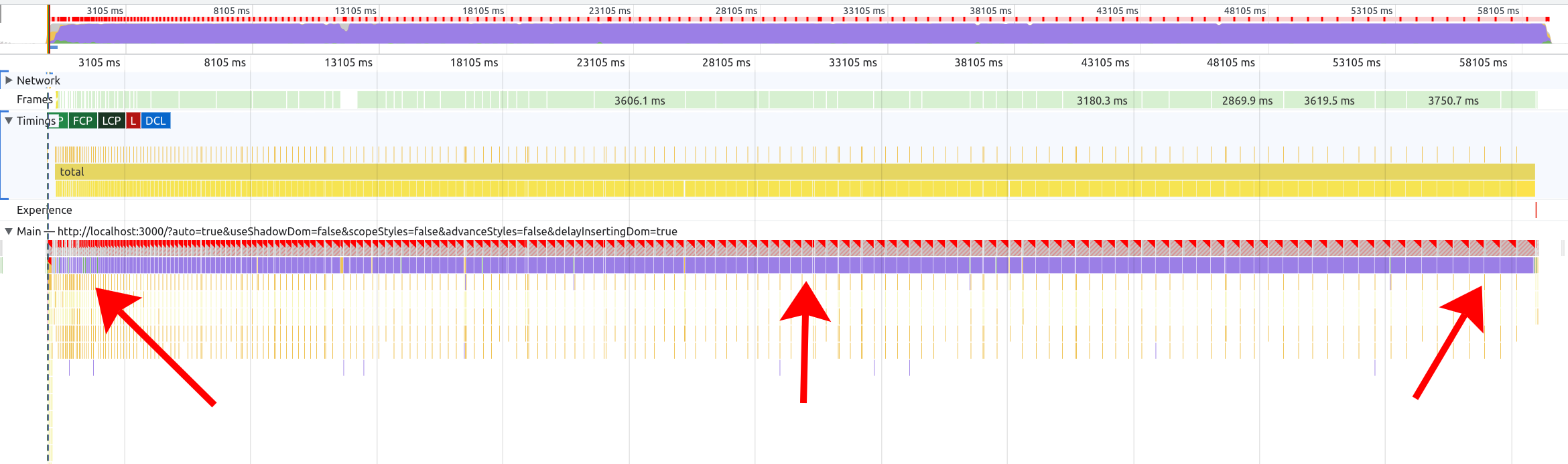
As it turns out, this doesn’t really change the conclusion – we still see gradually increasing style costs in a “layout thrashing” pattern, even when we’re only inserting <style>s between rAFs:

Chrome DevTools screenshot showing gradually increasing style costs over time

The main difference is that, when we front-load the style injections, the layout thrashing goes away entirely, because each rAF tick is neither reading from nor writing to the DOM. Instead, we have one big style cost at the start (when injecting the styles) and another at the end (when injecting the DOM nodes):

Chrome DevTools screenshot showing large purple style blocks at the beginning and end and little JavaScript slices in the middle

(In the above screenshot, the occasional purple slices in the middle are “Hit testing” and “Pre-paint,” not style or layout calculation.)

Note that this is still a teensy bit inaccurate, because now our rAF ticks aren’t doing anything, since this benchmark isn’t actually using React or virtual DOM. In a real-world example, there would be some JavaScript cost to running a React component’s render() function.

Still, we can run the modified benchmark against the various browsers, and see that the overall conclusion has not changed much (200 components, median of 25 samples, 2014 Mac Mini):

Chart data, see table below

Click for table
Scenario Chrome 106 Firefox 106 Safari 16
Unscoped 26180 17622 17349
Unscoped – styles in advance 3958.3 3663 3945
Scoped 3394.6 3370 3358
Scoped – styles in advance 3476.7 3374 3368
Shadow DOM 3378 3370 3408

So the lesson still seems to be: invalidating global CSS rules frequently is a performance anti-pattern. (Even moreso than inserting DOM nodes frequently!)

Afterword 2

I asked Emilio Cobos Álvarez about this, and he gave some great insights from the Firefox perspective:

We definitely have optimizations for that […] but the worst case is indeed “we restyle the whole document again”.

Some of the optimizations Firefox has are quite clever. For example, they optimize appending stylesheets (i.e. appending a new <style> to the <head>) more heavily than inserting (i.e. injecting a <style> between other <style>s) or deleting (i.e. removing a <style>).

Emilio explains why:

Since CSS is source-order dependent, insertions (and removals) cause us to rebuild all the relevant data structures to preserve ordering, while appends can be processed more easily.

Some of this work was apparently done as part of optimizations for Facebook.com back in 2017. I assume Facebook was appending a lot of <style>s, but not inserting or deleting (which makes sense – this is the dominant pattern I see in JavaScript frameworks today).

Firefox also has some specific optimizations for classes, IDs, and tag names (aka “local names”). But despite their best efforts, there are cases where everything needs to be marked as invalid.

So as a web developer, keeping a mental model of “when styles change, everything must be recalculated” is still accurate, at least for the worst case.

SPAs: theory versus practice

I’ve been thinking a lot recently about Single-Page Apps (SPAs) and Multi-Page Apps (MPAs). I’ve been thinking about how MPAs have improved over the years, and where SPAs still have an edge. I’ve been thinking about how complexity creeps into software, and why a developer may choose a more complex but powerful technology at the expense of a simpler but less capable technology.

I think this core dilemma – complexity vs simplicity, capability vs maintainability – is at the heart of a lot of the debates about web app architecture. Unfortunately, these debates are so often tied up in other factors (a kind of web dev culture war, Twitter-stoked conflicts, maybe even a generational gap) that it can be hard to see clearly what the debate is even about.

At the risk of grossly oversimplifying things, I propose that the core of the debate can be summed up by these truisms:

  1. The best SPA is better than the best MPA.
  2. The average SPA is worse than the average MPA.

The first statement should be clear to most seasoned web developers. Show me an MPA, and I can show you how to make it better with JavaScript. Added too much JavaScript? I can show you some clever ways to minimize, defer, and multi-thread that JavaScript. Ran into some bugs, because now you’ve deviated from the browser’s built-in behavior? There are always ways to fix it! You’ve got JavaScript.

Whereas with an MPA, you are delegating some responsibility to the browser. Want to animate navigations between pages? You can’t (yet). Want to avoid the flash of white? You can’t, until Chrome fixes it (and it’s not perfect yet). Want to avoid re-rendering the whole page, when there’s only a small subset that actually needs to change? You can’t; it’s a “full page refresh.”

My second truism may be more controversial than the first. But I think time and experience have shown that, whatever the promises of SPAs, the reality has been less convincing. It’s not hard to find examples of poorly-built SPAs that score badly on a variety of metrics (performance, accessibility, reliability), and which could have been built better and more cheaply as a bog-standard MPA.

Example: subsequent navigations

To illustrate, let’s consider one of the main value propositions of an SPA: making subsequent navigations faster.

Rich Harris recently offered an example of using the SvelteKit website (SPA) compared to the Astro website (MPA), showing that page navigations on the Svelte site were faster.

Now, to be clear, this is a bit of an unfair comparison: the Svelte site is preloading content when you hover over links, so there’s no network call by the time you click. (Nice optimization!) Whereas the Astro site is not using a Service Worker or other offlining – if you throttle to 3G, it’s even slower relative to the Svelte site.

But I totally believe Rich is right! Even with a Service Worker, Astro would have a hard time beating SvelteKit. The amount of DOM being updated here is small and static, and doing the minimal updates in JavaScript should be faster than asking the browser to re-render the full HTML. It’s hard to beat element.innerHTML = '...'.

However, in many ways this site represents the ideal conditions for an SPA navigation: it’s small, it’s lightweight, it’s built by the kind of experts who build their own JavaScript framework, and those experts are also keen to get performance right – since this website is, in part, a showcase for the framework they’re offering. What about real-world websites that aren’t built by JavaScript framework authors?

Anthony Ricaud recently gave a talk (in French – apologies to non-Francophones) where he analyzed the performance of real-world SPAs. In the talk, he asks: What if these sites used standard MPA navigations?

To answer this, he built a proxy that strips the site of its first-party JavaScript (leaving the kinds of ads and trackers that, sadly, many teams are not allowed to forgo), as well as another version of the proxy that doesn’t strip any JavaScript. Then, he scripted WebPageTest to click an internal link, measuring the load times for both versions (on throttled 4G).

So which was faster? Well, out of the three sites he tested, on both mobile (Moto G4) and desktop, the MPA was either just as fast or faster, every time. In some cases, the WebPageTest filmstrips even showed that the MPA version was faster by several seconds. (Note again: these are subsequent navigations.)

On top of that, the MPA sites gave immediate feedback to the user when clicking – showing a loading indicator in the browser chrome. Whereas some of the SPAs didn’t even manage to show a “skeleton” screen before the MPA had already finished loading.

Screenshot from conference talk showing a speaker on the left and a WebPageTest filmstrip on the right. The filmstrip compares two sites: the first takes 5.5 seconds and the second takes 2.5 seconds

Screenshot from Anthony Ricaud’s talk. The SPA version is on top (5.5s), and the MPA version is on bottom (2.5s).

Now, I don’t think this experiment is perfect. As Anthony admits, removing inline <script>s removes some third-party JavaScript as well (the kind that injects itself into the DOM). Also, removing first-party JavaScript removes some non-SPA-related JavaScript that you’d need to make the site interactive, and removing any render-blocking inline <script>s would inherently improve the visual completeness time.

Even with a perfect experiment, there are a lot of variables that could change the outcome for other sites:

  • How fast is the SSR?
  • Is the HTML streamed?
  • How much of the DOM needs to be updated?
  • Is a network request required at all?
  • What JavaScript framework is being used?
  • How fast is the client CPU?
  • Etc.

Still, it’s pretty gobsmacking that JavaScript was slowing these sites down, even in the one case (subsequent navigations) where JavaScript should be making things faster.

Exhausted developers and clever developers

Now, let’s return to my truisms from the start of the post:

  1. The best SPA is better than the best MPA.
  2. The average SPA is worse than the average MPA.

The cause of so much debate, I think, is that two groups of developers may look at this situation, agree on the facts on the ground, but come to two different conclusions:

“The average SPA sucks? Well okay, I should stop building SPAs then. Problem solved.” – Exhausted developer


“The average SPA sucks? That’s just because people haven’t tried hard enough! I can think of 10 ways to fix it.” – Clever developer

Let’s call these two archetypes the exhausted developer and the clever developer.

The exhausted developer has had enough with managing the complexity of “modern” web sites and web applications. Too many build tools, too many code paths, too much to think about and maintain. They have JavaScript fatigue. Throw it all away and simplify!

The clever developer is similarly frustrated by the state of modern web development. But they also deeply understand how the web works. So when a tool breaks or a framework does something in a sub-optimal way, it irks them, because they can think of a better way. Why can’t a framework or a tool fix this problem? So they set out to find a new tool, or to build it themselves.

The thing is, I think both of these perspectives are right. Clever developers can always improve upon the status quo. Exhausted developers can always save time and effort by simplifying. And one group can even help the other: for instance, maybe Parcel is approachable for those exhausted by Webpack, but a clever developer had to go and build Parcel first.

Conclusion

The disparity between the best and the average SPA has been around since the birth of SPAs. In the mid-2000s, people wanted to build SPAs because they saw how amazing GMail was. What they didn’t consider is that Google had a crack team of experts monitoring every possible problem with SPAs, right down to esoteric topics like memory leaks. (Do you have a team like that?)

Ever since then, JavaScript framework and tooling authors have been trying to democratize SPA tooling, bringing us the kinds of optimizations previously only available to the Googles and the Facebooks of the world. Their intentions have been admirable (I would put my own fuite on that pile), but I think it’s fair to say the results have been mixed.

An expert developer can stand up on a conference stage and show off the amazing scores for their site (perfect performance! perfect accessibility! perfect SEO!), and then an excited conference-goer returns to their team, convinces them to use the same tooling, and two years later they’ve built a monstrosity. When this happens enough times, the same conference-goer may start to distrust the next dazzling demo they see.

And yet… the web dev community marches forward. Today I can grab any number of “starter” app toolkits and build something that comes out-of-the-box with code-splitting, Service Workers, tree-shaking, a thousand different little micro-optimizations that I don’t even have to know the names of, because someone else has already thought of it and gift-wrapped it for me. That is a miracle, and we should be grateful for it.

Given enough innovation in this space, it is possible that, someday, the average SPA could be pretty great. If it came batteries-included with proper scroll, focus, and screen reader announcements, tooling to identify performance problems (including memory leaks), progressive DOM rendering (e.g. Jake Archibald’s hack), and a bunch of other optimizations, it’s possible that developers would fall into the “pit of success” and consistently make SPAs that outclass the equivalent MPA. I remain skeptical that we’ll get there, and even the best SPA would still have problems (complexity, performance on slow clients, etc.), but I can’t fault people for trying.

At the same time, browsers never stop taking the lessons from userland and upstreaming them into the browser itself, giving us more lines of code we can potentially delete. This is why it’s important to periodically re-evaluate the assumptions baked into our tooling.

Today, I think the core dilemma between SPAs and MPAs remains unresolved, and will maybe never be resolved. Both SPAs and MPAs have their strengths and weaknesses, and the right tool for the job will vary with the size and skills of the team and the product they’re trying to build. It will also vary over time, as browsers evolve. The important thing, I think, is to remain open-minded, skeptical, and analytical, and to accept that everything in software development has tradeoffs, and none of those tradeoffs are set in stone.